
Hosted SFTP vs Self-Hosted: Cloud FTP Servers, Hosting Services, and Running Your Own
Two people walk into the same meeting with two reasonable questions. Finance asks, "Why do we own a server for this? Surely it comes as a service now." Security asks, "If it is a service, where exactly are the files, and who else can read them?" Each has just argued, without knowing it, for the opposite of what the other wants. The administrator in the middle is asked to recommend something by Friday.
This article is the recommendation's working. It sets out the real choices, which number four and not two. It shows what "hosted" changes about who is responsible for what. It covers cost, including the bills that do not appear on the pricing page, and then control and compliance. It describes the middle path that many organizations settle on, which is their own server software on a rented cloud machine. It ends with a decision table and a list of questions for any provider.
It is part of our Cloud and Hybrid File Transfer series, which covers the architecture. This page is about the buying decision.
Four Ways to Have an SFTP Server
"Hosted or self-hosted" sounds like a choice between two things. In practice there are four arrangements, and most confusion comes from comparing the first with the fourth and ignoring the two in between.
| Arrangement | Who runs the machine | Who runs the server software | Where the files live |
|---|---|---|---|
| 1. Self-hosted, on your premises | You | You | Your disks, your building |
| 2. Self-hosted, on a cloud virtual machine | The cloud provider runs the hardware; you run the operating system | You | A disk in your cloud account, in a region you choose |
| 3. A cloud provider's managed transfer endpoint | The cloud provider | The cloud provider | Object storage in your cloud account |
| 4. A hosted SFTP or FTP service | The service provider | The service provider | The provider's storage, in the provider's account |
A hosted SFTP server, in the sense most sales pages use, is arrangement 4: you sign up, create users in a web console, and hand partners a host name. A cloud FTP server can mean 2, 3, or 4, depending on who is speaking. An SFTP cloud service usually means 3 or 4. When someone proposes "moving it to the cloud," the first useful question is which number they mean. The architecture behind each is covered in hybrid file transfer topologies.
The diagram below shows the same four arrangements by who runs each part. The bottom row is the one that never changes.
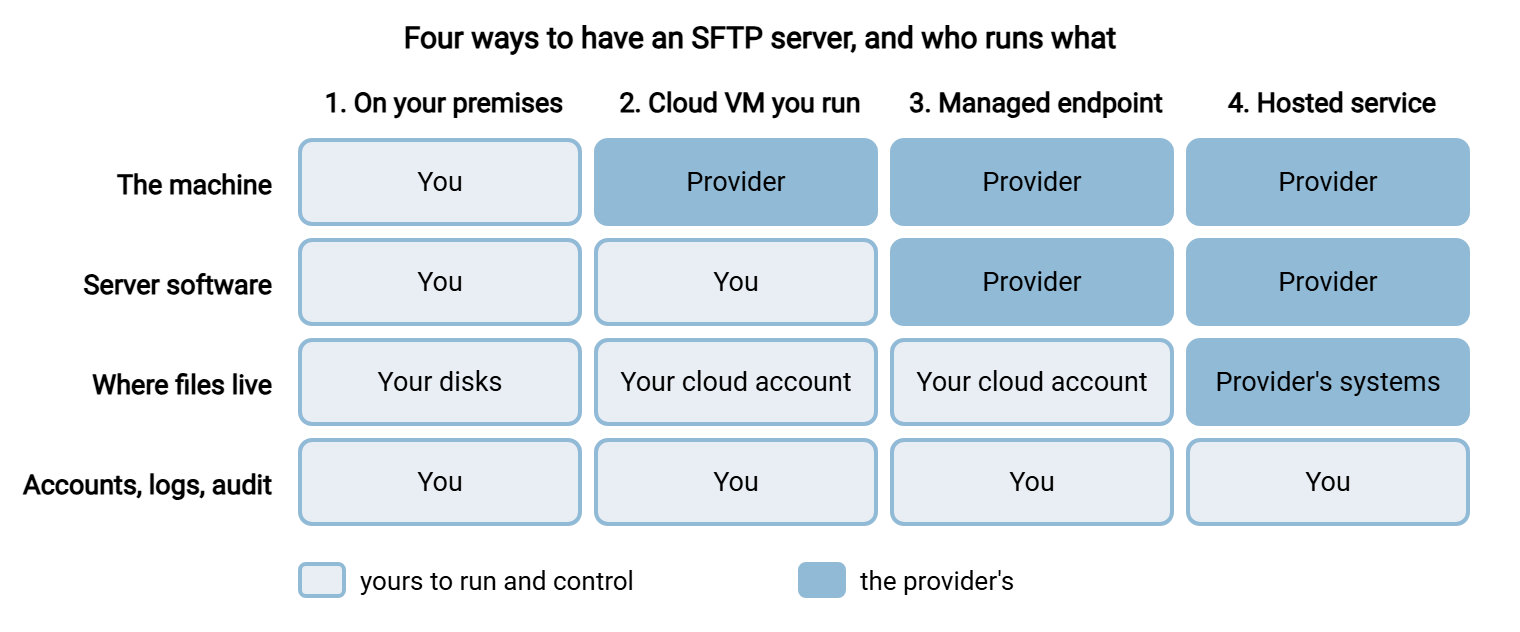
The differences between 3 and 4 are easy to miss. In arrangement 3 the files land in storage that belongs to your own cloud account, and the endpoint is a front door onto it. In arrangement 4 the files sit in the provider's systems, and you reach them only through the provider's product. That single difference decides most of the compliance conversation later on.
What "Hosted" Really Changes
Hosting does not remove work. It moves some of it to the provider and leaves the rest with you, sometimes without mentioning which is which. This table shows where each job lands. The middle arrangements fall between the two columns.
| Job | Self-hosted | Hosted service |
|---|---|---|
| Hardware, power, network | You | Provider |
| Patching the operating system and server software | You | Provider, on the provider's schedule |
| Keeping it available | You | Provider, to the level the contract states |
| Creating, reviewing, and removing accounts | You | Still you |
| Deciding who may connect from where | You, on your firewall | Still you, if the service offers address restrictions |
| Holding the host key and encryption keys | You | Provider, unless the service lets you bring your own |
| Keeping and reviewing logs | You | Provider keeps them for a set period; reviewing is still you |
| Moving files on to internal systems | A local folder; the files are already inside | Still you: a second transfer from the service to your network |
| Answering the auditor | You | Still you, now with the provider's paperwork attached |
Count the rows that say "still you." A hosted service takes away the machine. It does not take away the administration, and it never takes away the accountability. The row about moving files onward is the one that surprises people. With a server in your own network, an uploaded file is already where your systems can read it. With a hosted service, the file is somewhere else, and getting it home is a second transfer that somebody has to build and watch. What moves and what stays is the subject of what the cloud actually changes about file transfer.
Remember: hosting moves the server, not the responsibility. Accounts, access rules, log review, and the audit answer remain yours under every arrangement. Compare options by what is left on your side of the line, not by what the brochure says is included.
Cost: The Monthly Fee and the Other Bills
Hosted services are priced to look simple, and the pricing page usually shows one number. The invoice has more lines. Know which meters apply before you compare anything.
- Per user or per connection. Many hosted services charge for each account. This is cheap at ten partners and startling at two hundred.
- Per endpoint, by the hour. Cloud providers' managed endpoints commonly charge for every hour the endpoint exists, whether or not anything connects to it.
- Per gigabyte transferred. Uploads, downloads, or both may be metered.
- Storage. Files that are never cleaned up are billed every month, indefinitely.
- Egress. Data leaving a cloud provider's network is charged per gigabyte. Pulling your own files back to your own office counts. See egress and cost awareness.
- Features sold separately. Single sign-on, extra protocols, longer log retention, and fixed addresses are frequently higher tiers.
Self-hosting has its own less visible bills: a license if the software is commercial, the machine or virtual machine, backups, and above all the hours of the person who looks after it. Neither side is honestly free. The comparison only works over several years and with your own numbers.
THREE-YEAR COST SHEET             Option: ______________________

INPUTS (the same for every option)
Partner accounts today: ____     in three years: ____
Data in per month (GB): ____     Data out per month (GB): ____
Data kept on the server (GB): ____   Protocols required: ____________

                                    Year 1     Year 2     Year 3
Subscription or license             ______     ______     ______
Per-user or per-connection fees     ______     ______     ______
Endpoint or instance hours          ______     ______     ______
Storage                             ______     ______     ______
Data transfer and egress            ______     ______     ______
Add-ons (SSO, retention, fixed IP)  ______     ______     ______
Support or maintenance contract     ______     ______     ______
Administrator hours x hourly cost   ______     ______     ______
Onward transfer to internal systems ______     ______     ______
                                    ------     ------     ------
TOTAL                               ______     ______     ______

One-time: migration effort ______   exit effort (getting data out) ______
Fill the sheet in with year-three partner numbers, not today's. Acme chose a hosted service priced per user when it had twelve partner accounts, and the monthly fee was smaller than the team's coffee budget. Then the company opened its ordering system to every distributor. Eighteen months later it had a hundred and forty accounts and a bill eleven times the original. Nothing had gone wrong. The service had done exactly what it said, at exactly the price it said, for more users than anyone had written down. Acme's sheet now has a column headed "if this works."
Control and Compliance
Cost is the argument finance makes. Control is the one security makes, and it comes down to five questions that have easy answers when you host the server and contractual answers when someone else does.
- Where is the data, physically? Regulations and customer contracts often name a country or region. A hosted service must be able to state the location and commit to it.
- Who can read it? With your own server, your administrators. With a hosted service, also the provider's staff and systems, unless files are encrypted before upload with keys the provider never holds. File-level encryption is covered in when to use file-level encryption.
- Can you get the logs? An auditor will want every login and transfer for a period of months. Check that the service keeps them that long and lets you export them.
- Who else is involved? A hosted service is usually built on a cloud provider, which makes at least two outside parties. Ask for the list of subcontractors.
- How do you leave? Find out how accounts, files, and history come out, and in what format. An exit that requires recreating every partner account by hand is not really an exit.
None of these rules out a hosted service. Plenty of them answer all five well. The point is that the answers stop being facts you can check and become promises in a contract, and somebody has to read the contract. The security model is laid out in the security model of cloud-involved file transfers, and the risk comparison in self-hosted vs SaaS risk.
There is one practical matter that belongs here too. Partners often restrict access by source address. A server you run has an address you control. A hosted service may use shared addresses that change, both for the connections partners make to it and for any connections it makes outward on your behalf. Ask whether fixed addresses are available before forty partners have to update their firewalls. They will not thank you for the opportunity.
The Middle Path: Your Own Server on a Cloud VM
Arrangement 2 is the one that tends to satisfy both people in the meeting. You rent a virtual machine from a cloud provider and install your own server software on it. Finance gets its wish: no hardware, no server room, and a monthly bill. Security gets its wish too: the files sit on a disk in your own account, in a region you chose, readable only by your administrators, under a configuration you can inspect.
You are hosting an FTP server in the cloud, but it is still your server. The setup is the same as on a machine in your own building, with four cloud-specific points:
- Give the virtual machine a fixed public address, so that the address partners allow does not change when the machine restarts.
- Open the ports in the provider's network rules as well as in the Windows firewall. They are two separate gates, and both must allow port 22 for SFTP, or port 21 and the passive range for FTPS.
- Tell the server its public address. A cloud virtual machine usually sees only a private address on its own network interface, so for FTP and FTPS the announced external address must be set by hand.
- Put the data on a separate disk, and include it in the provider's snapshot or backup schedule.
On Windows this is where a product such as Sysax Multi Server fits: one service offering SFTP, FTPS, and HTTPS on a Windows virtual machine, with accounts and logs under your control. The installation steps are the same as anywhere else and are covered in how to set up an SFTP server on Windows. The ports are listed in ports for FTP, FTPS and SFTP.
The cost of this path is that patching and administration stay with you. You have rented the hardware, not the administrator. If nobody on the team wants to be responsible for a Windows server, this path is the wrong one, however tidy it looks on the diagram. A server with no owner is patched by no one. For designs that combine a cloud front end with systems on your premises, see hybrid transfer reference architectures.
Cloud MFT
Cloud MFT, or cloud-based managed file transfer, is arrangement 4 with the management layers added. Besides the hosted server you get workflow automation, central policy, monitoring, and reporting, delivered as a subscription. It suits organizations that need those layers and do not want to run an MFT platform themselves, which is a larger undertaking than running a single server.
Everything in the control section above applies to an MFT cloud service with extra weight. An MFT platform does not just store partner files. It holds the credentials it uses to reach your partners and your internal systems, and it holds the full history of what moved. That is a great deal to keep in somebody else's account. What MFT is, and whether you need it at all, is covered in MFT software and solutions explained.
A Web Host with FTP Is a Different Thing
Searches for hosted FTP often turn up web hosting companies, because nearly every web host with FTP access advertises the fact. That FTP account exists for one purpose: uploading the files of a website to the web server. It is hosted FTP in a literal sense. It is not a partner exchange service. It has one or a few accounts, no per-partner folders, no audit log to speak of, and files placed there may be reachable from the public web.
The same caution applies to any free FTP server online that offers instant accounts. These are useful for testing a client. They are not a place for business files. If the need is exchanging files with partners, the choice is among the four arrangements above. A spare corner of the company website is not one of them.
How to Decide
The decision usually falls out of four facts about your own organization.
| If this describes you | Lean toward |
|---|---|
| Files feed systems inside your network, and you have someone who administers Windows servers | Self-hosted, on premises or on a cloud virtual machine |
| Contracts or regulations fix where data may be and who may hold the keys | Self-hosted, or a managed endpoint onto storage in your own account |
| Your systems already live in one cloud provider and files should land in its storage | That provider's managed transfer endpoint |
| No server administrator, few partners, files are consumed by people rather than systems | A hosted SFTP service |
| Hundreds of flows, a need for central reporting, and no wish to run a platform | Cloud MFT |
If the table points to a provider, put these questions to each one on your shortlist. The answers that take longest to arrive are usually the informative ones.
QUESTIONS FOR SFTP SERVICE PROVIDERS

1. In which country and region will our files be stored? Can we choose?
2. Which of your staff or systems can read our files? Under what controls?
3. Can we supply our own SFTP host key, so partners see no change if we move?
4. Do connections to and from the service use fixed addresses we can give partners?
5. Which protocols are included: SFTP, FTPS, HTTPS? Which cost extra?
6. How long are login and transfer logs kept? Can we export them?
7. How is the service priced: per user, per gigabyte, per endpoint hour?
   What would our bill be at 10 times our current partners?
8. What happens to transfers during your maintenance? How much notice?
9. Which subcontractors and cloud providers are involved?
10. On leaving: how do we export accounts, files, and history, and how long
    do you keep our data afterward?
A longer set of security questions is in security questions for vendors.
The Version to Tell a Colleague
There are four ways to have an SFTP server: on your own premises, on a cloud virtual machine you run, as a cloud provider's managed endpoint onto your own storage, or as a hosted service on the provider's systems. Hosting moves the machine and the patching to someone else. It does not move account management, access rules, log review, or accountability. Compare costs over three years at the partner count you expect, and include per-user fees, egress, and the second transfer needed to bring files home. Your own server on a cloud virtual machine gives a monthly bill and keeps the data under your control. A web host's FTP account is for publishing a website, not for exchanging files with partners.
For the designs behind these choices, continue with hybrid file transfer topologies. If files will land in cloud storage, object storage in file transfer flows explains how that differs from a folder.
Frequently Asked Questions
What is a hosted SFTP server?
Is hosted SFTP cheaper than running my own server?
Can I run my own SFTP server in the cloud?
What is cloud MFT?
Is the FTP that comes with web hosting suitable for sharing files with partners?
What should I ask an SFTP service provider?
From the Sysax team: we build secure file transfer software for Windows. Sysax Multi Server is an FTP, FTPS, SFTP, and HTTPS server. Sysax FTP Automation handles scheduled, scripted transfers. Free trials are on the download page.