
Ports for FTP, FTPS and SFTP: Default Port Numbers and What Uses Them
The firewall change form has a box labeled "Port(s)." Somebody types "FTP" into it and presses submit. The network team, who are literal people by profession, open port 21. The login works, the directory listing hangs, and a second form is filed. I have watched this exchange run to four forms. The record, as far as I know, belongs to a request that said "the usual ones."
This page is the reference that goes in that box. It gives the default port for FTP, FTPS, and SFTP, says whether each one runs over TCP or UDP, and lists the extra ports that never make it onto the form. It also answers the questions that arrive right afterward. What does "entering extended passive mode" mean? How do you point a client at a non-standard port? What has to be opened on a Windows firewall? And how do you check which ports a server is really using?
It is part of our Firewalls, NAT, and File Transfer series, which explains why the rules look the way they do. If you only need the numbers, the first table has them. If the numbers have already failed you, keep reading.
The Default Ports at a Glance
Every protocol in this table runs over TCP unless the table says otherwise. Exactly one row says otherwise.
| Protocol | Default port | TCP or UDP | Other ports it needs |
|---|---|---|---|
| FTP, control connection | 21 | TCP | A data port for every listing and every file (next two rows) |
| FTP data, active mode | 20, as the server's source port | TCP | The server connects out from port 20 to a port the client chose |
| FTP data, passive mode | No fixed number | TCP | One port per transfer from the server's passive range, for example 50000–50100 |
| FTPS, explicit (FTPES) | 21 | TCP | The same passive range as FTP |
| FTPS, implicit | 990 | TCP | The same passive range; 989 is reserved for active-mode data |
| SFTP | 22 | TCP | None |
| SCP | 22 | TCP | None |
| HTTPS file transfer | 443 | TCP | None |
| TFTP | 69 | UDP | A fresh UDP port per transfer |
Remember: SFTP uses TCP port 22 and nothing else. FTP uses TCP port 21 for commands plus a second port for data. FTPS uses 21 (explicit) or 990 (implicit) plus that same second port. A rule that allows only the first number lets FTP and FTPS log in and then hang.
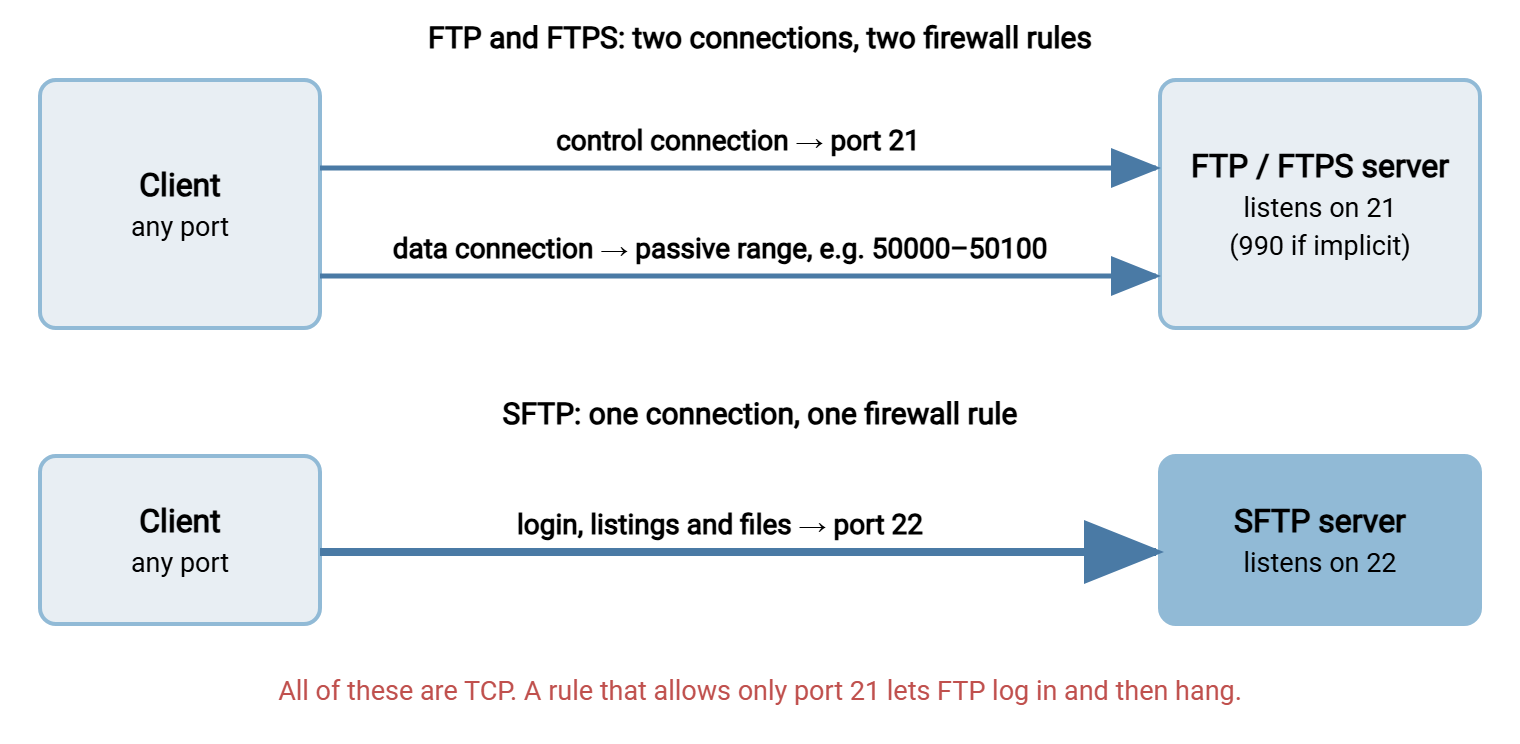
The diagram below shows the difference the table describes. FTP and FTPS open two connections to two different ports. SFTP opens one.
What a Port Number Is, and What It Is Not
A port is a number from 0 to 65535 that tells an operating system which program a network connection is for. The server's address gets a packet to the right machine. The port gets it to the right program on that machine. The address is the building, and the port is the apartment number.
A program that wants incoming connections asks the operating system for a port and waits there. That is called listening. An FTP server listens on port 21, an SSH server on port 22, a secure web server on 443. The client's end of the connection uses a throwaway number picked by its own operating system. That number is an ephemeral port: a temporary high port, above 49152 on Windows, used for one connection and then released.
The "default port" or "standard port" of a protocol is an agreement, not a law of physics. A registry kept by the Internet Assigned Numbers Authority records that FTP gets 21 and SSH gets 22. Clients assume those numbers when you do not say otherwise. Nothing stops an administrator from running an SFTP server on port 2222 or an FTP server on 8021, and the protocol does not change when the number does. Port 22 does not make a service SFTP any more than a blue door makes a building a police station.
That point causes real confusion, so here it is plainly. The port number tells you where a service is listening, never what the service is. When someone says "we use port 22," ask which protocol. When someone says "we use SFTP," ask which port. One of the two answers will occasionally surprise both of you.
FTP Ports: 21, 20, and the Range Nobody Wrote Down
FTP is the only protocol on this page that needs more than one connection. That is why it is the only one that needs more than one line on the form. An FTP session has a control connection, the long-lived conversation that carries commands such as "log me in" and "send that file." It also has a separate data connection, opened fresh for every directory listing and every file.
The FTP control port is TCP 21. This is the port the FTP service listens on, and the one a client means when you give it ftp.example.com and no number. It is the default FTP port in every server and every client I have met.
The FTP data ports depend on the mode the client asks for:
- Active mode. The client says "connect back to me on this port." The server opens the data connection outward, from its own port 20 to the port the client named. Port 20 is therefore a source port on the server. Nothing listens on it, and the server side never needs an inbound rule for it.
- Passive mode. The client asks the server to pick a port. The server picks one from its passive port range, a block of high ports set aside for the purpose, such as 50000 to 50100. The client connects to that port. Port 20 is not involved at all.
Almost every modern client uses passive mode. Active mode asks the client's firewall to accept an inbound connection from a stranger, and client firewalls decline. So the practical list of ports used by FTP is 21 plus the passive range. Port 20 appears on every list of FTP ports and in very few actual packets. It is the appendix of file transfer.
The server announces the data port inside the control connection. In the classic form it looks like this:
Command:   PASV
Response:  227 Entering Passive Mode (198,51,100,20,195,87)
The first four numbers are the server's address. The last two are the port, split across two bytes: multiply the first by 256 and add the second. Here that is 195 × 256 + 87, which is port 50007. If a server hands out ports from all over the high range, nobody has configured a passive range. In that case the firewall team has either opened everything or opened nothing, and neither is good news. The two modes are walked through in active versus passive FTP explained. Choosing and sizing the range is covered in configuring FTP passive port ranges.
On a Windows server the range should be a setting, not a mystery. In Sysax Multi Server, for example, the passive port range and the externally announced address are ordinary settings in the server configuration. The numbers on the firewall form can be copied from the screen rather than from memory.
Is FTP TCP or UDP?
TCP. Both FTP connections, control and data, are TCP connections. FTP does not use UDP for anything.
The question keeps coming up for an honest reason. The port registry lists port 21 under both TCP and UDP, because for many years it reserved each number in both columns as a bookkeeping habit. Firewall rule editors then offer "TCP," "UDP," or "Both" in a dropdown, and "Both" looks like the safe choice. It is harmless and unnecessary. An FTP rule should say TCP.
A related search is "FTP vs TCP," as though the two were rivals. They are layers. TCP, the Transmission Control Protocol, is the transport. It delivers a stream of bytes between two programs, in order, and resends anything that gets lost. FTP is an application protocol: an agreed set of commands and replies that two programs exchange over a TCP connection. TCP is the phone line and FTP is the conversation. The conversation needs the line. The line has no opinion about what is said on it.
SFTP is TCP as well. It runs inside SSH, and SSH is a TCP protocol. The same goes for FTPS and for HTTPS as a file transfer server uses it. If a firewall form asks "TCP or UDP?" for any of the protocols a transfer server offers, the answer is TCP every time.
There is one UDP file transfer protocol worth knowing by name. TFTP, the Trivial File Transfer Protocol, uses UDP port 69. It has no login, no directory listings, and no encryption. It exists so that network equipment and booting machines can fetch a firmware image or a boot file with almost no code. It shares three letters with FTP and nothing else. If a device manual asks for a TFTP server, an FTP server will not do, and the reverse is equally true. A few high-speed transfer tools also move data over UDP with their own reliability built on top. That is a product design choice, not a standard port you can look up.
FTPS Ports: 21 or 990, and Never 22
FTPS is FTP with TLS encryption wrapped around it. The commands are the same and the two connections are the same, but now they are encrypted. You will also see it called FTP over SSL or FTP over TLS. TLS is the current name for SSL, and all of these names mean one protocol. Whichever name the request uses, the FTP SSL port, the SSL FTP port, and the FTP/SSL port are the same question with the same two answers.
- Explicit FTPS, sometimes written FTPES, listens on port 21, the ordinary FTP port. The client connects in the clear and immediately sends
AUTH TLSto switch the connection to encryption before it logs in. - Implicit FTPS listens on port 990. Encryption starts with the first byte, and there is no unencrypted moment. Port 989 is reserved for its active-mode data, which in practice almost nobody uses.
Either way, the data connection still exists and still needs the passive range. FTPS did not fix FTP's port problem. It encrypted it. A firewall that used to peek at the control connection and open the data port by itself can no longer read a word, so the passive range has to be opened by hand. The two styles are compared in explicit versus implicit FTPS, and the firewall side is in FTPS through firewalls and NAT.
The one port FTPS never uses by default is 22. "FTPS port 22" is among the most common mix-ups in partner onboarding emails, and it comes from the names. FTPS and SFTP differ by the position of one letter and are otherwise unrelated. FTPS is FTP plus TLS on port 21 or 990. SFTP is a different protocol that runs inside SSH on port 22. The mirror-image mistake, "SFTP port 21," is just as common. I assume both names were chosen by someone who never had to say them aloud on a conference call. The full comparison is in SFTP vs FTPS.
Northgate Retail once lost a week to that single letter. A new supplier's onboarding sheet said "secure FTP, port 22." Northgate's administrator built an FTPS account, because the sheet said FTP and secure. She asked the network team to allow port 22, because the sheet said 22. The supplier's SFTP client connected to port 22, found nothing listening there, and reported "connection refused." Each side tested its own half and found it flawless. The fix took ten minutes once somebody asked the supplier which client program they were running. Northgate's onboarding form now has two separate boxes, protocol and port, and will not accept one without the other.
SFTP Port: TCP 22 and Nothing Else
SFTP, the SSH File Transfer Protocol, runs entirely inside one SSH connection. The default SFTP port is TCP 22, the standard SSH port, and that is the whole list. Logins, listings, uploads, and downloads all travel inside that single connection. There is no data port, no passive range, and no port number tucked into the conversation for a firewall to miss. The design is explained in how SFTP works.
This is why the answer to "what ports does SFTP use" is so short, and why firewall administrators like the protocol. The request is one inbound rule, TCP 22, to one address. Nothing about it needs a meeting.
Port 22 is a default, so a server can move it. Administrators run SFTP on another port for two reasons. Sometimes port 22 on the machine is already taken by the operating system's own SSH service, which is kept for administration. Sometimes they want fewer password-guessing robots in the logs. The second reason is about noise, not safety. Scanners sweep every port and will find the new one. Moving the port tidies the log. Strong authentication protects the server.
When the server is on a non-standard port, the client has to be told. In a graphical client the port is a box next to the host name. On the command line, each OpenSSH tool has its own flag to specify the port:
sftp -P 2222 alex@sftp.example.com
scp  -P 2222 report.csv alex@sftp.example.com:/inbound/
ssh  -p 2222 alex@sftp.example.com
That is a capital -P for sftp and scp, and a lowercase -p for ssh. In sftp and scp the lowercase -p means "preserve file times" and takes no number. Use the wrong case and you get a puzzling error about a host or file named 2222 instead of a helpful one about the flag. The spelling that works in all three tools is -o Port=2222. Three programs from one project, two conventions; consistency was evidently on a different port.
FTP "Entering Extended Passive Mode" and the 229 Reply
Sooner or later a command-line FTP client prints this and stops:
ftp> ls
229 Entering Extended Passive Mode (|||50123|)
Nothing is wrong yet. Extended passive mode is the newer form of passive mode, requested with the EPSV command instead of PASV. It was added so FTP could work over IPv6, and many clients now use it for IPv4 too. The reply carries only a port number between the bars. Here it is 50123, written as an ordinary decimal with no multiplication required. The client connects to that port at the same address it is already talking to. That is an improvement on the classic form. The server no longer announces an address, so it cannot announce the wrong one from behind NAT.
If the session hangs right after that line, the message is not the fault. It is the last thing that worked. The server said "229 Entering Extended Passive Mode." FTP clients then try to open the data connection to port 50123, and yours is getting silence. Work through these checks in order:
- Confirm the server has a passive port range configured, and that 50123 is inside it.
- Confirm the firewall in front of the server allows inbound TCP to the whole range, and that any NAT device forwards the range to the server.
- If the firewall has an FTP helper or inspection feature, find out whether it understands
EPSV. Some older ones watch only for the227reply and ignore229. - As a test, tell the client to fall back to classic passive mode. Many command-line clients have a toggle for it, often spelled
epsvorepsv4, andcurlhas--disable-epsv. If classic passive works and extended does not, the helper in step 3 is the suspect.
The four commands involved are explained line by line in PORT, PASV, EPRT, EPSV. One caution for Windows users: the built-in ftp.exe cannot request passive mode of either kind. It only does active mode, so it only works where the client's firewall lets the server connect back. This surprises most administrators exactly once.
Firewall Rules for Each Protocol
Here is what the firewall in front of a server has to allow, written the way a change request should be written. Every rule is inbound, TCP, to the server's address.
| Service | Inbound TCP ports | Also required |
|---|---|---|
| FTP | 21, plus the passive range (for example 50000–50100) | Behind NAT: the passive range forwarded, and the server set to announce its public address |
| FTPS, explicit | 21, plus the passive range | As FTP, with the firewall's FTP helper turned off for this server |
| FTPS, implicit | 990, plus the passive range | As explicit FTPS |
| SFTP and SCP | 22, or the port the server was moved to | Nothing |
| HTTPS | 443 | Nothing |
The server's own firewall needs the same ports. On Windows, these commands create the rules in Windows Defender Firewall from an elevated PowerShell prompt:
New-NetFirewallRule -DisplayName "FTP control" -Direction Inbound -Protocol TCP -LocalPort 21 -Action Allow
New-NetFirewallRule -DisplayName "FTP passive range" -Direction Inbound -Protocol TCP -LocalPort 50000-50100 -Action Allow
New-NetFirewallRule -DisplayName "FTPS implicit" -Direction Inbound -Protocol TCP -LocalPort 990 -Action Allow
New-NetFirewallRule -DisplayName "SFTP" -Direction Inbound -Protocol TCP -LocalPort 22 -Action Allow
Create only the rules for the protocols you run. Building the servers behind those rules is covered in how to set up an FTP server on Windows and how to set up an SFTP server on Windows. A server that offers SFTP alone needs the last line and none of the others. If the server lives in a cloud network, the provider's security group or network rule list needs the same ports too. The host firewall and the cloud firewall are two separate gates, and a packet has to pass both.
How large should the passive range be? Each simultaneous data connection uses one port, so a hundred ports comfortably serves a few dozen busy users. A range of ten thousand is not more generous. It is ten thousand open ports that somebody will eventually have to explain to an auditor. Rule design beyond the port numbers, including source restrictions, partner allowlists, and logging, is covered in designing transfer-friendly firewall rules.
A port sheet you can copy
Most of the back-and-forth in the opening story disappears when the request arrives complete. This is the sheet to attach to a firewall request and to send to every new partner. Fill it in once per server.
FILE TRANSFER SERVER - PORT SHEET
Server name:        transfer.example.com
Public address:     203.0.113.10
Internal address:   10.0.5.20

Service     Port(s)       Transport  Direction  Notes
SFTP        22            TCP        inbound    single connection
FTPS        21            TCP        inbound    explicit TLS (AUTH TLS)
FTPS data   50000-50100   TCP        inbound    passive range, same address
HTTPS       443           TCP        inbound    web transfer

Not offered:  plain FTP, implicit FTPS (990), active mode
Announced passive address:  203.0.113.10
Source restriction:  partner addresses on the allowlist sheet
Owner:  transfer administrator on call
The "not offered" line does as much work as the rest. It stops the helpful colleague who opens 990 "just in case."
Checking Which Ports a Server Is Really Using
Documentation says what the ports should be. The server says what they are. On Windows, list the listening ports and the process that owns each one:
PS C:\> Get-NetTCPConnection -State Listen -LocalPort 21,22,443,990 -ErrorAction SilentlyContinue |
        Select-Object LocalAddress, LocalPort, OwningProcess

LocalAddress LocalPort OwningProcess
------------ --------- -------------
0.0.0.0             22          3148
0.0.0.0             21          3148
0.0.0.0            443          3148
Three ports are listening, and all three belong to process 3148, which Get-Process -Id 3148 will name. Port 990 is absent. Implicit FTPS is not enabled on this machine, whatever the wiki says. The older equivalent is netstat -ano | findstr LISTENING, and on Linux ss -tlnp shows the same thing.
On a multi-protocol server each listener has its own port setting. Sysax Multi Server lists FTP, FTPS, SFTP, and HTTPS together on its connection protocols screen, each with its own port. That makes it quick to compare what is enabled against the port sheet above.
Listening is half the test. The other half is whether the port can be reached from outside, and that test has to be run from outside. Use a machine on the far side of the firewall, not one sitting next to the server:
PS C:\> Test-NetConnection -ComputerName transfer.example.com -Port 22

ComputerName     : transfer.example.com
RemoteAddress    : 203.0.113.10
RemotePort       : 22
TcpTestSucceeded : True
Read the failures carefully, because the two kinds mean different things. An immediate failure, which most tools report as "connection refused," means the packet arrived and nothing was listening. That points to the wrong port or a stopped service. A long pause followed by a timeout means the packet was dropped along the way. That points to a firewall. Test port 21 and one port from the passive range separately. If 21 succeeds and the passive port times out, you have found the most common FTP fault there is, and you found it before lunch. The full method is in the firewall troubleshooting playbook, and the client-side version is in how to connect to an FTP server and test it.
The Version to Tell a Colleague
SFTP uses TCP port 22: one connection, one rule. FTP uses TCP port 21 for commands and a second connection for data. In passive mode the data port comes from the server's passive range, and in active mode the server connects out from its port 20. FTPS is FTP inside TLS on port 21 (explicit) or port 990 (implicit), with the same passive range. None of them use UDP. TFTP on UDP 69 is a different protocol with a similar name. A port number says where a service listens, not what the service is, so always state the protocol and the port together.
For the reason FTP needs that second connection in the first place, read why file transfer protocols fight firewalls. For what address translation does to the announced port, continue with NAT types and what they do to transfers. Our blog post What port is FTP? is the two-minute version of this page, suitable for forwarding to whoever filled in the form.
Frequently Asked Questions
What is the TCP port for SFTP?
What is the default FTP port number?
Is FTP TCP or UDP?
What port does FTPS use?
Which port does the FTP service listen on usually?
Can I change the default port for FTP or SFTP?
From the Sysax team: we build secure file transfer software for Windows. Sysax Multi Server is an FTP, FTPS, SFTP, and HTTPS server. Sysax FTP Automation handles scheduled, scripted transfers. Free trials are on the download page.