
MFT Software and Solutions Explained: What Enterprise File Transfer Buys You
The budget meeting has reached item six. "We need an enterprise file transfer solution," says the operations director, and several people nod. Nobody asks what the problem is, because the solution sounded so confident. A week later a vendor presents a slide with a hexagon in the middle and six words around it: Secure, Scalable, Seamless, Compliant, Automated, Visible. Everyone agrees these are good words. The quote arrives the following Tuesday.
This article is for the week between the meeting and the quote. It explains what MFT software actually is, how it differs from an FTP or SFTP server, and what the brochure vocabulary means: solution, platform, system, service, gateway, tool. It maps the forms MFT comes in and who sells it. It gives you a way to read a feature list, and it describes the smaller alternative that suits many organizations better.
It is part of our Managed File Transfer Explained series. The series covers what MFT does layer by layer. This page covers what you are being sold.
What MFT Software Is
MFT stands for managed file transfer. MFT software is a product that moves files between systems and organizations and manages that movement: it schedules it, controls who may do it, shows what happened, and keeps a record. The word doing the work is "managed." Moving files is the easy half.
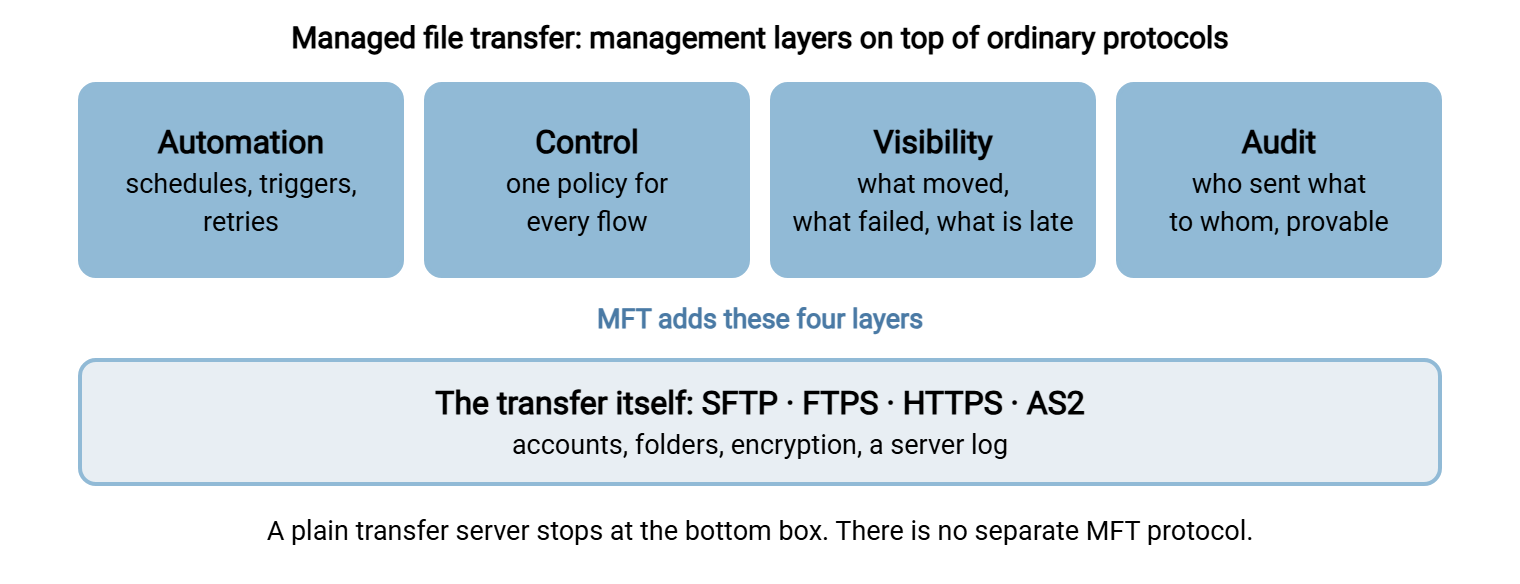
An ordinary transfer server gives you a place for files to arrive. Everything around the arrival is left to you. Scripts fetch and send. A spreadsheet lists the partners. Somebody checks each morning whether last night's files came in. MFT software pulls those surrounding jobs into the product. The series describes them as four layers:
- Automation. Transfers run on schedules or when files arrive, with retries, and with steps before and after such as renaming, encrypting, or moving. See the automation layer.
- Control. One set of policies covers every flow: who may connect, with which protocol, to which folder, and under what rules. See the control layer.
- Visibility. A console shows what moved, what failed, and what is late, without anyone reading log files. See the visibility layer.
- Audit. A durable record proves, months later, who sent what to whom. See the audit layer.
One thing MFT is not: a protocol. There is no MFT protocol. Underneath, MFT technology uses the same protocols as everything else, mainly SFTP, FTPS, and HTTPS, and sometimes AS2 for trading partners. An MFT data transfer on the wire is an SFTP or HTTPS transfer. The management happens around it. The plain-language introduction is managed file transfer in plain words.
The diagram below shows the arrangement: four management layers sitting on top of the same protocols any transfer server uses.
MFT vs FTP
"MFT vs FTP" is a slightly unfair comparison, like comparing a post office with an envelope. FTP is a protocol, a way of moving one file. MFT is a system built around many such movements. The fair comparison is between running a plain FTP or SFTP server with scripts and running an MFT product.
| Need | FTP or SFTP server plus scripts | MFT software |
|---|---|---|
| Encryption in transit | Yes, with FTPS or SFTP. Plain FTP has none | Yes, using the same protocols |
| Scheduled and triggered transfers | Scripts and the operating system's scheduler, or an automation client | Built-in workflow designer |
| Knowing a file did not arrive | Somebody notices, or a script you wrote checks | Alerts on missing or late files |
| One view of every flow | Per-server logs, read one at a time | Central dashboard across servers |
| Adding a new partner | Create an account, a folder, and usually a new script | A partner profile from a template |
| Audit evidence | Server logs, if kept and findable | Searchable history and reports |
| Cost and effort to run | Low license cost; effort grows with every flow | Higher license cost; a platform to learn, patch, and staff |
The last row is the honest one. The left column gets expensive in people's time as flows multiply. The right column is expensive on the day you sign. Somewhere between ten flows and a few hundred, the lines cross. The art is knowing which side of the crossing you are on.
The Vocabulary of the Brochure
Much of the confusion in this market is vocabulary. The same product is described with a dozen nouns, and buyers reasonably assume the nouns mean different things. Mostly they do not.
- File transfer solution, secure file transfer solution, enterprise file transfer solutions. A solution is a product that has been to marketing. These phrases cover everything from an SFTP server to a full MFT suite. Ask which.
- MFT platform, file transfer platform, secure file transfer platform. "Platform" suggests that other things are built on it: workflows, integrations, partner portals. MFT platforms are the larger products.
- MFT system, secure file transfer system. The same thing, described by someone from operations instead of sales.
- MFT server. The component that accepts and makes connections. In smaller products the MFT server is the whole product. In larger ones, MFT servers are one tier among several.
- MFT service. Either the vendor runs the software for you as a cloud subscription, or a consultancy runs it on your behalf. MFT services of both kinds exist, and the contract differs a great deal.
- MFT gateway. A relay placed in the perimeter network. Outside partners connect to the gateway, and it passes traffic to the MFT server inside, so that the server holding the files is never directly exposed.
- MFT tool, MFT apps. Usually the smaller pieces: a command-line client, a desktop agent, a mobile app for approvals or ad hoc sending.
- MFT site. The web address where partners and staff log in to the product's portal.
- MFT tracker, MFT database. The tracking screen that follows one file through each step of its journey, and the database behind it that stores the history.
- MFT integration. Connectors that hand files to and from other systems, such as an ERP, a cloud storage service, or a message queue.
- Secure MFT, secure managed file transfer solutions, secure enterprise file transfer. The word "secure" is free to add. What makes any of them secure is the list in what makes an FTP server secure, and it applies to MFT as much as to a single server.
Remember: when a document says "solution," "platform," or "system," ask which of the four layers it includes: automation, control, visibility, and audit. A product with all four is MFT. A product with none of them is a file transfer server with a longer name.
The Forms MFT Comes In
MFT software is delivered in three main forms, and one neighboring category is often mistaken for it.
Installed on your own servers. The traditional form. You install the product on Windows or Linux machines you run, in your own data center or your own cloud account. You control everything and you patch everything. Searches for "MFT Windows" usually mean this: an MFT product that installs on Windows Server and uses Active Directory accounts.
As a cloud service. The vendor hosts and operates the platform, and you configure flows in a web console. There is less to run and less you can inspect. Where the files physically sit, and under whose control, becomes a contract question. The hosted-or-not decision is worked through in hosted SFTP vs self-hosted. The risk side is covered in self-hosted vs SaaS risk.
Hybrid, with a gateway. The MFT server stays inside your network, and a gateway in the perimeter network or in the cloud receives outside connections on its behalf. This is the common design for regulated environments. The pattern is explained in our DMZ and gateway architecture series.
The neighbor: high-speed file transfer software. This is a different product category with a different purpose. It exists for very large files over long or lossy links, such as video masters and scientific data. Instead of TCP it typically moves data over UDP with its own reliability scheme, which keeps throughput up where ordinary transfers slow to a crawl. It is the right tool for a studio sending a film across an ocean. It solves a physics problem. MFT solves a management problem. Some vendors sell both, and the brochures blur together.
Whichever form you choose, budget for three costs, not one. The license or subscription is the visible one. The second is infrastructure: installed MFT products commonly want more than one server and a database behind them. The third is people. Somebody has to learn the workflow designer, keep the platform patched, and be the person everyone else asks. Large organizations sometimes end up with several MFT systems after mergers, each with its own specialist. That is the problem MFT was bought to solve, reproduced one level up.
Who Sells MFT
The names below come up in most evaluations. This is a map, not a ranking, and each vendor's own site is the authority on what its product currently does. Prices are rarely published. Expect a conversation, a questionnaire about your volumes, and then a quote.
- IBM. The IBM managed file transfer solution is the Sterling family, usually shortened to IBM MFT or Sterling MFT. It is long established in banking and large supply chains.
- Fortra. Fortra MFT is GoAnywhere. The same company sells the FileCatalyst file transfer solution, which belongs to the high-speed category described above.
- Progress. MOVEit MFT is this vendor's product line, with separate transfer and automation components.
- Oracle. Oracle MFT is part of that vendor's middleware family and is usually found where the rest of that middleware already runs.
- Boomi. Boomi MFT is the managed transfer service inside that vendor's integration platform.
- Others. Several further vendors sell MFT servers and cloud MFT services, including some that grew out of Windows FTP server products. A few of them appear in our comparison of SFTP servers for Windows.
And where are we on this map? Below it, deliberately. Sysax Multi Server is a multi-protocol file transfer server for Windows, and Sysax FTP Automation is a scripted, scheduled transfer client. Together they cover the automation layer and the per-server parts of control and audit. They are not an enterprise MFT suite with a central console spanning dozens of servers, and we do not describe them as one.
Reading an MFT Feature List
Every MFT product claims the same six words on the hexagon. The difference between products is in what happens when you ask to see each claim working. Use this sheet in a demonstration. It turns adjectives into things that either appear on the screen or do not.
MFT DEMONSTRATION SHEET              Product: ____________  Date: ________

AUTOMATION - "show me"
[ ] Build a flow: pick up a file by SFTP, rename it, deliver it elsewhere
[ ] Make the partner unreachable; show the retries and the final alert
[ ] Show a flow triggered by a file arriving, not by a clock

CONTROL - "show me"
[ ] Add a new partner from a template; time it: ______ minutes
[ ] Restrict one partner to SFTP with keys only, from two addresses
[ ] Show who inside our company can change a flow, and who approved it

VISIBILITY - "show me"
[ ] Find yesterday's failed transfers in under a minute
[ ] Show the alert when an expected file does NOT arrive by a deadline
[ ] Follow one file from arrival to final delivery on one screen

AUDIT - "show me"
[ ] Produce a report: every file partner X sent us last month
[ ] Show that the history cannot be edited by an administrator
[ ] Show how long history is kept, and where

RUNNING IT
[ ] Number of servers and databases the installation needs: ______
[ ] Who patches it, how often, and how long an upgrade takes: ______
[ ] Price for our number of partners and flows, year one and year three
The questions to ask a vendor before the demonstration are in questions every transfer server vendor should answer. The security side of a vendor review is in reading vendor security claims.
The Smaller Alternative: A Server Plus Automation
Many organizations that shop for MFT need two of the four layers and are quoted for all four plus a platform team. The smaller alternative is a capable transfer server and an automation client, put together with some discipline.
The server provides SFTP, FTPS, and HTTPS, per-partner accounts, folder confinement, and an activity log. The automation client runs the scheduled and triggered transfers, retries failures, and sends an alert when a job does not complete. What you do not get is the single console across many servers, the missing-file dashboard, and the templated partner onboarding. You get there with a naming convention, a partner list, and a morning check instead.
That arrangement suits an organization with one or two transfer servers and tens of flows. It stops suiting at hundreds of flows, several servers, and an auditor who wants one report covering all of them. Northgate Retail found the boundary from the other direction. An audit finding had asked whether the company used MFT, and a platform was bought to make the answer yes. Eighteen months later it was running nine flows, the same nine the old scripts had run. Two of its features were in use. What the auditor had wanted, it turned out, was the transfer logs kept for a year and reviewed monthly. The old server could have done that on the day of the finding.
How to tell which side of the boundary you are on is the subject of do you need MFT?, which has a worksheet. The build-or-buy argument is laid out in our build vs buy series.
If You Only Want to Move Files Between Two PCs
Some searches land here from a very different need. If you were looking for the best PC file transfer software, or the best file transfer software for PC to move your documents to a new computer, MFT is the wrong aisle entirely. The same goes for a PC file transfer software free download meant for copying photos between two machines at home. None of that needs a server, a partner profile, or an audit trail. A network share, an external drive, or a cloud storage folder does the job, and our blog guide to transferring files from PC to PC covers the options.
Likewise, classic FTP file transfer software, meaning a desktop FTP client for uploading to a web host, is a client rather than MFT. The Windows FTP server software guide sorts clients from servers.
MFT Also Means Other Things
One last piece of housekeeping. The letters MFT are shared with several unrelated fields, and search results mix them freely. In Windows, MFT files are the Master File Table, the index the NTFS file system keeps of everything on a disk. In photography the letters name a camera lens standard, and in healthcare a professional licence. None of these has anything to do with managed file transfer. If your results are full of disk forensics, add the words "file transfer" to the search. Our FTP definitions reference has the short version of each abbreviation.
The Version to Tell a Colleague
MFT software moves files and manages the movement: it automates transfers, applies one set of rules to all of them, shows what happened, and keeps a record. It is not a protocol. Underneath it uses SFTP, FTPS, and HTTPS like any other server. "Solution," "platform," and "system" are mostly the same thing in different clothes, so ask which of the four layers a product really includes. MFT comes installed, as a cloud service, or as a hybrid with a gateway. It earns its cost at hundreds of flows and several servers. Below that, a good transfer server with an automation client, run with discipline, covers most of the need.
To decide, work through do you need MFT? If the answer is not yet, the automation ladder series shows how to grow from scripts in sensible steps.
Frequently Asked Questions
What is MFT software?
What is the difference between MFT and FTP?
Is there an MFT protocol?
What is an MFT gateway?
Do I need MFT or just an SFTP server?
What is high-speed file transfer software?
From the Sysax team: we build secure file transfer software for Windows. Sysax Multi Server is an FTP, FTPS, SFTP, and HTTPS server. Sysax FTP Automation handles scheduled, scripted transfers. Free trials are on the download page.