
HIPAA and File Transfers: What the Security Rule Asks
"The claims go to the clearinghouse at eleven. They always have." That is the entire handover note for a nightly job at a small clinic, and every word of it is accurate. The batch is a file. The file contains patient names, diagnosis codes, and policy numbers. Somewhere between the clinic's practice-management system and the clearinghouse's intake server, it crosses the internet. The moment it does, it becomes exactly the kind of thing HIPAA was written about. If you administer that job, HIPAA is part of your job description, whether the handover note mentioned it or not.
HIPAA has a fearsome reputation, mostly because people meet it as legal text instead of as engineering requirements. Read from an administrator's chair, the relevant part — the Security Rule — asks for things you already know how to do. Encrypt data in motion, give every user their own account, log what happens, and keep the paperwork. The hard part is knowing which settings map to which expectations, and that mapping is what this article provides.
The ground rules: this is education, not legal advice. Whether HIPAA applies to your organization, and exactly what it demands of you, are questions for your compliance and legal people. This article equips you to implement their answers well and to ask them better questions. It is part of our Compliance Frameworks series, which maps regulations of all kinds onto file transfer controls.
PHI, Covered Entities, and Why Your Server Is in Scope
HIPAA protects PHI — protected health information. The definition is broader than "medical records": it is health information combined with anything that identifies a person. The identifiers include obvious ones like names and policy numbers as well as less obvious ones like dates of service and device serial numbers. When PHI is in electronic form — a file, a database row, a message — it is called ePHI, and ePHI is what the Security Rule governs. That nightly claims batch is ePHI from end to end.
The rule applies to two kinds of organizations. Covered entities are the healthcare core: providers (clinics, hospitals, practices), health plans (insurers), and clearinghouses (companies that translate claims between formats). Business associates are everyone who handles PHI on a covered entity's behalf. These include billing services, IT providers who can touch the data, software vendors hosting patient information, shredding companies, and analytics firms. Business associates carry direct security obligations of their own — being "just the vendor" is not an exemption. (It has been tried.)
The test that matters for you: if your organization is either of those things, then every system that stores or moves ePHI is in scope. In that setting, the transfer server is usually the busiest ePHI intersection in the building. Claims batches, lab results, referral documents, remittance files, eligibility feeds: in most healthcare-adjacent organizations, all of it flows through one or two transfer systems. Securing that chokepoint well is the highest-leverage HIPAA work an administrator can do.
The Security Rule at a Glance
The Security Rule organizes its expectations into three families of safeguards. Administrative safeguards are the people-and-process layer: risk analysis, workforce training, access management procedures, incident response. Physical safeguards cover buildings and hardware: who can walk up to the server, what happens to old disks. Technical safeguards are the ones that live in your configuration screens: access control, audit controls, integrity protection, authentication, and transmission security. Administrators spend most of their HIPAA effort in the technical family, with a supporting role in the administrative one.
One piece of vocabulary saves a great deal of confusion: the rule labels each specification either required or addressable. Required means exactly what it sounds like. Addressable does not mean optional. It means the organization must assess whether the measure is reasonable and appropriate for its environment. If so, the organization must implement the measure. If not, it must document why and implement an equivalent alternative. Famously, encryption is addressable. In practice, for files crossing the internet, it is very hard to write a straight-faced document explaining why encryption was unreasonable and what you did instead that was just as good. Treat addressable as "do it, or prepare to defend a written argument." I have yet to read that argument, and I have looked.
Remember: "addressable" is not a loophole. It shifts the burden onto your organization to justify any decision not to implement the measure — in writing, with a documented alternative. For encrypting transfers over public networks, the justification almost never exists. Encrypt.
Transmission Security: ePHI in Motion
The transmission security standard is the one aimed squarely at your transfer server. Its expectation, in plain words: when ePHI moves across a network — especially a network you do not control — guard it against interception and against undetected modification. The two named ideas are encryption and integrity controls, and they translate directly into transfer engineering.
Encryption in transit means the claims batch travels over SFTP, FTPS, or HTTPS with current TLS versions — never plain FTP. The batch must never travel as an ordinary email attachment. Our article on why email is bad file transfer dismantles that habit in detail. The protocol mechanics are covered in our encryption in transit series. From the HIPAA angle, what matters is that every hop a file takes is an encrypted one, including the "internal" hops people forget to count.
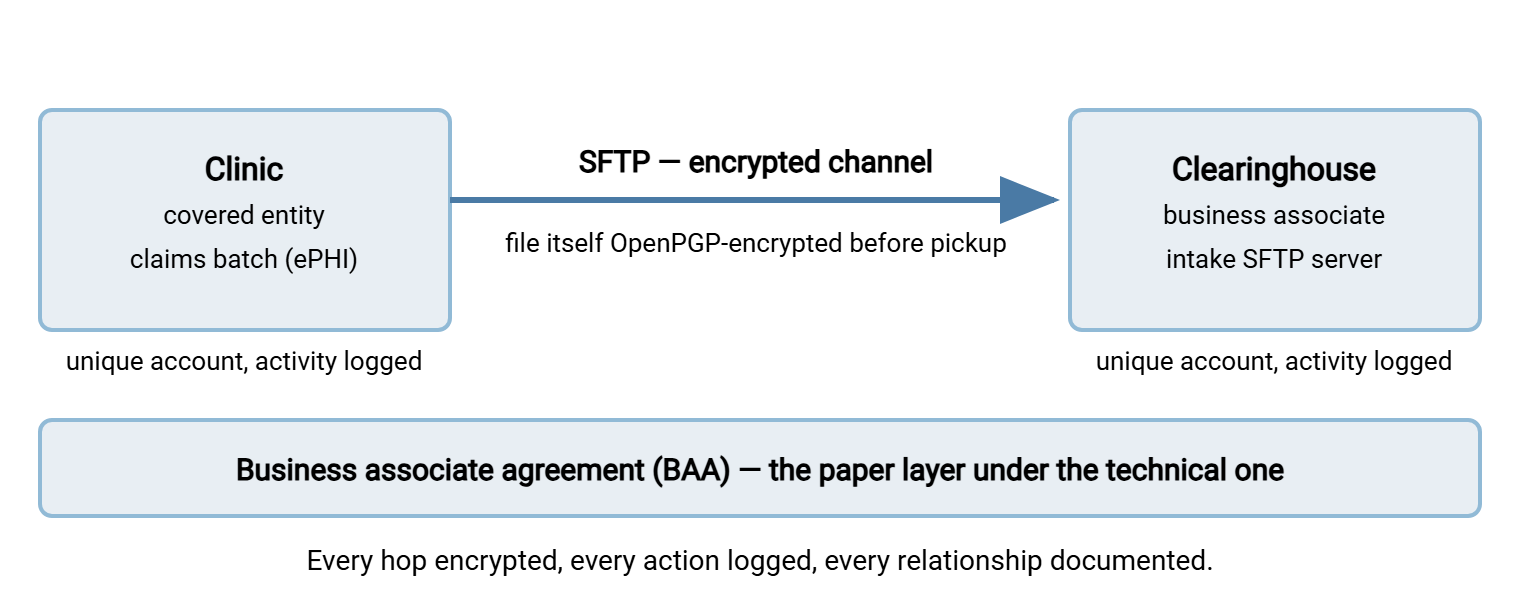
Many healthcare flows add a second layer: encrypting the file itself with OpenPGP before it ever leaves. That way, the batch stays unreadable while sitting in staging folders, on the transfer server, and anywhere else it rests along the way. That pattern — encrypt before send — is a strong answer to the awkward gap between "encrypted in transit" and "protected everywhere." It is described in encrypt-before-send workflows. In the clinic's case, a scheduled job in a tool like Sysax FTP Automation can pick up the nightly batch from a monitored folder. It can OpenPGP-encrypt it, deliver it over SFTP, and email the admin if anything fails. That covers the transmission story and part of the monitoring story in one job definition.
The diagram below shows the clinic example with the layers labeled: an encrypted channel, an encrypted file, and the agreement that ties the two organizations' obligations together.
Access Control and Authentication
The access control standard asks a simple question: can you name every person and system that can touch ePHI, and does each of them have exactly the access they need? Several specifications hang off it, and they map cleanly to transfer-server settings.
- Unique user identification — a required specification, and the end of shared logins. Every staff member and every partner system gets its own account on the transfer server. When three billing vendors share one "vendor" password, you cannot say who downloaded a file. In that situation, you cannot disable one vendor without disrupting the others, and cannot pass this specification. One account per person or partner, no exceptions worth having.
- Automatic logoff — addressable, and in transfer terms it becomes idle session timeouts: connections that end after a period of inactivity rather than lingering all day on an unattended workstation.
- Emergency access — an organizational procedure for reaching ePHI in a crisis. Mostly a policy matter, but the admin should know where the break-glass account is documented and make sure its use would show up loudly in the logs.
Alongside access control sits person or entity authentication: verifying that whoever presents an account really is that account's owner. Passwords meet the bar when they are strong and managed well. Public keys are better for unattended system-to-system feeds. Multi-factor authentication strengthens interactive logins and is discussed in MFA for file transfer. Layer on least privilege — each account confined to its own folders, upload-only or download-only where the flow allows — using the patterns from least privilege in practice.
On a Windows transfer server, these expectations are ordinary configuration. Sysax Multi Server, for instance, authenticates users against built-in accounts, Windows or Active Directory accounts, or public keys. It can restrict connections with IP allow and block lists. So the clearinghouse's account can be limited to the clearinghouse's addresses, which shrinks the audience for a stolen password dramatically. For organizations that need validated cryptography, the server also offers a FIPS 140-2 mode.
Audit Controls: Recording What Happens to ePHI
The audit controls standard expects mechanisms that record and examine activity in systems containing ePHI. Both verbs matter. Recording means the transfer server logs every session and every file operation: who connected, from where, when, what they uploaded or downloaded, what failed. If your logging today cannot answer "which files did this account touch last Tuesday?", start with our baseline article on what to log on a transfer server. The question is always about last Tuesday, never about this morning.
Examining means somebody actually looks. A log nobody reads satisfies the letter of "record" and the spirit of nothing. The workable pattern for a small team is a short periodic review — failed logins, first-time connections, unusually large downloads — plus automated alerts for the events that should never happen quietly. Where the logs land matters too. Sysax Multi Server writes activity logs to file and to a database with rollover. The database copy is the one that makes review and reporting practical instead of heroic, since questions become queries.
Then there is retention. HIPAA expects security documentation — policies, risk analyses, and similar records — to be kept for six years. The rule does not pin a specific number to activity logs. But many organizations apply the same six-year horizon to transfer logs so that any investigation or audit within that window has evidence to work with. Ask your compliance officer what retention they want, get it in writing, and configure rollover so old logs are archived rather than silently deleted. A retention period chosen by whoever installed the server is a retention period nobody chose.
Integrity, Business Associates, and the Paper Trail
The integrity standard is the next piece: ePHI must be protected from improper alteration or destruction. For transfers, the working translation is verification — checksums or hashes computed at the source and checked at the destination. That way, a truncated or tampered claims batch is caught before it becomes wrong claims. The mechanics are in our guide to hashing and integrity verification; protocols like SFTP also provide built-in integrity protection on the wire.
The last piece is the paperwork that makes the clinic-to-clearinghouse relationship legal: the business associate agreement, or BAA. This is a contract in which the associate commits to safeguarding the PHI it handles. Signing BAAs is emphatically not the admin's job. But the admin holds something the paperwork process needs: the true list of where ePHI actually flows. Every partner endpoint on your transfer server should correspond to a documented relationship, and a new feed should not go live until compliance confirms the agreement exists. The nightmare finding is the reverse situation — a years-old automated feed to a vendor nobody remembers engaging, with no agreement behind it. Business associates have their own associates, too; the obligations chain down through subcontractors, which is why your compliance team will care about where the clearinghouse sends the data next.
Acme's on-site clinic had eleven partner accounts on its transfer server, and during a BAA review the compliance officer asked for the list. Nine matched agreements on file. One belonged to a billing vendor the clinic had stopped using years earlier. The account was still enabled, still the target of a weekly scheduled job that had been failing quietly since the vendor's host went away. The job was therefore still producing a tidy log of attempts nobody had read. The other was a "temporary" account created by the consultant who built the original feed. Both were disabled that afternoon, and the review that should have taken an hour took a week, most of it archaeology. The agreement list had been accurate all along; nobody had checked the server against it.
Behind all of these specifics sits the Security Rule's quiet engine: the risk analysis. Organizations are expected to identify where ePHI lives and moves, assess the threats to it, and decide on safeguards — in writing, updated as things change. Your transfer flows belong in that document, and you are the person who knows what they really look like. Feeding accurate technical facts into the risk analysis — every flow, every endpoint, every protocol — is one of the most valuable compliance contributions an administrator can make. The method looks a lot like our transfer risk assessment walkthrough.
What Assessors Tend to Write Up
Security assessments in HIPAA environments — whether internal, contracted, or regulator-driven — keep finding the same transfer problems. Knowing the classics is the cheapest way to avoid them:
- A cleartext feed nobody remembered. The main flows use SFTP, but one legacy device or one old partner still uses plain FTP. Assessors look for the exception, not the rule — finding yours first is the point of finding all your FTP.
- PHI in email. The official channel exists, but staff still attach spreadsheets of patient data to messages when the deadline is tight.
- Shared accounts. One login used by multiple vendors or multiple staff, which fails unique user identification on its face.
- Logs that exist but are never reviewed — or logs that roll over after two weeks, leaving nothing to investigate with.
- "Addressable" treated as "skipped." No encryption at rest, no timeout, and no written assessment explaining the decision — the missing document is the finding.
- Orphaned partner access. Accounts for terminated vendors still enabled, keys for departed staff still authorized.
None of these requires exotic tooling to fix. They require inventory, a few configuration changes, and someone who reads the logs on a Tuesday for no particular reason. That is why assessors treat them as signals of how seriously an organization takes the whole subject. The last item on the list is the one that comes back; the quarterly hunt in finding stale and orphaned transfer accounts is the habit that keeps it closed.
A HIPAA Transfer Checklist
Keep this summary next to the server. It is not a certification standard; it is the set of questions that lets you walk into a HIPAA conversation with good answers.
HIPAA TRANSFER CHECKLIST
[ ] Every flow carrying ePHI identified and written down (source,
    destination, protocol, schedule, data description)
[ ] All ePHI transfers on encrypted protocols (SFTP/FTPS/HTTPS);
    plain FTP and plain email retired or formally justified
[ ] Sensitive batches OpenPGP-encrypted before send where they
    rest on intermediate systems
[ ] Unique account per person and per partner system; no sharing
[ ] Least-privilege folder access; idle session timeouts enabled
[ ] Strong authentication: good passwords or public keys; MFA
    for interactive access where available
[ ] Every session and file operation logged; logs retained per
    the written retention decision (ask compliance; many use six years)
[ ] Log review happening on a schedule, with alerts for failures
    and anomalies
[ ] Integrity verification on critical feeds (hashes/checksums)
[ ] Every partner endpoint matched to a current BAA (confirmed
    with compliance); orphaned accounts disabled
[ ] Transfer flows reflected in the organization's risk analysis
Where This Fits in the Bigger Picture
The Security Rule, translated to transfer work, asks for five familiar things. These are encrypted channels, identified and restricted users, minimized and integrity-checked payloads, recorded and reviewed activity, and documentation that proves all of it. Those are the same five themes every framework repeats — the pattern laid out in why compliance frameworks care about file transfers — wearing healthcare vocabulary.
If your organization answers to more than one regime, resist the urge to run a separate HIPAA project. Build the controls once and map them to each framework with a transfer control matrix. HIPAA's privacy-law cousins are surveyed in GDPR-style privacy laws and file transfers. And when an assessment is on the calendar, the evidence-gathering craft in our audit-ready reporting series is what turns these controls into a calm meeting. The handover note that says "the claims go at eleven" can finally have a second line.
Frequently Asked Questions
Is SFTP "HIPAA compliant" by itself?
Is encryption actually required, or is it optional?
Do we need a business associate agreement with every transfer partner?
How long should we keep transfer logs under HIPAA?
We are an IT company with healthcare clients. Does HIPAA apply to us?
From the Sysax team: we build secure file transfer software for Windows. Sysax Multi Server is an FTP, FTPS, SFTP, and HTTPS server. Sysax FTP Automation handles scheduled, scripted transfers. Free trials are on the download page.