
Why Compliance Frameworks Care About Your File Transfers
"Is the claims feed HIPAA compliant?" The question arrives in a ticket, or in a hallway, or forwarded from a lawyer with "can you confirm" at the top. It is the first thing anyone has asked about that server in years except whether it is up. Nobody mentioned regulations when you inherited it. The documentation was a text file called notes.txt. Now a compliance officer, an auditor, and someone from legal all want to know how the settlement files are protected in transit. They all mean the same transfer server, the same scheduled jobs, and the same partner connections.
It feels like an ambush, but the logic underneath is short. Nearly every compliance framework, whatever industry produced it, treats data in motion — data traveling between systems and organizations — as data at risk. File transfer is data in motion at its most concentrated, so file transfer is where the frameworks aim. Once you see that pattern, the subject stops being mysterious and starts being manageable. That is a lower bar than it sounds and the right one to aim for.
This article explains the pattern. It covers why frameworks single out transfers, what a framework actually is and who enforces it. It covers the five control themes that every regime keeps demanding in slightly different words. It is the opening article of our Compliance Frameworks series. The rest of the series takes the major frameworks one at a time and translates each into concrete transfer-server settings.
A File Transfer Is Data at Its Most Exposed
Think about the life of a sensitive file — a batch of insurance claims, a payroll export, a customer list. For most of that life, the file sits inside a system you control. That could be a database with its own permissions, an application with its own logins, or a server behind your firewall. Then someone needs to send it somewhere, and three things change at once.
First, the file crosses networks nobody fully controls. Between your server and your partner's server sits the open internet, and anything that travels there in cleartext can be read along the way. Second, the file lands on systems other people administer, with security you can only take on faith. Third, the file multiplies. A single "send" typically leaves copies in a staging folder, on the transfer server, in the recipient's download area, and in backups on both sides. Every copy is another chance for exposure, and most of those copies have no owner watching them. Staging folders in particular have never met a file they were willing to let go of.
Now look at that from a regulator's chair. The harms regulations exist to prevent — health records exposed, card numbers stolen, financial statements quietly corrupted, personal data misused — all need an opportunity. A transfer is a bundle of opportunities: interception, impersonation, tampering, misdelivery, and slow, unnoticed leakage. Add the fact that a transfer server is a naturally attractive target. It is reachable from the internet, holds credentials for many partners, and touches the organization's most sensitive files every day. The regulatory attention makes sense. Attackers reached the same conclusion long ago, which is why well-publicized breaches of file transfer products keep proving the point. Our threat-modeling article on what attackers want from file transfer walks through that attacker's-eye view in detail.
So when the authors of a framework asked themselves "where could this data leak, be altered, or go missing?", file transfer landed near the top of every list. The scrutiny is not bureaucratic whim. It is the same reasoning you would use in an honest threat model of your own network — just written down by someone with the power to check your work.
What a Compliance Framework Actually Is
A compliance framework is a published set of requirements for protecting certain data, plus a mechanism that makes the requirements stick. The requirements are usually less specific than admins expect — outcomes, not settings — and the mechanisms differ. Knowing which kind of framework you are dealing with tells you who can demand what from you.
- Laws and regulations. HIPAA governs health information held by certain organizations in the United States. SOX governs the financial reporting of publicly traded companies. GDPR, and the many privacy laws modeled on it around the world, govern personal data about individuals. Government agencies enforce these, and "we didn't know" is not a defense anyone wants to test.
- Contractual standards. PCI DSS, which governs payment card data, is not a law at all. It is an industry standard that banks and card networks impose through the agreements a business signs in order to accept card payments. The enforcement is commercial — penalties, higher processing costs, or losing the ability to take cards — but it has real teeth all the same.
- Voluntary frameworks. SOC 2 and ISO 27001 are security frameworks organizations adopt by choice, usually because customers ask for independent proof that their data is handled carefully. Nobody forces them on you, but a large customer's security questionnaire can make them feel mandatory in practice.
Which of these applies to your organization is a legal determination. It is driven by the data you handle, the industry you are in, where your customers live, and the contracts you have signed. Making that determination is not the administrator's job, and it should not be. The division of labor that works in practice is this: legal and compliance decide which frameworks apply and interpret what they demand. Administrators implement the controls and produce the evidence. When a requirement reaches you, you are allowed — encouraged, even — to ask for it in the form of a concrete expected outcome. You can ask before you change a single setting. A requirement that arrives as a section number is a translation request, not a work order.
Remember: you implement controls; you do not interpret statutes. If a requirement arrives as raw legal text, send it back for translation. A good compliance colleague will state the outcome — "this data must never cross a network unencrypted" — and let you choose the mechanism that achieves it.
The Five Control Themes Every Framework Repeats
Strip away the vocabulary, and the frameworks that touch file transfer keep asking for the same five things. The diagram below shows the shape of the whole subject. Many regimes on top converge on one shared set of demands. Those demands map to controls you already know how to run.
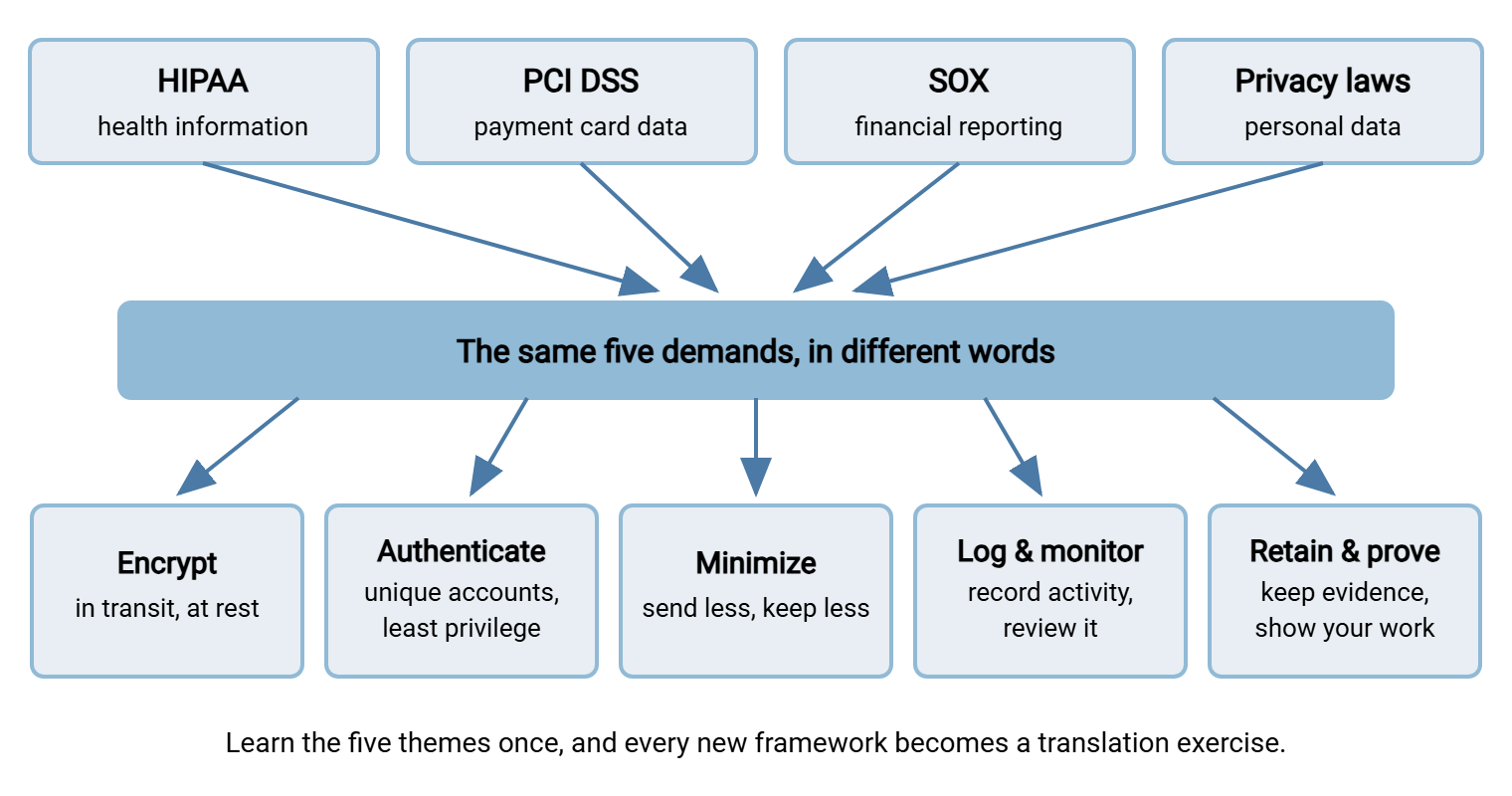
Theme one: encrypt. Every framework expects the data it protects to be unreadable to anyone eavesdropping while it travels. In transfer terms, that means SFTP, FTPS, or HTTPS instead of plain FTP, with current TLS versions and sensible settings on the server. Many regimes also expect encryption at rest — protecting the file while it sits on disk before pickup and after delivery. That is where file-level tools like OpenPGP come in. The mechanics live in our encryption in transit series; the compliance takeaway is simply that this demand appears in every framework you will ever meet.
Theme two: authenticate and restrict. Frameworks want assurance that only identified, authorized people and systems touch the data. That translates to unique accounts instead of shared logins, strong credentials or keys, least-privilege access to folders, and disabled accounts the moment a person or partner leaves. I once cleaned up a transfer server where three vendors shared one login. The log attributed four years of activity to a user named "vendor," which narrowed things down to three companies. That is what this theme is trying to prevent. The options are compared in authentication methods for file transfer.
Theme three: minimize. The data you never send cannot leak, and the copy you never keep cannot be breached. HIPAA calls this idea "minimum necessary." Privacy laws call it "data minimization" and "storage limitation." PCI DSS tells you flatly not to store card data you do not need. In every case the translation is the same: trim the fields in the export, question the recipient list, and delete staging copies when the job is done. The starting point is knowing what data leaves your network in the first place. Most of it left because an export "just needed the customer table" and nobody asked which columns.
Theme four: log and monitor. Every framework asks some version of "how would you know?" Who connected, from where, what files moved, when, and did anyone fail trying? A transfer server that cannot answer those questions fails this theme no matter how good its encryption is. Collection alone is not enough — someone has to look at the logs, or wire up alerts that look for them. Our guide to what to log on a transfer server sets the baseline.
Theme five: retain and prove. Compliance is not just doing the right thing; it is being able to demonstrate later that you did it, to someone whose job is professional skepticism. That means logs retained on a defined schedule, configuration records, review sign-offs, and reports you can produce on request. That is the craft of turning transfer logs into audit-ready reports. How long to keep transferred files themselves is its own discipline, covered in our data retention series.
Same Demand, Different Vocabulary
Each framework names these themes in its own dialect, which is the frustrating part of compliance reading. An admin who does not know the dialects reads three documents and thinks they face three unrelated projects. An admin who knows them reads the same documents and sees one project with three vocabularies. The table below is a rough phrasebook — deliberately simplified, because the point is recognition, not legal precision.
| Control theme | HIPAA tends to say | PCI DSS tends to say | Privacy laws tend to say |
|---|---|---|---|
| Encrypt in motion | Transmission security | Strong cryptography over open, public networks | Appropriate technical measures, with encryption named |
| Authenticate & restrict | Access control; unique user identification | Restrict access to need-to-know; unique IDs | Confidentiality; access by authorized persons only |
| Minimize | Minimum necessary | Do not store what you do not need | Data minimization; storage limitation |
| Log & monitor | Audit controls | Track and monitor all access | Accountability; ability to demonstrate compliance |
| Retain & prove | Documentation; periodic evaluation | Evidence of testing and assessment | Records of processing activities |
SOX is missing from the table because its dialect is different in kind, not just in wording. SOX auditors rarely quote requirements at you. Instead they assess IT general controls over any system that feeds financial reporting. These cover who has access to systems and data, how changes are managed, and whether operations run reliably. Inside those categories, the same five themes reappear. SOC 2 and ISO 27001 assessments use yet another set of labels for, once again, the same ideas. The lesson: when a new framework lands on your desk, do not start from zero. Find how it names each of the five themes, and you have understood most of what it wants from your transfer estate.
Meridian Parts ran the three-project version for most of a year. The card processor's questionnaire, the privacy review, and the financial auditors each asked, in their own dialect, for the same two things on the supplier feed. Those were encrypted transport and retained session logs. Three tickets were opened, assigned to three administrators, and worked on three schedules. The second change reverted the retention setting the first had made. The third was booked into a maintenance window the first had already used. Nobody noticed until an auditor asked, politely, why the log retention setting had changed twice in a quarter. The fix was one spreadsheet with a column per framework, which is roughly what the last article in this series describes.
Why Frameworks Keep Converging
The convergence is not a coincidence, and it is not committees copying each other's homework — or not only that. Frameworks converge because they all model the same threats. An eavesdropper on a network path does not care whether the file contains lab results or card numbers. A shared account with a weak password is equally dangerous in a hospital and a retailer. An unlogged server hides an insider in any industry. Controls follow threats, and the threats to a file in motion are universal; only the data and the enforcement differ.
The strategic consequence is worth internalizing early: controls are reusable across frameworks. An estate with encrypted protocols only, unique authenticated accounts, minimized payloads, complete logs, and organized evidence is most of the way to satisfying the next framework before anyone has read it. The efficient path is to build that one control set well and then map it to each framework's vocabulary. The final article in this series, building a transfer control matrix, turns that method into a single working document.
Key idea: one well-run set of transfer controls, mapped to many frameworks, beats several parallel compliance projects every time. Frameworks differ far more in vocabulary and paperwork than in what they actually want your server to do.
The Admin's Share of the Work
So what specifically lands on you? Four jobs, in a sensible order.
- Inventory the flows. You cannot secure transfers you do not know about. List every scheduled job, partner connection, and ad-hoc route — the systematic version of this is the file flow census.
- Classify what moves. For each flow, ask the data owner what is actually in the files: health information, card numbers, personal data, financial figures. This one question determines which frameworks care about that flow, and it is a question for the business, not a guess for the admin.
- Apply the five themes. Encrypt, authenticate and restrict, minimize, log, retain — configured on the servers and jobs you already run, hardest-first based on what the classification revealed.
- Keep the evidence. Configuration exports, logs, review notes — filed as you go, so that proving a control exists takes minutes instead of a week of archaeology.
The tooling matters mostly because it determines how hard those jobs are. A server built for this makes the themes ordinary settings. Sysax Multi Server, for example, can be configured to support HIPAA-, PCI DSS-, and GDPR-related transfer requirements. Those include encrypted FTPS, SFTP, and HTTPS transfers, and authentication against built-in accounts, Windows or Active Directory, or public keys. They include IP allow and block lists, and activity logging to file and database with rollover. On the automation side, Sysax FTP Automation handles the scheduled, scripted secure transfers that regulated feeds usually are. It offers OpenPGP encryption and email notifications when a job fails. Those notifications are exactly the kind of monitoring the log-and-monitor theme expects.
Write the rules down; that job is shared with management, but it belongs on your list. A short document saying which transfer methods are approved for which data turns your controls from folklore into policy. It gives you something to point to when someone proposes emailing the claims file "just this once." Our file transfer policy series covers how to write one people actually follow.
A Starter Question List for Any Regulated Flow
When compliance flags a flow — or when you suspect they are about to — walk it through this list. It is framework-neutral on purpose: these are the questions every regime will ask in its own words, so answering them once prepares you for all of them. Copy it into your runbook. (Question ten is the one that stings; answer it first.)
FLOW REVIEW — ask for every regulated transfer
 1. What data is in the files, exactly? (ask the owner; open a sample)
 2. Which frameworks care about that data? (compliance answers this)
 3. Is the transport encrypted end to end? What protocol?
 4. Is the file itself encrypted at rest before and after transfer?
 5. Who and what can access it — named accounts only? least privilege?
 6. Could this flow work with less data in it?
 7. Is every connection, upload, and download logged?
 8. Who reviews the logs, and how would a failure be noticed?
 9. How long are files and logs kept, and who decided that?
10. If an auditor asked tomorrow, what evidence could I produce today?
Where to Go From Here
The one-paragraph version of this article: frameworks regulate file transfer because a file in motion crosses trust boundaries, multiplies, and travels through a server attackers love. Every framework responds with the same five demands: encrypt, authenticate and restrict, minimize, log and monitor, retain and prove. Legal decides which regimes apply; you translate the themes into settings and keep the receipts. The next time the question arrives in the hallway, your answer will be shorter than the question.
From here, go where your data takes you. If your files touch health information, start with HIPAA and file transfers. If card numbers are anywhere near your estate, read PCI DSS and file transfers. If personal data about customers or employees moves through your jobs, the survey of GDPR-style privacy laws is your entry point. When the auditors do come knocking, our audit-ready reporting series covers the meeting itself. If the meeting produces a finding, turning audit findings into budget language shows how to convert it into the money to fix it.
Frequently Asked Questions
Do compliance frameworks require specific protocols like SFTP?
How do I find out which frameworks apply to my organization?
Is plain FTP ever acceptable for regulated data?
What is the difference between a law like HIPAA and a standard like PCI DSS?
We are a small company. Do these frameworks really apply to us?
From the Sysax team: we build secure file transfer software for Windows. Sysax Multi Server is an FTP, FTPS, SFTP, and HTTPS server. Sysax FTP Automation handles scheduled, scripted transfers. Free trials are on the download page.