
HIPAA-Compliant SFTP and PGP Encryption: What Each One Covers and How to Combine Them
The product datasheet has a badge in the corner. It is round, it is green, and it says "HIPAA Compliant." Badges like this are comforting, and they cost a designer about ten minutes. An assessor will not ask to see the badge. An assessor will ask who logged in last March, how you know, and where the file sat after it arrived. The badge has no opinion on any of that.
This article explains what stands behind the phrase. It covers what "HIPAA-compliant SFTP" can and cannot mean, what SFTP protects, and what PGP encryption adds. It shows how SFTP and PGP work together as two layers, with the commands. It untangles SSH keys from PGP keys, which are different things that people ask for with the same sentence. It ends with a configuration checklist for a server that handles health information.
The ground rules are the same as elsewhere in our Compliance Frameworks and File Transfer Controls series. This is education, not legal advice. Whether HIPAA applies to you, and exactly what it requires of you, are questions for your compliance and legal people. This page helps you carry out their answers properly.
What "HIPAA-Compliant SFTP" Can and Cannot Mean
HIPAA is the United States law that governs health information. Its Security Rule sets out safeguards for ePHI, electronic protected health information, which is health data that can be tied to a person. If your transfer server carries claims, eligibility files, lab results, or benefit enrolments, it is carrying ePHI.
No server, protocol, or product is HIPAA compliant by itself. Compliance describes how an organization operates: its policies, its controls, its reviews, and its records. Software can only make those controls possible. So a "HIPAA-compliant SFTP server" is, in honest terms, an SFTP server with the features the Security Rule's safeguards call for, run by an organization that actually uses them and can prove it.
The useful question is therefore which safeguards touch a file transfer server, and what the server has to be able to do for each.
| What the Security Rule is concerned with | What the server must be able to do | What you show an assessor |
|---|---|---|
| Transmission security | Encrypt every connection and refuse unencrypted ones | Protocol settings; a test showing plain FTP is refused |
| Unique user identification | One account per person or system; no shared logins | The account list, with an owner for each |
| Person or entity authentication | Strong passwords, SSH keys, a second factor where appropriate | Authentication policy and settings |
| Access control | Confine each account to the folders it needs | Home folder and permission settings per account |
| Audit controls | Record logins, failures, uploads, downloads, and deletions | Logs for the period asked about, and evidence they are reviewed |
| Integrity | Deliver files unaltered, and detect it if they are not | Protocol integrity checks; signatures or checksums on files |
| Protection of stored data | Keep files unreadable at rest, or justify in writing why not | Disk or file encryption, and the written assessment |
| Business associates | Not a server feature: a signed agreement with any vendor that handles the data | The agreement itself |
Every row except the last can be met with a correctly configured SFTP server and some discipline. The last row is a reminder that if someone else hosts the server, the paperwork comes first. The full walk through the rule is in HIPAA and file transfers: what the Security Rule asks.
SFTP Protects the Journey
SFTP, the SSH File Transfer Protocol, encrypts everything that passes between the client and the server: the login, the commands, the file names, and the file contents. It also checks that nothing was altered on the way, and it lets the client confirm it has reached the real server through the server's host key. For transmission security, SFTP is the standard answer.
What SFTP does not do is protect the file once it stops moving. The encryption exists only inside the connection. Consider where a nightly claims file sits in readable form:
- In the export folder on the sending system, before the transfer.
- On the transfer server's disk, after the upload and before anyone collects it.
- In the receiving system's inbound folder.
- In every backup taken of any of those three places.
SFTP is an armored van. It is very good at being an armored van. When it arrives, somebody opens the doors and puts the contents on a loading dock, and the van's armor has nothing more to contribute.
PGP Protects the File
PGP, more precisely the open standard called OpenPGP, encrypts the file itself. It uses two related keys. The recipient creates a key pair: a public key, which they give to anyone who wants to send them something, and a private key, which they keep. A file encrypted with the public key can be decrypted only with the matching private key.
The consequence is the one that matters for ePHI. A PGP-encrypted file is unreadable everywhere it rests: on the sender's disk after encryption, on the transfer server, in backups, and on the recipient's disk until the moment they decrypt it. Anyone who gets a copy along the way, including an administrator of the transfer server, has a file of noise.
PGP can also sign a file. The sender signs with their own private key, and the recipient checks the signature with the sender's public key. A valid signature proves two things: the file came from that sender, and not one byte has changed since. That speaks directly to the integrity row in the table above. How it works is explained in how PGP file encryption works.
SFTP with PGP: The Two Layers Together
SFTP and PGP are not alternatives. They protect different things, and regulated transfers commonly use both. Using SFTP with PGP means the file is encrypted first and then sent through an encrypted connection.
The diagram below shows where each layer protects a file on its way from sender to recipient.
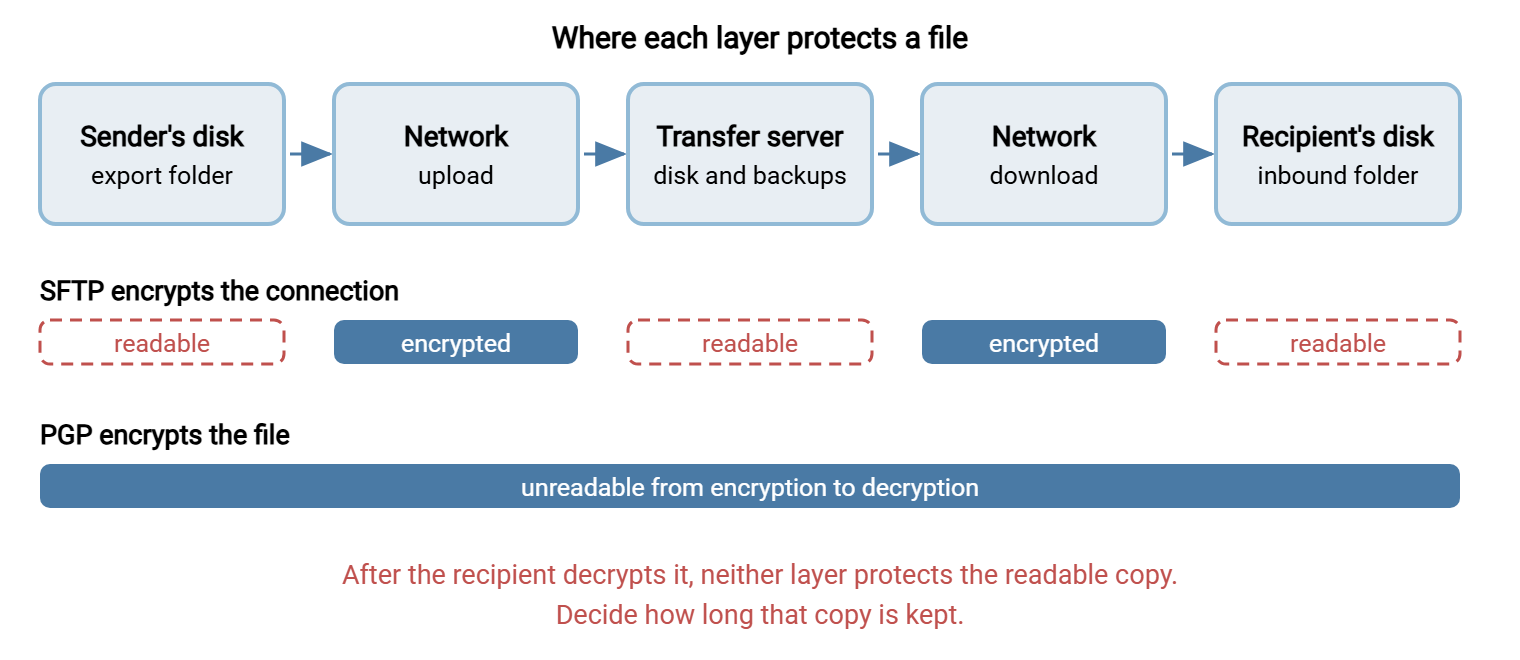
| Where the file is | SFTP alone | SFTP and PGP |
|---|---|---|
| Crossing the network | Encrypted | Encrypted twice |
| On the transfer server's disk | Readable, unless the disk is encrypted | Unreadable |
| In the server's backups | Readable | Unreadable |
| Seen by the server's administrators | Readable | Unreadable |
| Proof of who sent it and that it is unaltered | The login record only | A signature on the file itself |
| After the recipient decrypts it | Readable | Readable. PGP's protection ends at decryption |
The workflow has six steps. The first is done once per partner and the rest for every file.
- Exchange PGP public keys with the partner, and confirm each key's fingerprint by a second channel, such as a telephone call.
- Encrypt the file with the partner's public key, and sign it with your private key.
- Upload the encrypted file over SFTP.
- The partner downloads it over SFTP.
- The partner decrypts it with their private key and checks your signature.
- Both sides delete readable copies they no longer need, on a schedule.
With GnuPG, the free OpenPGP tool, steps 2 and 5 are one command each:
REM sender: encrypt for the partner and sign, producing claims.csv.pgp
gpg --encrypt --sign --recipient claims@partner.example.com --output claims.csv.pgp claims.csv

REM recipient: decrypt and verify the signature
gpg --decrypt --output claims.csv claims.csv.pgp
On decryption, GnuPG reports whether the signature is good and whose it is. A file that fails this check should be treated as not received.
Nobody should run those commands by hand every night. An automation client can do the PGP sftp sequence as one job: pick up the file, encrypt it, deliver it, and report a failure. Sysax FTP Automation includes OpenPGP encryption and decryption commands in its scripting for this purpose, and on the receiving side Sysax Multi Server can run an OpenPGP action when a file is uploaded. The pattern is described in encrypt-before-send workflows.
Step 6 is the one that gets forgotten, as Kestrel Payroll found. Kestrel sent benefit enrolment files to an insurer every week. The files were PGP-encrypted, signed, and delivered over SFTP, and the arrangement had passed two reviews. A third review looked at the insurer's side of the workflow, on a workstation where an analyst decrypted each file to load it. Every decrypted file was still there, in a folder named temp, going back eighteen months. The encryption had protected the files perfectly at every point except the one where they were kept. Nobody had been careless. The procedure ended at "decrypt," and so did everyone's attention. Kestrel's partner procedure now has a seventh line and a cleanup job that enforces it.
Remember: SFTP encrypts the connection, and its protection ends when the file lands. PGP encrypts the file, and its protection ends when the file is decrypted. Between them they cover the journey and the waiting. Neither covers what happens to the readable copy afterward.
Is PGP Always Necessary?
No, and it is worth being honest about the cost before adding it everywhere. PGP is the strongest answer to the question of files at rest. It is not the only acceptable one.
The Security Rule treats encryption of stored data as an addressable safeguard. Addressable does not mean optional. It means you must assess whether the measure is reasonable for your environment, implement it if it is, and otherwise document why not and what you did instead. For a transfer server, there are two common ways to meet it. One is PGP on the files. The other is encrypting the server's data volume and removing files promptly after they are collected.
Volume encryption is simpler to run. It needs no cooperation from partners and no key exchange. It protects against a stolen disk or a discarded backup tape. It does not protect against anyone who can log in to the running server, because to them the files look perfectly normal. PGP protects against that too, which is why it is preferred when the server is hosted by a third party or shared between partners.
PGP has running costs that volume encryption does not. Every partner must generate a key, exchange it, and renew it. Keys expire, usually on a date nobody wrote down, and when one does the nightly file fails to encrypt. Somebody has to hold the private keys safely for years. For a handful of high-sensitivity flows that is a fair price. For three hundred small ones it is a second job. Many organizations settle on PGP for flows that leave the building and volume encryption for everything else, and write the reasoning down. The written reasoning is the part the assessor actually reads. The trade-off is examined in at rest vs in transit.
SFTP/SSH Key vs PGP Key: Two Different Keys
A partner writes, "Please send us your key." Which key? Regulated transfers involve two kinds, and the phrase "SFTP/SSH key" in an onboarding document gives no hint that there may be another. They are both key pairs, they both have a public half and a private half, and they do completely different jobs.
| Question | SSH key (for SFTP) | PGP key |
|---|---|---|
| What it is for | Logging in. It proves who is connecting | Encrypting and signing files. It controls who can read them |
| Who creates it | The party that connects (the client) | The party that will receive and decrypt files |
| Where the public half goes | Onto the server, attached to the user's account | To everyone who will send that party files |
| Typical creation command | ssh-keygen -t ed25519 |
gpg --full-generate-key |
| What the public half looks like | One line beginning ssh-ed25519 or ssh-rsa |
A block beginning -----BEGIN PGP PUBLIC KEY BLOCK----- |
| If the private half is lost | You cannot log in until a new key is installed. No data is lost | Files encrypted to it can never be decrypted |
| If the private half is stolen | Someone can log in as you | Someone can read files meant for you and forge your signature |
A fully set up partner connection therefore involves up to four public keys changing hands. You send your SSH public key so that you can log in to their server. They send their PGP public key so that you can encrypt files for them. If files flow both ways, the reverse of each is exchanged as well. There is also a fifth item, the server's own host key, whose fingerprint lets the client confirm it has reached the right server.
The two rows about loss explain why the keys are handled differently. A lost SSH key is an inconvenience. A lost PGP private key is permanent data loss for everything encrypted to it, which is why PGP keys need a protected backup and SSH keys, strictly, do not. I have watched an organization discover this distinction with a year of archived files that had become very secure indeed. SSH keys are covered in SSH keys explained and PGP keys in PGP key management.
A Server Configuration That Supports HIPAA Work
This is the checklist for an SFTP server that will carry ePHI. It maps to the table at the top of the page. It is a starting point for your compliance team's requirements, not a replacement for them.
SFTP SERVER CHECKLIST FOR ePHI          Server: __________  Date: ________

TRANSMISSION
[ ] SFTP (or FTPS with TLS required) only; plain FTP disabled
[ ] Outdated protocol versions and weak ciphers disabled
[ ] FIPS-validated cryptography enabled, if your policy requires it
[ ] Host key fingerprint published to partners; host key backed up

IDENTITY AND ACCESS
[ ] One account per person or partner system; none shared
[ ] SSH key or strong password; second factor for administrators
[ ] Each account confined to its own folder, with least permissions
[ ] Accounts disabled promptly when a partner or employee leaves
[ ] Idle sessions time out
[ ] Account list reviewed on a schedule: every ____ months

AUDIT
[ ] Logins, failures, uploads, downloads, deletions logged with user and address
[ ] Logs kept for the period compliance has set: ____ years
[ ] Logs stored where server administrators cannot alter them
[ ] Failed logins and unusual activity reviewed: every ____ days

DATA AT REST
[ ] Files containing ePHI are PGP-encrypted before upload, or
[ ] the server's data volume is encrypted, and
[ ] the decision is written down either way
[ ] Files removed from the server after ____ days
[ ] Decrypted copies on receiving systems removed after ____ days

PAPERWORK
[ ] Business associate agreement in place with any vendor hosting or
    operating the server
[ ] Risk assessment covers this server and each flow through it
[ ] Each partner flow documented: what, from, to, how, who owns it
On Windows, a server such as Sysax Multi Server supplies the technical items in the first three blocks: SFTP and FTPS with plain FTP switched off, a FIPS 140-2 mode, per-account folders, directory logins, a second factor, and activity logging to file and database. The fourth block needs PGP or disk encryption. The fifth block is entirely yours, and no software will sign an agreement for you. If the server is to be hosted by a provider, read hosted SFTP vs self-hosted first, because that choice decides who else needs a business associate agreement.
The general security checklist behind this one is in what makes an FTP server secure. Turning controls into evidence an assessor will accept is covered in building a transfer control matrix.
The Version to Tell a Colleague
No SFTP server is HIPAA compliant on its own. Compliance is how the organization operates, and the server only makes the controls possible: encrypted connections, unique accounts, confined folders, and logs. SFTP encrypts the file while it travels and stops protecting it when it lands. PGP encrypts the file itself, so it stays unreadable on the server and in backups until the recipient decrypts it, and a PGP signature proves who sent it. Use both for health information. An SSH key is for logging in and a PGP key is for encrypting files, so a partner connection may need both exchanged. And decide how long readable copies are kept after decryption, because neither layer protects those.
For the rule itself, read HIPAA and file transfers. For deciding when file-level encryption is worth its overhead, see when to use file-level encryption.
Frequently Asked Questions
Is SFTP HIPAA compliant?
What makes an SFTP server suitable for HIPAA?
Do I need PGP if I already use SFTP?
What is the difference between an SSH key and a PGP key?
How does SFTP with PGP encryption work?
Does a hosted SFTP service need a business associate agreement?
From the Sysax team: we build secure file transfer software for Windows. Sysax Multi Server is an FTP, FTPS, SFTP, and HTTPS server. Sysax FTP Automation handles scheduled, scripted transfers. Free trials are on the download page.