
Fixing Slow Transfers: Remedies Ranked by Effort
By this point in the series you know what is slowing the transfer down. The pipe is full, or the path is long, or a disk at one end is saturated. Or twelve thousand small files are each paying a round-trip fee, or a device in the middle is capping the flow. Diagnosis done. What remains is choosing a remedy — and the choice is where a lot of good diagnoses go to waste. That is because the remedy people reach for is the one they have heard of, not the cheapest one that matches the cause.
This article is the remedy list, ranked by effort. It starts with settings and scheduling you can change in minutes. It moves through parallelism, compression, and protocol changes that take an afternoon. It ends with the project-sized options of moving endpoints, widening links, and accelerated protocols. Each remedy comes with what it costs, what it can be expected to gain, which diagnosis it fits, and the honest note about when it does nothing at all. It closes with the question nobody asks often enough: the point at which optimizing stops paying. This is the last article in our Diagnosing Slow Transfers series.
First Rule: Match the Remedy to the Diagnosis
Most remedies help exactly one kind of slowness and do nothing for the others — and a few make the others worse. Before reading the ranked list, find your diagnosis in this table. It is the single most useful thing on the page.
| Diagnosis | Remedies that help | Remedies that do not |
|---|---|---|
| Bandwidth-bound — the link is full | Quiet-hour scheduling, throttling competitors, compression, delta transfer, a wider link | Parallel streams (they share the same full pipe), window tuning, acceleration |
| Latency-bound — long path, small window | Window and autotuning checks, parallel streams, a closer endpoint, acceleration on very long paths | A wider link, a faster server, compression on its own |
| Disk or CPU-bound at one end | Rescheduling around the competing job, cipher choice, scan exclusions, faster storage, more cores | Anything on the network side; more parallel sessions (they make it worse) |
| Overhead-bound — many small files | Keeping the session open, listing once, parallel sessions, bundling, rsync or persistent HTTPS | A wider link, window tuning, compression without bundling |
| Path-bound — shaper, proxy, inspection, VPN, MTU | MSS clamping, traffic reclassification, split tunnel, protocol change, inspection exception | Anything at either endpoint |
| Congestion — busy hours | Quiet-hour scheduling, reserved capacity, throttling the bulk flow itself | Parallel streams (they deepen the congestion for everyone) |
If you have not yet got a diagnosis, go back to triage. Applying remedies without one is how a team ends up with a faster link, a rebuilt server, and the same slow job.
Tier 0: Minutes, No Change Request
These cost nothing but attention, need no approval, and between them resolve a surprising share of tickets.
- Move the job to a quiet hour. Fits: congestion, bandwidth contention, a far end busy with its own jobs. Gain: often the entire difference. A job that takes twenty minutes at five in the afternoon and four at two in the morning has a four-minute version waiting. Cost: a calendar check with whoever depends on the file. In a scheduler such as Sysax FTP Automation this is a change to the job's schedule and nothing else. The wider question of which hours are quiet and how to stagger many jobs belongs to bandwidth management.
- Stop reconnecting per file. Fits: overhead. Gain: for a script that opens a new session per file, halving or better. Cost: a small script change — open once, loop, close once. The server log with a login line before every file is the tell.
- List the remote directory once. Fits: overhead. Gain: hours, in a sync script that checks for each file's existence with a fresh listing. Cost: restructure the script to list, compare locally, then act.
- Check the interface speed. Fits: an endpoint that is inexplicably capped near 100 Mbit/s or 10. Gain: tenfold, when a gigabit port has negotiated down. Cost: one command —
Get-NetAdapterorethtool— and possibly a cable. - Turn on in-protocol compression for text-like data. Fits: bandwidth-bound transfers of logs, exports, CSV, XML. Gain: two- to five-fold for such data. Cost: CPU at both ends, and a real slowdown for data that is already compressed — archives, images, video, encrypted files. So test it, and if in doubt leave it off. In SSH-based transfers it is the client's
-Coption. - Ask about scan exclusions. Fits: disk-bound endpoints where an on-access scanner reads every byte. Gain: up to double the write rate. Cost: a conversation with the security team about scanning the landing folder on a schedule instead of on write; never a unilateral change.
Tier 1: An Hour, and a Test Before and After
These change a setting or a job definition. Measure before and after with the same file, because each one can also do nothing, and one of them can make things worse.
- Check the window and autotuning. Fits: latency-bound single streams. Gain: from a small-window ceiling up to the link's real capacity — in the series' running case, from 2.4 MB/s toward 12. Cost: reading two settings. On Windows,
netsh interface tcp show globalshould report receive window auto-tuning asnormal. On Linux,sysctl net.ipv4.tcp_rmem net.ipv4.tcp_wmemshows the receive and send buffer ranges. Their upper values should be in the megabytes for a long path. Both ends matter, and a middlebox can undo either. That is the short version; TCP tuning first is the full one. - Choose a hardware-accelerated cipher. Fits: CPU-bound endpoints with one core pinned. Gain: several-fold on machines that accelerate AES in hardware but negotiated something else. Cost: a client option —
-cin OpenSSH's client, a preference list in most others — and confirming the server allows it. - Run several files in parallel. Fits: overhead-bound jobs of many files. Gain: close to the number of sessions, up to the point where the server's connection limit, CPU, or disk gives out. Four to eight sessions is the usual sweet spot. Cost: a job setting in most tools. A scheduler that runs tasks concurrently, as Sysax FTP Automation does, turns it into a matter of splitting the file set across tasks. Does not help and can hurt if the diagnosis was bandwidth or disk.
- Split one large file into parallel streams. Fits: latency-bound single large files where window tuning is blocked. Gain: roughly the number of streams, until the link fills. Cost: a client that supports segmented transfer, and a far end that can reassemble or tolerate it. The mechanics and the fairness limits are in our parallel streams article.
- Fix the MTU. Fits: path-bound transfers over a tunnel that stall on large packets. Gain: from a crawl to full speed. Cost: an MSS-clamping setting on the VPN or firewall, applied by its owner. Cheap in effort, but it crosses a team boundary, which is why it sits here rather than in tier 0.
- Adjust the SFTP request window, if the client exposes it. Fits: SFTP-only slowness on large files across a long path, with HTTPS fast on the same path. Gain: several-fold. Cost: a client setting, where one exists; otherwise a different client.
Remember: change one thing, measure, then change the next. Two remedies applied together tell you nothing about which one worked, and the one that did not work is now a permanent setting nobody understands. The tuning knobs worth testing lays out the control-run discipline for exactly this.
Tier 2: A Day, a Change Window, or Another Team
These alter the shape of the feed, the protocol, or the network's treatment of the traffic. They need agreement with the far end or the network team, and they need a rollback plan.
- Bundle small files into archives. Fits: overhead. Gain: the largest of any remedy for small-file trees — the series' twelve-thousand-file case drops from fifty-eight minutes to under four. Cost: an archiving step before sending and an unpacking step after. You also need the far end's agreement to receive one archive rather than a stream of files. Where the archive also compresses, see the next item; compression in transfer pipelines covers where the step belongs in the job.
- Compress at the pipeline level. Fits: bandwidth-bound feeds of compressible data. Gain: two- to ten-fold for text and database exports; nothing for media and already-compressed archives. Cost: CPU and time at both ends, and disk for the temporary archive. Test compressibility on a sample before committing; the arithmetic and the formats that are not worth compressing are in large file strategies.
- Send only what changed. Fits: bandwidth-bound or overhead-bound feeds that re-send mostly unchanged data every run. Gain: proportional to how little actually changes — a nightly full copy of a tree that changes two percent becomes fifty times smaller. Cost: rsync or an equivalent at both ends, and a change to the job. How the rsync algorithm works explains what makes this possible.
- Change the protocol for this feed. Fits: overhead (FTPS with a handshake per file, a client that reconnects per file) and some path cases (an inspection device that slows one protocol). Gain: two- to three-fold for the per-file-handshake case. Cost: client and server support at both ends, credentials, firewall rules, and partner coordination. This is a small migration, and it deserves the care of one.
- Get the traffic reclassified or excepted. Fits: path-bound — a shaper class, an inspection policy, a VPN detour. Gain: often the entire difference. Cost: evidence, a request, and the network team's change window. The comparative tests in slowdowns along the path are the evidence; the ask is a specific class, exception, or split-tunnel route for a named destination.
- Throttle the transfer itself. This one is backwards on purpose: a bulk job that is crushing the link for everyone else is a slow-transfer problem for everyone else. Fits: congestion the transfer causes. Gain: for the other users. Cost: the job takes longer, by design. Client, server, and network-level throttles are compared in bandwidth management.
Tier 3: Projects
These take weeks, money, or both, and each is justified only by a specific diagnosis that the cheaper tiers could not resolve.
- Move an endpoint closer. Fits: latency-bound, when the far end is far away by round trip. Gain: a shorter RTT raises every single connection's ceiling and cuts every per-file fee at once. A 150 ms path shortened to 20 ms is a seven-fold change in both. Cost: a server or a relay in the partner's region, or a cloud region chosen for proximity rather than convenience. Often the right answer for a permanent, high-volume partner.
- Widen the link. Fits: bandwidth-bound, proven by a flat parallel test at the link's rated speed. Gain: proportional to the upgrade. Cost: a carrier contract. This is the remedy most often bought for the wrong diagnosis; the parallel-stream test in latency or bandwidth? is the ten-minute check that prevents that.
- Add server capacity. Fits: a server that is fine for one session and slow for fifty — cipher work exceeding its cores, disk IOPS exceeding its storage. Gain: proportional. Cost: hardware or a larger virtual machine, and the sizing work in server capacity and concurrency.
- Adopt an accelerated protocol. Fits: latency-bound transfers of very large files over very long, wide paths — intercontinental, gigabit-class. Window tuning and parallel streams must have been tried, with the link still sitting mostly empty. Tools for accelerated protocols replace TCP's one-window-per-round-trip behavior with their own flow control over UDP, and can fill a long, fat pipe that TCP cannot. Cost: software at both ends, firewall changes for UDP, and a security review. Do you need acceleration? is the honest checklist for whether you are one of the few who do.
- Ship it. Fits: datasets so large that even a full link needs weeks. Gain: total. Cost: a courier and the handling work in physical shipping versus the network. Nobody likes it; sometimes it is simply the fastest transfer available.
Where Optimizing Stops Paying
Every remedy on the list has a ceiling above it that it cannot cross. The gains shrink as you approach that ceiling while the effort grows. The picture below shows the shape: each tier of effort lifts throughput, but toward the narrowest link's capacity the steps get smaller and the cost of each one larger.
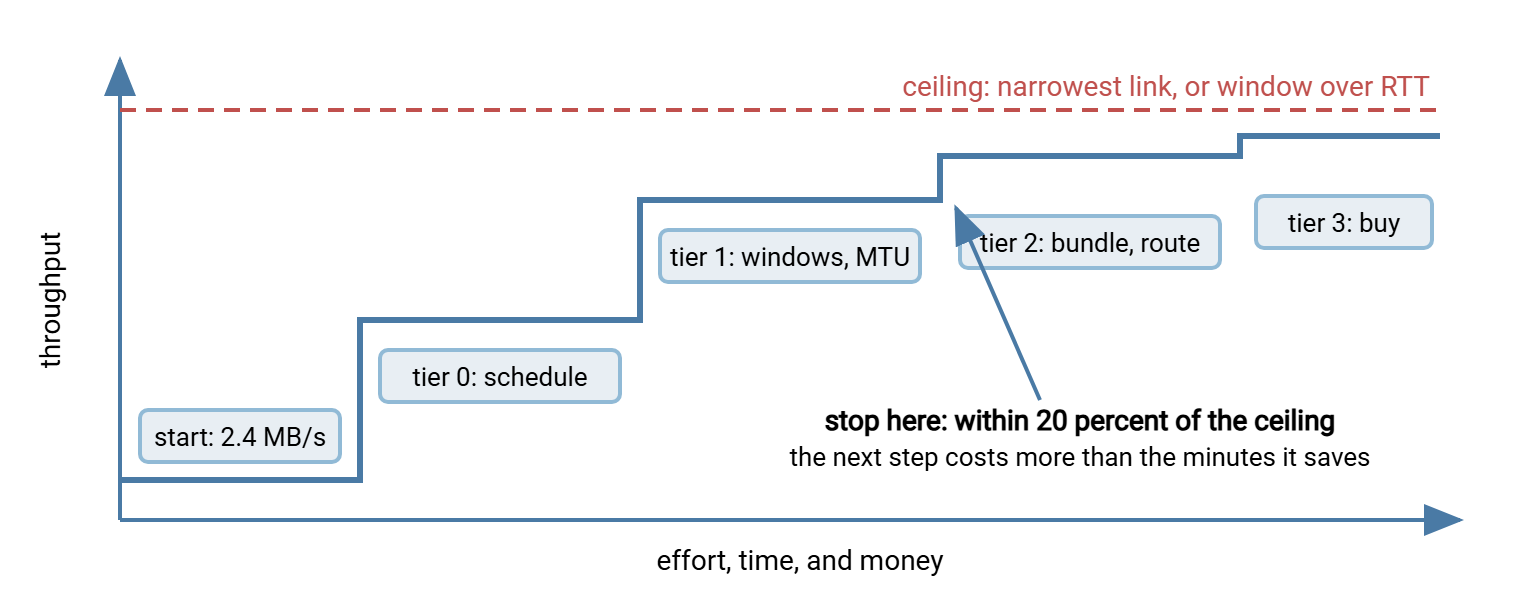
Three tests tell you when to stop. The first is the ceiling test. The transfer may run within about twenty percent of the narrowest link's capacity. Or a latency-bound stream you cannot widen further may run within twenty percent of window ÷ RTT. Once either applies, there is nothing left to gain without a project-sized change to the ceiling itself. A 100 Mbit/s link delivering 10 MB/s is done.
The second is the window test: does the job now finish comfortably inside the time it has? A nightly job that must complete before a six o'clock import, and now finishes at two, does not become more valuable by finishing at one. If nobody waits for it and nothing depends on the margin, further speed is a hobby. If the margin is thin, or the job has a habit of overrunning on busy nights, it is worth the next tier. And scheduled job hygiene covers the overrun problem from the scheduling side.
The third is the arithmetic test: minutes saved per run, times runs per month, against the hours the next remedy costs and the risk it carries. Cutting a two-minute transfer to one minute saves thirty minutes a month. A day of partner coordination to achieve it pays back in a year and a half, if nothing breaks. Cutting a three-hour transfer to ninety minutes so it stops colliding with the morning backup is worth almost any tier. Do the sum out loud in the ticket; it settles most arguments about whether to go further.
Gotcha: remedies that squeeze more out of a shared link — parallel streams, more sessions, acceleration — take that capacity from someone. A transfer that reached the ceiling by filling the pipe during business hours has not been optimized; it has been prioritized. The people it displaced will find out. Pair any remedy that increases the transfer's share of a link with a look at who else uses it.
The Series' Three Cases, Fixed
The cases that ran through this series illustrate how little of the list a real fix usually needs.
- The 2 GB upload at 2.4 MB/s was latency-bound behind a VPN detour with a broken MTU. Remedies: an MSS clamp (tier 1) and a split-tunnel route (tier 2), both by the network team. Result: 12 MB/s, three minutes, at the link's ceiling. Stop.
- The 6 GB nightly pull at 4.6 MB/s was the far end's disk, contended by a backup. Remedy: reschedule the export ahead of the backup (tier 0). Result: two minutes. Stop.
- The 12,000-file publish at fifty-eight minutes was overhead. Remedies: keep the session open (tier 0), then bundle into one archive with the partner's agreement (tier 2). Result: under four minutes. The parallel-session option was never needed.
Notice that none of the three touched a tier-3 remedy, and none bought bandwidth. That is typical. The expensive remedies exist for the cases that need them, and the whole point of diagnosing first is to know whether you are one.
Closing the Series
Diagnosis is the work; the remedy is usually obvious once the diagnosis is right. Measure the rate and the ceilings in triage. Separate distance from width with the three latency tests. Climb the isolation ladder through disk, CPU, and network. Count the per-file fee in the overhead article, and bracket the middle of the path with comparative tests. Then come to this list, find the diagnosis in the first table, and start at the cheapest remedy that matches. Change one thing, measure, and stop when the ceiling, the window, or the arithmetic says you are done.
Frequently Asked Questions
What is the single fix most likely to help a slow transfer?
Should I turn on compression for every transfer?
How many parallel sessions is too many?
When is an accelerated transfer product actually justified?
The transfer is already at the link's ceiling. Is there anything left to do?
From the Sysax team: we build secure file transfer software for Windows. Sysax Multi Server is an FTP, FTPS, SFTP, and HTTPS server. Sysax FTP Automation handles scheduled, scripted transfers. Free trials are on the download page.