
The Cutover Night: A Technical Runbook
It is 02:34. The freeze went in at 02:00, the final delta finished six minutes ago, and the person with the DNS console is looking at you. Tonight the address moves, and real partners connect to the new server with real files. The night goes well when every step is written down with a time, an owner, a check, and a known rollback point. It goes badly when someone is improvising a firewall rule at three in the morning. Meanwhile, a partner's job retries every fifteen minutes against a server that is not listening yet.
A cutover runbook is that written-down sequence: what happens, when, by whom, and how you know it worked. This article is the runbook. It covers the address switch, the firewall and passive-range work before it, and service order. It includes a timestamped checklist to copy, per-protocol smoke tests, what partners will see, and the rollback switch you rehearsed. It is part of our Platform Migration Mechanics series; it is the night the earlier articles converge on.
The runbook is deliberately narrow. The cutover shape was chosen in cutover strategies. Who was told what and when is in partner coordination. Rollback triggers and who may pull them are in validation and rollback.
What the Runbook Assumes
A runbook is only as good as its preconditions. Before the night begins, every one of these is true and someone has initialed it.
- Accounts, keys, and folders are staged and verified on the new server. The isolation transcripts from migrating accounts are filed. So are the fingerprint and chain checks from migrating keys and certificates. The tree diff from migrating folders is filed too.
- The routine delta has run within the last hour, so the final delta under the freeze will be small.
- The night has been rehearsed end to end against the new server: freeze, delta, switch, smoke tests, rollback. During that rehearsal, the flip pointed at a test name rather than the production alias. That rehearsal happens on a trial installation of the target. On Windows the free trial of Sysax Multi Server serves, as do most platforms' evaluation periods.
- The DNS record's time-to-live was lowered days ago, as the next section explains.
- The rollback decision-maker is named and awake, the triggers are written, and the go/no-go deadline is on the runbook.
The Address Switch: Alias Flip or IP Takeover
Partners reach the server by a name that resolves to an address. Tonight either the name starts resolving to the new server's address, or the new server takes over the old address. Both work; they differ in the minutes after.
Alias flip and what a TTL really is
When a partner's computer looks up transfer.example.com, the answer comes with a time-to-live (TTL). This is a number of seconds for which that answer may be reused without asking again. Every resolver between the partner and your DNS may cache the answer that long. If the TTL is a day, a partner who looked up the name this afternoon may keep connecting to the old address until tomorrow afternoon. That is true whatever you change tonight. That is why the TTL is lowered before the night, at least one old-TTL period in advance. Answers cached under the old, long TTL must expire before the short one protects you. I have never regretted lowering a TTL a week early. I have regretted the alternative.
ALIAS FLIP TIMELINE -- transfer.example.com

A week before    TTL on the record is a day. Lower it to five minutes (300).
                 Old cached answers expire within a day; from then on every
                 resolver re-asks at least every five minutes.
Cutover night    Change the record: transfer.example.com -> 203.0.113.20 (new)
                 Within about five minutes, name-following clients arrive at
                 the new server. Confirm from a machine outside your network:
                   nslookup transfer.example.com
Soak period      Leave the TTL at five minutes. Rollback is another five-minute flip.
After decommission  Raise the TTL back to something normal (an hour or more).
Two caveats the timeline cannot fix. Some client runtimes cache a name lookup for the life of the process. So a partner's long-running job may keep the old address until it restarts. That is why a few stragglers appear on the old server the next morning. And partners who connect by IP address, or whose firewall rules name your old address, get nothing from the flip. The inventory knows them.
IP takeover
The alternative is to move the address itself. The old server releases its IP and the new server claims it. Or a translation or load-balancing layer in front of both repoints the public address at the new backend. Nothing changes from the partners' side: no DNS, no cached answers, no firewall edits. The cost is that the switch is sharp and exclusive (one server or the other, never both). The network in between also has to learn the change. Neighbors on a local segment update their tables within seconds when the new server announces itself. But a stale entry on a switch or router can hold for a few minutes. In cloud environments the move is a floating-address reassignment, usually instant. Takeover rarely works across data centers and makes a parallel run impossible, so it pairs naturally with a big-bang cutover.
Whichever you use, the new server must already be listening on every port partners use before the address arrives. Those ports are 22, 21 and the passive range, 990, 443. A switch to a server that is not yet listening turns every partner retry into a refused connection, and partners' alerting starts before yours.
Firewall and Passive Port Range Changes
The firewall work happens before the switch, and most of it is on your side.
- Inbound rules to the new host must cover every listener. That means 22 for SFTP, 21 for FTP and explicit FTPS, 990 for implicit FTPS, 443 for HTTPS, plus the whole passive port range. Apply the same again on the host's own firewall.
- The passive range on the new server is identical to the old one. Partners' firewalls sometimes pin the exact range you published years ago. A different range on the new server fails on the data connection after a successful login, the classic mode-failure signature. The mechanics are in configuring passive port ranges.
- The external address setting on the new server is the IP it announces in passive replies. It is the public address partners connect to, not the private one behind the translation layer. Get this wrong and FTPS clients connect to a private address and hang. Because FTPS encrypts the control channel, the firewall cannot rewrite the announced address for you. FTPS, firewalls, and NAT explains why.
- Translation rules mapping the public address to the new server's private one, for every port above, if the new server sits behind one.
- Outbound rules from the new server cover every push job it runs. On the partner side, their allow rules are updated to include the new source address if it changed. That is the "add, don't replace" instruction from their notice, tested tonight.
- IP allow and block lists carried from the old server to the new. A platform with per-account or global IP allow and block lists, as Sysax Multi Server provides, takes the old list as data. The risk is forgetting it, so it is a line on the runbook.
Service start order
The order is simple and rarely followed under pressure: new up, old frozen, then switch. The new service is started and confirmed listening on every port before the address moves. The old server is frozen, accepting no writes, but left running so it can still be verified and can still take the address back.
# New server: every listener up before the switch (Windows)
netstat -ano | findstr /r ":22 .*LISTENING :21 .*LISTENING :990 .*LISTENING :443 .*LISTENING"
sc query "transfer-service-name"        # STATE: RUNNING; start type should be AUTO

# New server: same check on a Unix-like host
ss -ltn | grep -E ':(22|21|990|443) '

# Old server: frozen, not stopped -- accounts read-only / disabled, service still answering
# (an admin login succeeds; a partner login is refused or read-only)
Set the new service to start automatically. A reboot at three in the morning, from a patch or a hypervisor hiccup, should bring the listeners back without a human. Any product that runs as an operating-system service gets this for free.
Kestrel Payroll's cutover went to plan until 03:10, when the new host applied a pending update and rebooted itself. Someone who was not on the bridge had configured it that way. It came back in ninety seconds; the transfer service did not, its start type still "manual" from the build. Nobody noticed for forty minutes, because the smoke tests had passed and everyone was watching the old log for stragglers. The partners' alerting noticed first, which is the wrong order. The runbook now has a line that reads "start type: AUTO".
The Timestamped Runbook
Every line has a time, an owner, an action, and the check that proves it worked. Rollback points mark the last moment each rollback path is the easy one. Copy it and replace hostnames, ports, and owners. The same shape serves the DR runbook, for the same reason. At three in the morning nobody should have to think about what comes next.
CUTOVER NIGHT -- transfer.example.com: sftp-old (203.0.113.10) -> sftp-new (203.0.113.20)
Go/no-go deadline: 04:30.  Rollback owner: [name].  Comms channel: [bridge].

Time   Owner  Action                                              Check / evidence
-----  -----  --------------------------------------------------  ------------------------------------
01:15  ops    Confirm preconditions initialed; TTL is 300         dig transfer.example.com: TTL <= 300
01:20  ops    Routine delta pass                                  delta log: small, no errors
01:30  ops    New server: service running, all listeners up       netstat / ss output filed
01:35  ops    New server: IP allow/block lists match old          side-by-side export filed
01:45  ops    Internal smoke test on sftp-new BY IP (not alias)   all four protocol tests pass
02:00  ops    FREEZE sftp-old: partner accounts read-only         partner test login refused writes
02:00  ops    Drain: watch sessions until zero partner sessions   session list screenshot, 02:11
02:12  ops    List temp-name / unstable files on sftp-old         partials.txt filed (for partners)
02:13  ops    Snapshot inbox listings                             inbox-final.txt
02:15  ops    FINAL DELTA old -> new, temp names excluded         copy log; counts match snapshot
02:28  ops    Hash files changed since 01:20, both sides          diff empty
                                                  ---- ROLLBACK POINT A: nothing partner-visible yet
02:35  net    ADDRESS SWITCH: alias -> 203.0.113.20 (or takeover) public resolver shows new address
02:40  ops    External smoke tests via the alias (all protocols)  transcripts filed
02:45  ops    Watch new server log: first real partner logins     bayside 02:47 login+put; harlow 02:50
02:50  ops    Watch OLD server log: anyone still arriving?        list of stragglers -> morning calls
                                                  ---- ROLLBACK POINT B: reverse delta still trivial
03:15  ops    Second pass of smoke tests; downstream job check    notify_erp fired on new upload
03:30  lead   Go/no-go review against rollback triggers           decision recorded, time-stamped
04:30  lead   Deadline: GO declared or rollback executed          runbook signed
morn.  ops    Late-arrival sweep on sftp-old; partner calls       see post-migration article
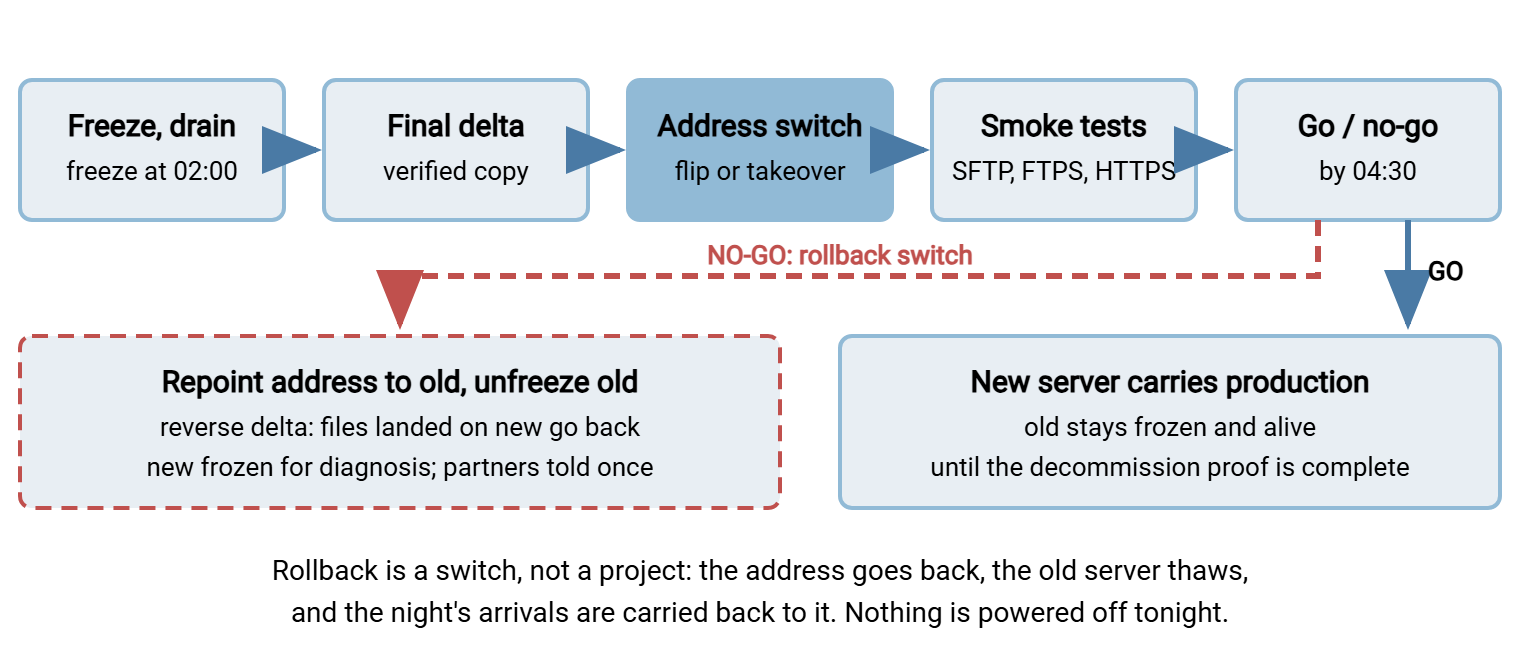
The diagram shows the same night as a sequence, with the rollback branch that returns the address to the old server.
Per-Protocol Smoke Tests
A smoke test is the smallest transfer that proves a listener works end to end. Connect, verify identity, authenticate, put a file, get it back, clean up. Run the set twice, by IP before the switch and by alias after it, from a machine outside your network. The point is to see what partners see. Use a dedicated test account with its own folder, so transcripts never touch partner data.
### SFTP: identity, login, put/get/rename/delete, jail
ssh-keyscan -t ed25519,rsa transfer.example.com 2>/dev/null | ssh-keygen -lf -
#   fingerprints must equal the recorded ones (carried) or the announced ones (reissued)
printf 'put smoke.txt inbox/smoke.txt\nls -l inbox\nget inbox/smoke.txt smoke.back\nrename inbox/smoke.txt inbox/smoke.done\nrm inbox/smoke.done\n-ls /partners\nquit\n' > smoke.batch
# cutover_known_hosts holds only the recorded (or announced) key, so a wrong key fails hard
sftp -oStrictHostKeyChecking=yes -oUserKnownHostsFile=cutover_known_hosts -b smoke.batch smoketest@transfer.example.com
cmp smoke.txt smoke.back && echo "SFTP OK"      # bytes identical; the -ls line must have failed

### FTPS explicit: connect on 21, upgrade with AUTH TLS, verify chain, passive data connection
#   --disable-epsv forces the old-style PASV reply, which is the one that carries the announced address
curl -v --ssl-reqd --disable-epsv --cacert ca-bundle.pem -u smoketest:'PASSWORD' -T smoke.txt ftp://transfer.example.com/inbox/
#   look for: "SSL certificate verify ok", then "227 Entering Passive Mode (203,0,113,20,195,87)"
#   the address in the 227 reply must be the PUBLIC one, and 195*256+87 = 50007 must be inside the range
curl -s --ssl-reqd --cacert ca-bundle.pem -u smoketest:'PASSWORD' ftp://transfer.example.com/inbox/smoke.txt -o smoke.back

### FTPS implicit: TLS from the first byte on 990 (curl treats ftps:// as implicit)
curl -v --cacert ca-bundle.pem -u smoketest:'PASSWORD' ftps://transfer.example.com:990/inbox/ -T smoke.txt

### HTTPS portal: certificate, then a login and an upload through the interface
curl -vI https://transfer.example.com/ 2>&1 | grep -E "subject:|issuer:|expire date|HTTP/"
#   then, in a browser from outside: log in as smoketest, upload smoke.txt, download it, delete it

### Plain FTP (only if it is still deliberately offered -- otherwise confirm port 21 refuses plaintext logins)
curl -v -u smoketest:'PASSWORD' ftp://transfer.example.com/   # expect a refusal if FTP was retired
Reading the results: the SFTP fingerprint check is the first line of the night's evidence. A mismatch there is a wrong server or a wrong key. Nothing after it matters until the mismatch is explained. The passive reply in the FTPS test is the second line of evidence. It exposes the two settings most often wrong on a freshly built server: the announced address and the port range (diagnosing FTP mode failures). Never use a client's "ignore certificate" flag to make a test pass. A test that only passes with verification off has found the problem partners will hit. If FTP was retired in this migration, the last line proves the new server does not quietly offer it (see proving FTP is gone). Keep the set after tonight: scheduled against the alias, it becomes the synthetic login in service liveness monitoring.
What Partners See Tonight
Every partner-visible effect of the night is predictable; the helpdesk should have the list in advance.
- During the freeze: a refused login or a "permission denied" on upload for roughly half an hour. Unattended jobs retry and succeed on the new server; a human sees an error and tries again.
- After the switch, if the host key was reissued: a host-key warning on first SFTP connection, to be checked against the announced fingerprint. Strict unattended jobs fail until the partner updates their stored key — expected, and on the partner's list.
- After the switch, if the certificate changed: partners see nothing for a certificate from a public authority with a complete chain. Partners who pinned the old certificate deliberately see a trust error.
- If the address changed: partners whose firewalls name the old address cannot connect until they add the new one — the "add, don't replace" instruction from their notice.
- Stragglers on the old server: partners still arriving at the old address through cached lookups or hardcoded IPs, visible in its log. Each becomes a morning call.
The Rollback Switch
Rollback is decided by the triggers written in advance and the person named to decide. Tonight's job is making the mechanism so fast that the decision is never distorted by how hard it would be. Four moves, in order.
ROLLBACK -- executed only on a written trigger, by the named owner

1. Address back      alias -> 203.0.113.10 (five-minute TTL: partners return within minutes)
                     or: new server releases the IP, old server reclaims it
2. Unfreeze old      partner accounts on sftp-old back to read/write -- the one-step reversal
                     of the freeze; confirm with a partner test login and put
3. Reverse delta     every file that landed on sftp-new since the switch (02:35) is copied
                     back to sftp-old, temp names excluded, verified by count and hash --
                     partners uploaded them in good faith and must not lose them
4. Freeze new        sftp-new set read-only for diagnosis; nothing on it is deleted
Then: one message to partners: "the migration was reversed; connect as before; if you
      accepted a new host key tonight, the previous key is in effect again" (reissue path only)
Three points make the switch real. The old server was frozen, not powered off, which is why step two is a setting change rather than a boot and a prayer. The reverse delta is not optional. Files that arrived on the new server during the window are real deliveries. A rollback that abandons them is data loss. And the decision has a deadline, the 04:30 line. A rollback at 07:00, into the morning's partner traffic, is far more disruptive than one at 03:30. Afterward the new server stays frozen for diagnosis, and partners hear one calm message. The runbook is re-run on another night with the finding fixed. (Change rollout and rollback has the general discipline.)
Remember: nothing is powered off tonight. The old server stays frozen and alive through the soak period that follows. The decision to switch it off belongs to the decommission evidence, not to the relief of a quiet cutover night. That proof is built in post-migration cleanup, hardening, and decommission proof.
Wrapping Up: A Clock, a Check, and a Way Back
The cutover night is a sequence with a rollback branch. The address moves by an alias flip whose TTL was shortened days ago, or by an IP takeover that is sharp and partner-invisible. Firewall rules, passive range, external address, and IP lists are in place before the switch. The new service is listening. The old server is frozen but never stopped. The final delta runs under the freeze. The smoke tests run from outside for every protocol. A named person decides go or no-go against written triggers by a deadline. Rollback is four moves, and the third, carrying the night's arrivals back, is the one people forget. At 02:34 the person with the DNS console should be looking at a runbook, not at you.
The morning after has its own list: the late-arrival sweep, every shortcut the night required, the hardening baseline, and log continuity. That is post-migration cleanup, hardening, and decommission proof, the last article in the series.
Frequently Asked Questions
How far in advance do I lower the DNS TTL?
Why run the smoke tests from outside the network?
Should the old server be shut down once the new one is working?
What is the most common thing that goes wrong on the night?
From the Sysax team: we build secure file transfer software for Windows. Sysax Multi Server is an FTP, FTPS, SFTP, and HTTPS server. Sysax FTP Automation handles scheduled, scripted transfers. Free trials are on the download page.