
How Resume Works in FTP, SFTP, HTTP, and rsync
"Resume" sounds like a single feature, but it is really four different mechanisms that solve the same problem. FTP has a restart marker and an append command. SFTP has offsets built into every read and write. HTTP has byte ranges. rsync has partial files and an append mode bolted onto its delta algorithm. Each makes different assumptions, advertises support differently, and fails differently. A tool that says "resume supported" is quietly relying on one of the four.
This article opens each one up and shows what actually goes over the wire. It shows the commands, a transcript with the reply codes, and what each line means. It also shows the conditions under which the mechanism breaks. The goal is that when a resumed transfer misbehaves, you can read the log and know which assumption was violated.
It is the mechanics chapter of our Resume & Restart series. If you have not yet read why transfers get interrupted, the terms defined there — offset, partial file, checkpoint — are used freely here.
The One Idea Underneath All Four
Every resume mechanism does the same four steps. First, the receiving side finds out how much it already has: the size of the partial file on its disk. Second, it tells the sending side "start at that offset" — the byte position, counted from zero, where the missing data begins. Third, the sender transmits bytes from that offset to the end. Fourth, the receiver appends them to the partial and, if it is careful, verifies the result. The diagram shows the generic form; the rest of the article is how each protocol spells it.
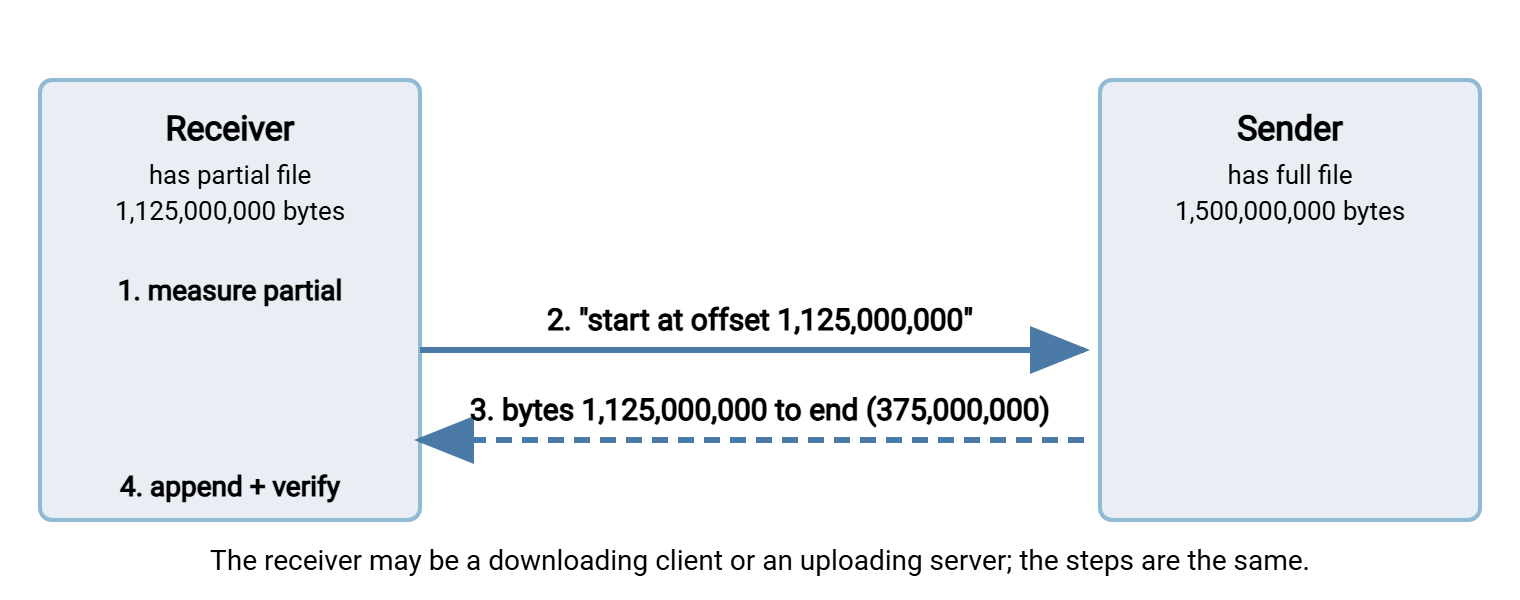
Two things follow. The "receiver" is whichever side is writing the file. So for an upload the server is the receiver and the client must ask it how big the partial is. And every step assumes the partial is an exact prefix of the sender's file: the same first 1,125,000,000 bytes, unchanged. None of the four protocols checks that assumption for you.
FTP: REST, APPE, and SIZE
FTP resumes with three commands sent over the control connection (the long-lived command channel; the file itself travels on a separate data connection).
REST— the restart marker.REST 1125000000tells the server "the next transfer command starts at byte 1,125,000,000". The server acknowledges with a350reply: "fine, now send the transfer command".RESTmust be followed immediately byRETR(download) orSTOR(upload). Put anything in between and most servers forget the marker.SIZE— asks the server how big a remote file is. The reply is213followed by the size in bytes. A client resuming an upload uses it to learn the server's partial size.APPE— append. LikeSTOR, but the server adds the incoming bytes to the end of an existing file instead of overwriting it. No marker needed: the server's current file size is the offset.
Before any of them, the session must be in binary mode with TYPE I. A server advertises restart support in its FEAT reply with the line REST STREAM. If that line is missing, do not expect REST to work.
A resumed download
Lines with > are sent by the client, lines with < are the server's replies. The client has a 1,125,000,000-byte partial on disk.
> TYPE I
< 200 Type set to I.
> PASV
< 227 Entering Passive Mode (10,20,30,40,196,12)
> REST 1125000000
< 350 Restarting at 1125000000. Send STORE or RETRIEVE to initiate transfer.
> RETR nightly-backup.tar.gz
< 150 Opening BINARY mode data connection for nightly-backup.tar.gz (375000000 bytes).
< 226 Transfer complete.
The 350 is the reply that matters; it confirms the marker was accepted. The 150 says the data connection is open. Some servers quote the remaining byte count, some the full size. So do not rely on that number. 226 means the server finished sending. The client, meanwhile, opened its partial for appending and wrote the incoming 375,000,000 bytes to the end. If the connection drops again you will see 426 Connection closed; transfer aborted instead of 226. In that case, the sequence repeats with a bigger offset.
A resumed upload
Uploads are the mirror image, with one extra step: the client has to ask how much the server already has.
> TYPE I
< 200 Type set to I.
> SIZE nightly-backup.tar.gz
< 213 1125000000
> PASV
< 227 Entering Passive Mode (10,20,30,40,196,40)
> APPE nightly-backup.tar.gz
< 150 Ok to send data.
< 226 Transfer complete.
After the 213, the client seeks its local copy to offset 1,125,000,000. The server cannot do that for it. The client then sends the rest with APPE. The alternative is REST 1125000000 followed by STOR. The two are not quite equivalent. APPE always adds to the end of whatever exists. By contrast, REST plus STOR overwrites from the offset. It may or may not truncate anything beyond it, depending on the server. Some servers also require a distinct "append" permission for APPE.
Where FTP resume breaks
- ASCII mode. In
TYPE Athe server converts line endings as it sends. So a byte count on the wire is not a byte count on disk. An offset is meaningless, and the standard leaves ASCII resume undefined. Some servers rejectRESTwith504or answerSIZEwith a different number; others cheerfully produce a corrupt file. - No
REST STREAMinFEAT, or a502 Command not implementedreply toREST. The server, or that account, does not support restart. - Offset past the end. Restarting beyond the file's size gets either an error or an empty transfer that reports success. Compare sizes first.
- Read-only accounts that can
STORinto a drop folder but cannotAPPEor overwrite: the resumed upload fails with550where the first attempt succeeded.
All of this applies unchanged to FTPS, the same protocol inside a TLS wrapper. Our guide to FTP commands and reply codes is the reference for anything in a transcript you do not recognize. If you run the server side, a product like Sysax Multi Server records the command sequence in its activity log. It serves FTP, FTPS, SFTP, and HTTPS. That log lets you see whether a client actually sent REST or started over.
SFTP: Offsets Are Built In
SFTP is not FTP over SSH. It is a different protocol that behaves like a remote filesystem. That is why resume in SFTP needs no special command. Every read and write request carries an explicit offset: "read 32 kilobytes starting at byte 1,125,000,000", "write these bytes at byte 1,125,000,000". A normal transfer is a series of those requests with offsets climbing from zero. A resumed transfer is the same series starting from a bigger number.
So an SFTP client resumes a download by asking for the file's attributes (which include its size). It then opens the file and reads from its local partial's size onward. It resumes an upload by asking for the remote partial's size. It then opens the remote file for writing without truncating it and writes from that offset. The server does not know or care that a resume is happening.
With the OpenSSH sftp client
The sftp client that ships with OpenSSH has reget and reput for exactly this. It also has an -a flag on get and put that means the same thing. lls lists local files, ls remote ones.
$ sftp batch@sftp.example.com
Connected to sftp.example.com.
sftp> ls -l nightly-backup.tar.gz
-rw-r--r--    1 batch    batch    1500000000 Mar 14 01:02 nightly-backup.tar.gz
sftp> lls -l nightly-backup.tar.gz
-rw-r--r-- 1 alex alex 1125000000 Mar 14 02:18 nightly-backup.tar.gz
sftp> reget nightly-backup.tar.gz
Fetching /home/batch/nightly-backup.tar.gz to nightly-backup.tar.gz
nightly-backup.tar.gz                  100% 1431MB  38.2MB/s   00:09
sftp> reput reports.zip
Uploading reports.zip to /home/batch/reports.zip
The two listings show the situation before the resume: 1,500,000,000 bytes remote, 1,125,000,000 local. reget compares them, refuses if the local file is larger than the remote one, and otherwise reads from offset 1,125,000,000 to the end. The progress meter shows the whole file's size but only the missing part crosses the wire. The client's documentation carries a warning worth repeating. If the partial's contents differ from the file being transferred, the result is likely to be corrupt. Nothing in SFTP checks the prefix.
In code
Because offsets are native, resuming in a library is a few lines. This example uses Paramiko, the widely used open-source SSH library for Python:
remote_size = sftp.stat(remote_path).st_size
local_size = os.path.getsize(local_path) if os.path.exists(local_path) else 0
if local_size < remote_size:
    with sftp.open(remote_path, "rb") as rf, open(local_path, "ab") as lf:
        rf.seek(local_size)               # start reading at the offset
        while True:
            chunk = rf.read(1048576)      # one mebibyte per request
            if not chunk:
                break
            lf.write(chunk)
stat fetches the remote size. seek sets the offset for the next read. The local file is opened in append mode so new bytes land after the old ones. Python SFTP basics covers the connection setup this snippet leaves out.
Where SFTP resume breaks
- Servers backed by something that is not a filesystem. An SFTP front end over object storage may accept writes only from offset zero, in order. It may reject or mishandle a write at offset 1,125,000,000. Test before relying on it.
- Permissions. Resuming an upload needs write access to an existing file, which some servers grant separately from the right to create new ones.
- scp, the older SSH copy tool, has no resume at all; see scp's limitations.
HTTP: Range Requests and 206
HTTP resumes downloads with a request header. Range: bytes=1125000000- asks for everything from that offset to the end. A server that honors it replies with status 206 Partial Content instead of 200 OK. That response includes a Content-Range header stating which bytes it is sending and the total size. A server advertises the capability with Accept-Ranges: bytes; a HEAD request shows it before you commit to a resume.
With curl
curl's -C - (the dash means "work out the offset from the local file") and -O (save under the remote name) do a resumed download; -v shows the exchange.
$ curl -v -C - -O https://files.example.com/nightly-backup.tar.gz
** Resuming transfer from byte position 1125000000
> GET /nightly-backup.tar.gz HTTP/1.1
> Host: files.example.com
> Range: bytes=1125000000-
< HTTP/1.1 206 Partial Content
< Content-Range: bytes 1125000000-1499999999/1500000000
< Content-Length: 375000000
< Accept-Ranges: bytes
< ETag: "a1b2c3-59682f00"
Read the Content-Range line carefully: "bytes 1125000000-1499999999/1500000000" means the response carries bytes 1,125,000,000 through 1,499,999,999 inclusive, of a file 1,500,000,000 bytes long. Content-Length is the size of this response only. The ETag is a version identifier for the file. If it differs from the first attempt's, the file changed and the partial is no longer a valid prefix. A careful client sends If-Range with the stored ETag: "give me the range if the file is still this version, otherwise send the whole thing".
Two responses signal trouble. If the server ignores the header and answers 200 OK with the full body, curl stops. It does not glue a whole file onto the end of a partial. It reports exit code 33 and "HTTP server doesn't seem to support byte ranges. Cannot resume." If the offset is at or beyond the end of the file, the server answers 416 Range Not Satisfiable. Typically, this happens because the download had actually finished. The response includes Content-Range: bytes */1500000000. Compare sizes rather than assume failure.
With wget
$ wget -c https://files.example.com/nightly-backup.tar.gz
HTTP request sent, awaiting response... 206 Partial Content
Length: 1500000000 (1.4G), 375000000 (358M) remaining [application/gzip]
Saving to: 'nightly-backup.tar.gz'
nightly-backup.tar.gz  100%[+++++++++++++++=====>]   1.40G  38.1MB/s    in 9.4s
-c means continue. wget reports the total and remaining amounts, and its progress bar draws the part it already had as plus signs. If the local file is already complete it says so and does nothing. If the server will not honor ranges it refuses to overwrite the partial. The curl and wget cookbook has more variations.
Uploads, and where HTTP resume breaks
Plain HTTP has no standard way to resume an upload. The Range mechanism is for responses, and servers do not generally accept a PUT with a partial body. Resumable uploads over HTTP are built at the application layer. The file is split into chunks, each uploaded with its own request. The server tracks which chunks it has. This design topic is covered in large files over HTTP. On the download side, ranges fail on dynamically generated responses and on some proxies and caches that strip the header. They also fail on responses compressed on the fly, where offsets in the compressed stream do not correspond to the file.
rsync: Partial Files and Append Modes
rsync has no resume command, because it normally does not need one. Its delta algorithm compares the file on each side in blocks and sends only the blocks the receiver lacks. So if a partial exists at the destination, a second run naturally sends only what is missing. The catch is that by default rsync writes to a temporary file and deletes it when interrupted, leaving nothing to compare against. Resume in rsync is therefore about keeping the partial.
rsync -av --partial --partial-dir=.rsync-partial --timeout=60 \
      /data/nightly-backup.tar.gz batch@backup.example.com:/incoming/
--partialkeeps the partially transferred file instead of deleting it. On its own, it leaves the partial under the final name, where a consumer could mistake it for a finished file.--partial-dir=.rsync-partialstores the partial in a subdirectory of the destination instead. The next run finds it there, uses it as the basis for the delta, and only then writes the completed file into place. This is the combination to use.-Pis shorthand for--partial --progress.--timeout=60makes rsync give up after sixty seconds of silence rather than hanging on a dead connection, so your retry loop gets control back.
Run the same command again after an interruption and rsync picks up the partial. It checksums the blocks it already has. The sender skips them, and the missing tail comes across. It is not an offset resume. There is checksum traffic for the existing part. But for a big file on a slow link the effect is the same. The block comparison itself is explained in how the rsync algorithm works.
For the special case of a file that only ever grows, rsync offers true append:
rsync -av --append-verify /data/nightly-backup.tar.gz batch@backup.example.com:/incoming/
--append skips the delta comparison and simply sends the bytes beyond the receiver's current size, assuming the existing bytes match the start of the source. --append-verify does the same but includes the existing bytes in the whole-file checksum at the end, and resends the file if the check fails. Both write directly into the destination file (they imply --inplace). Both skip a file whose receiver copy is already as large as or larger than the source rather than correcting it. Use --append-verify if you use append at all; plain --append on a changed source produces a silently wrong file. rsync flags that matter covers the neighbors of these options.
lftp: Resume as a Habit
lftp, the long-standing open-source command-line client, wraps all of the above behind one -c ("continue") flag and reconnects automatically on failure:
lftp -u batch sftp://sftp.example.com -e "get -c nightly-backup.tar.gz; bye"
lftp -e "pget -c -n 4 https://files.example.com/nightly-backup.tar.gz; bye"
lftp -u batch ftp.example.com -e "mirror -c /outgoing /srv/incoming; bye"
get -c resumes a single file, choosing REST, an SFTP offset, or a Range header to match the protocol. pget -c -n 4 downloads in four parallel segments and resumes them individually, tracking progress in a small status file beside the download. mirror -c continues a directory mirror, resuming each partial file rather than starting the tree over. See lftp power usage for its retry settings.
Side by Side
| Protocol | How the offset is sent | Download / upload | How support is advertised | Typical failure |
|---|---|---|---|---|
| FTP / FTPS | REST before RETR/STOR; or APPE |
Both | REST STREAM in FEAT |
ASCII mode; account lacks append rights |
| SFTP | Offset in every read/write request | Both | Inherent; nothing to advertise | Non-filesystem backends; changed source |
| HTTP / HTTPS | Range: bytes=N- header |
Download only (uploads need an application scheme) | Accept-Ranges: bytes; 206 reply |
Server answers 200; dynamic or compressed responses |
| rsync | Implicit: partial used as delta basis, or --append |
Both | Always; needs --partial to keep partials |
Partial deleted by default; append on a changed source |
Remember: every one of these mechanisms trusts that the partial is an unchanged prefix of the source, and none of them checks. The protocol gets the bytes from the offset to the end. Whether the result is the right file is your job. That is the subject of verifying a resumed transfer.
The Version to Keep in Your Head
FTP resumes with REST (answered by 350) before RETR or STOR, or with APPE for uploads, and only in binary mode. SFTP resumes by reading or writing from an offset, because every SFTP request carries one. reget and reput are the commands. HTTP resumes downloads with a Range header answered by 206 Partial Content, and cannot resume uploads without application help. rsync resumes by keeping the partial (--partial-dir) and letting its delta algorithm skip what is already there, or with --append-verify for files that only grow.
The next article, resume support compared, turns this into a checklist for the tools and servers you actually run. For the ways the "unchanged prefix" assumption gets violated, and how to catch them cheaply, go on to verifying a resumed transfer. When files get large enough that chunking and manifests matter, the large-file strategies series takes over.
Frequently Asked Questions
What does the FTP reply "350 Restarting at" mean?
Why does my HTTP download restart from zero even though I used curl -C -?
Does SFTP need the server to support resume?
Is rsync --partial the same as resume?
Can I resume an FTP transfer that was done in ASCII mode?
From the Sysax team: we build secure file transfer software for Windows. Sysax Multi Server is an FTP, FTPS, SFTP, and HTTPS server. Sysax FTP Automation handles scheduled, scripted transfers. Free trials are on the download page.