
Resume Support Compared: Clients, Servers, and Settings
"Does it support resume?" is the wrong question, because it has no single answer. A client can support resume and still restart from zero because a checkbox was left on its default. A server can support resume in general and refuse it for one account, one folder, or one transfer mode. A proxy in the middle can strip the one header that makes it work. Resume is a property of a whole path: client settings, client capability, network path, server capability, server permissions. It takes only one of those to fail for the whole thing to fall back to starting over.
This article is the checklist for that path. It compares support by class of tool rather than by brand: graphical clients, command-line clients, libraries, and servers for each protocol. Then it covers the settings on each that silently disable resume. It also covers the one danger that no setting fixes: resuming onto a file whose source has changed. It ends with a test you can run in ten minutes to find out whether your resume actually resumes.
It is part of our Resume & Restart series and assumes you have seen how resume works in each protocol: the FTP REST marker, SFTP offsets, HTTP ranges, and rsync's partial files.
Resume Is a Property of the Pair
Think of a resumed transfer as passing through five gates. The client must be configured to try. The client must know how, for this protocol. The network path must carry the request unchanged. The server must implement the mechanism. And the server must permit it for this account and folder. The diagram shows the five gates in order; every "resume didn't work" report you will ever get is one of them closed.
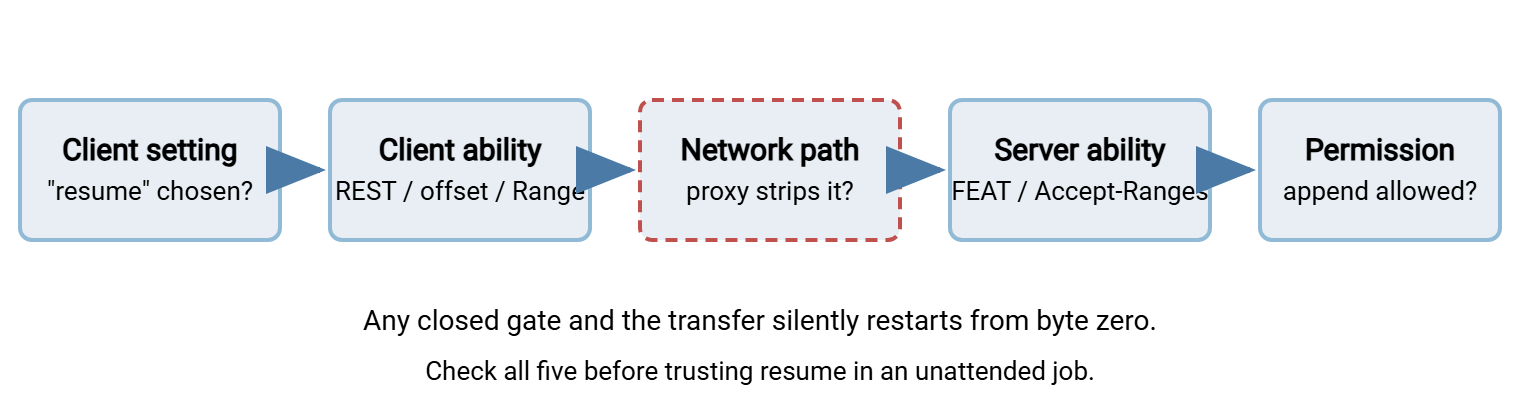
The word to notice is "silently". Most tools do not report "resume was refused, restarting". They restart. The only evidence is a byte counter that starts at zero or a transfer that takes as long as the first attempt did. That is why the test at the end of this article matters more than any documentation claim.
Clients, by Class
Graphical clients
Almost every graphical FTP, SFTP, and multi-protocol client can resume. The question is what it does by default when the destination file already exists. Look for a setting with a name like "default action when file exists" or "overwrite policy". The usual choices are overwrite, resume, rename, skip, and ask. "Ask" is fine for a person at a keyboard and useless for a queue left running overnight. Some clients add a conditional option, "resume if the existing file is smaller, otherwise overwrite", which is the sensible default for downloads.
Three other settings decide whether that choice actually works. The transfer type must be binary, not "auto". Auto mode picks ASCII for files with text-like extensions, and ASCII transfers cannot be resumed. A temporary filename during transfer option, if enabled, gives the partial on disk a different name. That differs from the name the client will look for when resuming. Some clients handle their own temp names correctly and some do not. And a delete incomplete files or "remove failed downloads" option, which exists in several clients, guarantees there is never a partial to resume from. Graphical clients that resume well tend to gray out the Resume choice when the server's FEAT reply lacks REST STREAM. That is a useful hint that the server, not the client, is the closed gate.
Command-line clients
Command-line tools are explicit: resume happens when you pass the flag, and only then. The table lists the ones you will meet.
| Tool | Resume download | Resume upload | Notes |
|---|---|---|---|
| curl | -C - (HTTP, FTP, SFTP) |
-C - with -T on FTP/SFTP |
Refuses to glue a full 200 response onto a partial; exit code 33 |
| wget | -c (HTTP, FTP) |
Not an upload tool | Refuses to overwrite a partial when the server ignores ranges |
| OpenSSH sftp | reget, get -a |
reput, put -a |
Refuses if the partial is larger than the source; does not check its contents |
| scp | None | None | Use sftp or rsync for anything large |
| lftp | get -c, pget -c, mirror -c |
put -c, mirror -R -c |
Reconnects and resumes automatically; picks the right mechanism per protocol |
| rsync | --partial --partial-dir |
Same flags; --append-verify for grow-only files |
Without --partial the interrupted file is deleted |
| Built-in Windows ftp.exe | None | None | No REST support and active mode only; a login tester, not a transfer tool |
Two of these deserve a second look. curl resumes uploads too: curl -C - -T localfile ftp://host/path/ asks the server for the remote size and sends from there. And rsync is the odd one out. Its resume is not a flag on the retry but a flag on the first attempt. If the interrupted run was not started with --partial, there is nothing left to resume. Our command-line one-liners cookbook has the full invocations.
Libraries and scripting
Libraries give you the mechanism and none of the policy. Python's standard ftplib, for example, accepts a rest= argument on retrbinary and storbinary that sends the REST command. Deciding the offset, opening the local file in append mode, and checking the reply are your job. Paramiko's SFTP file objects have seek, as shown in the per-protocol article. HTTP client libraries generally let you set any request header. So resume means adding Range yourself. Then check that the status was 206 and not 200 before writing a single byte. Frameworks with a built-in FTP class usually expose a content-offset property that does the same thing as REST.
The recurring mistake in scripted resume is trusting the library to notice a refused resume. It will not. If the server ignores REST and sends the file from the start, retrbinary happily hands you the whole file. Your append-mode write then produces a file one and three-quarter times the right size. Every scripted resume needs three checks around it: the remote size before, the status or reply code during, and the final size and hash after. Our articles on Python FTP and FTPS and reliability inside applications show where those checks go.
Servers, by Protocol
FTP and FTPS servers
Ask the server directly. Connect with any client that shows the raw conversation and send FEAT:
> FEAT
< 211-Features:
<  MDTM
<  REST STREAM
<  SIZE
<  UTF8
< 211 End
REST STREAM means the server implements restart markers for ordinary stream-mode transfers. SIZE means clients can learn a remote file's size, which upload resume depends on. If either is missing, resume is off for everyone. If both are present, the remaining gate is per-account permission. Many FTP servers separate the right to create files from the right to overwrite or append to existing ones. A "drop box" account that can only create will fail a resumed upload with 550 Permission denied even though the first attempt worked. Some servers also let an administrator disable REST for uploads specifically. The reason is that this command lets a client overwrite the middle of a file. Check the server's own settings if REST before STOR is refused while REST before RETR works. A server product such as Sysax Multi Server serves FTP, FTPS, SFTP, and HTTPS. It exposes its per-account permissions and activity logging in its configuration interface. Whatever server you run, confirm behavior with the test at the end rather than the feature list.
SFTP servers
Because offsets are part of every SFTP request, an SFTP server that follows the protocol resumes without knowing it. The gates that remain are permission and storage. Resuming an upload means opening an existing remote file for writing without truncating it. A server configured for append-only or create-only upload folders may refuse. Servers that present something other than a local filesystem — object storage, a database, an archive — may accept writes only sequentially from offset zero. There is no FEAT to query in SFTP, so the test is the only way to know. The standard OpenSSH server and its internal SFTP subsystem resume fine; see SFTP server configuration for the folder and permission settings that interact with it.
HTTP and HTTPS servers
A HEAD request answers the question:
$ curl -sI https://files.example.com/nightly-backup.tar.gz
HTTP/1.1 200 OK
Content-Length: 1500000000
Accept-Ranges: bytes
ETag: "a1b2c3-59682f00"
Accept-Ranges: bytes says ranges are honored. Accept-Ranges: none, or no such header at all, means assume not. Static files served straight off disk by any mainstream web server support ranges. Downloads generated by application code usually do not unless the developer added it. And anything that passes through a caching proxy or content-delivery layer may lose the header on the way. The ETag, and the Last-Modified header that usually accompanies it, are what a careful client stores to detect a changed source later.
rsync
rsync needs nothing special on the far side, whether it runs over SSH or as a daemon, with one exception. The destination directory must be writable enough to hold the --partial-dir folder. A daemon module marked read-only is fine as a source and useless as a destination, resume or not. See rsync over SSH versus the daemon for the difference.
The Settings That Silently Turn Resume Off
Collected in one place, because in practice this table is the troubleshooting guide.
| Setting | Where it lives | Why it kills resume | Set it to |
|---|---|---|---|
| Transfer type = auto or ASCII | Client | ASCII offsets are undefined; a resumed text file is corrupt | Binary, always |
| Existing-file action = overwrite or ask | Client | Overwrite discards the partial; ask hangs an unattended queue | Resume, or resume-if-smaller |
| Delete incomplete files | Client | There is never a partial to resume from | Off for resumable flows |
| Temporary name during transfer | Client or server | The partial has a different name from the one the resume looks for | Keep it, but make sure the tool resumes onto its own temp name |
No REST STREAM or SIZE in FEAT |
FTP server | Server cannot restart, or client cannot learn the remote size | Enable, or accept restart-only for that server |
| Create-only or append-denied account | FTP or SFTP server | Resumed upload is refused with 550 or a permission error |
Grant append/overwrite in the upload folder |
| Write-only upload folder (no listing) | Server | Client cannot SIZE or stat the partial, so cannot find the offset |
Allow size queries, or use a protocol that does not need them |
| Proxy or gateway in the path | Network | Strips Range, or does not forward REST to the real server |
Test through the proxy, not around it |
The temporary-name row is worth a second look because it collides with a practice we recommend elsewhere. Writing to file.part and renaming to file on completion — the atomic rename pattern — is how you stop consumers from picking up half a file. It is fully compatible with resume as long as the resuming side looks for file.part, resumes onto it, and renames at the end. rsync's --partial-dir does exactly this. A client that writes file.part but looks for file when resuming will never find its partial.
The Modified-Source Danger
Every setting above can be fixed. This one cannot; it can only be detected. Suppose a nightly export is regenerated at 01:00 under the same name, orders-export.csv.gz. Last night's download was interrupted at 75%. Tonight the resume-capable client finds a partial, asks the server for the size, and requests bytes from the partial's end onward. The server obliges. The result is the first three-quarters of yesterday's export joined to the last quarter of today's. Its size matches today's file exactly. It decompresses with an error at best, or at worst produces a plausible-looking table of orders that never existed together.
No protocol checks for this. The defenses are all on your side:
- Compare timestamps before resuming. If the source's modification time is newer than the partial's creation time, the partial is garbage. FTP's
MDTMcommand, SFTP's file attributes, and HTTP'sLast-Modifiedheader all give you the source time. - Use the protocol's version check where one exists. In HTTP, send
If-Rangewith the storedETag. A changed file gets you a full200instead of a206, and the tool starts over cleanly. In rsync, prefer--append-verifyto--append, or better, plain--partial-dir, which checksums the blocks it reuses. - Never reuse names for regenerated files. A datestamp in the name —
orders-export-20250314.csv.gz— means tonight's file can never be confused with last night's partial. Our datestamp formats article shows conventions that sort correctly. - Age out partials. A partial older than your flow's cycle — a day for a nightly job — should be deleted, not resumed.
- Hash at the end regardless. The final defense, covered in verifying a resumed transfer.
Remember: resume trusts that the partial is the beginning of the file being sent. A file regenerated under the same name breaks that trust without any error, and the resulting file will have the right size. Unique names per run and a timestamp check before resuming are cheaper than any verification you can do afterwards.
Test Resume Before You Trust It
Ten minutes with a test file settles what the documentation cannot. The procedure below uses curl against an FTP server, but the shape is identical for any tool and protocol. Substitute your own client's commands.
# 1. Make a 200 MB test file of random bytes and record its hash
dd if=/dev/urandom of=resume-test.bin bs=1M count=200
sha256sum resume-test.bin > resume-test.sha256

# 2. Start the upload and kill it after 20 seconds (curl prompts for the password)
timeout 20 curl -sS -T resume-test.bin ftp://ftp.example.com/incoming/ --user batch
echo "exit code: $?"          # 124 means timeout killed it, as intended

# 3. Confirm a partial exists on the server and note its size
curl -sS --user batch ftp://ftp.example.com/incoming/ | grep resume-test.bin

# 4. Resume, watching the byte counter start from the partial size, not zero
curl -v -C - -T resume-test.bin ftp://ftp.example.com/incoming/ --user batch 2>&1 | grep -E "REST|350|APPE|STOR|226"

# 5. Download it back and compare hashes
curl -sS --user batch -o roundtrip.bin ftp://ftp.example.com/incoming/resume-test.bin
sha256sum roundtrip.bin
cat resume-test.sha256
Step 1 uses random data so that a wrong join cannot accidentally produce the right hash. Step 2's timeout kills the transfer part-way; the exit code 124 confirms it was the timeout and not an error. Step 3 proves a partial exists. If it does not, a setting on one side deleted it, and you have found your first closed gate. Step 4 is the heart of the test. In the verbose output you want to see REST followed by a 350 reply, or an APPE, and then 226. If you see STOR with no REST before it, the tool restarted. Step 5 is the proof: the two hashes must match exactly.
Then run the test three more times. Run it once as a download and once through any proxy or gateway that production traffic uses. Run it once after modifying the source between the kill and the resume. That shows what your tool does when the source changes. The last run should fail loudly; if it succeeds, you now know your flow needs the timestamp or name-based defenses above. Write the results down next to the flow's documentation, because "we tested resume on this path" is exactly the kind of fact that gets lost.
For unattended jobs, the same test tells you whether your automation's retry actually resumes. A scheduled job in a tool like Sysax FTP Automation can be pointed at a test folder and interrupted the same way. Its log can be read afterwards. The retry and error-handling settings decide that a retry happens. The test decides what the retry does with the partial.
The Version to Keep in Your Head
Resume works only when five gates are open. The client is set to try, and the client knows how. The path carries the request, the server implements it, and the account is allowed. Graphical clients hide the first gate in an "existing file" default. Command-line tools open it with a flag. Libraries open the second gate and leave every check to you. Servers advertise support in FEAT (FTP) or Accept-Ranges (HTTP). They need no advertisement for SFTP. They close the last gate with per-account append and overwrite permissions. None of them protects you from a source that changed between attempts, so name regenerated files uniquely and compare timestamps. And test, with random data and a deliberate kill, before any unattended job depends on it.
Next in the series: checkpointing in automated jobs moves from single files to whole runs, and a resume strategy for your flows turns these checks into a per-flow decision. If a large share of your flows involve very big files, the large-file strategies series covers the design side.
Frequently Asked Questions
How do I tell whether an FTP server supports resume?
My client says it resumed, but the transfer took as long as the first attempt. Why?
Why does resuming an upload fail with 550 when the first upload worked?
Is it safe to resume a file whose name is reused every night?
Does SFTP need a server-side setting to enable resume?
From the Sysax team: we build secure file transfer software for Windows. Sysax Multi Server is an FTP, FTPS, SFTP, and HTTPS server. Sysax FTP Automation handles scheduled, scripted transfers. Free trials are on the download page.