
Verifying a Resumed Transfer
A transfer that ran from byte zero to the end in one go has one way to be wrong: something corrupted bytes in flight. Modern protocols make that rare. A resumed transfer has a second way. It has a seam: the point where the bytes from the first attempt stop and the bytes from the second begin. Everything that can go wrong with resume goes wrong at that seam. Bytes get duplicated across it. Bytes go missing from it. A hole of zeros opens up under it. Yesterday's file gets stitched to today's. And in most of those cases the final size comes out exactly right.
That last point is the reason this article exists. The check most jobs do after a transfer, if they do one at all, is to compare sizes. For a resumed file that is not enough, and this article shows precisely why. It covers the four ways a resumed file goes wrong, what each looks like on disk, and which check catches it. It also shows how to verify cheaply enough that you will actually do it every time. It ends with the verification step that belongs in every resume-capable job.
It is part of our Resume & Restart series and stays narrowly on the hazards of resume. For hashing itself — what a hash is, which algorithm to use, how to publish checksums — see our hashing explained article. For verification in general, see verifying transfers end to end.
What "Verified" Means
A transfer is verified when you have evidence that the file on the receiving side is byte-for-byte identical to the file on the sending side. Not "the same size", not "the transfer command returned success", not "the archive opened". Identical. Only two checks give that evidence. One is comparing the two files directly, which is rarely practical across a network. The other is comparing a hash of each: a short fixed-length fingerprint computed from every byte. Any change to the content changes the fingerprint. Two matching hashes from a decent algorithm mean two identical files.
Everything else is a cheaper proxy. Size is a proxy. A successful format check is a proxy. Proxies are worth doing because they are fast and catch most problems. But the article's argument is that resume creates failure modes that specifically slip past the size proxy. So a resumed file needs at least one check that looks at content.
Four Ways a Resumed File Goes Wrong
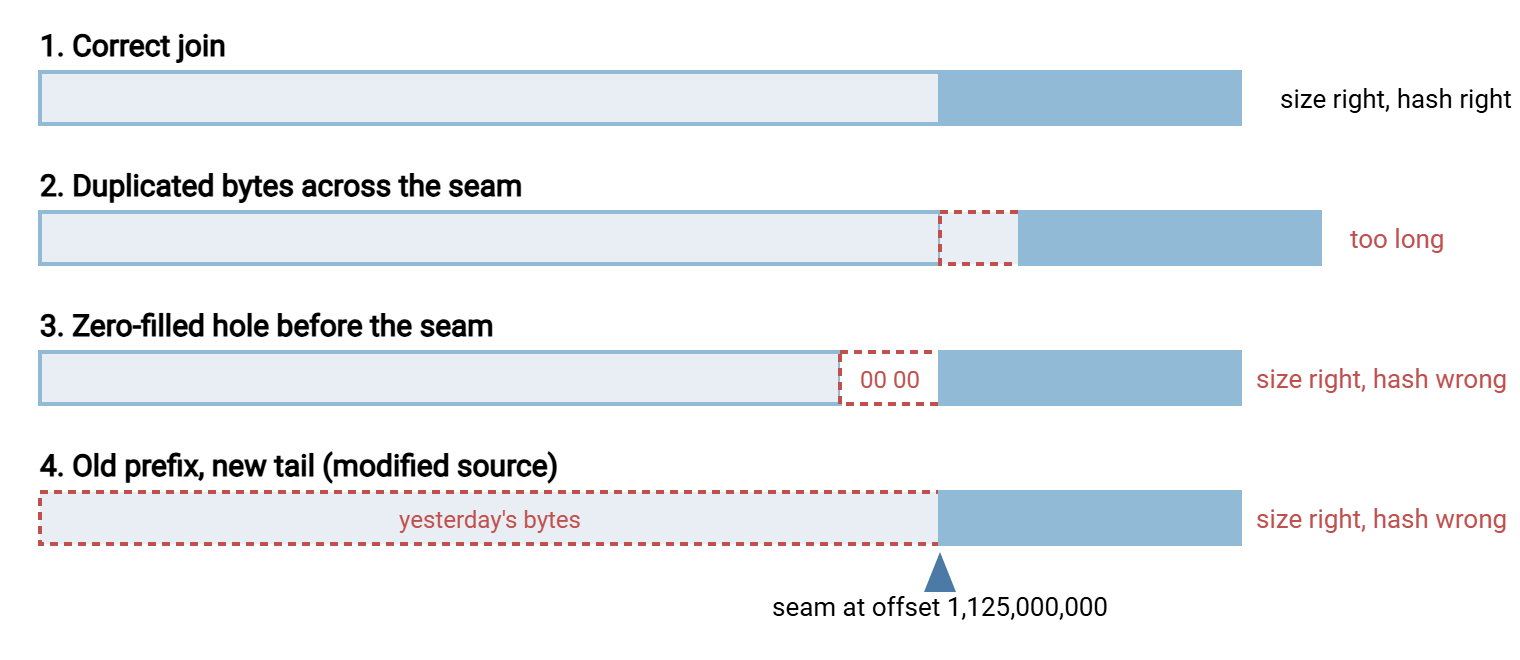
The diagram shows the same 1,500,000,000-byte file after four different resumes. The seam in each is at offset 1,125,000,000, where the first attempt stopped. Only the first bar is correct, and three of the four have the right size.
The appended-garbage case
The second bar is what you get when the resumed upload starts from an offset earlier than the server's real end of file. It happens more often than it should. The client trusted its own byte counter from the failed attempt instead of asking the server with SIZE. The server had actually flushed more than the client counted. Or the previous attempt had in fact completed. In that case, the final 226 reply was lost when the connection died. The retry used APPE, which appends unconditionally. That glued a second copy of the tail, or of the whole file, onto a file that was already finished. Either way, some bytes exist twice and the file is longer than the source.
This is the one hazard the size check does catch: the resumed file is bigger than it should be. It is also the easiest to prevent. Before any resumed upload, ask the server for the remote size. If it equals the source size, do not resume; verify. If it is larger, do not resume; delete and restart. Only if it is smaller is there anything to resume, and then use that server-reported number as the offset, never your own count.
Truncation and holes
The third bar comes from writing at an offset beyond the end of the file. Suppose the receiving side's partial was truncated or replaced between attempts. A cleanup job trimmed it, a disk-full condition cut it short, or a colleague deleted and recreated it. So it is now 1,075,000,000 bytes, but the resuming client still believes the offset is 1,125,000,000. An SFTP write at that offset does not fail. The filesystem extends the file to reach the offset and fills the gap with zero bytes. The result is exactly the right size, with 50,000,000 bytes of zeros where real data should be.
FTP has a cousin of this problem in the other direction. When a client sends REST followed by STOR, some servers truncate the file at the offset before writing and some overwrite in place without truncating. On the second kind, if the source shrank between attempts, stale bytes from the old tail survive beyond the new end. The file is longer than the source, and a size check catches it. The zero-filled hole is the dangerous one because nothing about its size looks wrong.
The prevention is the same rule as before, applied on the download side as well. Measure the partial immediately before resuming, and use that measurement as the offset. Never carry an offset over from a previous run's log or a checkpoint file; the partial on disk is the only truth.
ASCII-mode resume is undefined
FTP's ASCII transfer type rewrites line endings during the transfer. A text file with Windows-style two-byte line endings loses a byte per line on the way to a system that uses one-byte endings. It gains one going the other way. The number of bytes that crossed the wire is therefore not the number of bytes on either disk. When a client sends REST 1125000000 in ASCII mode, the server has no reliable way to know which byte of the source that corresponds to. The standard does not define the result; servers either refuse, guess, or restart silently. Files resumed this way typically have a few bytes duplicated or missing around the seam and a size that may or may not match. Their content is typically subtly wrong in a way no format check will notice. The fix is not a check but a rule: binary mode for everything, and if a partial was produced in ASCII mode, delete it. The ASCII and binary corruption series explains the mode itself.
Size matches, hash does not
The fourth bar is the modified-source case from resume support compared. The source was regenerated under the same name between attempts. So the partial holds the first three-quarters of the old version and the resume fetched the last quarter of the new one. When the new version is the same length as the old — common for fixed-format exports, and a coin-flip for anything else — the size check passes. Together with the zero-filled hole, this is the case that makes the whole argument: a resumed file can be exactly the right size and wrong.
Detecting Stale Partials Before You Resume
Half of verification is refusing to resume in the first place. A partial file is safe to resume only if it is a true prefix of the current source. You can rule out most of the ways that fails before sending a byte. A partial is stale, and should be deleted rather than resumed, when any of the following is true:
- Its modification time is older than the source's modification time. The source changed after the partial was written.
- It is larger than the source. It cannot be a prefix of anything smaller than itself.
- It is equal in size to the source. Then it is either complete, in which case verify it, or wrong, in which case restart; it is never a resume candidate.
- It is older than one cycle of the flow. A partial from three nights ago has no business in tonight's run.
- It was written in ASCII mode, or you cannot tell what mode it was written in.
- It is zero bytes. Resuming from offset 0 is a restart; just restart, and clean up the empty file.
These checks cost a directory listing. For FTP that is SIZE and MDTM on the remote side and a stat locally. For SFTP it is a single attributes request. For HTTP it is a HEAD request returning Content-Length and Last-Modified. Our size-stability and settle checks article covers the closely related question of whether a file is still being written.
The Cheap Checks, in Order
Verification has a cost ladder. Each rung is more expensive than the last and catches more. Climb until you reach the rung your flow needs, and always climb at least one rung past "size".
# Rung 1: sizes (free). Local size versus what the server reports.
stat -c %s nightly-backup.tar.gz
curl -sI https://files.example.com/nightly-backup.tar.gz | grep -i content-length

# Rung 2: seam spot check (a few kilobytes). Fetch 4096 bytes straddling the
# seam from the server and compare them with the same bytes in the local file.
curl -s -r 1124997952-1125002047 https://files.example.com/nightly-backup.tar.gz > seam.remote
dd if=nightly-backup.tar.gz of=seam.local bs=1 skip=1124997952 count=4096 2>/dev/null
cmp seam.remote seam.local && echo "seam OK"

# Rung 3: format check (reads the whole file locally, no network).
gzip -t nightly-backup.tar.gz && echo "gzip structure OK"

# Rung 4: whole-file hash on both sides (definitive).
sha256sum nightly-backup.tar.gz
ssh batch@files.example.com sha256sum /srv/files/nightly-backup.tar.gz
Rung 1 compares the local size with the server's. It is free, and it catches the appended-garbage and stale-tail cases, both of which produce a file that is too long. Rung 2 is the trick most people do not know. HTTP ranges and SFTP offsets let you read any part of a remote file. So you can fetch a small window of bytes around the seam — here 2,048 bytes either side of offset 1,125,000,000. You can then compare them with the local copy. The dd command extracts the same window locally (bs=1 and skip in bytes), and cmp compares. A wrong offset, a zero-filled hole, an ASCII-mode join, or a changed source almost always shows up as a mismatch right there. The price is four kilobytes over the network. Rung 3 checks that the file's own format is intact: gzip -t tests a gzip stream, tar -tf lists an archive, unzip -t tests a zip file. It reads the whole file but needs no network, and corruption at a seam nearly always breaks a compressed format. Rung 4 is the real thing: a hash of every byte on each side, compared. It costs a full read on both machines, and it is the only rung that proves the file is right rather than not-obviously-wrong.
Getting a hash from the far side depends on what you have. With SSH access, run the hashing tool remotely as shown. Some FTP servers offer a hash command. Look in the FEAT reply for entries such as HASH, XCRC, or XSHA256. These are extensions rather than part of the base protocol, so check before depending on them. Many HTTP file publishers ship a sidecar checksum file alongside each download. And the most robust arrangement of all is for the sender to compute the hash before sending and deliver it separately. Our checksum files and manifests article describes this. If you run the receiving server, its activity log tells you the offset each client asked for. Sysax Multi Server, for example, records session activity for its FTP, FTPS, SFTP, and HTTPS services. That log is where you would look to see whether a client sent REST or APPE against a file that later failed verification.
Remember: a size check catches the resumed files that are too long. It cannot catch a zero-filled hole, an ASCII-mode join, or a changed source, because all three produce the right size. A resumed file needs at least the seam spot check, and anything that matters needs the hash.
The Verification Step for Every Resume-Capable Job
Here is the sequence that belongs between "the resume finished" and "the file is done" in any automated job. It is written as steps rather than code because the tools vary; the order does not.
- Before resuming, measure and decide. Get the source size and modification time and the partial's size and modification time. Apply the stale-partial rules above. If the partial is not a strict, fresh prefix candidate, delete it and restart from scratch.
- Resume from the measured offset. Use the size you just measured on the receiving side, not a number remembered from anywhere else.
- Check the size. The resumed file's size must equal the source's size exactly. Larger or smaller is a failure.
- Check the content. At minimum, the seam spot check or a format check. For anything a downstream system will act on, the whole-file hash against a hash from the sending side.
- Only now, finish. Rename the file from its temporary name into place, write the checkpoint entry, and run any post-steps. The atomic rename is what stops anyone consuming the file before step 4 passed.
- On any failure, do not resume again. Delete the partial, log which check failed and the sizes involved, and schedule a restart from scratch. A file that failed verification after a resume is not a resume candidate; it is evidence that something about this flow's resume is unsafe.
- Count the failures. One verification failure is bad luck. Two on the same flow is a pattern — a proxy, a changed-source problem, a server that mishandles offsets — and needs a person. Our detecting corruption sources article is the guide for that investigation.
Step 6 deserves emphasis because it is the one people get wrong under pressure. A resumed file that fails its hash is often "fixed" by resuming it again, which appends more bytes to a file that is already wrong. The corruption is behind the offset; no amount of appending reaches it. Start over.
How Much Verification Does a Flow Need?
The cost ladder is there so you can be proportionate. A few examples of where flows tend to land:
| Flow | Minimum after a resume | Why |
|---|---|---|
| Compressed archive or backup image | Size + format check; hash if a sender-side hash exists | Compressed formats break loudly at a bad seam, so the format check is nearly as good as a hash and needs no remote access |
| Financial or regulatory data file | Size + whole-file hash, always | A plausible-looking wrong file is worse than a missing one; the hash is also your evidence later |
| Media or scientific raw data | Size + seam spot check; hash on a sample | Uncompressed data does not fail format checks; the seam check is the cheap content check that works |
| Software or firmware distribution | Published hash, verified before use | The publisher's checksum is the whole point; verify it at the consumer, not only at the transfer |
| Plain text logs or exports in ASCII mode | Do not resume | Switch to binary mode and unique names per run, then treat as any other file |
Files large enough that hashing them takes longer than you can afford are a design problem rather than a verification problem. Chunked transfers with a hash per chunk let you verify each piece as it lands and resume at chunk boundaries. That belongs to the large-file strategies series.
The Version to Keep in Your Head
A resumed file has a seam, and the seam is where resume goes wrong. Bytes are duplicated when the offset was too early. A zero-filled hole appears when it was too late. Results are undefined in ASCII mode. Yesterday's prefix is stitched to today's tail when the source changed. Three of those four produce a file of exactly the right size. So measure the partial immediately before resuming and use that as the offset. Refuse to resume anything stale. Check the size, then check the content — a four-kilobyte seam comparison at minimum, a whole-file hash for anything that matters. Only then rename into place and record the file as done. If verification fails, restart from scratch; never resume a resume.
From here, checkpointing in automated jobs shows where this step sits in a multi-file run. The article on a resume strategy for your flows helps you decide, per flow, which rung of the ladder is enough. For the mechanics that create the seam in the first place, go back to how resume works per protocol.
Frequently Asked Questions
The resumed file is exactly the right size. Isn't that enough?
How can a resumed file end up with a block of zero bytes in it?
What is a seam spot check?
My resumed file failed its hash. Should I resume it again?
How do I get a hash of the file on the server side?
From the Sysax team: we build secure file transfer software for Windows. Sysax Multi Server is an FTP, FTPS, SFTP, and HTTPS server. Sysax FTP Automation handles scheduled, scripted transfers. Free trials are on the download page.