
SFTP Server: What It Is, What It Does, and How to Choose One for Windows
"We need an SFTP server" is rarely said by the person who will run it. It is said by a project manager reading from a customer's requirements document, and it lands on an administrator's desk as a single line in a ticket. The ticket does not say how many accounts, which files, how long they are kept, or who is called when a partner cannot log in. It says SFTP server, and it has a due date.
This article fills in the rest of the ticket. It explains what an SFTP server is and what it does during a session. It names the five parts every SFTP server has, whatever product it is. It compares an SFTP server with an FTP server, sets out the ways to get one on Windows, and lists what to look for. It ends with the mistakes that turn a simple server into a recurring problem, and a requirements sheet to fill in before choosing anything.
It is part of our SFTP In Depth series. If the word SFTP itself is new, start with what is SFTP? and come back.
What an SFTP Server Is
An SFTP server is software that runs continuously on a computer, accepts encrypted SSH connections on TCP port 22, and lets logged-in users list, upload, and download files in the folders assigned to them. It is the receiving end of every SFTP transfer.
People use the phrase for two things: the software and the machine it runs on. Both are fair. When a partner asks for "your SFTP server," they want a host name. When your manager asks which SFTP server you use, they want a product name.
One detail surprises newcomers. There is no separate SFTP service underneath. SFTP is a part of SSH, so an SFTP server is an SSH server with its file transfer part switched on. On many systems the same program also offers a remote command line. A well-configured SFTP server offers the file part and withholds the rest.
The Five Parts of Every SFTP Server
Products differ in their menus and their prices. Underneath, they all have the same five parts. Knowing them makes any product's settings screen readable.
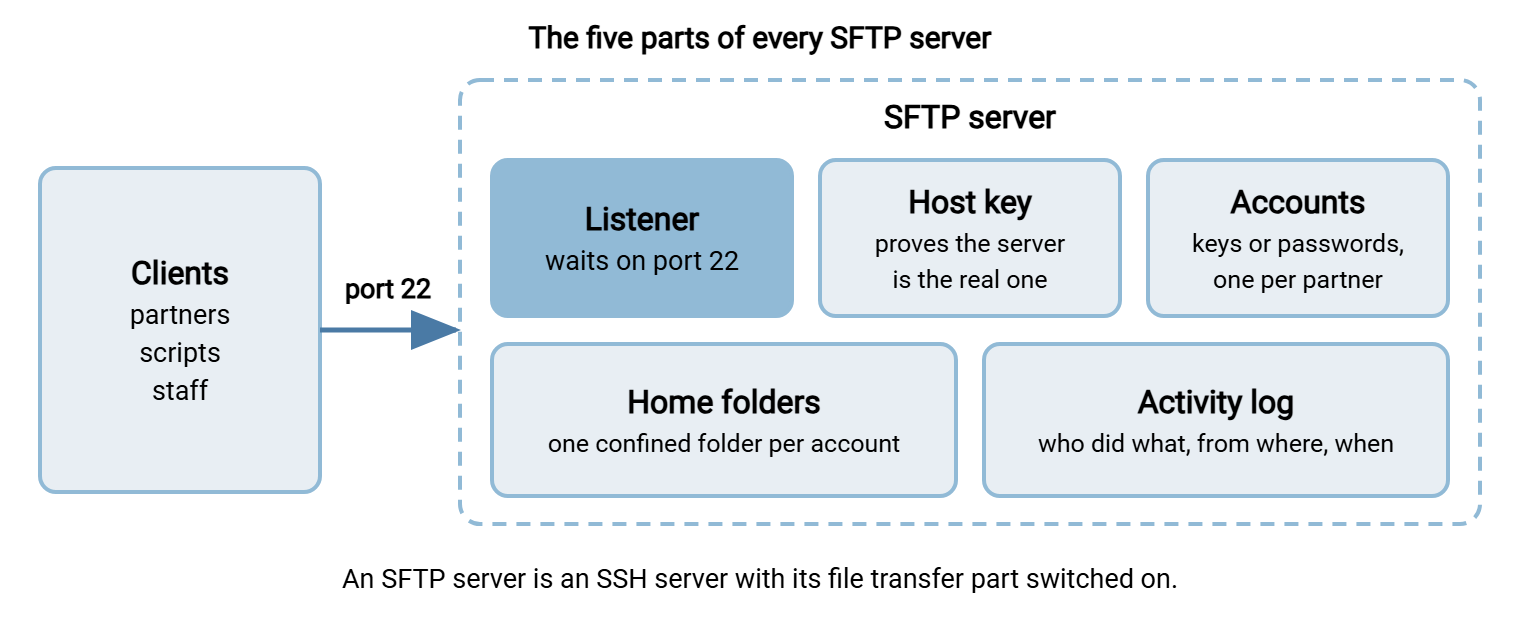
- The listener. The part that waits on a port, normally 22, for incoming connections. Its settings are the port, the addresses it accepts connections from, and the encryption algorithms it will agree to.
- The host key. A key pair the server generates for itself. Clients use it to confirm they have reached the real server and not an impostor. It should be created once, backed up, and never changed casually.
- Accounts. One per person or partner system. Each has a way to log in: a password, an SSH public key, or both. Accounts may be the server's own, or may come from Windows or Active Directory.
- Home folders and permissions. Each account is tied to a folder it sees as the top of the server, and to rights within it: read, write, delete. A well-run server confines each account to its own folder.
- The activity log. A record of every login, failed login, upload, download, and deletion, with the account, the source address, and the time.
When a server misbehaves, the fault is in one of these five. When you compare two products, you are comparing how well each one handles these five. The configuration side is covered in SFTP server configuration.
What an SFTP Server Does in One Session
It helps to follow one transfer from the server's side. A partner's nightly script connects to upload an order file.
- The listener accepts a TCP connection on port 22 from the partner's address.
- The two sides agree on encryption, and the server presents its host key. The partner's client checks it against the fingerprint it remembers.
- The client offers a user name and a key. The server finds the account, checks the key against the public key stored for it, and accepts the login.
- The client asks to start the file transfer subsystem. From here on, it sends file requests and the server answers them.
- The server shows the account its home folder. The client changes to
/inboundand uploadsorders.csv. The server checks that the account may write there and stores the file. - The client disconnects. The server has written a log line for the login, one for the upload, and one for the logout.
Everything in that list happened inside one encrypted connection. Nothing in it required a certificate, a second port, or a human. That is the appeal. A good night for an SFTP server is one in which nobody thinks about it at all.
SFTP Server vs FTP Server
An SFTP server and an FTP server do the same job, holding files for accounts that connect, with different protocols. The differences decide how much work each one is to run.
| Question | FTP or FTPS server | SFTP server |
|---|---|---|
| Encryption | None in FTP. TLS in FTPS, if the server requires it | Always |
| Ports to open | 21 or 990, plus a passive port range | 22 |
| Behind NAT | Needs the public address configured on the server | Nothing special |
| How the server proves its identity | A certificate that must be renewed (FTPS) | A host key that does not expire |
| Login without a password | Rare | Standard, with SSH keys |
| Who still needs it | Older partners, devices, and systems built around FTP | Most new partner connections |
Many organizations end up needing both, because partners arrive with different requirements. That is the argument for a server product that offers SFTP and FTPS from one set of accounts. The protocols are compared in SFTP vs FTPS.
Ways to Run an SFTP Server on Windows
An SFTP Windows server can be had three ways. They differ in who does the work.
The OpenSSH server included with Windows. It costs nothing and is real SFTP. Accounts are Windows accounts, configuration is a text file, and a new account gets a command shell until you restrict it. It suits a small number of technical users. The details are in OpenSSH Server for Windows as an SFTP server.
A dedicated SFTP server product. This is SFTP server software built for file transfer: an administration console, accounts that are not Windows logins, a confined folder per account by default, and an activity log made for answering questions. Many also offer FTPS and a browser upload page from the same accounts. Sysax Multi Server, which we make, is one. Six products are compared in best SFTP server for Windows.
A hosted or cloud based SFTP server. A provider runs the server and you manage accounts in a web console. There is no machine to patch, and the files live on the provider's systems. The trade is examined in hosted SFTP vs self-hosted.
Whichever you choose, the installation steps for the first two are in how to set up an SFTP server on Windows.
What to Look For
These are the questions that separate a server you can run for years from one you will replace. Each maps to one of the five parts.
| Part | Question to ask | Why it matters |
|---|---|---|
| Listener | Can I restrict by source address and disable old algorithms? | Security reviews ask for both |
| Host key | Can I export and re-import the host key? | A rebuild must not change it |
| Accounts | Own accounts, directory accounts, or both? Keys? A second factor? | Partners should not hold Windows logins; staff should not need a second password |
| Accounts | What happens after repeated failed logins? | Every public server is probed constantly |
| Folders | Is each account confined to its folder by default? | One partner must never see another's files |
| Folders | Can the server act when a file arrives? | Saves building a separate job to notice new files |
| Log | Is every file action logged with account and address, and searchable? | "Did the file arrive?" is the question you will be asked most |
| All of it | How long does adding a partner take, and who can do it? | You will do it every month for years |
The last row is the one a feature list never shows. Time the everyday task during a trial. A server that makes adding a partner a ten-minute puzzle will be resented by everyone who inherits it. The security requirements in full are in what makes an FTP server secure, which applies to SFTP servers as well.
Remember: every SFTP server is a listener, a host key, accounts, folders, and a log. Choose by how well a product handles those five for the number of partners you expect, not by the length of its feature list.
How Big Does It Need to Be?
Smaller than most people expect. An SFTP server spends its effort on two things: encrypting data and writing it to disk. Neither is demanding on a modern machine for the volumes a typical business moves.
For a few dozen partner accounts exchanging files of ordinary size, a modest virtual machine is plenty. What matters more than processor speed is the disk and the network. Size the disk for the largest amount of data that will sit on the server at one time, plus room for the day a partner sends everything twice. Size the network for the largest files arriving in the same hour. Encryption does use the processor, and it becomes noticeable only when many large transfers run at once.
The number worth estimating is simultaneous sessions, not accounts. Two hundred partners who each connect for a minute a night are a light load. Twenty who all connect at midnight and send gigabytes are a heavier one. If your partners share a schedule, ask a few to shift by a quarter of an hour. It costs nothing and it is the most effective tuning there is. Capacity planning is treated properly in our server capacity and concurrency series.
What It Costs to Run
The license, if there is one, is the smallest part of the cost. An SFTP server is a responsibility that lasts for years, and the real expense is the attention it needs.
Somebody has to add accounts when partners arrive and remove them when partners leave, which is the task most often forgotten. Somebody has to apply security updates to the operating system and to the server software, on a schedule, and check afterward that partners can still connect. Somebody has to notice when the disk fills, when a partner's nightly file does not arrive, and when failed logins from one address run into the thousands. And somebody has to answer the question "did you receive our file on the ninth?" with evidence, in minutes and not days.
None of this is difficult. All of it is recurring. A product that makes these tasks quick is worth more than one that is cheaper to buy and slower to operate, because the purchase happens once and the operating happens every week. The comparison of where the hours go is in hidden costs of open source and commercial transfer tools.
The Mistakes That Come Back Later
Most SFTP servers work on the first day. The trouble arrives in the second year, and it comes from a short list of decisions that seemed harmless at the time.
One shared account. It is quicker to give every partner the same login. Then one partner leaves, and removing their access means changing the password for all the others. The log, meanwhile, can only say that "the account" did something.
No folder confinement. Accounts that can browse above their own folder turn one stolen password into access to everyone's files.
A host key nobody backed up. The server is rebuilt, a new key is generated, and every partner's automated job stops with a warning about a changed identity. Each partner's security team then wants an explanation.
A server with no owner. It was set up for a project, the project ended, and the server stayed. Nobody patches it because nobody knows it is theirs.
Files that are never removed. An SFTP server is a transfer point, not an archive. Left alone it becomes one, and then it is a store of sensitive data on a machine facing the internet.
Acme managed three of the five at once. Its SFTP server was set up in an afternoon for one distributor, with one account named partner. Over three years, eleven more distributors were given the same account because it was already there. When one of them was acquired by a competitor, Acme needed to cut that single company off. There was no way to do it without changing a password eleven other companies had built into their nightly jobs. The change took six weeks of emails. Nothing had ever gone wrong with the server. It had only ever been easy, and easy turned out to have been borrowed.
A Requirements Sheet to Fill In First
Before comparing products, write down what the ticket left out. This sheet takes ten minutes and prevents most of the mistakes above.
SFTP SERVER REQUIREMENTS

WHO CONNECTS
Partner accounts now: ____      expected in two years: ____
Internal users: ____            Do they need directory (AD) logins?  yes / no
Do any partners also require FTPS or a browser upload page?  yes / no

LOGIN
Keys required / passwords allowed / both: ____________
Second factor required for anyone?  yes / no
Restrict by partner source address?  yes / no

FILES
Largest single file: ____        Total stored at one time: ____
Direction: partners upload / partners download / both
How long files stay on the server: ____ days, then removed by ____________
Should anything happen automatically when a file arrives?  ____________

EVIDENCE
Who asks "did the file arrive?" and how often: ____________
Log retention required: ____ months
Any regulation that applies (payment, health, privacy): ____________

RUNNING IT
Server owner (a team, not a person): ____________
Who adds and removes accounts: ____________
Patching schedule: ____________
Host key backup location: ____________
Where it runs: our data center / our cloud account / a hosted service
A sheet with small numbers and "no" in most boxes points to the OpenSSH server already in Windows. A sheet with directory logins, several protocols, a regulation, and a growing partner count points to a dedicated product. The fuller evaluation method is in gathering requirements before you shop.
The Version to Tell a Colleague
An SFTP server is software that accepts encrypted SSH connections on port 22 and gives each logged-in account access to its own folder. It is an SSH server with file transfer enabled. Every one has five parts: a listener, a host key, accounts, home folders with permissions, and an activity log. Compared with an FTP server it needs one port, no certificate, and no special handling behind NAT. On Windows you can use the included OpenSSH server, a dedicated product, or a hosted service. Give each partner their own confined account, back up the host key, remove old files, and make sure the server has an owner.
Next, how to set up an SFTP server on Windows covers the installation, and SFTP authentication covers keys and passwords. To compare products, see best SFTP server for Windows.
Frequently Asked Questions
What is an SFTP server?
Is an SFTP server the same as an SSH server?
What is the difference between an SFTP server and an FTP server?
Does Windows Server include an SFTP server?
What should I look for in SFTP server software?
Can an SFTP server run in the cloud?
From the Sysax team: we build secure file transfer software for Windows. Sysax Multi Server is an FTP, FTPS, SFTP, and HTTPS server. Sysax FTP Automation handles scheduled, scripted transfers. Free trials are on the download page.