
What Is SFTP? The Meaning, the Port, and How It Differs from FTP and FTPS
The onboarding form from the bank has a field labeled "Protocol," and somebody has already filled it in: SFTP. The new analyst reads it as "FTP, the secure kind," which is a perfectly sensible reading of four letters. She asks the network team to open the FTP ports. The network team opens the FTP ports. On the agreed day, nothing connects to anything. The S, it turns out, was not an adjective.
This article explains what SFTP is, in the order the questions usually arrive. It covers what the name means, how the protocol works, which port it uses, and how each side proves its identity. It compares SFTP with FTP, FTPS, and SCP in one table, says what SFTP is used for, and shows what you need to use it. It ends with the things SFTP does not protect, which matter as much as the things it does.
It is the starting point of our SFTP In Depth series. The other articles go further into each part. This one assumes you have just met the word.
SFTP in One Paragraph
SFTP is the SSH File Transfer Protocol. It is a way of listing, uploading, downloading, renaming, and deleting files on another computer over an encrypted connection. It runs inside SSH, the Secure Shell protocol, normally on TCP port 22. The login, the commands, and the file contents all travel inside that one encrypted connection.
That is the whole SFTP meaning. Everything else on this page is a consequence of one phrase in it: "runs inside SSH."
What the Name Means, and What It Does Not
The letters stand for SSH File Transfer Protocol. You will often see them expanded as "Secure File Transfer Protocol" instead. That version describes SFTP fairly and is harmless in conversation, but it is not the name in the specification, and it encourages the mistake in the opening story.
The mistake is to read SFTP as "secure FTP," meaning FTP with security added. It is not. FTP, the File Transfer Protocol, is an older and separate protocol with its own commands, its own ports, and no encryption. SFTP shares its purpose and three of its letters. It shares no commands, no ports, and no code. A program that speaks FTP cannot talk to an SFTP server, and the reverse is equally true.
There is a protocol that really is FTP with security added. It is called FTPS, and the fact that its name is an anagram of the other one has caused more wasted afternoons than any technical fault in either. I have seen experienced administrators get them the wrong way round in writing, in a document titled "Clarification."
How SFTP Works
SFTP is easiest to understand in two layers.
The bottom layer is SSH. SSH was created so that an administrator could log in to a remote machine and type commands safely over an untrusted network. It sets up one TCP connection, encrypts everything in it, confirms the server's identity, and authenticates the user. What flows through the connection afterward is up to the programs using it.
The top layer is the file transfer part. Once the SSH connection is up, the client asks the server to start its SFTP subsystem, a small service that understands file requests. The client then sends requests such as "list this folder," "open this file," "read these bytes," and "rename this to that." The server sends a reply to each one. All of it rides inside the SSH connection that already exists.
The diagram below shows the result. There is one connection, and everything is inside it.
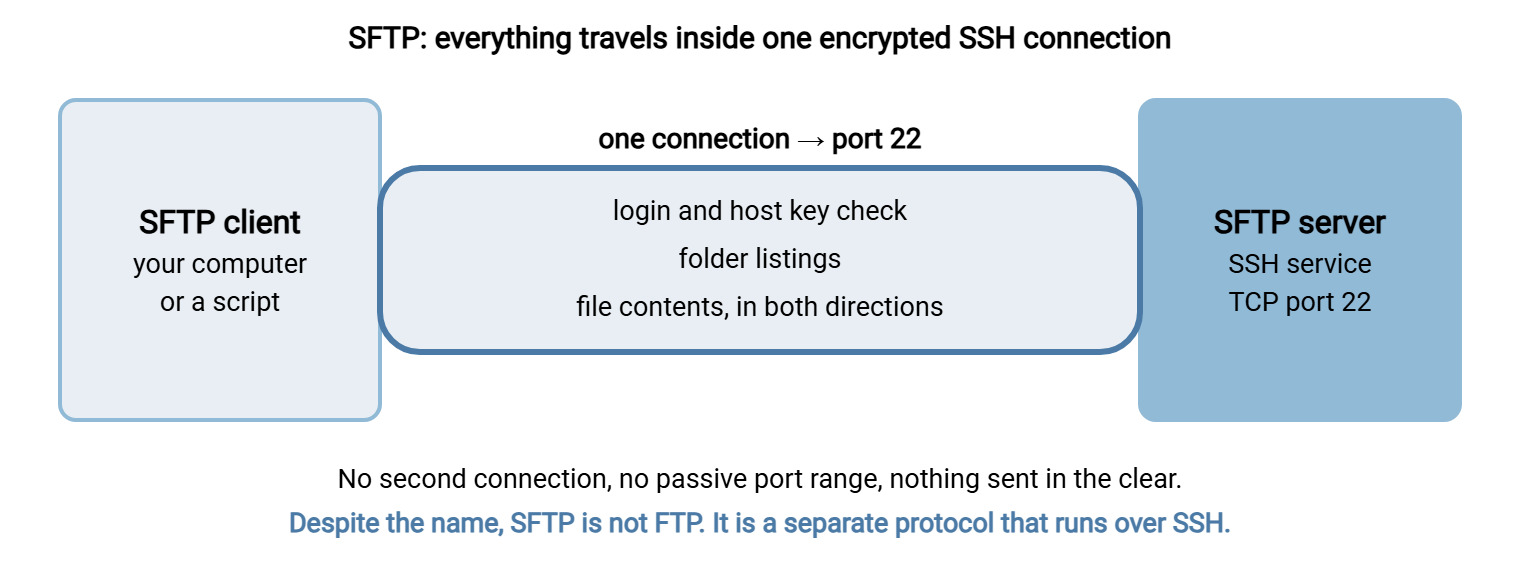
Three practical consequences follow from that design, and they explain most of SFTP's popularity.
- Nothing is sent in the clear. There is no unencrypted mode to forget to switch off.
- One connection is all there is. FTP opens a second connection for every file and every listing. SFTP never does, so firewalls have nothing extra to allow.
- No certificate is required. The server identifies itself with a key it generates for itself, so there is nothing to buy or renew.
The internal design, with the actual messages, is covered in how SFTP works.
What Port Is SFTP?
SFTP uses TCP port 22, the standard SSH port. That is the complete answer. There is no data port, no passive port range, and no second number to remember. A firewall rule for SFTP is one line: allow inbound TCP 22 to the server.
The port is a default, not a requirement. Administrators sometimes run SFTP on another port, often because port 22 on that machine is already used by the operating system's own SSH service. When that is the case, the server's owner will tell you the port, and you give it to the client. The numbers for every transfer protocol, side by side, are in ports for FTP, FTPS and SFTP.
How Each Side Proves Who It Is
An SFTP session involves two proofs of identity, one in each direction.
The server proves itself to the client with its host key. This is a key pair the server created when it was installed. The first time you connect, your client shows you the key's fingerprint, a short string of characters, and asks whether you trust it. You are meant to compare it with a fingerprint the server's owner gave you. The client then remembers it. If the server ever presents a different key, the client refuses to connect and says so loudly.
The user proves themselves to the server in one of two ways. A password works as you would expect. An SSH key is the better option for anything automated: the user holds a private key, the server holds the matching public key, and the login succeeds without any password crossing the network. Many servers can require both. The options are explained in SFTP authentication.
Bluewater Bank found out what the first proof is worth. A developer, tired of the fingerprint question interrupting a nightly script, added the option that tells the client to accept any host key without asking. The script ran quietly for four years. Then a code review asked a simple question: if this server were replaced by an impostor tomorrow, what would the script do? The answer was that it would hand over the files and report success. Nobody had attacked anything. The lock had simply been taped open, by someone being helpful, and nobody had walked down that corridor since. The bank now pins the fingerprint in the script and treats a mismatch as an alarm.
SFTP vs FTP vs FTPS vs SCP
The four names appear together on forms and in meetings. This table is the difference between them.
| Protocol | What it is | Encryption | Ports | Server identity |
|---|---|---|---|---|
| FTP | The original file transfer protocol | None | 21, plus a data port per transfer | Not checked |
| FTPS | FTP wrapped in TLS | TLS, when required | 21 or 990, plus a data port per transfer | Certificate |
| SFTP | File transfer inside SSH | Always, by SSH | 22 only | Host key |
| SCP | A simple copy command, also inside SSH | Always, by SSH | 22 only | Host key |
So what is the difference between FTP and SFTP? FTP is unencrypted and uses two connections. SFTP is always encrypted and uses one. They are different protocols that need different client settings and different firewall rules.
The difference between SFTP and SCP is smaller. Both run inside SSH on port 22. SCP copies a file from here to there and does nothing else. SFTP can also list folders, resume an interrupted transfer, rename, and delete, which is why it is the one used for anything beyond a one-off copy. The comparison with FTPS, which is the one that causes the most trouble in practice, has its own article: SFTP vs FTPS.
Six Things People Get Wrong About SFTP
Most SFTP confusion comes from a short list of reasonable assumptions that happen to be false. Clearing them up early saves a great deal of email.
- "It is FTP with SSL." That describes FTPS. SFTP uses neither FTP nor SSL. It uses SSH.
- "We need to buy a certificate for it." No. Certificates belong to FTPS and HTTPS. An SFTP server identifies itself with a host key it creates for itself, which costs nothing and does not expire.
- "We need to open a passive port range." No. That is FTP and FTPS. SFTP needs port 22 and nothing more.
- "The SFTP server and the SSH server are two different things." They are one service. SFTP is a part of SSH that the server either offers or does not.
- "An SFTP user can run commands on our server." Only if the server is configured to allow it. A properly set up SFTP account can transfer files in its own folder and do nothing else.
- "Our FTP client will work if we change the port to 22." It will not, unless the client also speaks SFTP and you select that protocol. Changing the port number does not change the language.
One more piece of vocabulary. Vendor documents sometimes list "SFTP protocols" in the plural. They usually mean SFTP together with its neighbors, SCP and FTPS, as a family of secure transfer options. There is only one SFTP. When a document says "SFTP protocols," ask which one the other side has actually built.
The second item on that list deserves emphasis, because it changes the planning. A team that budgets for a certificate, a renewal reminder, and a passive range for an SFTP server has planned an FTPS server by mistake. The reverse error is worse, since an FTPS server without those things does not work at all. Writing the protocol's full name on the first page of the project document is the cheapest fix there is.
When SFTP Is the Wrong Tool
SFTP is the default for good reasons, and a default is not a universal answer. It fits poorly in four situations. Occasional human users are better served by a web page. A partner whose system speaks only FTPS cannot be argued into SFTP, and you will need to offer both. Very large files over long, lossy links may call for specialized acceleration tools. And trading partners who need signed delivery receipts use a protocol built for that purpose. In each case the choice is made by who is at the other end, not by which protocol is best in the abstract.
What SFTP Is Used For
SFTP is the default choice for moving files between organizations, and between systems inside one. Typical uses look like this:
- Partner file exchange. A supplier uploads order files every night. A bank collects payment files every morning. Each side has an account on the other's server.
- Scheduled jobs. A script connects with an SSH key at a set time, moves files, and disconnects, with no person involved.
- Regulated data. Health, payment, and personal data are sent over SFTP because the protocol encrypts by design and logs who connected.
- Administration. Engineers move configuration files and logs to and from servers they already manage over SSH.
- Replacing plain FTP. Organizations retiring unencrypted FTP usually move those flows to SFTP.
It is less suited to people who transfer a file twice a year. They are better served by a web page than by an SFTP client they will never learn. That choice is discussed in when HTTPS beats SFTP.
What You Need to Use It
Using SFTP takes an SFTP client and four facts from the server's owner. The facts are easy to mislay, so keep them together. This card is worth copying into your notes for every connection you are given.
SFTP CONNECTION CARD
Host name:             sftp.example.com
Port:                  22
User name:             acme
Login method:          SSH key  /  password  /  both
Host key fingerprint:  SHA256:................................
My source address:     (the address they have allowed, if they restrict)
Folders:               /inbound (I upload)   /outbound (I download)
Their contact:         name and phone number
Current versions of Windows, macOS, and Linux all include a command-line SFTP client. A session looks like this:
C:\> sftp acme@sftp.example.com
acme@sftp.example.com's password:
Connected to sftp.example.com.
sftp> ls
inbound   outbound
sftp> cd inbound
sftp> put orders.csv
sftp> get ../outbound/prices.csv
sftp> bye
The commands are few: ls to list, cd to change folder, put to upload, get to download, and bye to leave. A graphical client offers the same things as a window with two panes. Connecting and testing are covered step by step in how to connect to an FTP server and test it, which includes SFTP.
If you are the one providing the server, you need SFTP server software. On Windows that is either the OpenSSH server included with the operating system or a dedicated product such as Sysax Multi Server. The steps are in how to set up an SFTP server on Windows.
Is SFTP Secure? What It Does Not Do
SFTP is secure in the sense that matters most: an eavesdropper on the network learns nothing, and nobody can alter a file in flight without being detected. That is a strong guarantee, and it is on by default.
It is also a narrow one. SFTP protects the file while it travels. It has no say over what happens before or after.
- It does not encrypt the file on disk. Once a file lands on the server, it is an ordinary readable file. Protecting it there takes disk encryption or file encryption such as PGP. See HIPAA-compliant SFTP and PGP encryption.
- It cannot verify a server you did not check. The host key only helps if somebody compared the fingerprint once. A habit of accepting whatever appears removes the protection, as the bank's script showed.
- It does not make a weak password strong. A guessable password is as guessable over SFTP as over anything else. Keys are better.
- It does not limit what an account can reach. That is the server's job. A badly configured server can give an SFTP user far more than one folder.
- It does not tell you a file failed to arrive. SFTP moves files when asked. Noticing that nobody asked is a monitoring job.
None of these is a flaw in the protocol. They are the edges of what a transfer protocol is. The armor is real, and it covers the journey.
The Version to Tell a Colleague
SFTP is the SSH File Transfer Protocol: file transfer that runs inside an encrypted SSH connection on TCP port 22. It is not FTP with security added. It is a separate protocol, and FTP clients cannot use it. The protocol that is FTP plus encryption is FTPS. SFTP uses one connection, encrypts everything, and identifies the server by a host key whose fingerprint you should check the first time. Users log in with a password or, better, an SSH key. It is the standard way to exchange files between organizations. It protects files in transit, not at rest.
To go deeper, read how SFTP works for the mechanics and SFTP server: what it is and how to choose one for the server side. The plain definitions of the neighboring terms are in our FTP definitions reference.
Frequently Asked Questions
What is SFTP?
What does SFTP stand for?
What port does SFTP use?
What is the difference between FTP and SFTP?
Is SFTP the same as FTPS?
Is SFTP secure?
From the Sysax team: we build secure file transfer software for Windows. Sysax Multi Server is an FTP, FTPS, SFTP, and HTTPS server. Sysax FTP Automation handles scheduled, scripted transfers. Free trials are on the download page.