
Gathering Requirements Before You Shop for a Transfer Server
"Can you write up the requirements? Something that lines up with what we saw on Tuesday." That sentence has started more transfer server purchases than any inventory has. Tuesday was the demo. The requirements document gets written the following week and, by an astonishing coincidence, describes the product from the demo. Eight months later a partner needs a protocol the product does not speak, or an auditor asks for a log field it never recorded. The team learns what the document should have said.
A requirement is one sentence saying what the server must do for your organization. It is written before you look at anything for sale. It comes with the evidence behind it and the check that will prove a candidate meets it. By the end of this article you will have a worksheet with one row per requirement. Each is tagged must, should, or could, each with evidence and a trial check. It opens our Choosing a File Transfer Server series. The criteria matrix, the trial plan, and the scoring are all built on it.
First, a Disclosure
Sysax sells a file transfer server, so we are one of the vendors whose demo you might sit through. We are not a neutral party in what follows. Read this article as the standard to hold us to. A vendor who would rather you wrote your requirements after the demo wants you to shop by impression. A vendor comfortable with you writing them first has nothing to fear from the comparison. That is the whole test, and it applies to us.
Requirements come first because demos are persuasive by design. A demo shows what a product does well, and the brain converts "that was impressive" into "that is what we need" without asking permission. The dull things that decide whether a purchase succeeds never make it into a demo. They include directory authentication, the log fields the auditor wants, and whether two generalist admins can run it. Nobody has ever gasped at a log field.
Start With What Already Moves
The best source of requirements is not a brainstorm but an inventory of the files that already move. If you have run a file flow census, you own most of the raw material. If not, run a short one now; an afternoon of honest listing beats a week of workshops. For every flow the census gives you:
- Direction and endpoints: who sends, who receives, and whether your server is the origin, the destination, or a relay.
- Protocol in use: SFTP, FTPS, plain FTP, HTTPS, a share, an email attachment. Include the embarrassing ones; they still have to be replaced by something.
- Volume and shape: how many files, how large, how often, in a burst or a trickle.
- The other party: a partner with its own rules, an internal application, a single-protocol device, or a person with a browser.
- What failure costs: an inconvenience, a missed deadline, a contractual penalty, or a regulatory report.
Read the census with one question in mind: what would a new server have to do for this flow to keep working? Each answer is a requirement, and it arrives with its evidence attached, because the census row is the evidence. Such requirements are hard to argue with: the flow already exists and already hurts when it breaks. Only then open the floor to wishes. Wishes are legitimate. They belong in a different column.
The Seven Sources of Requirements
A transfer server touches more than flows. Work through all seven sources; the ones teams skip are the ones that cause trouble after the purchase order clears.
1. Flows
Every existing flow, plus the ones you know are coming: a partner in contract negotiations, an application launching next quarter. The requirement is usually about isolation and layout. That means per-partner folders other partners cannot see, a landing area for an application to poll, a place for outbound files to wait. Write the flow count down; it drives the licensing questions later.
2. Protocols
List every protocol the server must speak and, separately, every one you would like to retire. A partner that will only send FTPS is a requirement. A LAN device that only speaks plain FTP is a requirement with a containment condition. Our partner protocol decision guide explains why the partner, not you, often decides the protocol. That is exactly why it must be a written requirement rather than a hope. (Ask each relationship owner twice. The first answer is "SFTP, I think"; the second is "except the one on FTPS".)
3. Users and authentication
Who logs in, and with what? Staff on their existing directory accounts, service accounts for scheduled jobs, partners on public keys, occasional senders who need something simpler. The comparison of authentication methods helps you choose, but the requirement is the list of methods and who uses each. "Staff must not have a second password to forget" is a real, testable requirement. So is how accounts are created and closed; provisioning transfer accounts covers that.
4. Partners
Partners bring their own rules: a security addendum that demands key-based authentication, an allowlist on their side that limits which addresses your server may use. They also bring a fixed test window for changes. Ask whoever manages each relationship what the partner has insisted on before. Those insistences are requirements you did not write but must satisfy.
5. Compliance duties
If any regulation or contract applies to the data that moves, it has probably been translated into controls already: logging, retention, access review, encryption. If you have built a transfer control matrix, lift the rows directly. If not, at least list what the logs must record; our what-to-log guide is the checklist. Compliance rows are almost always musts, because a server that cannot produce the evidence cannot be fixed by configuration later.
6. Integrations
What must the server talk to? A directory, a central log platform, a backup agent, a monitoring system, a script that runs when a file arrives. "Log lines arrive in the central platform with the account name intact" is testable in a trial. "Integrates with our tools" is a sentence from a brochure.
7. Operational constraints
The source teams skip most, and the one that sinks the most purchases. Which operating systems does your team run and patch? How many people will administer the server, with what skills? Must it run unattended as a service and survive reboots with nobody logged in? May a management interface face the internet? These rows eliminate whole categories of product; more on them below.
Must, Should, Could
Every row gets one of three tags.
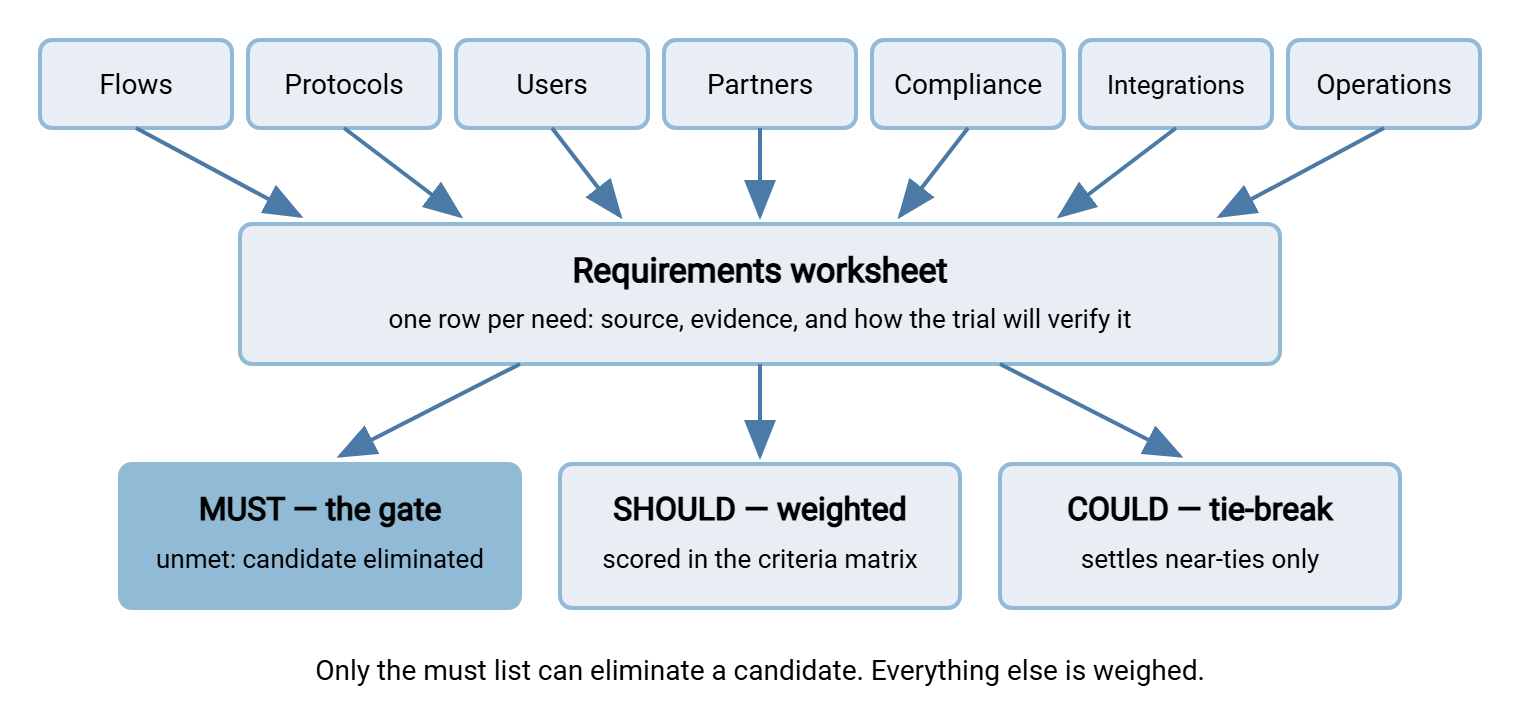
- Must: unmet, the candidate is eliminated no matter how good it is at everything else. The test is simple: if this were missing, would we refuse to buy? If the honest answer is "we would grumble and buy anyway," it is not a must.
- Should: matters and will be scored, but a strong candidate could compensate with strengths elsewhere. Most rows land here.
- Could: a genuine wish. Recorded so it is not forgotten, it decides between otherwise-equal candidates and never eliminates anyone.
The discipline is in keeping the must list short and defensible. A must list with forty rows is a wishlist wearing a uniform. It eliminates every candidate. The team quietly downgrades rows until someone survives. You end up with no must list at all, plus a paper trail proving you once had one. A good must list has eight to fifteen rows, each traceable to a flow, a partner's rule, a compliance control, or an operational fact.
Remember: a must is a requirement you would walk away over. If nobody in the room would actually walk away, tag it should. The must list's power comes entirely from being true.
The diagram below shows the shape: seven sources feeding one worksheet, which sorts rows into three lanes that behave differently from here on.
The Requirements Worksheet
The worksheet is deliberately plain: six columns, kept wherever your team keeps shared documents. What matters is that every row has all six filled in. A row without evidence is an opinion. A row without a trial check will be "confirmed" by a sales engineer's nod, and sales engineers nod for a living.
REQUIREMENTS WORKSHEET — one row per requirement

ID        R-01, R-02 ... (stable; the trial and the score refer to it)
SOURCE    flows | protocols | users | partners | compliance |
          integrations | operations | wish
REQUIREMENT  one sentence, testable, no product words
          ("per-partner folders invisible to other partners",
           not "good multi-tenancy")
PRIORITY  MUST (would walk away) | SHOULD (scored) | COULD (tie-break)
EVIDENCE  the census row, partner document, control-matrix row,
          staffing fact, or ticket history that justifies it
TRIAL CHECK  the exact observation that proves a candidate meets it
          (something a person can do and record, not "vendor confirms")

RULES
 - a MUST with no evidence is downgraded to SHOULD until evidence exists
 - a row with no trial check is not finished
 - product names never appear in the requirement column
 - the must list is frozen and signed before the first demo
Here is the worksheet in use for a synthetic but typical organization: a regional distributor. It has nine partners sending order files overnight, three partners receiving invoices, and forty staff who occasionally upload documents. It has a two-person Windows-only admin team and personal data (customer addresses) in some files. The rows are abbreviated; yours will be wordier.
| ID / Source | Requirement | Priority | Evidence | Trial check |
|---|---|---|---|---|
| R-01 / flows | Accept nightly SFTP uploads from nine partners into per-partner folders that no other partner can list or read | Must | Census rows F-01 to F-09 | Replay three partner flows with test accounts; attempt cross-partner listing and confirm it is refused |
| R-02 / protocols | Serve explicit FTPS to three partners who have declined to move to SFTP | Must | Partner protocol sheet; two written refusals | Scripted FTPS download from a client behind NAT, passive mode, certificate chain validated |
| R-03 / users | Staff authenticate with their existing Windows domain accounts; no separate password | Must | Helpdesk reset tickets on the current server | Bind the trial server to a test OU; log in as a test user; disable the user in the directory and confirm login fails |
| R-04 / partners | Public-key authentication per partner account, with a rotation an admin can perform without downtime | Must | Two partner security addenda | Onboard a test partner with a key; rotate the key while a transfer is running |
| R-05 / compliance | Log every login, upload, download, delete, and admin change with who, what, when, and source address; keep one year | Must | Control matrix row L-2 | Pull one account's activity for a week; check every field is present and readable |
| R-06 / operations | Runs unattended as a service and resumes after a reboot with nobody logged in | Must | Change policy; unattended patch window | Reboot the trial server during a transfer; confirm listeners return without login |
| R-07 / operations | Runs on Windows Server; the team has no other operating system in production | Must | Staffing and patching inventory | Eliminates non-Windows candidates before the trial |
| R-08 / wish | A browser upload page for occasional external senders | Could | Four ad-hoc requests last quarter | Have a non-technical volunteer upload a file over HTTPS with no instructions |
Three things stand out. Every must traces to something that already exists. The trial checks are actions a person performs and records, never a vendor's assurance. And R-07, one operational row, filters harder than all the others combined. It removes every non-Windows product before a demo is booked, for a reason nobody can argue with.
Rows That Clear Whole Shelves
Some rows do not score a candidate lower; they remove an entire category of product. Spot these early. They save weeks of evaluating things you could never buy, and honesty means saying which categories they remove, including ours.
- Operating system. A Windows-only team should not buy something that needs a Linux host it cannot maintain. The reverse is equally true. Sysax Multi Server is a Windows server. If your R-07 says "Linux only," we are eliminated at this row along with every other Windows-native product. That is the row working correctly.
- Hosting model. A policy that transfer infrastructure must be a vendor-run service removes every self-hosted product. A policy that data must never sit on a third party's infrastructure removes every hosted service. Our self-hosted versus hosted risk comparison helps you decide which policy you actually hold.
- Storage model. If files must land directly in cloud object storage rather than on a server's disk, you are shopping in a cloud-native category. In that case, traditional servers of any brand are the wrong shelf.
- Protocols outside the usual family. A partner that requires AS2 for EDI documents needs a product that speaks AS2. A server whose protocol list is FTP, FTPS, SFTP, and HTTPS, ours included, does not meet that must.
- Scale. Thousands of concurrent partner sessions across several data centers with automatic failover is a clustered, load-balanced category of product. Single-server products are not where that search begins.
- The managed-transfer layers. If your rows demand workflow orchestration, visibility across many systems, and a governance layer, you are describing managed file transfer. Our honest MFT assessment tells you whether you need that or a well-run server plus automation.
One more category question belongs here: whether to buy a server at all, or keep building on scripts and a standard SSH daemon. That decision has its own worksheet, the tipping-point assessment, and sometimes it honestly says "keep building." Our open source versus commercial series covers the same ground from the licensing angle. If the answer is to buy, the business case series shows how to ask for the money in words finance recognizes.
The Constraints Nobody Writes Down
The operational rows deserve a second pass, because teams assume they are obvious and never write them. I have watched each of the following end a purchase after the fact.
- Who administers it, and with what skills. Two generalist admins who manage everything from printers to the directory need a product whose daily tasks do not require scripting. Those tasks include adding a partner, rotating a key, and restricting an address. A team of engineers may prefer text configuration under version control.
- Where it sits on the network. In a DMZ with a hardened path to internal storage, or inside, behind a reverse proxy? The answer decides whether you need a gateway component and whether the management interface may face outward.
- Change windows and unattended operation. If patches reboot the host overnight, the transfer service must come back on its own. If a partner window is fixed, upgrades must fit inside it.
- Backup and restore. Can the configuration (accounts, keys, folder rules) be backed up as a unit and restored to a fresh host? Nobody asks until the disk dies.
- Budget shape. Not the amount, which is not a requirement, but the shape: a one-time purchase with maintenance, or a subscription; fixed, or growing with users or connections. Finance usually has a preference; put it in a should row so vendors can be asked, as the vendor question set does.
The staffing row is the one people fudge, so be literal. Write down who will run the server. Not the hire you are waiting for, not the team after the reorganisation: whoever is on the rota next Tuesday.
Here is one candidate against those rows, as an example of the facts to collect for every product on your list, not a conclusion. Sysax Multi Server runs as a Windows service. It authenticates each account through built-in accounts, Windows and Active Directory accounts, or public keys. It restricts connections by IP allow and block lists and writes activity logs to a file or a database. Against the distributor's rows, those facts answer R-03, R-04, R-06, and R-07 and part of R-05. Against a Linux-only R-07 they answer nothing, which is why the row is written first.
Gotcha: the constraint that most often surfaces after purchase is "who will run this?" A product that fits the flows but needs skills the team lacks will be run badly. A badly run transfer server is a security incident on a timer.
Freeze the List Before You Look
The last step gives the worksheet its authority. Circulate it to everyone who will have an opinion later. That means security, the partner owners, the application owners whose flows are on it, whoever holds the budget. Ask each one question: is anything missing, and is any must actually a should? Fold in the answers, freeze the must list, and record who agreed to it.
Freezing does not mean the list can never change. It means changing it after the demos begin requires a written reason. That way, a must cannot quietly become a should because a favorite candidate failed it. Keep the frozen version and the change history together. The decision memo reproduces both. A skeptical executive reading it later will see the goalposts stayed where they were planted.
Meridian Parts skipped the freeze. Their must list was drafted the week after a demo and included a visual workflow designer nobody had mentioned before it. It did not include key rotation, because nobody had asked the dealer groups about their security addenda. The product they chose rotated a partner's key by deleting and recreating the account, which the largest dealer group discovered mid-transfer at the first rotation. The workflow designer was opened twice in the first year, both times to show a visitor. The missing requirement was one sentence long and would have cost one phone call.
What You Hold Now
You now hold a worksheet in which every requirement has a source, a defensible priority, evidence, and a trial check. The must list is short, frozen, and signed. Some categories are already eliminated without a demo, possibly including ours; the rest will be judged by the same rows. If someone later asks you to "line the requirements up with what we saw on Tuesday", point at the date beside the signatures.
The next article turns those rows into a weighted criteria matrix, with honest guidance on weighting for your situation. After that, the trial checks in the last column become the backbone of a trial that actually tests the server.
Frequently Asked Questions
How many requirements should the worksheet have?
What if we do not know a requirement until we see what products can do?
Should performance numbers be a requirement?
Is "easy to administer" a valid requirement?
From the Sysax team: we build secure file transfer software for Windows. Sysax Multi Server is an FTP, FTPS, SFTP, and HTTPS server. Sysax FTP Automation handles scheduled, scripted transfers. Free trials are on the download page.