
Why USB Drives and Share Chaos Keep Winning
There is a USB stick taped to the side of the milling machine. The masking tape says DRAWINGS in marker, and the stick has outlasted two operators. Two floors up, a network share called TRANSFER has just grown its ninth subfolder named new, and nobody owns any of them. In a hotel across town, a laptop is syncing a work folder to a personal cloud account. That is because the VPN lost an argument with the hotel Wi-Fi last spring, and the user drew the sensible conclusion. Walk through almost any organization and you will find these two file transfer systems running side by side. The official one has the transfer server, the managed folders, and the accounts somebody provisioned on purpose. The unofficial one has the stick, the share, and the personal account. It has the file emailed to a home address so it can be finished after dinner. The second system usually moves more files than the first.
The tempting explanation is that people are careless or defiant. It is wrong, and acting on it fails every time. I have watched it fail in three organizations and, early on, helped it fail in one. People route around the official path because the official path does not do something their job requires, and the workaround does. Every risky habit in your estate is a requirement that nobody has met yet, wearing a disguise. Some of the disguises are very good.
This article opens our Governed Alternatives series by teaching you to read the chaos that way. By the end you will be able to name what each habit actually solves. You will be able to run an inventory of the habits in your own organization without turning it into a witch hunt. You will be able to turn what you find into a requirements document you can build against. The stick on the milling machine will still be there when you finish. You will know what it is for.
One Organization, Two Transfer Systems
Start by taking the unofficial system seriously as a system. It has infrastructure (sticks, shares, personal accounts) and conventions (the folder named final_v2_really, the stick labeled with masking tape). It has users who train each other in it. A new hire asks how to send a large file and a colleague answers "oh, everyone just uses the TRANSFER share." That is onboarding documentation — for the shadow system. It is also the only onboarding documentation anyone reads to the end.
The industry name for this is shadow IT: technology used for work without the knowledge or governance of the IT function. The phrase can sound accusatory, which is why this series mostly says ungoverned file movement instead. That means files moving without the access control, logging, or lifecycle management that governed paths provide. The distinction that matters is not sanctioned versus forbidden; it is can anyone answer questions about this later versus nobody can.
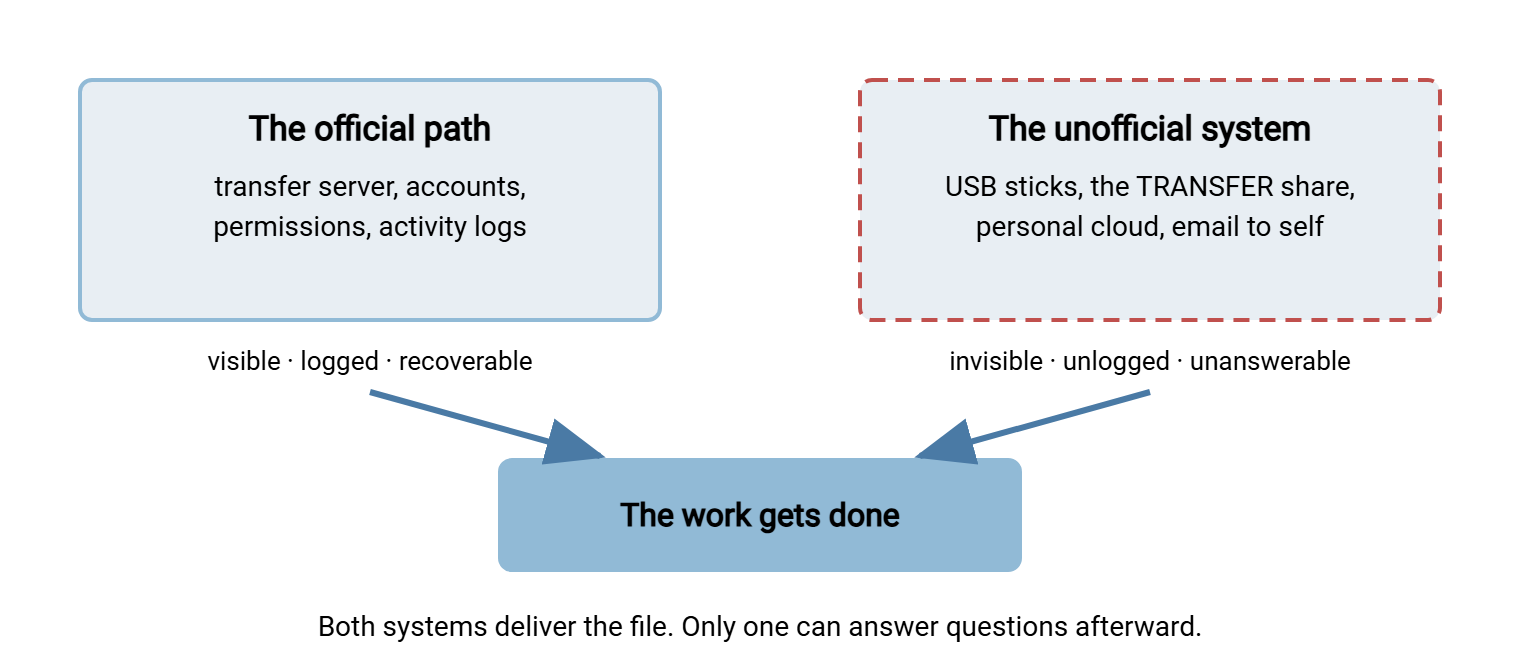
Both systems deliver the file, and that is the uncomfortable symmetry. The stick works. The junk-drawer share works. The personal cloud account works, often more smoothly than anything you provide. The difference only appears afterward. Someone asks where a file went, who took a copy, or whether the version the customer got was the right one. The official system can answer. The unofficial one cannot, and was never designed to. It was designed to get the file across the car park by four o'clock.
The diagram below shows the two systems side by side. Both end at the same place — the work gets done — which is exactly why the unofficial one persists.
What Each Habit Actually Solves
Every durable workaround earns its place by solving a specific problem better than the official alternative did. If you want to replace a habit, you first have to name the problem it solves. Name the problem precisely, with some respect for how well the habit solves it. The standard gallery:
- The USB stick. It solves moving files between machines that share no network path. Those include the machine on the shop floor, the presentation laptop in a customer's meeting room, and the workstation that is not on the domain. Also solves certainty: a stick has no upload quota, no size limit anyone remembers hitting, and no dependency on the guest Wi-Fi. It is the only transfer tool many users have never seen fail.
- The junk-drawer share. The share named TRANSFER, TEMP, or SCRATCH, writable by everyone, owned by no one. Solves: getting a file to a colleague right now without asking anyone's permission, choosing a location, or thinking about access. It is the office table where you leave things for people. Its openness — the exact property that makes it dangerous — is its feature.
- Personal cloud storage. A consumer sync account holding a work folder. Solves: access from home and from a phone, sharing with outsiders who cannot reach anything internal, and surviving the loss of a laptop. It is often adopted the first time a user was burned by a dead disk or locked out by a VPN. It is self-service disaster recovery.
- Email to self, or attachments in general. Solves: universal reach. Every recipient on earth has email; no recipient needs an account on your systems. It also leaves a personal breadcrumb trail — sent mail is the only "transfer log" most users have. Our series on email attachments covers why it fails as infrastructure, but as a habit it is perfectly rational.
- Consumer sharing sites. The free upload-a-file, send-a-link services. Solves: the file too big for email, sent to an outsider, with zero setup on either end. This habit appears within the hour after a bounced attachment.
- The laptop that walks. Copying a working set of files locally and carrying the machine. Solves: unreliable connectivity and slow links — the field engineer who cannot depend on reaching anything from a client site takes the data with them.
Read the list again and notice what is absent: malice. Nobody in the gallery is trying to steal anything or hide anything. They are trying to move a file across a boundary — machine to machine, inside to outside, office to home. The unofficial tool crossed the boundary while the official one asked them to open a ticket. The ticket is still open.
The Friction Ledger: Why the Official Path Loses
When a user chooses how to move a file, they run a cost comparison that takes about three seconds. On one side: the habit, whose cost they know exactly (walk to the machine, plug in the stick, ninety seconds). On the other: the official path, whose cost is uncertain and front-loaded — and uncertainty is itself a cost when a deadline is near.
Write the ledger out honestly, because parts of it are invisible from the IT side:
- Acquisition friction: does using the path require requesting an account, waiting for approval, or opening a ticket? A path you must ask for loses to a path you already have, every time, even if the wait is only a day.
- Installation friction: does it need client software? Users on locked-down machines cannot install it; users on personal or partner machines will not. Any path that begins "first, install…" has excluded half its audience. That is why a browser-based option matters so much when you design the replacement.
- Recipient friction: what does the other person need? A habit that works for any recipient beats a path that works only for colleagues. Users are protective of their outside contacts and will not send a customer through a clumsy signup.
- Failure friction: what happens at the size limit, the timeout, the expired password? Each failure teaches the user a permanent lesson, and the lesson is "use the stick next time." Trust in a transfer path is lost in one failure and rebuilt over dozens of successes.
Security appears nowhere in that ledger, and not because users are reckless. Risk is abstract, deferred, and statistical, while the deadline is concrete, immediate, and personal. A path that loses the friction comparison does not get a sympathy vote for being safer. Safety is not on the ballot. This is the founding axiom of the whole series: a sanctioned path that adds friction is a policy violation waiting to happen. We apply that test rigorously when designing sanctioned paths later in the series.
Remember: users do not choose between "safe" and "risky." They choose between "works now" and "might work after a ticket." If you want different choices, change what "works now" means. Lectures do not move the ledger, and blocking a habit without replacing it just breeds a cleverer habit.
Reading Chaos as a Requirements Document
Your organization's collection of risky habits is the most accurate requirements document you will ever receive. That reframe is what makes the whole problem tractable. Nobody exaggerated in it. Nobody padded it with nice-to-haves. Every entry was written by a person under real constraints choosing what actually works. The document is continuously updated at zero cost to you. No steering committee has ever reviewed it, which may be why it is accurate.
Translate each habit and the requirements fall out. The USB stick says: we need to cross network boundaries, and we need transfers that never mysteriously fail. The junk-drawer share says: we need a zero-permission way to hand a file to a colleague in seconds. Personal cloud storage says: we need access from outside the building and protection from dead laptops. The consumer sharing site says: we need to send large files to outsiders with no setup on their end. Attachments say: whatever you build must work for any recipient with an email address. That requirement is explored in depth in our person-to-person sharing series.
This reading changes what "fixing the chaos" means. It does not mean suppressing demand; the demand is legitimate. It means building supply: for each requirement, a governed path that meets it as well or better. That path provides the access control and audit trail the habit lacks. Some of that supply you may already own. A transfer server such as Sysax Multi Server, for instance, can offer HTTPS transfers through a plain web browser. There is nothing to install, which directly answers the installation-friction requirement. Underneath are per-account or Active Directory authentication and per-area permissions. So the easy path and the governed path are finally the same path. But which supply to build comes later in the series. First you need an accurate demand picture, which is what the inventory is for.
Inventorying the Habits Without a Witch Hunt
The fastest way to ruin this project is to let the inventory feel like an investigation. The moment people believe you are collecting names, the habits go underground. Your data quality collapses, and every future adoption effort starts in a hole. The inventory must be — and must visibly be — a requirements-gathering exercise. People are generous with requirements and stingy with confessions.
Northgate Retail ran this inventory across forty stores, and it nearly went wrong before the first interview. The draft template had a column headed Who, added by someone who wanted to follow up later. The project lead struck it out the evening before the announcement, on the grounds that a follow-up list is a suspect list with better manners. The finished inventory held forty-one entries, clustered into seven requirements. The largest by far was store managers sending the weekly stock count to head office from a phone in the stockroom. Nobody had ever filed a ticket about it. They had a messaging app, and it worked.
Ground rules that keep it safe
- Record flows, not people. Your inventory entry is "estimating sends drawings to fabricators on sticks," never "Dana uses a USB stick." If a name would appear in the record, generalize it until it does not.
- Announce it, with amnesty. Say plainly, in writing, before you start: we are cataloging how files really move so we can build official paths that are actually better. Nothing anyone tells us will be used against them. Existing habits keep working until a replacement exists. Then honor that, permanently. One broken amnesty poisons the well for years.
- No enforcement during discovery. If you spot something genuinely dangerous mid-inventory, fix the danger (quietly, structurally) — do not discipline the person who innocently showed it to you.
- Bring appreciation, not judgment. The user who built a stick-based workflow for the air-gapped test rig solved a real problem with the tools they had. Say so. You are there to learn the requirement, and the person who invented the workaround is its leading expert.
Where the habits show themselves
You are not limited to interviews. The estate testifies on its own, if you look in the right places:
- Share names and contents. List the shares on your file servers and look for the tells: TRANSFER, TEMP, EXCHANGE, DROP, OUT, a personal name, a customer name. Open them (you are the administrator; this is your job) and note file ages. A "temporary" share where files are years old is a habit with tenure. Our guide to outgrowing the shared drive describes this archaeology in detail.
- Helpdesk history. Search tickets for "too big," "attachment," "blocked," "can't send," "external." Every such ticket marks a moment the official path failed someone. Most users stopped filing tickets after the first one, so each ticket represents many silent workarounds.
- The expense trail. Small recurring charges for consumer storage or sharing subscriptions, and purchases of USB drives, show demand that found its own budget.
- Web proxy or firewall logs, in aggregate. If your organization logs outbound traffic, categories like consumer file sharing show volume trends. Use totals per department, never per-person browsing — the witch-hunt rule applies to logs too.
- Physical observation. Sticks in drawers, drives on lanyards, the labeled stick taped to the CNC machine. You will see them once you start looking.
The interview that actually works
The direct question — "do you use unauthorized tools?" — gets you nothing but denial. Ask about the work instead, and the habits narrate themselves. Three questions do most of the lifting:
- "Walk me through the last time you had to get a file to someone outside the company. What did you actually do, step by step?"
- "What do you do when a file is too big to email?"
- "When the official way didn't work for something, what did you use instead — and what made it better?"
That third question is the gold mine. The answer is a requirements statement in the user's own words: it's faster; it works from home; the customer doesn't need an account; it never fails. Write those phrases down verbatim. They are your acceptance criteria for the replacement. Quoting them back later is how you will eventually win adoption: "you said it had to work from a browser with no account for the customer — here it is." I have kept a file of those phrases for years. It is the most honest specification I own.
From Inventory to Requirements
Capture each flow you find in a flat, boring, consistent record. Boring is a feature: it keeps the inventory factual and keeps names out. A template you can copy:
HABIT INVENTORY ENTRY
Flow:          what moves, from where, to where
               e.g. "drawing packages, estimating team to outside fabricators"
Method:        stick / open share / personal cloud / attachment / sharing site / other
Frequency:     daily / weekly / monthly / rare-but-critical
Trigger:       what makes it happen (deadline, request, machine boundary)
Data class:    public / internal / confidential / regulated (best guess)
Why it wins:   the user's own words for what the habit does better
Requirement:   the need, stated so a replacement could be tested against it
Official gap:  which official path was tried and how it failed, if known
Two fields deserve emphasis. Data class is your first, rough sensitivity call. It feeds the risk ranking in the next article. A companion method for finding sensitive flows is in what data leaves your network. Requirement is the translation step: it must be written so that a proposed replacement can pass or fail it. "Needs to be easy" is not testable; "fabricator receives the package with no account and no software installed" is.
Expect the finished inventory of a mid-sized organization to hold a few dozen entries that cluster into perhaps six or eight distinct requirements. That compression is good news — it means you will not need dozens of solutions. If you have run a formal file flow census before, this is the same discipline pointed at the flows nobody registered.
Gotcha: the inventory is never finished, because the shadow system keeps evolving. Treat the first pass as a snapshot, then keep the intake open. A standing "tell us about a workaround, no consequences" channel costs nothing and quietly becomes your early-warning system for the next unmet requirement.
What You Do With the Requirements
The inventory in hand, the temptation is to jump straight to lockdown: block the sticks, kill the share, filter the sharing sites. Resist it. Blocking removes the habit's supply while leaving its demand fully intact. Demand under pressure gets creative in ways you will like even less. Those include the personal phone as a hotspot, the photo of the screen, and the printout (which no firewall has ever blocked). Enforcement has a place, but it comes last, after the replacement exists and is winning on merit. The policy side of that sequencing is covered in why a transfer policy.
The productive order is the arc of this series. First, understand what the habits cost you when they go wrong — soberly, without fear-mongering — so you can rank which flows matter most. That is the next article, the real risks of ungoverned file movement. Then pair every habit with a sanctioned path that passes the as-easy-or-easier test. Then build the most common replacement — the governed drop zone that retires the junk-drawer share. Automation earns its keep there. With a tool like Sysax FTP Automation watching a drop area, files can be picked up, moved to where they belong, and announced by email notification. Nobody has to remember to check. That is exactly the "it just appears where it's needed" quality that made the old habits sticky.
None of that works without the reframe this article exists to install. The chaos is not an enemy. It is the most honest account you will ever get of what your users need from file transfer. Read it that way, and every stick in every drawer stops being an infraction and becomes a specification. Including the one taped to the milling machine.
Frequently Asked Questions
What is shadow IT?
Should we just block USB ports and be done with it?
How do I get people to admit their workarounds?
Isn't ungoverned file movement a training problem?
Is a shared network folder really in the same category as a USB stick?
What should the inventory record if I can only capture three things?
From the Sysax team: we build secure file transfer software for Windows. Sysax Multi Server is an FTP, FTPS, SFTP, and HTTPS server. Sysax FTP Automation handles scheduled, scripted transfers. Free trials are on the download page.