
Why Transfer Changes Deserve Staging
"It's just a small change." Everyone who runs a transfer server has said it, and most of us have said it while already typing. Think of an edited path, a tightened cipher list, a renamed folder, or a schedule nudged half an hour earlier. Each takes thirty seconds to make. Each can stop a partner's feed, send a thousand files to the wrong place, or do nothing at all for a week before anyone notices. The edit is small. What it touches is not.
The sentence that follows, a few hours later, is "we tested it in production." It is a complete sentence, grammatically. This article is about not needing it. It explains why file transfer changes are riskier than they look, and the two words that organize the whole subject (production and staging). It explains what a change's blast radius is and why transfer changes have unusually large ones. It covers the four classes of change and the risk each carries, and the minimum test each class deserves. It is the first article in our Testing and Staging Transfer Changes series. The others build the pieces this one argues for.
None of this is a scolding. I have tested in production, and so has everyone who has run a transfer server for more than a year. Usually it was because there was nowhere else to test. The point of the series is to build somewhere else, one cheap rung at a time.
Two Words That Organize Everything: Production and Staging
Production is the live environment. It includes the transfer server your partners connect to, and the scheduled jobs that move real files. It includes the accounts, the folders, the firewall rules, and every system upstream and downstream that depends on them. When a file lands in production, somebody's automation acts on it. Production is where consequences happen.
Staging is a separate copy of that environment where changes are tried first. Some teams call it "test" or "pre-production". The name matters less than the rule: nothing in staging is real, and nothing in staging can reach anything that is. The analogy is a rehearsal: same script, same cues, but an empty hall, so a dropped line costs nothing. "We tested it in production" means the rehearsal had an audience.
The word environment is broader than "server." It is everything a job runs inside. That includes the machine, the operating system, the transfer software and its settings, and the accounts and credentials. It includes the folder layout, the network path, the DNS names, and the firewall rules. A job that works in one environment and fails in another usually failed because one of those differed. That is why later articles talk so much about parity — keeping staging as close to production as you can afford. Most staging environments match production in every way except the ones that matter.
Staging is a ladder, not a single thing. The bottom rung is a spare account and a test folder on the production server. The top rung is a second server on its own network segment with a copy of every job and a fake partner to talk to. Every rung counts, and building a transfer staging environment walks through each one.
Blast Radius: Why Transfer Changes Hit Harder Than They Look
Blast radius is the set of everything that breaks, or could break, when one change goes wrong. The question is not "how big is the charge" but "how far does the damage reach." A change to a single job on a single server sounds like a small charge. Five properties of file transfer make its blast radius large anyway.
- Files are one-way. Once a file lands in a partner's inbound folder, their automation picks it up. You cannot un-send it. A misdirected batch is undone by phone calls and somebody at the partner reversing whatever their system did with it, not by fixing the job.
- Jobs are chained. The nightly export feeds the transfer job, which feeds the partner's loader, which feeds their morning reports. A change to the middle link breaks everything after it — see mapping batch dependencies for how long those chains get.
- Nobody is watching. Transfer jobs run at two in the morning without a human. The first person to see the result is usually the person waiting for the file, hours later and in another organization.
- Failure is often silent. A job that finds nothing to send reports success; so does a job pointed at the wrong folder. The ways this happens are cataloged in why jobs fail silently.
- Settings are shared. One server setting — a cipher list, a port, a timeout, a passive range — applies to every account and every partner at once. There is no such thing as a small server-wide setting.
The diagram below shows the rings of damage spreading from a single edited job. Each ring is a group of people or systems that feels the effect, and each is harder to repair than the one inside it.
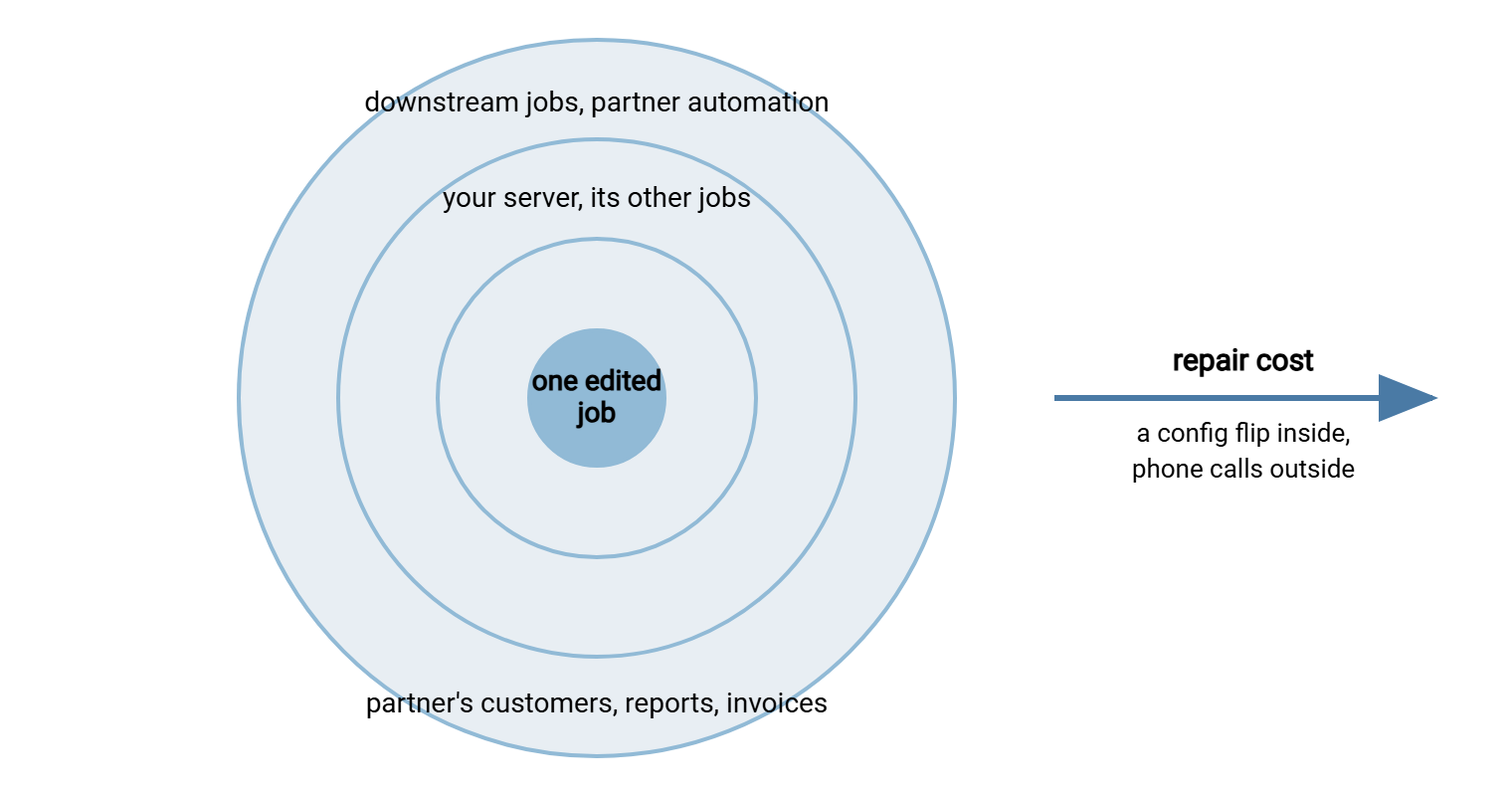
Remember: the size of an edit tells you nothing about the size of its blast radius. A one-character change to a filename pattern can reach a partner's customers; a brand-new job on an isolated test account reaches nobody. Judge the change by who consumes what it touches and whether the result can be undone — never by how long it took to type.
Five Incidents That Never Needed to Happen
Each incident below is a composite of things that happen in real estates, and I have been the person at the keyboard for two of them. None involved a difficult change; all would have been caught by a test that takes less time than the cleanup took. Each was tested in production. The results came back by phone.
The wildcard that matched everything
A job uploaded *.csv from an export folder to a partner every night. The partner started wanting an XML summary too, so an administrator changed the pattern to *. The export folder also contained an archive subfolder with eighteen months of old files, and the job recursed into subfolders. At 02:10 it uploaded three thousand four hundred files. The partner's loader, which trusts everything in its inbound folder, re-imported eighteen months of invoices. A staging run against a fake partner would have shown the file count in the log before a single real file moved. A close cousin is told in the misdirected file.
The security setting that locked out three partners
A hardening review asked for weak ciphers to be disabled on the SFTP server. The administrator removed them in one evening — correctly, on paper. Three partners ran older client software that only offered ciphers from the removed list. Their nightly uploads failed with a negotiation error on their side, where nobody was watching. The gap was discovered at 07:30. A test login from each partner against a staging server with the same setting would have found all three. So would a look at the server log to see which ciphers each partner actually negotiated. Cipher policy basics explains how to tighten without surprises.
The rebuild that changed the host key
An SFTP server was rebuilt on a fresh virtual machine. Accounts, folders, and settings were restored. The server's SSH host key was not. So the new machine generated its own. Every scheduled job in the estate refused to connect. A changed host key is exactly what a client should refuse. Correct behavior, wrong night. A rollback plan that lists "host key" as something to preserve, and a smoke test after the rebuild, would have caught it before the first scheduled job. The mechanism is explained in host keys and known_hosts.
The folder rename that watched nothing
A watch folder on a Linux server was renamed from outbound to Outbound during a tidy-up. The job definition still said outbound, and on Linux those are two different names. The job watched an empty directory for nine days, found nothing, and reported success nine times. It was, to be fair, very good at watching. A regression test with a single expected file, run after the rename, would have failed on day one.
The schedule that ran too early
To free up the batch window, a job was moved from 02:00 to 01:30. The upstream export that produces its input finishes anywhere between 01:20 and 01:45 depending on volume. So on busy nights the job picked up a half-written file and sent it. The partner received a file that ended mid-row. Staging cannot tell you when the real export finishes, but a dependency map can. So can a settle check that refuses to send a file whose size is still changing — see size stability and settle checks.
The Four Change Classes and Their Risk Profiles
Treating every change identically leads to one of two failure modes. Either every trivial edit needs a committee, so people stop filing changes. Or nothing needs a test, so the incidents above keep happening. Sorting changes into four classes gives each the care it needs. The committee is not the problem; the committee for everything is.
Job changes
A job change edits one scheduled or triggered transfer. It can change its source or destination path, filename pattern, schedule, script steps, post-processing (rename, move, delete after send), or notifications. The blast radius is that job's consumers — usually one partner or one internal system — plus anything downstream. You can always put the old definition back, but a file already sent stays sent. The minimum test is a staging run with a synthetic file set that includes the edge cases, followed by that job's regression cases.
Setting changes
A setting change alters something server-wide. That could be allowed protocols or ciphers, listening ports, the passive port range, or idle timeouts. It could be connection limits, permission templates, or the IP allow list. It applies to every account at once, so the blast radius is every partner and every job on that server. Reversal is a quick flip, but by then the missed windows have been missed. The minimum test is a staging server carrying the same setting, a login from each affected client type, and a partner test window for anyone whose client you cannot reproduce.
Server changes
A server change replaces or restructures the platform itself. It could be an upgrade or patch, an operating system update, a rebuild, or a move to new hardware or a new address. It could be a certificate renewal or a host key change. The blast radius is every flow. The failure modes include the ones nobody thinks of — the host key, the certificate chain, the DNS name that still points at the old box. These changes need everything: a staging mirror, the regression suite, a maintenance window, a rollback plan written before you start, and a watch period after. A rollback plan written during the outage is a diary entry. The procedure is in rolling out transfer changes safely.
Partner changes
A partner change is one where the other side of the flow moves. A partner changes their address, credentials, host key, folder layout, or file format — or asks you to change yours. The blast radius is that partner's flows and everything downstream. You cannot stage the partner's side; you can only stage yours and test against theirs at an agreed time. That is what partner test windows and test endpoints are for.
| Class | Typical examples | Who is hit | Minimum test |
|---|---|---|---|
| Job | Path, pattern, schedule, script step, post-processing | One flow and its downstream | Staging run with synthetic files; that job's regression cases |
| Setting | Ciphers, ports, timeouts, limits, allow lists | Every account on the server | Staging server with same setting; login per client type; partner test window |
| Server | Upgrade, patch, rebuild, move, certificate, host key | Every flow | Full staging mirror; regression suite; window; rollback plan; watch period |
| Partner | Their address, key, credentials, folders, format | That partner's flows and downstream | Partner test window with test accounts on both sides |
The Testing Ladder: What Each Change Deserves
Tests, like staging, come in rungs. Each rung costs more than the one below and catches things the one below cannot. A change should climb as many rungs as its class requires, and no more.
- The read-back. Somebody who did not make the change reads it and says back what it will do. Free, and it catches a surprising share of typos and inverted conditions.
- The dry run. A dry run asks a tool to report what it would do without doing it.
rsync --dry-runlists the files it would copy;robocopy /Ldoes the same on Windows; a well-written script has a "list only" switch. For scripted jobs in Sysax FTP Automation, the script editor's line debugger lets you step through a transfer script one line at a time. It lets you watch each step's result before the script is ever scheduled. - The staging run. The changed job or setting runs in staging against synthetic files chosen to include the awkward cases — empty, huge, oddly named. Synthetic test files and test data covers how to make them.
- The partner test. An agreed window where both sides exchange clearly marked test files through test accounts, so the half of the flow you do not control gets exercised too.
- The canary. A canary is one low-risk, well-watched flow that receives the change first. If it survives a cycle or two, the change goes to everyone else; if not, one flow needed repair instead of forty.
- The regression suite. A regression is something that used to work and now does not. A regression suite is a fixed set of test cases run after every change, so a fix in one place cannot silently break another. Regression testing transfer jobs builds one.
A job change typically climbs rungs one through three and six. A setting change adds rung four for every partner whose client you cannot reproduce. A server change climbs every rung. A partner change lives on rung four, with rung three for your own side.
Northgate Retail learned what the canary rung is for when they widened the passive port range on their FTPS server. Staging passed, the setting was correct, and the change was pushed to a single store's nightly upload first, with someone watching the log. That upload failed on its first data connection, because the firewall rule for the new range had been requested but not yet applied. The setting was flipped back. The store's file went out ten minutes later, and the rule was applied the next morning. The change went out again the following night with the remaining forty stores none the wiser. The canary cost one watched cycle and saved forty phone calls.
The Pre-Change Risk Check
Two of the questions below need the word rollback: putting things back the way they were. Some changes roll back cleanly — restore the setting, restore the job file, restart the service. Others cannot be rolled back at all, because the files were delivered and processed or the source files were deleted after send. Those irreversible outcomes are exactly what staging exists to prevent. They are why safe reprocessing patterns are worth designing in before you need them. Paste the checklist into the change record before any transfer change, however small. If you cannot answer a question, that is the answer: the change is not ready.
PRE-CHANGE RISK CHECK
[ ] Change class: job / setting / server / partner
[ ] Exactly what is changing (old value -> new value, one line per item)
[ ] Which flows touch the thing being changed (list them by name)
[ ] Who consumes those flows (internal systems, partners, downstream jobs)
[ ] Can the outcome be undone? Files sent, deleted, or renamed after send?
[ ] Last known good: where is the current job file / config snapshot saved?
[ ] Rollback: the exact steps to restore it, and how long they take
[ ] Test done: read-back / dry run / staging run / partner test / canary
[ ] Test evidence: log excerpt or regression run id attached
[ ] When: outside the batch window? partner notified if their flow is affected?
[ ] Watch: who checks the first live run, and when?
When You Have No Staging at All
Many estates have no staging environment yet, and the right response is not to skip testing until one exists. The bottom rung of the ladder is available on any server today.
- Make a copy of the job, not an edit. Duplicate the job definition, make the change in the copy, and point the copy at a test folder or a test account. Run the copy by hand. When it behaves, disable the old job and enable the copy — which also gives you an instant rollback.
- Create a test account that can see nothing real. On a server with per-account permissions, such as Sysax Multi Server, a test account can be confined to its own folder tree. That way, a mistaken path in a test job cannot land in a production folder. The server's activity log gives you a clean record of what the test did.
- Know the consumers before you start. The most useful preparation is knowing who depends on the thing you are changing. That knowledge lives in a flow inventory, the subject of our Documenting Transfer Flows series.
And when a change goes wrong despite all this, resist the urge to change things at random. Random changes do find the fault eventually, along with several new ones. The layered troubleshooting method finds the broken layer faster than guessing, and the change record you wrote beforehand tells you exactly what to put back.
Remember: the cheapest staging environment is a copy of the job pointing at a test folder. It costs five minutes, it exists on every server you already own, and it would have prevented three of the five incidents in this article. Start there; build upward later.
The Habit to Build
The estate stops producing untested-change incidents when one habit takes hold. Every change, before it touches production, is classified, tested on the rung its class deserves, and recorded with a way back. Job changes get a staging run and their regression cases. Setting changes get a staging server and a login from each client type. Server changes get everything, including a written rollback and a watch period. Partner changes get a test window with test accounts on both sides. After that, "we tested it in production" is something you hear about other estates.
The rest of this series builds each of those pieces. Start with building a transfer staging environment, which is far cheaper than a second data center. Then read synthetic test files for the data to run through it. When the change is a big one, rolling out transfer changes safely is the procedure for the night itself.
Frequently Asked Questions
What is the difference between staging and production?
What does "blast radius" mean for a file transfer change?
Do I really need to test a one-line change?
What is a canary flow?
We have no staging server. What is the minimum I can do?
From the Sysax team: we build secure file transfer software for Windows. Sysax Multi Server is an FTP, FTPS, SFTP, and HTTPS server. Sysax FTP Automation handles scheduled, scripted transfers. Free trials are on the download page.