
War Story: The Leaked Credential
Hugo was not looking for an intruder. He was looking for something to show an auditor. The report he ran showed successful logins per account grouped by source address. It is the kind of thing you run once a year to prove you can. The service account svc_enroll should have shown two addresses. It showed four. For twenty-seven nights, someone who was not an employee had logged in to a benefits company's SFTP server with a valid password. They downloaded that day's enrollment file: names, dates of birth, plan codes. Nothing failed. No lockout tripped, no alert fired, and the nightly job that owned the account ran perfectly the whole time.
This is the postmortem of a credential that traveled. It went from a batch file, to a shared drive, to a ticket, to a synced personal folder. From there, it went to someone unknown. The postmortem covers how the leak was noticed and how the responders contained it while a job still depended on the password. It also covers the rotation mistakes and what changed. Vellum Benefits, Ridgeback Life, and the people are composites with invented names; every mechanism is real. It is part of our War Stories series. It ends with a checklist for finding the same password in your estate before someone else does.
The Estate, and the File Designed to Be Copied
Vellum Benefits administers employee benefits for a few hundred employers. Every night at 23:30, a scheduled batch file on the Windows job server jobs02.example.com uploads the day's enrollment changes to the company's own SFTP server, sftp.example.com. The upload goes into a folder that an insurance carrier, Ridgeback Life, collects from each morning. A second job on jobs03.example.com uses the same account once a week to download the carrier's response files. The account is svc_enroll, and it authenticates with a password that lives in the batch file:
@echo off
rem push-enrollments.bat -- nightly enrollment feed to Ridgeback, 23:30 from Task Scheduler
set XFER_HOST=sftp.example.com
set XFER_USER=svc_enroll
set XFER_PASS=Vb!Enroll#Summer7
set FEED=D:\feeds\out\ENR_daily_%DSTAMP%.csv

"C:\Tools\sftpcli.exe" -host %XFER_HOST% -user %XFER_USER% -pass %XFER_PASS% -put "%FEED%" /carriers/ridgeback/outbound/
if errorlevel 1 goto fail
Read that file the way an attacker would. The password is in clear text, beside the hostname and username that go with it. It is in a file whose whole purpose is to be copied wherever the job runs. It is also passed on the command line, where any process listing on the machine can read it. The file was three years old and had been "temporary" since the day it was written. Three years is a long time to be temporary. The enrollment file it sends holds personal data for roughly nine thousand members.
How the Password Traveled
The diagram below shows the path the postmortem reconstructed. Each step was an ordinary act by a well-meaning person; the last hand-off was never proven, and the report says so.
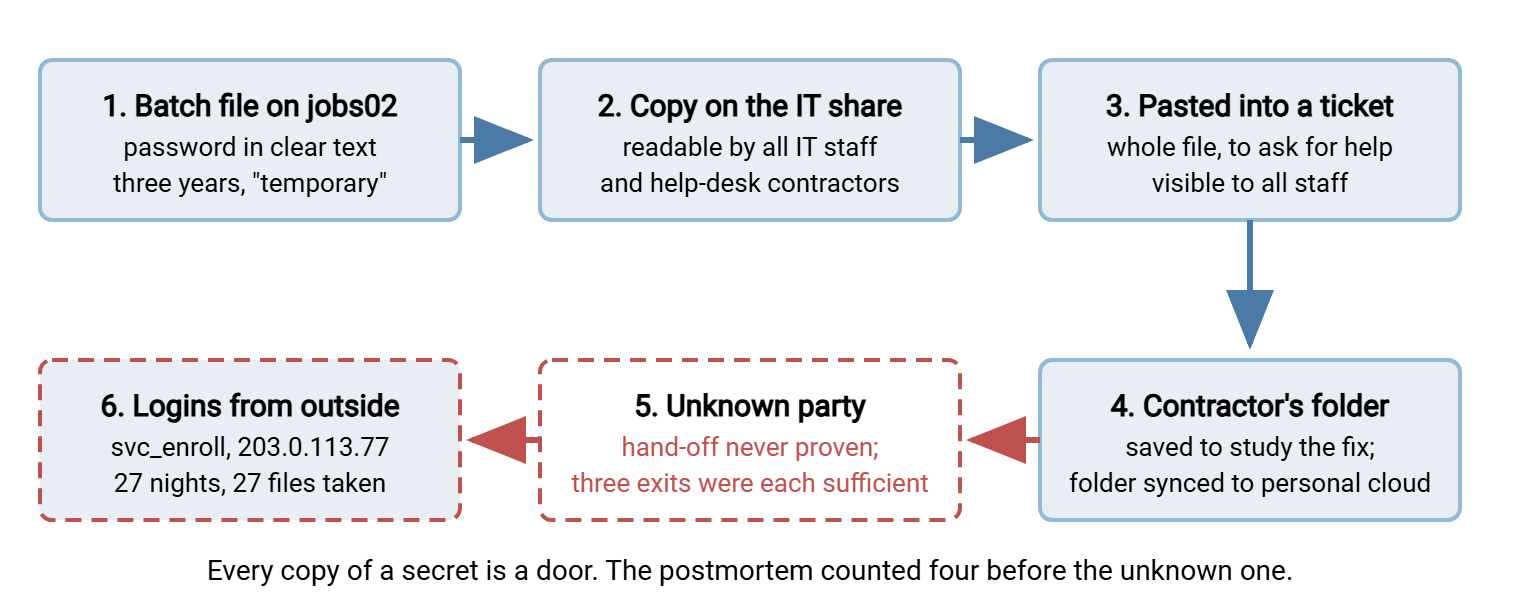
- Jul 02 — Marcus rebuilds
jobs02after a disk failure. Before wiping it he copiesD:\jobs\, batch files included, to\\fs01\IT\rebuild-backup\jobs02\. The share is readable by every IT employee and by the contracted help-desk team. The folder is still there two months later. - Jul 09 — The job is failing after the rebuild because the SFTP client's install path changed. Elena, who inherited the job, pastes the entire batch file into a support ticket to ask a colleague what is wrong. The ticket system's default visibility is all staff.
- Jul 21 — Omar, a contractor on the help desk, picks up the ticket. He saves the pasted script into his Documents folder to draft a fix and resolves the ticket. His laptop syncs Documents to a personal cloud account. Nothing forbade it; nothing prevented it.
- Between Jul 21 and Aug 03 — The password reaches someone else. The most likely route was a compromise of the personal cloud account. But the postmortem could not prove it, and it did not pretend to. Three exits existed; any one was enough.
None of those four people did anything unusual. Rebuild backups, pasted scripts, and synced folders are how work gets done. The personal sync is the pattern why shadow sharing happens describes. The secret did not leak because someone was careless. It leaked because it was in a form that could be copied at all.
The Timeline
- Aug 02 23:31 — The nightly job runs from
10.20.4.15, as it has every night for three years. - Aug 03 02:14 — The first login as
svc_enrollcomes from203.0.113.77. The address belongs to a consumer broadband provider in a region where Vellum has no staff. The user lists both carrier folders and downloads the day's enrollment file and the carrier's latest response file. - Aug 03 – Aug 29 — Twenty-six more logins come from that address and a second one,
198.51.100.24. They are always between 01:00 and 03:00, always after the nightly upload. Twenty-seven enrollment files are downloaded. No failed logins, ever: the password was correct the first time. - Aug 30 10:40 — Hugo, the transfer administrator, is preparing evidence for an upcoming audit. For the first time, he runs a report from the server's activity-log database. It shows successful logins per account, grouped by source address, over sixty days.
svc_enrollshould show two addresses. It shows four. - Aug 30 10:55 — Hugo escalates to Noor, the security lead. Incident opened.
- Aug 30 11:10 — Containment: the account is restricted to the two job servers' addresses. The unknown addresses can no longer authenticate; tonight's job is unaffected.
- Aug 30 11:30 — Password rotated and updated in the batch file on
jobs02. Nobody remembersjobs03. - Aug 30 13:00 — Elena, trying to help, edits the ticket to remove the pasted password and deletes the attachment. The ticket's view history, the list of who opened it and when, goes with it.
- Aug 30 14:00 — Scope established from the log: exactly which files were downloaded, by which address, when. Because the files hold personal data, the incident is handed to the privacy officer and legal counsel.
- Aug 31 – Sep 02 — The credential hunt: every place the password might have been copied is searched and cleaned.
- Sep 01 03:00 — The weekly reconciliation job on
jobs03fails with an authentication error. The carrier's response files go uncollected for a day. - Sep 05 — Key-based authentication, per-account address restrictions, and a new-address alert are in place. The password is rotated a second time, because the first replacement had been pasted into the incident chat channel during the scramble.
- Sep 08 10:00 — Postmortem.
Discovery, Containment, and the Mistakes
A question nobody had asked the logs
The server had everything. Sysax Multi Server writes its activity log to file and, as Vellum had configured it, to a database. The log records every login with account and source address, every listing, every upload and download with a path. Here is what Hugo found once he looked, condensed:
Aug 02 23:31:04  login ok   svc_enroll  10.20.4.15     SFTP
Aug 02 23:31:09  upload     svc_enroll  10.20.4.15     /carriers/ridgeback/outbound/ENR_daily_aug02.csv   312 KB
Aug 03 02:14:07  login ok   svc_enroll  203.0.113.77   SFTP
Aug 03 02:14:12  list       svc_enroll  203.0.113.77   /carriers/ridgeback/outbound
Aug 03 02:14:31  download   svc_enroll  203.0.113.77   /carriers/ridgeback/outbound/ENR_daily_aug02.csv   312 KB
Aug 03 02:15:02  download   svc_enroll  203.0.113.77   /carriers/ridgeback/inbound/RESP_aug01.csv          41 KB
Nothing in those lines is an error. That is why the existing monitoring, built around failed logins, lockouts, and job failures, saw nothing for a month. A leaked valid password produces successes. (To the server, an intruder with the right password is simply a user, and a punctual one.) The only signal is context: the right account from the wrong place, at the wrong hour, doing a download the job never does. The rule that came out of the incident is the copyable part of this section. It asks the log one question every morning. Which service accounts logged in yesterday from an address they had never used in the previous thirty days?
-- New source address for a service account: seen in the last day, never in the prior thirty.
-- Shape it to your own log table; the columns are the ones any transfer server records.
SELECT l.account, l.source_ip, MIN(l.event_time) AS first_seen, COUNT(*) AS logins
FROM   login_events l
WHERE  l.result = 'success'
  AND  l.account LIKE 'svc_%'
  AND  l.event_time >= DATEADD(day, -1, GETDATE())
  AND  NOT EXISTS (SELECT 1 FROM login_events p
                   WHERE p.account = l.account AND p.source_ip = l.source_ip
                     AND p.event_time <  DATEADD(day, -1, GETDATE())
                     AND p.event_time >= DATEADD(day, -31, GETDATE()))
GROUP BY l.account, l.source_ip;
With a file log instead of a database, the same question is a script. It extracts account and address from yesterday's successful logins. Then it compares the pairs against a list built from the previous month. Either way it is an afternoon's work, and it would have fired on Aug 04.
Containment first, then rotation
Noor's first instinct was to rotate the password immediately. Hugo argued for a different order, and the postmortem agreed with him: restrict first, rotate second. The server allowed the account to be limited to specific source addresses. So within minutes svc_enroll could authenticate only from the two job servers. The intruder was locked out without touching a single job, which bought time to rotate carefully instead of in a panic. Rotation under pressure is where the mistakes live, and this incident collected three.
Mistake one: rotating without the dependency list
Nobody had written down which jobs used svc_enroll. Marcus updated the batch file he knew about; the weekly job on jobs03 was discovered when it failed two days later. That is the ordinary consequence of an account whose consumers are not inventoried. It is why service account hygiene begins with a register: one row per account, every job and host that depends on it.
Mistake two: cleaning up the evidence
Removing the password from the ticket was the right outcome and the wrong first step. The ticket system kept a view history: who had opened that ticket and when. It was the best evidence the team had for the hand-off in step 5. Deleting the attachment discarded it. The rule the postmortem wrote: capture before you clean. Export the ticket, its history, and the share's access log, then remove the secret.
Mistake three: the new secret in the chat
Under pressure, the replacement password was pasted into the incident channel so two people could update two hosts. It was rotated again on Sep 05. Ninety seconds saved; one extra rotation bought.
Root Cause and Contributing Factors
- The secret lived in a file designed to be copied. A batch file is portable by nature; anything inside it travels with it. A script with a password in it will eventually be copied somewhere with a wider audience.
- The account had no address restriction. A service account used from two known hosts could have been limited to those hosts from the day it was created. Then a leaked password is a failed login from a strange address: an alert, not a breach.
- Monitoring watched for failures only. Lockouts and failed logins were alerted; successful logins from new places were not. Valid credentials in the wrong hands look like success.
- Three storage locations with wide audiences. A rebuild backup on a broad share, a ticket visible to all staff, an unmanaged personal sync folder. None was malicious; each widened the audience by an order of magnitude.
- No dependency register for the account, which turned a rotation into a second outage.
- The file carried personal data. Whether the enrollment feed needed dates of birth at all was a question nobody had asked; it made the incident a notifiable one.
- Three years of "temporary." The batch file predated every current team member, and inherited jobs are rarely re-examined until they break.
Remember: a service password is not a secret if it is in a file. It is a secret with a copy count you do not know. Restrict where the account can be used from, so that the copy count stops mattering.
What Was Actually Changed
svc_enroll moved to public-key authentication. The private key lives on jobs02 and jobs03, readable only by the account the scheduled task runs as. The server holds only the public half, something a copied script cannot leak. The private key stays on those two hosts. Not in a ticket, not in the chat, not "just while we update jobs03." The account is restricted to those two addresses. Sysax Multi Server supports both per-account IP allow and block lists and key-based or Windows-account authentication. So both controls were configuration rather than code. The new-address query above runs every morning and pages on any row. Every other job on the two servers was rewritten to fetch its credential at run time instead of embedding it. For jobs that still need a password, the pattern became the standard Windows one:
# One time, on the job server, logged in AS the account the scheduled task runs under:
Get-Credential -UserName 'svc_enroll' -Message 'transfer account' | Export-Clixml D:\jobs\secrets\svc_enroll.xml
# The file is encrypted with DPAPI for that user on that machine; copying it elsewhere yields nothing usable.

# In the job:
$cred = Import-Clixml 'D:\jobs\secrets\svc_enroll.xml'
$plain = $cred.GetNetworkCredential().Password      # only ever in memory, never on a command line or in a log
Three process changes went with it. The ticket template gained a banner and a pattern check that refuses submissions containing anything shaped like pass=. Rebuild backups go to a restricted folder that is deleted when the rebuild ticket closes. And the service-account register now lists every consumer of every account, reviewed quarterly. New service credentials are issued as credential issuance and first login describes. They go straight into the store on the host that uses them, never as a line of text anyone could paste.
The Lessons, and Where to Learn Each Fix
- Get the secret out of the script. Key authentication where the protocol allows it; a credential store or DPAPI-protected file where it does not. Job credentials storage compares the options, and PowerShell credentials handling shows the mechanics used above. For SFTP keys, start with SFTP authentication.
- Restrict service accounts by source. An account used by two hosts should authenticate from two hosts. IP allowlisting explains how and where it belongs.
- Watch successes, not only failures. A new address, an odd hour, an operation the job never performs. Monitoring authentication attacks covers the failure side. The articles reading transfer logs and what to log cover the context that makes successes visible.
- Inventory every account's consumers before you need to rotate. Service account hygiene is the register and the review cadence.
- Contain, capture, then clean. Restrict the account before rotating; export the evidence before deleting the copy.
- Know what is in the file. Personal data made this a privacy incident with its own clock. Personal data transfer incidents describes what the privacy team needs from you and how fast. The article data minimization asks whether the file needed those columns at all.
Check Your Estate
The hunt below is the one Vellum ran over three days. Most estates find at least one hit in the first hour. I have run it in estates run by people I respect and never come back empty-handed. That says nothing about the people and everything about batch files.
CREDENTIAL EXPOSURE HUNT

Where the secrets are
[ ] Search every job host for pass=, -pw, password, PASS in .bat .cmd .ps1 .sh .py .cfg files
[ ] Search shared drives for copies of job folders: rebuild-backup, old-scripts, "scripts - copy"
[ ] Search the ticket system, wiki, and chat history for the same strings and for job file names
[ ] Ask contractors and leavers' managers about personal sync folders; check the sync tools you allow

What the server can tell you
[ ] Run the new-address query for the last sixty days, for every service account
[ ] For each service account: expected source addresses written down, and enforced on the server
[ ] Alerts exist for successful logins from a new address and for downloads by upload-only accounts

Before you ever rotate
[ ] Every service account has a register row listing each job, host, and person that uses it
[ ] Rotation is rehearsed: restrict, capture evidence, rotate, update every consumer, verify next run
[ ] Rebuild backups and script copies have an owner and a deletion date
One habit is worth more than the whole list. When a colleague pastes a script into a ticket or a chat to ask for help, read it for secrets before you read it for bugs.
The Version to Tell a Colleague
A nightly job kept its SFTP password inside a batch file. The file was copied to a shared drive during a rebuild and pasted whole into a ticket visible to everyone. It was also saved into a contractor's synced personal folder. A month later someone unknown used the password from a residential address, twenty-seven nights running, downloading enrollment files full of personal data. Nothing failed, so nothing alerted. The server's log had every line. An administrator found the pattern only when an audit made him ask about logins by address. Containment was an address restriction, which held the job together while the password was rotated, twice. The fix was keys instead of passwords, per-account address limits, a new-address alert, and a register of who uses what. The intruder never missed a night. Neither should your morning query.
In another story in this series, the log settled the question of who touched a file. Read the misdirected file. For a job that stopped producing logs at all, read the file that never arrived. And the method behind all of them is in running a blameless postmortem.
Frequently Asked Questions
Why didn't brute-force protection catch this?
Should I rotate the password immediately when I suspect a leak?
Is a DPAPI-protected file really safer than a password in a script?
How do I find out which jobs use a service account before rotating?
Why did the personal-data angle change how the incident was handled?
From the Sysax team: we build secure file transfer software for Windows. Sysax Multi Server is an FTP, FTPS, SFTP, and HTTPS server. Sysax FTP Automation handles scheduled, scripted transfers. Free trials are on the download page.