
War Story: The Looping Job
At ten to eight in the morning, the accounts-payable lead at Brannock Foods looked at his import queue, looked again, and rang his supplier. More than forty thousand invoices had arrived overnight. Nine hundred of them were distinct. A parts maker's invoice job had sent every invoice in its archive to its biggest customer roughly forty times each between dinner and breakfast. Nothing had crashed. The exit code was zero on every run. The only alert that fired all night pointed at the wrong company.
This is the postmortem of a transfer loop: a job that keeps finding its own output and treating it as new input. Loops are the mirror image of the deleted inbox. Instead of doing too little, the automation does far too much. The ordinary alerts stay silent because every individual operation succeeds. Meridian Parts, Brannock Foods, and the people are composites with invented names. The mechanism is exact. This article is part of our War Stories series. It ends with a checklist for finding the same loop in your own watch folders.
The Estate and the Flow
Meridian Parts invoices its customers through files. The ERP writes each invoice as a PDF named INV-<number>.pdf into a folder on the Windows job server jobs01.example.com. A scheduled PowerShell script, the "sweep," runs every thirty seconds. It lists PDFs in the watched folder and uploads each over SFTP to the customer's server at sftp.brannock.example.com. It copies each file into an archive folder and deletes the original. The archive keeps ninety days of invoices, about nine hundred files.
D:\xfer\invoices\out\        ERP drops INV-*.pdf here          (the watched folder)
D:\xfer\invoices\archive\    copies of everything sent, 90 days
sftp.brannock.example.com    /inbound/  the customer's import poller collects every 5 minutes
Brannock Foods, the customer, runs a poller of its own. Every five minutes it downloads whatever is in /inbound, deletes it from the server, and feeds it to accounts payable. Any file present is treated as a new document. That design is normal, and it matters later.
Two details of the sweep's configuration had been set months earlier and forgotten. The scheduled task was set to run a new instance in parallel if the previous one was still running. This was chosen once when a large batch delayed the next cycle. And the script's archive step wrapped its copy in a try/catch that logged a warning and moved on. That way, one bad file could not stop the others. Both were reasonable. Both became amplifiers.
The Timeline
- Sep 09 17:40 — Brannock has asked to receive credit notes as well as invoices. The ERP will drop them in a new sibling folder,
D:\xfer\invoices\credits\. Sam, who owns the job, makes the smallest possible change. The watched folder becomesD:\xfer\invoiceswith recursion on, so one job covers both subfolders. He drops one test credit note intocredits\and sees it sent and archived. He leaves at 17:55. - Sep 09 17:41 — The first cycle after the change lists every PDF under
D:\xfer\invoices, including the nine hundred already inarchive\. It uploads all of them to/inbound. Then it tries to archive each one onto itself. The copy fails. The failure is caught and logged as a warning. Every file stays exactly where it was. - Sep 09 17:42 — A second instance starts while the first is still uploading. It finds the same nine hundred files and begins again. By 17:50 there are a dozen instances.
- Sep 09 18:05 — Brannock's poller collects the first batch and feeds accounts payable nine hundred "new" invoices, all of them already paid.
- Sep 09 22:14 — Brannock's SFTP server, counting connections per minute from one address, bans
203.0.113.40, Meridian's job server, for an hour. - Sep 09 22:15 — Meridian's only alert of the night fires: SFTP connection failed: sftp.brannock.example.com. Lena, on call, reads it at 22:30 and concludes the customer's server is down or blocking. She snoozes the alert until 07:00 and emails Brannock's operations mailbox.
- Sep 09 23:14 — The ban expires. The instances, which have been retrying, resume. The flood, the ban, and the misleading alert repeat nine times before morning.
- Sep 10 07:50 — Ravi, Brannock's accounts-payable lead, calls. Their review queue holds more than forty thousand documents. Their SFTP administrator reports nine overnight bans for connection floods from Meridian's address.
- Sep 10 08:05 — Lena disables the scheduled task. Instances drain over the next six minutes.
- Sep 10 08:20 — Sam arrives, opens the configuration, and sees it at once.
- Sep 10 12:00 — Brannock's AP team finishes clearing the queue. No invoice was paid twice. Their system had flagged repeated invoice numbers for review rather than posting them. But a day of their work is gone. The incident reaches their vendor-management team as a formal complaint.
- Sep 12 14:00 — Postmortem.
Anatomy of the Loop
The diagram below shows the loop. The archive folder lives inside the newly widened watch root. So every archived file is a candidate on the next sweep. Archiving a file onto itself fails, so the file is never moved out of the way. The sweep sends it again every cycle, forever.
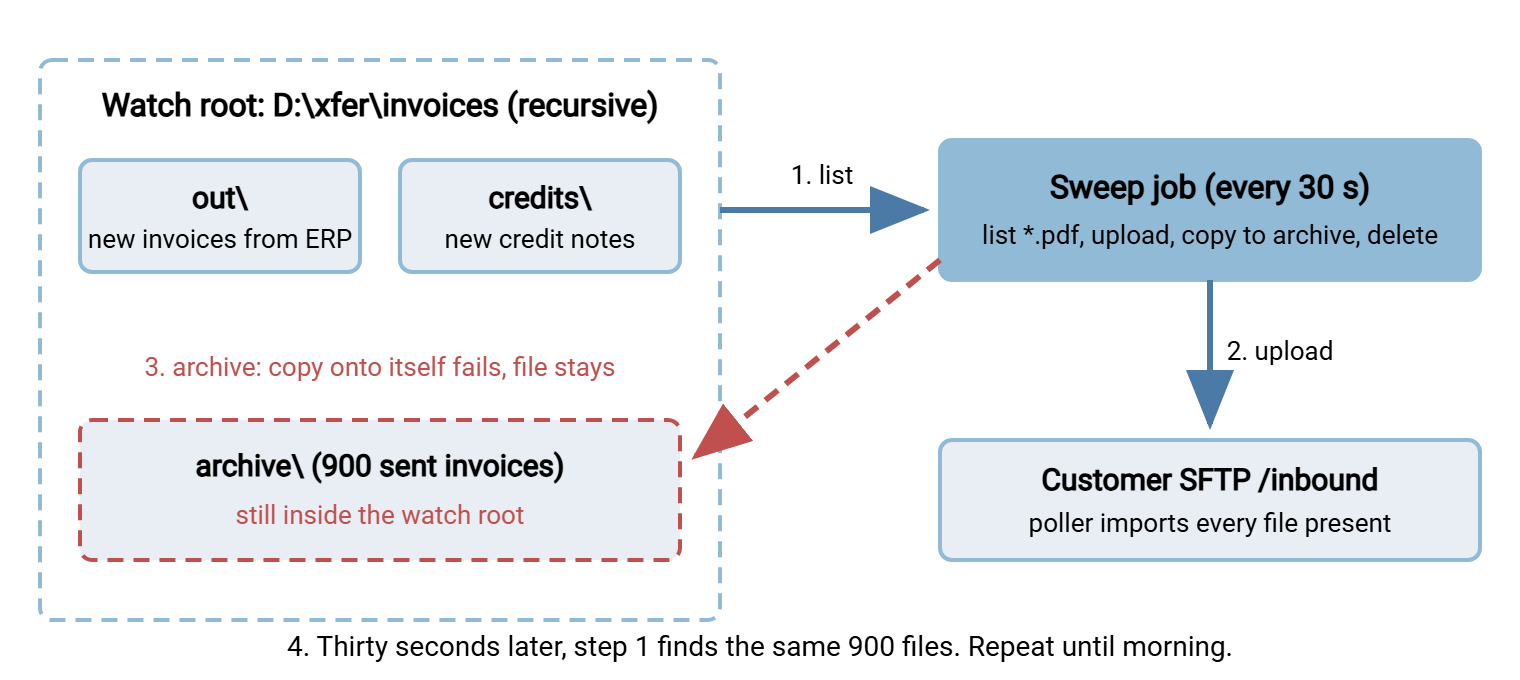
Here is the sweep, condensed to the lines that matter. The bug is in none of them individually. It is in how they behave together once the two paths overlap.
# sweep-invoices.ps1 -- runs every 30 s from Task Scheduler
$WatchDir   = 'D:\xfer\invoices'            # was D:\xfer\invoices\out until Sep 09 17:40
$ArchiveDir = 'D:\xfer\invoices\archive'
$Recurse    = $true                         # new: cover out\ and credits\ with one job

foreach ($f in Get-ChildItem -Path $WatchDir -Recurse:$Recurse -Filter 'INV-*.pdf' -File) {
    try {
        Send-ToCustomer -LocalPath $f.FullName -RemotePath "/inbound/$($f.Name)"   # SFTP upload
        Copy-Item -Path $f.FullName -Destination (Join-Path $ArchiveDir $f.Name) -Force -ErrorAction Stop
        Remove-Item -Path $f.FullName -Force
        Write-Log "sent $($f.Name)"
    } catch {
        Write-Log "WARN archive step failed for $($f.Name): $_"     # file left in place; retried next cycle
    }
}
Walk one archived file through it. Get-ChildItem with recursion finds archive\INV-877.pdf. The upload succeeds. The customer's server does not care that it received this file two months ago. (Servers are not sentimental.) Copy-Item then tries to copy the file onto its own path and throws Cannot overwrite the item with itself. The catch logs a warning. Remove-Item never runs, the one mercy in the story: nothing was deleted. But the file stays in the watched tree, so the next cycle repeats every step. The job log captured it precisely:
Sep 09 17:41:02 INFO  sweep: 903 candidates under D:\xfer\invoices
Sep 09 17:41:03 INFO  sent INV-877.pdf
Sep 09 17:41:03 WARN  archive step failed for INV-877.pdf: Cannot overwrite the item D:\xfer\invoices\archive\INV-877.pdf with itself.
Sep 09 17:41:03 INFO  sent INV-878.pdf
Sep 09 17:41:03 WARN  archive step failed for INV-878.pdf: Cannot overwrite the item D:\xfer\invoices\archive\INV-878.pdf with itself.
Sep 09 17:41:32 INFO  sweep: 903 candidates under D:\xfer\invoices        <-- second instance
Sep 09 17:42:02 INFO  sweep: 903 candidates under D:\xfer\invoices        <-- third
Three lines into the log, the incident is fully visible. The candidate count is nine hundred higher than any previous cycle. There is a warning on every file and a new instance starting before the last one finished. Nobody was looking, because nothing had failed.
Why Nobody Noticed
This is the part of the postmortem worth the most attention. The loop is easy to understand. The silence is not, and I have heard the same silence in three different estates.
Every alert was a failure alert. The job alerted when it exited non-zero or when the SFTP connection failed. Neither happened until the customer banned the address, and by then the alert said the wrong thing. A loop is made of successes: successful listings, successful uploads, successfully caught exceptions. No alert built around "did something fail?" can see it. Only an alert built around "how much happened?" can, and Meridian had none. Our article on why jobs fail silently calls this the green-status trap.
The warnings were logged, not counted. Thousands of WARN lines went to a file. A single rule, more than ten warnings in ten minutes, would have paged someone at 17:42.
The one alert that fired pointed at the customer. "Connection failed" to a partner's host reads as the partner's outage, especially at 22:30. Lena's decision to email and wait was defensible on what the alert told her. The postmortem's conclusion was not that she should have dug deeper. It was that the alert should have carried the job's own recent volume. Connection refused after 31,000 uploads in four hours reads very differently. Alerting that gets read covers what belongs in the message.
The success email was unread. A nightly summary went to a shared mailbox with a subject line that never changed. Its body that morning said forty-one thousand files transferred. Nobody opens a message that has said "OK" four hundred times.
Root Cause and Contributing Factors
- Overlapping paths. The archive folder sat inside the watch root, and nothing in the job checked for it. The configuration permitted a shape that can only loop.
- A stateless sweep. "Process everything present" has no memory. It cannot tell a new invoice from one it sent two months ago. The only thing that stopped resends before was that sent files were moved out of sight. Once the move failed, there was no second line of defense. This is the absence of idempotency, the property that processing the same input twice has the same effect as processing it once.
- Infinite retry of a permanent failure. The catch block treated "archive failed" as transient and left the file for the next cycle. A copy-onto-itself error will never succeed. Retrying it forever is a design choice, and it was the wrong one. Poison files and dead-letter handling describes the alternative. After a few failures, park the file somewhere the sweep cannot see and raise a hand.
- Parallel instances. The scheduler setting multiplied every cycle by however many instances were running. With a lock, the flood would have been one sweep every seven minutes instead of a dozen at once. It would still be a loop, but a tenth the size.
- Failure-only alerting, covered above.
- The customer's inbound design accepted any file present as new. That is their normal, and it is not a fault to record against them. But it meant that everything Meridian sent, Brannock ingested.
- A late-afternoon change with a one-file test. The test proved the new subfolder worked. It could not reveal what else the widened watch root would pick up. The test looked at one file, not at the candidate list.
Remember: a watch folder job has two questions to answer every cycle: "what is new?" and "what do I do with what I have already handled?" If the answer to the second is anything that could land back inside the first, you have built a loop. You are then waiting for the trigger.
What Was Actually Changed
The archive moved to D:\xfer\archive\invoices, a sibling tree, never a descendant of any watched folder. That became a written rule for every job on the server. Output goes beside the input. Never under it. Not "just for the credit notes." The scheduled task went back to do not start a new instance. The script took a lock of its own so the rule survives the next person who edits the task. A sent-ledger gave the sweep memory. A quarantine folder outside the watch root received any file whose post-processing failed three times. Two volume alerts were added: sends per ten minutes above three times the trailing average, and any cycle with more than ten warnings. And a circuit breaker stops any cycle that finds more than two hundred candidates. A real batch that size is announced in advance, and a surprise one is a loop.
The guards at the top of the rewritten script are the copyable part of this article:
# --- guards before any file is touched ---
$Watch   = (Resolve-Path $WatchDir).Path.TrimEnd('\') + '\'
$Archive = (Resolve-Path $ArchiveDir).Path.TrimEnd('\') + '\'
$cmp = [System.StringComparison]::OrdinalIgnoreCase
if ($Archive.StartsWith($Watch, $cmp) -or $Watch.StartsWith($Archive, $cmp)) {
    throw "Refusing to start: archive '$Archive' overlaps watch folder '$Watch'"
}

# One instance at a time, whatever the scheduler thinks
$mutex = New-Object System.Threading.Mutex($false, 'Global\InvoiceSweep')
if (-not $mutex.WaitOne(0)) { Write-Log "another sweep is running; exiting"; exit 0 }

try {
    $files = @(Get-ChildItem -Path $Watch -Recurse -Filter 'INV-*.pdf' -File)
    if ($files.Count -gt $MaxPerCycle) {        # circuit breaker: a surprise batch is a loop until proven otherwise
        Send-Alert "sweep found $($files.Count) candidates (ceiling $MaxPerCycle); stopped for a human"
        exit 2
    }
    foreach ($f in $files) {
        if (Test-SentLedger -Name $f.Name -Length $f.Length) {      # idempotency: seen before?
            Move-Item $f.FullName (Join-Path $Quarantine $f.Name)
            Write-Log "DUPLICATE parked, not sent: $($f.Name)"; continue
        }
        Send-ToCustomer -LocalPath $f.FullName -RemotePath "/inbound/$($f.Name)"
        Add-SentLedger -Name $f.Name -Length $f.Length
        Move-Item -Path $f.FullName -Destination (Join-Path $Archive $f.Name) -ErrorAction Stop
    }
} finally { $mutex.ReleaseMutex() }
The ledger is nothing exotic: a text file or small table of file name, size, and time sent, checked before every upload. It is the second line of defense the original job never had. A folder-monitoring tool such as Sysax FTP Automation gives you the monitoring, retry and error handling, and email notifications as configuration rather than hand-written code. That removes the place where this catch block lived. But no tool can know that two folders you typed overlap. That check is always yours.
The Lessons, and Where to Learn Each Fix
- Output must never land inside input. Archive, quarantine, and error folders live beside the watch root, never under it. The job refuses to start if they live under the watch root. The design rules are in watch folder error design.
- Give every sweep a memory. A sent-ledger, a hash, or a rename-on-send marker makes reprocessing harmless. Start with idempotency in plain words, then why duplicates happen for the full catalog of triggers.
- One instance at a time. A lock is ten lines and turns a flood into a trickle. Locking and overlap prevention covers the shell version. The mutex above is the Windows one. The forgotten scheduler toggle is what scheduled job hygiene reviews for.
- Permanent failures get parked, not retried. Three strikes and the file goes to quarantine with an alert. See poison files and dead-letter handling and transient vs permanent failures.
- Alert on volume, not just on failure. Too many is as wrong as too few. Alerting that gets read and job status monitoring basics show how to add a baseline.
- Test the candidate list, not the happy path. Before widening any watch folder, run the listing the job will run and read it. If it returns nine hundred files, stop. Change rollout and rollback makes a 17:40 edit reversible.
- Tell the partner what happened. Brannock's view was "our vendor flooded us and got banned nine times." A same-day summary followed the shape partner SLAs and expectations describes. It turned a complaint into a shared postmortem.
Check Your Estate
For every watch-folder or scheduled sweep job you run, answer these. Any "no" is the next loop, waiting for a configuration change. I have run this list on estates I thought I knew and found a "no" every time, usually the one about recursion.
WATCH-FOLDER LOOP CHECKLIST  (one copy per sweep or monitor job)

[ ] Archive, error, and quarantine folders are outside the watched tree, and the job checks this at start
[ ] Recursion is off unless every subfolder is meant to be input
[ ] The job keeps a record of what it has sent and skips anything already recorded
[ ] Only one instance can run at a time (scheduler setting AND a lock in the job)
[ ] A file whose post-processing fails three times is moved out of the watched tree and raises an alert
[ ] A cycle that finds far more candidates than normal stops and asks a human
[ ] An alert fires on sends-per-hour above baseline and on warning counts, not only on failures
[ ] Connection-failure alerts include the job's recent volume, so a partner-side ban reads correctly
[ ] The success email carries a number that changes, or it does not exist
[ ] Widening a watch folder requires reading the candidate list first, with a second person
The quickest single test is to list what the job would process right now. Use the same filter and recursion it uses, and count the result. If that number surprises you, the job is one edit away from surprising your customer.
The Version to Tell a Colleague
A watch folder was widened to include a sibling subfolder. The archive folder happened to live under the new root. Every archived invoice became a candidate again. Archiving each one onto itself failed. The failure was caught and the file left in place. The next cycle sent it again. Parallel instances multiplied the flood, and the only alerts were failure alerts. So the first sign was the customer's server banning the job. Everyone read that alert as the customer's problem. It was, in a sense. Meridian had just caused it. The fixes were structural: output outside input, a ledger for memory, a lock, quarantine for permanent failures, a circuit breaker, and alerts that count.
The companion stories include the file that never arrived, with the same failure-only alerting silent in the opposite direction. The other is the deleted inbox. The method is in running a blameless postmortem.
Frequently Asked Questions
Why didn't the job's error handling stop the loop?
Wouldn't a hash check have caught the duplicates?
Was the customer's server wrong to ban the job server?
Is recursion in a watch folder always a bad idea?
How do I pick a threshold for a volume alert?
From the Sysax team: we build secure file transfer software for Windows. Sysax Multi Server is an FTP, FTPS, SFTP, and HTTPS server. Sysax FTP Automation handles scheduled, scripted transfers. Free trials are on the download page.