
Off-Peak Scheduling: Moving Bulk Out of Business Hours
The cheapest bandwidth fix there is costs nothing, needs no network change, and lets the transfer run flat out. Move it to a time when nobody else wants the link. Most bulk jobs have no reason to run at four in the afternoon beyond the fact that somebody once clicked "now." Yet off-peak scheduling is done badly far more often than it is done well. Every job starts at exactly 02:00, and the window was chosen for the wrong time zone. The night the job overruns, it is still hammering the link at nine in the morning.
This article is about choosing windows, not about the scheduler itself. The mechanics of cron and Task Scheduler are covered in our cron versus Task Scheduler guide. Here you will learn what "off-peak" means when a company spans several time zones. You will learn how to size a window with arithmetic rather than hope, and how to spread jobs in waves so they do not collide with each other. You will learn what to do when a job runs past the end of its window and how to catch up after a missed one. You will also learn how to handle the few jobs that genuinely need daytime bandwidth. This article is part of our Bandwidth Management series.
What "Off-Peak" Means, and for Whom
An off-peak window is a period during which a particular link has spare capacity. The definition is deliberately narrow. "Off-peak" is not a company-wide fact; it is a property of one link at one time. The branch office in one country is asleep while head office in another is at its busiest. A transfer between them is on-peak at one end and off-peak at the other. For a global company there is often no hour when every link is quiet. The right question is not "when is our off-peak?" but "when is this link quiet, at both ends?"
Finding out is a measurement job, not a guess. The utilization graph for each WAN interface, described in why bulk transfers crush the WAN, shows the quiet hours directly. Look at a full week, because the quiet hours differ on weekends. Look for the hidden peaks: the other team's backup at midnight, the database replication at six, the software update that every workstation downloads at 07:30 when people arrive. A window that looks empty on the business-hours graph is frequently already occupied by another department's bulk job, which is exactly the collision this series exists to prevent.
Write the window down as three facts: the link it applies to, the start and end time, and the clock those times are in. "The backup window is 01:00 to 06:00 UTC on the London circuit" is a window. "Overnight" is not, and it is how two jobs end up starting together.
The Window Arithmetic
A window has a capacity, and the sum of the jobs in it must fit with room to spare. The arithmetic is the same as in the first article of this series, applied to a span of hours instead of one job.
Take the running example: a 50 Mbit/s link, which is 6.25 MB/s, and a window from 01:00 to 06:00, five hours or 300 minutes. At full rate the window can move 6.25 MB/s × 300 × 60 = 112,500 MB, about 112 GB. That is the theoretical ceiling. Real jobs never run at exactly line rate, and the window must absorb growth and the occasional slow night. So plan to fill no more than seventy percent of it: about 78 GB. Now list the jobs.
| Job | Typical size | Time at full rate | Deadline |
|---|---|---|---|
| Server backup to data center | 30 GB | 80 min | 08:00 |
| Partner order files (pull) | 6 GB | 16 min | 05:00 (feeds the batch) |
| Report bundle to regional offices | 12 GB | 32 min | 07:00 |
| Total | 48 GB | 128 min of 300 | fits, with 172 min slack |
Forty-eight gigabytes in a 78 GB planning budget is comfortable. The slack is not waste. It is what absorbs the night the backup is twice its usual size after a system upgrade, or the night the partner's server is slow. When the total creeps past seventy percent, the window is shrinking, and our article on batch window shrinkage covers what to do before it closes entirely.
Time Zones and Partner Clocks
Nearly every scheduling mishap in a multi-site company comes down to a clock. Three rules prevent most of them.
Schedule in one clock, preferably UTC. UTC (coordinated universal time) is the reference clock that never shifts for daylight saving. If every window and every job start is expressed in UTC, "01:00" means the same instant on every server in every country. Then a job that must run after another can be reasoned about without converting. On Linux, cron reads the system time zone. Some cron implementations accept a CRON_TZ=UTC line at the top of a crontab. Otherwise, the safe approach is to set the transfer host's system clock to UTC. On Windows, Task Scheduler triggers use the machine's local time unless you tick "synchronize across time zones" in the trigger, which stores the time as UTC. The specifics are in Task Scheduler for transfers and cron for transfers.
Stay away from the daylight-saving gap. Twice a year, on the transition night, the local hour between 01:00 and 03:00 either does not exist or happens twice. A job scheduled at 02:00 local time may not run at all, or may run two times. If you must schedule in local time, start critical jobs outside that band. If you schedule in UTC, the problem disappears. But remember that the window then moves an hour relative to the business day. So a window that ended at 06:00 local in winter ends at 07:00 local in summer, or the reverse.
Agree partner times in writing, in UTC. A partner's "we put the file up at 2 a.m." is meaningless until you know whose 2 a.m. Partner exchanges should specify the time the file will be available and the clock it is measured on. Put those in the same document that lists hosts and credentials. Both sides should treat the partner's off-peak as part of the window. Their upload to you during their quiet hours may land in your busiest hour. Cut-off times and deadlines across systems have their own subtleties, covered in cut-off times and deadlines and scheduling across systems.
Remember: "02:00" is a bug waiting to happen. Write times as "02:00 UTC" or "02:00 Europe/London" everywhere a human will read them. Put the transfer host on UTC where you can, and keep critical starts out of the daylight-saving hour.
Scheduling in Waves
The natural instinct, once a window exists, is to schedule everything at its start. Six jobs at 01:00 is the four-in-the-afternoon problem moved to one in the morning. The jobs fight each other for the link, and each runs at a sixth of the speed. The one with the earliest deadline is as likely to finish last as first. The answer is waves: stagger the starts so that each job has the link to itself, or nearly so, in the order the deadlines demand.
Order the waves by deadline first and size second. The partner pull in the table above feeds a batch that needs it by 05:00, so it goes first even though it is small. The backup is large but only needs to finish by 08:00, so it goes next and has the longest run. The reports go last. Between waves, leave a gap of at least twenty percent of the previous job's expected duration, so a slightly slow night does not push two jobs into overlap. The diagram below shows the three jobs placed in the 01:00 to 06:00 window with those gaps.
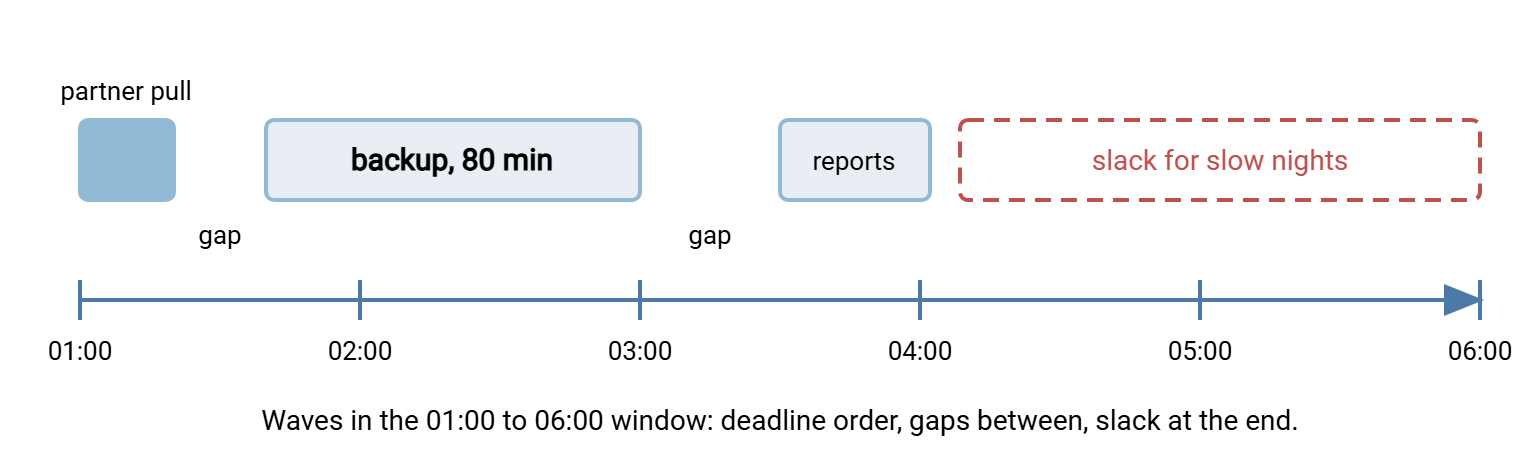
In cron and Task Scheduler the waves are simply different start times. Here is the crontab for the three jobs, with times in UTC, and the equivalent Task Scheduler command for the first:
# crontab on the transfer host (system clock set to UTC)
# min hour dom mon dow   command
0    1    *   *   1-5    /usr/local/bin/pull-partner.sh
40   1    *   *   1-5    /usr/local/bin/push-backup.sh
30   3    *   *   1-5    /usr/local/bin/send-reports.sh

# Windows Task Scheduler equivalent for the first wave
schtasks /Create /TN "PartnerPull" /SC WEEKLY /D MON,TUE,WED,THU,FRI ^
  /ST 01:00 /TR "C:\jobs\pull-partner.cmd" /RU SYSTEM
One job may genuinely depend on another — the reports cannot be sent until the backup has confirmed the database is consistent. In that case, do not use the clock as a proxy for the dependency. Chain the second job from the first's success instead, so that a slow night delays the successor rather than colliding with it. How to map and chain those dependencies is the subject of batch dependency mapping. And whatever the scheduler, make sure two copies of the same job cannot run at once. A job that is still going when its next start fires is the commonest self-inflicted collision. The article on locking and overlap prevention shows the lock file that stops it.
The Job That Overruns Into the Morning
Eventually a job will not finish inside its window. The partner's server is slow, the dataset doubled, the link was degraded. What happens next is the difference between a scheduling policy and a scheduling accident. A job with no overrun rule keeps running at full speed straight into the business day, and every complaint from the first article returns at 09:00.
There are two sane responses, and the right one depends on the job. A hard stop kills the job at the window's end and lets it resume the next night from where it left off. This suits backups and mirrors whose tools support resuming partial transfers. A soft landing lets the job continue past the window but throttled to a rate the daytime link can spare, so it finishes late rather than never. This suits jobs with a deadline later in the day. Both depend on the transfer being resumable, which is its own subject, covered in our Resume and Checkpoint Restart series.
On Linux, both fit in a few lines. The timeout command ends the first attempt when the window closes; rsync's --partial keeps whatever was transferred; and a second, throttled rsync picks up the remainder:
#!/bin/bash
# push-backup.sh: full speed for up to 260 minutes, then a throttled soft landing
SRC=/data/backup/
DST=backup@sftp.example.com:/inbound/

timeout 260m rsync -av --partial "$SRC" "$DST"
status=$?

if [ "$status" -eq 124 ]; then
  logger "push-backup: window closed, continuing at 12 Mbit/s"
  rsync -av --partial --bwlimit=1500 "$SRC" "$DST"
fi
timeout returns 124 when it had to stop the command, which is how the script knows to switch to the throttled second pass. The limit --bwlimit=1500 is 1500 KiB/s, roughly 12 Mbit/s, a quarter of the example link. For a hard stop, delete the second pass and let the next night's run resume. On Windows, Task Scheduler has the same hard stop built in. In the task's settings, "Stop the task if it runs longer than" ends it at the window's edge. A resumable tool continues the next night. A soft landing on Windows is a second task, scheduled at the window's end. It runs the same transfer with a throttle flag or under a QoS policy as described in throttling at the client and server.
Whichever you choose, the overrun must be visible. A job that quietly lands softly every night is a window that has already shrunk. Log it, count it, and treat three soft landings in a week as a capacity problem rather than bad luck.
Catch-Up After a Missed Window
Sometimes the job does not overrun; it never starts. The host was rebooting for patches, the scheduler service was stopped, the job failed early and nobody noticed until the morning. Now there is a night's worth of data to move and it is 09:15. The dangerous default is the scheduler's "run as soon as possible after a missed start" option, or an administrator clicking "run now". That puts a full-speed bulk transfer onto the link at the start of the business day.
A catch-up policy decides in advance what happens, and it depends on why the window was missed and how urgent the data is. The table below is the version most sites need.
| Situation | Catch-up action | Why |
|---|---|---|
| Data not needed until the next day | Wait for the next window; run two nights' worth then | No daytime impact; check the doubled size still fits the window |
| Needed today, no fixed hour | Run now, throttled to the daytime rate | Finishes in hours rather than tonight; link stays usable |
| Needed by a deadline this morning | Run now at full speed, warn the site, keep it short | A real deadline justifies the disruption; a warning halves the complaints |
| Missed because the job keeps failing | Fix first, do not catch up blindly | A retry loop at 09:00 is the worst of every case |
Encode the policy in the scheduler rather than in memory. In Task Scheduler, the "run task as soon as possible after a scheduled start is missed" setting is the catch-up switch. Leave it off for jobs in the first row and on for the second and third, with the throttled variant as the task action. In cron there is no missed-start behavior at all — a missed job is simply missed. So catch-up is a separate throttled job, run by hand or by a morning check that notices the missing output. Surviving the reboot in the first place is covered in surviving reboots and misfires, and the wider recovery of a whole batch night in catch-up after failures.
The Exceptions That Need Daytime Bandwidth
Not everything can move. Legitimate daytime transfers include a partner cut-off at noon, an inbound file that arrives whenever the partner sends it, and an urgent restore. They include a media file the design team needs in an hour. The goal is to make them the documented exceptions rather than the unexamined norm.
Treat each exception in three steps. First, confirm the deadline is real by asking the person who depends on the data, not the person who set up the job. Half of "must run at 14:00" jobs turn out to mean "someone looks at it the next morning." Second, give the survivors a limit: a throttle in the job, a per-account cap on the server, or the scavenger class from network-level QoS. That way, a legitimate daytime job still leaves the link usable. Third, record each exception with an owner and a review date. The deadline that justified it will quietly disappear when the downstream process changes, and nobody will tell you.
Event-driven transfers — a watch folder that sends a file the moment it appears — deserve a specific mention, because they run whenever the trigger fires, which is by definition not scheduled. If a watch folder feeds large files during the day, either throttle its transfer or add a rule that holds files above a size threshold until the window opens. Scheduling tools handle this naturally. In Sysax FTP Automation, for instance, a task can be triggered by a schedule or by folder monitoring. So the small urgent files can go on arrival while the bulk set runs as a separate scheduled task inside the window.
The Version to Tell a Colleague
Off-peak is a property of one link at one time, found on the utilization graph, not a company-wide hour. Size the window with arithmetic — link rate times hours, filled to seventy percent. Schedule jobs in waves ordered by deadline, with gaps between them and slack at the end. Express every time in UTC or with an explicit zone, keep critical starts out of the daylight-saving hour, and put partner times in writing. Decide before it happens what a job does when it overruns (hard stop and resume, or a throttled soft landing). Decide in advance what it does when it misses the window (wait, run throttled, or run now with a warning). Keep the real daytime exceptions short, limited, and reviewed.
One natural companion is fairness between flows, for the jobs that must share a window. The other is measuring transfer impact, for the graphs that tell you when a window is shrinking.
Frequently Asked Questions
How do I find the off-peak hours for a link?
Should I schedule jobs in local time or UTC?
Why not start all the overnight jobs at the beginning of the window?
What should a job do if it is still running when the window ends?
The job missed its window last night. Can I just run it now?
From the Sysax team: we build secure file transfer software for Windows. Sysax Multi Server is an FTP, FTPS, SFTP, and HTTPS server. Sysax FTP Automation handles scheduled, scripted transfers. Free trials are on the download page.