
Internal, Department, and Project Folders
Partner folders are easy to keep tidy, because a partner is outside the building and has to ask for everything. The internal area of a transfer server is where the trouble starts. Colleagues do not ask. They find an administrator in the corridor and say "can I just have a folder?" The administrator, who has eleven other things to do, says yes. Six months later the internal area has a folder per person, a folder per meeting, and a folder called temp that holds the finance team's year-end.
The internal area needs rules that are as firm as the partner rules. It needs one more thing partners do not: a clear answer to what a transfer folder is for. The people asking usually want a file share and have not noticed the difference. This article draws that line, then lays out department roots with owners and project folders with an end date. It gives you the card that makes the end date real.
It is part of our Folder Taxonomy series, and it assumes the reserved folder names and the one-root-per-owner idea from the earlier articles.
A Transfer Folder Is Not a File Share
A file share is a folder people work in. They open documents in place, save them back, keep them there for years, and map the folder to a drive letter so it feels local. A transfer folder is a folder files pass through. Something writes a file in, something else takes it out, and the folder is empty again in between. The two look identical in a directory listing and behave nothing alike, which is why the difference must be stated out loud.
The test is one question: does anyone open a file in place? If a spreadsheet is opened from the folder, edited, and saved back to the same path, that folder is a share, whatever the server calls it. A transfer server's folders should fail this test everywhere. Files arrive, are moved, and leave; nothing has a home there. A transfer folder where files live permanently is a file share with worse tooling and better logging, and its users will eventually ask for the tooling.
Why does the distinction matter enough for its own section? Because the two need different controls. A share needs collaboration features, backup of working documents, and versioning. A transfer folder needs the four reserved subfolders, a job that empties it, and an archive. Applying transfer rules to a share deletes people's work; applying share habits to a transfer folder fills the disk and stops the jobs. Our shares versus transfers article makes the full comparison. The article outgrowing the shared drive covers the moment a share starts to be used as a transfer system. That is the same mistake from the other side.
What the Internal Area Is For
The internal area is internal/ under the data root. It serves exchanges between internal systems and teams that need what the transfer server provides and a share does not. That could be an audit trail, a job that reacts to arrival, a jail, or a route to a partner. Finance exporting a payment file that a job forwards to the bank is an internal flow. Logistics receiving a nightly stock extract from the warehouse system is an internal flow. Two people swapping a presentation is not. The answer to that request is a share or a sharing service, not a transfer folder. The design of that service is covered in our person-to-person sharing series.
The internal area uses exactly the same conventions as the partner area, because a department is a partner that happens to be inside the building. Each department has a root. Each root has the four reserved folders, named from the server's point of view as in inbox and outbox conventions. Finance writes to internal/finance/inbox. A job takes the file and delivers it to the bank's partner outbox. The bank's statement comes back the other way and lands in internal/finance/outbox for finance to collect. The department never touches the partner root and the partner never touches the department root. The server's jobs are the only thing that crosses between them.
Here is the internal and project area of Meridian Parts, a synthetic distributor, alongside the partner area for comparison. Notice that every root, whoever owns it, has the same four children.
D:\transfer
├── partners
│   └── bluewater             (the bank)
│       ├── inbox
│       ├── outbox
│       ├── processed
│       └── error
├── internal
│   ├── finance               owner: head of finance; group: tx-finance
│   │   ├── inbox             payment files, collected by the bank job
│   │   ├── outbox            statements, delivered by the bank job
│   │   ├── processed
│   │   └── error
│   └── logistics             owner: warehouse manager; group: tx-logistics
│       ├── inbox
│       ├── outbox
│       ├── processed
│       └── error
└── projects
    └── fin-erp-cutover       owner: finance systems lead; ends: see card
        ├── inbox
        ├── outbox
        ├── processed
        └── error
The comments on the right are not decoration. They are the two facts every internal root must have on record before it is created. Those facts are a named owner and the group that may use it. Without an owner, a folder belongs to whoever created it, and that person will leave.
Department Roots With Owners
A department root is a root under internal/ that belongs to a business function rather than to a person. It is named for the function (finance, logistics, hr), never for the manager, the team name of the moment, or the system that happens to use it today. Systems and managers change; the function does not.
Access to a department root is granted to a group, not to individuals, and the group has an owner who approves membership. On a directory-backed server that is a security group. On a transfer server with its own user database it is whatever grouping the product offers. For that kind of server, the other option is one account per system with the department's owner responsible for it. A server such as Sysax Multi Server can give each internal account a home folder and per-folder permissions. So a finance export account lands in internal/finance and sees only its four folders, exactly like a partner. The mechanics of groups and inheritance are in least privilege in practice. The taxonomy's contribution is the rule that rights are granted at the root and the four subfolders, and nowhere else.
The owner of a department root is a named person, with a named deputy. The owner approves who may use it and answers for what passes through it. The owner is the person you telephone when a job fails. Ownership is recorded in the one-page standard and in the flow inventory, and it is reviewed when the owner changes role. The pattern for recording owners and contacts against each flow is in flow ownership and contacts. A root whose owner has left is an orphan, and orphans are found in audits, never in advance.
One rule catches the most common internal-area abuse. No personal roots. Not internal/dave, not internal/finance/dave, not internal/finance/inbox/dave. A personal folder is a file share for one, it outlives its person, and it cannot be handed to a successor without reading everything in it. If a colleague needs to send a file somewhere, they need a flow, and a flow has a department root already. If they need to keep a file, they need a share.
Project Folders: A Start, an End, and a Cleanup
A project folder is a root under projects/ created for a bounded piece of work. That includes a system migration, an audit, a one-off data exchange with a consultancy, a three-month pilot. The project folder has everything a department root has, plus two things a department root does not. It has an end date and a cleanup action that happens on that date without anyone remembering to do it. Most temporary folders become permanent by default. The project folder's design is that permanence takes effort and expiry takes none.
The name is a code, <department>-<short-name>, such as fin-erp-cutover. It never contains a date or a year. That sounds like a small rule until you have watched a folder called after a year survive well into the following one. At that point its name is actively lying. The dates belong on the card, where they can be changed and checked, not in the name, where they are a permanent fossil.
The lifecycle is fixed and the diagram below shows it. A project folder is requested with a card and created by the same skeleton script that builds partner roots. It is used, and then its end date arrives. The owner is notified and a short grace period runs. The contents are swept to archive/projects/, and the root is removed. A renewal is possible, once, by updating the card. A second renewal means it was never a project and should become a department root with its own owner.
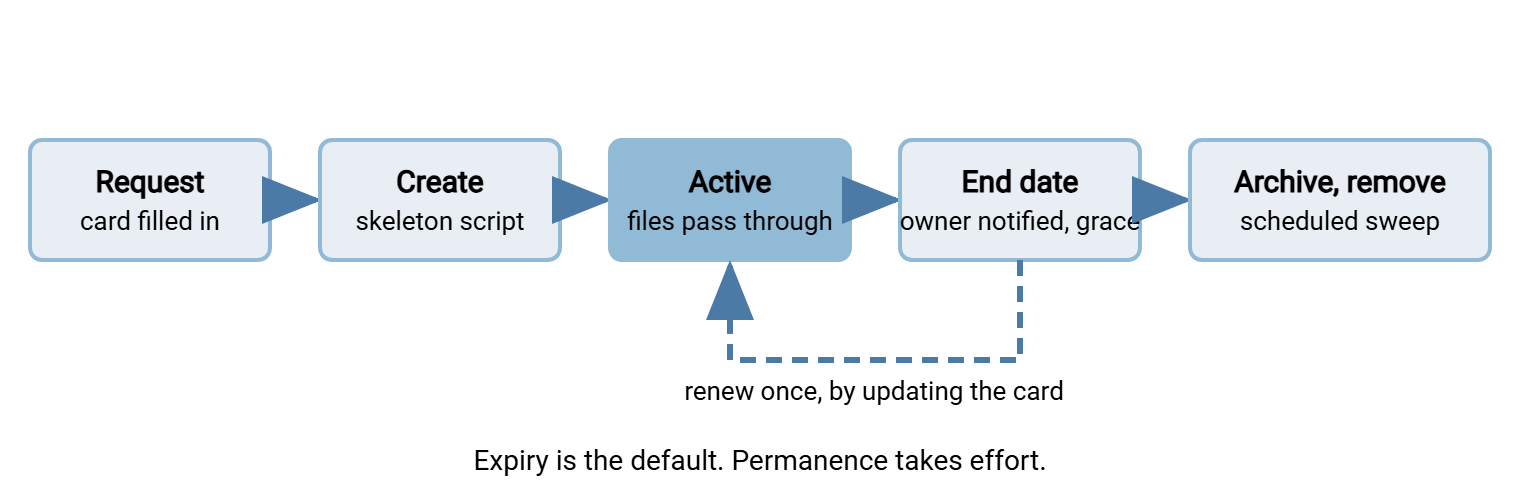
The sweep at the end is a scheduled folder operation. It is the same kind that archives partner processed folders each night. An automation tool such as Sysax FTP Automation can run the sweep as a timed task against whatever roots the card list says have expired. How the archive is laid out so the swept contents can still be found is the subject of archives that stay navigable. The age-based rules that decide what expires, and how to make them safe, are in age-based cleanup jobs. A quota on each project root, sized from the card, stops a "small pilot" from eating the volume. The article designing quota policies shows how to set one people accept.
Remember: a project folder without an end date is a department folder that has not been introduced to its owner yet. Write the end date on the card before the folder exists, make the sweep automatic, and make renewal a deliberate act. The folder that expires by default is the only kind that ever does.
The Project Folder Lifecycle Card
The card is the template that makes a project folder different from a hopeful mkdir. It is filled in by the requester, approved by the department owner, and stored beside the standard. The skeleton script reads the code from the card and the sweep reads the end date. Nothing on it is optional, and the questions it asks are the questions the administrator would otherwise have to ask in the corridor.
PROJECT FOLDER CARD

Code:            fin-erp-cutover
Root path:       /transfer/projects/fin-erp-cutover
Purpose:         Exchange of migration extracts between finance
                 and the ERP consultancy during cutover.
Owner:           Finance systems lead        (name, phone)
Deputy:          Finance controller          (name, phone)
Approved by:     Head of finance             (name, date)

Who writes:      ERP consultancy account (jailed to this root)
Who reads:       tx-finance group
Data class:      Internal; contains supplier bank details

Start:           YYYY-MM-DD
End:             YYYY-MM-DD   (max 90 days from start)
Renewal:         None used    (one renewal allowed; new end date here)

Quota:           20 GB
Cleanup action:  Archive to /transfer/archive/projects/fin-erp-cutover/
                 then remove root. Owner notified 14 days before end.
Retention:       Archive kept per finance retention schedule.

Reviewed:        YYYY-MM-DD by (name)
Two fields do most of the work. "Who writes" forces the requester to name an account. That means a consultancy gets a jailed account on the project root rather than a login someone lends them. "Cleanup action" forces a decision about the data before any of it exists, which is the only time that decision is easy. Everything else on the card is there for one reason. When the sweep notifies an owner who has since changed jobs, the deputy's phone number is on the same page.
"Can I Just Have a Folder?"
The request will keep coming, and the answer should be a short conversation rather than a reflex. Three questions settle it: who sends, who receives, and for how long. The table maps the answers to the right home. The last row is the one that saves the most disk.
| What they say | What it is | Where it goes |
|---|---|---|
| "Our system sends the bank a file every night." | Recurring internal flow to a partner | Department root inbox; job forwards to the partner outbox |
| "The consultants need to send us extracts for three months." | Bounded work with an outside party | Project root with a card; consultancy account jailed to it |
| "Warehouse sends logistics a stock file at six." | Recurring internal-to-internal flow | Logistics department root; warehouse system account writes to its inbox |
| "I need to get a big file to a colleague." | Person-to-person, one-off | Sharing service or a share; not a transfer folder |
| "We just need somewhere to keep the year-end files." | Storage, not transfer | A file share with backup; refuse politely and point at it |
The refusal in the last two rows is the hardest part of the job and the most valuable. It is not "no"; it is "not here, and here is where". A transfer server that says yes to storage requests becomes the corporate attic within a year. Attics are where the audit finds the spreadsheet with everyone's salary in it. The wider problem of people reaching for whatever folder is nearest, and what to offer them instead, is covered in governed drop zones.
The Project That Became a Department
Acme, a synthetic manufacturer, created projects/erp-migration for a three-month cutover, without a card. That was because the project manager was in a hurry and the administrator was helpful. Four years later the folder held several hundred gigabytes and was mapped as a drive letter on eleven finance PCs. It was the finance team's primary working location for month-end. When the transfer server was rebuilt, the new taxonomy's sweep treated a project root with no card as expired. The sweep archived it exactly as designed and removed it on a Sunday night. Finance discovered the archive on Monday morning, by which time the drive letter pointed at nothing, and the restore took until Wednesday. The postmortem recorded that the sweep had worked perfectly.
Every part of that story was preventable by the card. An end date would have expired the folder before anyone came to depend on it. A "who reads" field would have caught eleven PCs mapping a transfer folder as a drive. A cleanup action would have been agreed with finance in advance rather than discovered by them. And the one-renewal rule would have forced the conversation at month four. That conversation would have turned a project into a department root with an owner. That is what the project had quietly become.
The Version to Tell a Colleague
The internal area follows the partner rules with two additions. Department roots are named for the function, owned by a named person, used through a group, and shaped exactly like a partner root. Project roots have all of that plus an end date and a cleanup action. These are written on a card before the folder exists. Expiry is automatic and renewal deliberate. And nothing on the transfer server is a file share: if anyone opens a file in place, the file is in the wrong place. Say "not here, and here is where" as often as you need to.
The script that builds these roots is in per-partner folder structures. The script does not care whether the code it is given is a partner, a department, or a project. Where the swept contents go, and how to find them again, is in archives that stay navigable. The script that finds the personal folder someone created anyway is in documenting and enforcing the taxonomy.
Frequently Asked Questions
Why do department roots need the same four folders as partners? Internal users are trusted.
What happens if a project owner ignores the end-date notification?
Can a project folder be renewed more than once?
Someone has mapped a transfer folder as a drive letter. Is that a problem?
Why no dates or years in project folder names?
From the Sysax team: we build secure file transfer software for Windows. Sysax Multi Server is an FTP, FTPS, SFTP, and HTTPS server. Sysax FTP Automation handles scheduled, scripted transfers. Free trials are on the download page.