
The Client Sprawl Problem
"Which programs on our machines can send files outside the company?" The question came from Acme's security review, and the IT team expected to answer it in one line: the standard SFTP client. The inventory came back with nine. Two popular graphical clients in several versions each. The console ftp program built into Windows. The OpenSSH tools. A portable client living in a dozen user profiles. An uploader installed on a partner's instructions, a browser extension, a terminal suite's file-transfer companion, and a cloud sync agent somebody was using as a transfer tool. Nobody had chosen nine. Nobody would.
This is client sprawl: transfer software on the desktops that grew by accretion instead of decision. Servers get architecture reviews; clients get installed by whoever needed one that afternoon. This article explains how sprawl happens to well-run organizations and what it costs in support burden, security drift, and audit blindness. It also explains how to inventory the clients you have without turning the exercise into a hunt for someone to blame. It is part of our Client Standardization series, and it is the diagnosis the standard-setting and deployment articles then treat.
How Nine Clients Happen
Client sprawl is not a record of bad decisions. Almost every client in Acme's inventory arrived for a reason that made sense at the time.
- The free download. A user needs to send a file, searches for "FTP client", installs the first result, and it works. The install took two minutes and asked nobody's permission because nobody's permission was required.
- The partner's instruction sheet. A trading partner sends a PDF that says "install this client and use these settings". The user does exactly that. The partner's preferred client is now part of your estate, at whatever version the PDF was written for.
- The developer's favorite. Power users bring the tools they know. Each one is a good tool; together they are five tools doing one job.
- The inherited batch file. A scheduled task from years ago calls the console
ftpclient with a script file. It still works, so it is still there, and it is plain FTP. Our inherited FTP automation article is about exactly this artifact. - The acquisition and the image drift. An acquired company arrives with its own standard; laptop images built in different years carry different defaults. Neither gets reconciled because nobody owns the question.
- The operating system itself. Windows ships a console FTP client and the OpenSSH
sftpandscptools. They are on every machine whether anyone asked or not. That is fine for the OpenSSH tools and a problem for the plain-FTP one.
Each addition was locally rational. The global result, nine clients, no owner, no shared configuration, was chosen by no one. That is the pattern to recognize: sprawl is what happens when "which client do we use?" has no owner. The same mechanism produces server sprawl, which how sprawl happens dissects on the server side. Clients sprawl faster, because they are cheaper to add and nobody has to ask for a rack.
Northgate Retail found the whole mechanism in one folder. Their intranet's "Useful Software" share held a client installer copied there by a long-departed contractor. It was the first thing the search box returned for "ftp". So it was what a hundred and forty people installed, one at a time, over six years. During those years, the publisher fixed two security bugs in that version and shipped a dozen releases. The share was backed up nightly the entire time, which was the only maintenance it ever received.
The Three Costs
Sprawl feels free because no single client costs anything. The cost is in the multiplication.
Support burden
Every client has its own connection dialog, its own name for "passive mode", its own place to find the log, and its own wording for every error. A help-desk article written for one client is useless for the other eight. When a user says "it says the host key is not cached", the first ten minutes of the ticket go on working out which client they are looking at. Nine clients means nine sets of screenshots, nine update procedures, and nine ways for a partner onboarding to go wrong. The support cost of sprawl is not nine times one client's cost. It is worse, because you never become fluent in any of them.
Security drift
Security drift is the gap between the settings you would choose and the settings that actually exist on the desktops. It widens quietly. Unmanaged clients do not get updated. So vulnerabilities fixed upstream years ago are still present on machines that installed the client once and never again. Unmanaged clients keep their defaults, and defaults favor convenience. Plain FTP is offered as an ordinary option. Host-key warnings have a prominent "always accept" button. Saved passwords are stored in whatever form was easiest to implement. Logging is off. Nobody chose these settings either. They are simply what nine clients do when nobody configures them. The next section ranks the drifts by how much they matter.
Audit blindness
Sooner or later someone with authority asks what can move data out of the organization, and a sprawled estate cannot answer. Your transfer policy may say "SFTP only, approved client only", but a policy that cannot be checked against reality is a wish. An auditor might find the console FTP client on every machine and a scheduled task that uses it. That auditor will not be reassured by the policy document, however nicely it is formatted. And retiring plain FTP from the servers means little if the clients still speak it to someone else's server.
Security Drift, Ranked
Not all drift is equal, and the inventory that follows will turn up more findings than you can fix at once. Rank them. The table below orders the common drifts by consequence, so that the register you build later has a severity column that means something.
| Drift | What it looks like | Why it matters | Severity |
|---|---|---|---|
| Plain FTP in active use | Profiles or batch files connecting to port 21 without TLS | Credentials and file contents cross the network in cleartext | High |
| Host-key or certificate checking disabled | "Always trust" enabled; "accept any certificate" ticked; scripts that auto-accept | Removes the only defense against a man-in-the-middle; see MITM and trust failures | High |
| Stale client with published fixes | Versions several years behind the publisher's current release | Known, documented vulnerabilities in software that talks to the internet | High |
| Saved passwords in weak storage | Plaintext or trivially reversible credentials in config files and batch scripts | Anyone with the file has the partner login; see job credentials storage | High |
| Unknown download source | Installer from a third-party download site, possibly with bundled extras | You cannot vouch for what the binary does | Medium |
| Cloud and sync connectors enabled | Client can push files to personal storage accounts | An unmonitored exit path for data | Medium |
| Logging off | No session logs; nothing to reconstruct after an incident | Blindness after the fact; slower support | Medium |
| Version skew across users | Same client, five versions, five different dialogs | A support problem more than a security one | Low |
Two of the high-severity rows deserve emphasis because they are invisible in a simple software list. Plain FTP in use and disabled trust checking are configuration drifts: the same client, correctly configured, would be fine. That is the argument for the rest of this series. A standard client with a deployed configuration removes these rows; merely reducing nine clients to one does not.
Inventorying Without a Witch Hunt
An inventory only works if people cooperate with it, and people do not cooperate with investigations. So set the frame before the first query runs: you are counting tools, not judging choices. Everyone who installed a client did so to get their job done with the tools available. The outcome of the inventory is a better tool for them, not a reprimand. Say this in writing, say it again in the team meeting, and mean it. The moment one person is disciplined for a portable client in their profile, the next inventory will find nothing, because everything will be hidden. The same rule, applied to consumer sharing tools, is worked through in discovering shadow sharing without a witch hunt.
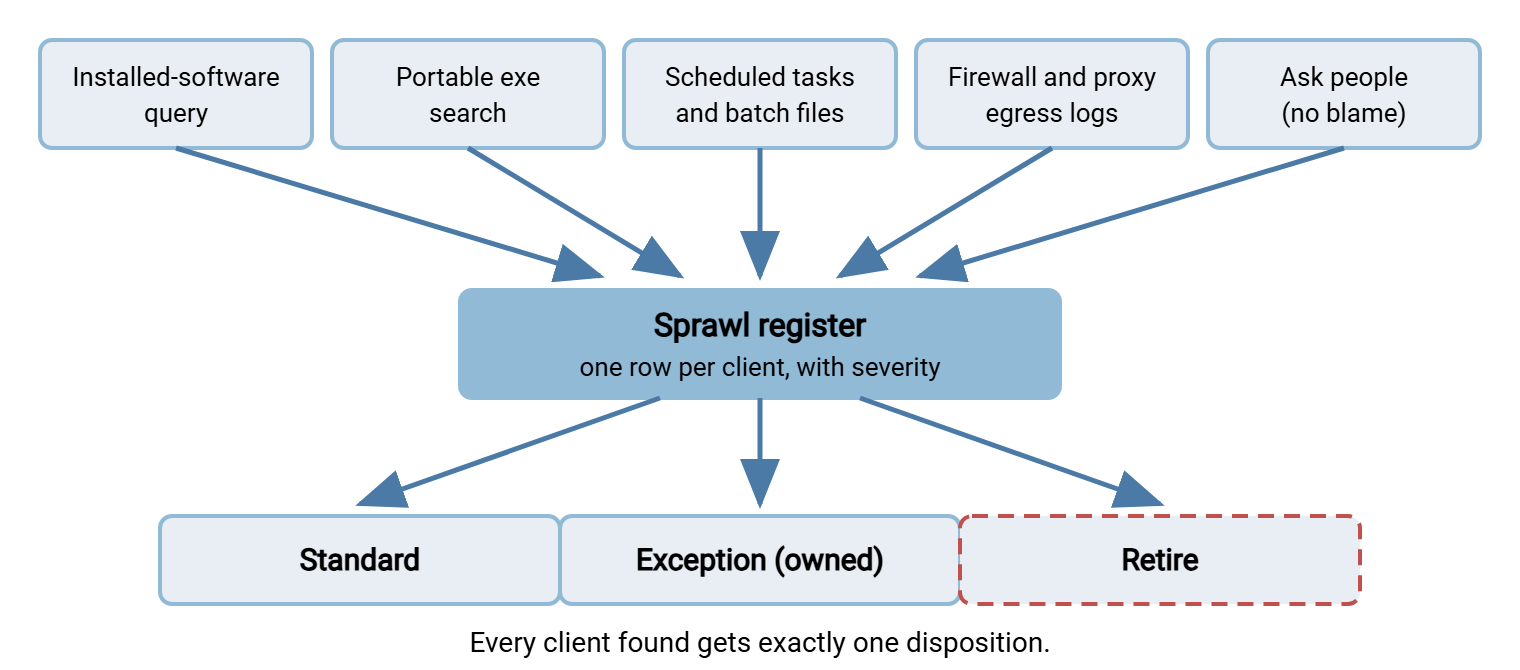
With the frame set, the inventory has five sources, and you need all of them because each one misses what the others catch.
Installed-software queries
Your endpoint management tool almost certainly reports installed software across the fleet. That is the first query, filtered for anything with "ftp", "sftp", "scp", "ssh", or "transfer" in the name. On a single machine, the same information lives in the registry's uninstall keys. The snippet below works on any Windows machine with PowerShell. The per-user key only shows the currently logged-on user's installs. That is one reason the fleet-wide tool matters.
# Installed clients: per-machine and per-user registrations
$keys = 'HKLM:\Software\Microsoft\Windows\CurrentVersion\Uninstall\*',
        'HKLM:\Software\WOW6432Node\Microsoft\Windows\CurrentVersion\Uninstall\*',
        'HKCU:\Software\Microsoft\Windows\CurrentVersion\Uninstall\*'
Get-ItemProperty $keys -ErrorAction SilentlyContinue |
  Where-Object { $_.DisplayName -match 'ftp|sftp|scp|ssh|transfer' } |
  Select-Object DisplayName, DisplayVersion, Publisher, InstallDate

# Portable executables that never registered an install
Get-ChildItem C:\Users -Recurse -Include *.exe -ErrorAction SilentlyContinue |
  Where-Object { $_.Name -match 'ftp|sftp|scp' } |
  Select-Object FullName, LastWriteTime

# Scheduled tasks that call a transfer client
Get-ScheduledTask | ForEach-Object {
  $task = $_
  $_.Actions | Where-Object { "$($_.Execute) $($_.Arguments)" -match 'ftp|sftp|scp' } |
    Select-Object @{n='Task';e={$task.TaskPath + $task.TaskName}}, Execute, Arguments
}
Portable executables
Portable clients never appear in an installed-software list because they were never installed; they were unzipped. The second query above searches user profiles for executables with transfer-related names. Extend the pattern with the file names of clients you already know about, and search the shared drives too. A portable client on a network share is one that a whole team runs. It is how Northgate's installer got its six-year career.
Scheduled tasks and batch files
The automation persona leaves tracks in the task scheduler and in .bat and .cmd files. The third query lists scheduled tasks whose actions mention a transfer client. A text search of script folders for ftp -s:, sftp -b, and similar patterns finds the batch files themselves. This is where plain FTP hides most reliably. The server-side counterpart is in discovering every server and script.
Network evidence
The queries above find what is on disk. Firewall and proxy logs find what is actually used. Outbound connections to ports 21, 22, and 990, grouped by source machine, give you a list of machines that transfer files and how. Port 21 traffic without a TLS upgrade is plain FTP in use, whatever the policy says. Cleartext discovery shows how to confirm that from the network side. Network evidence also tells you which installed clients are dormant, which matters when you decide what to retire.
Asking people
Finally, ask. A short survey, "which tool do you use to send files outside the company, and to whom?", has the no-blame framing repeated at the top. It will surface the partner-mandated uploader, the browser extension, and the cloud agent that no query recognizes as a transfer client. It also surfaces the why, which the register needs and no script can provide. Ask what the tool is for, not why they installed it. The first question gets an answer and the second gets a defense.
The diagram below shows the five sources feeding a single register, and the three dispositions every entry ends up with.
The Sprawl Register
The output of the inventory is a sprawl register: one row per client. Each row has what you found, why it is there, and what should happen to it. Here is Acme's, trimmed to seven rows. The "why" column is the one that comes from asking people, and it is the column that decides the disposition.
| Client | Class | Machines | Found via | Protocols | Why it is there | Disposition |
|---|---|---|---|---|---|---|
| Open-source GUI client, six versions | GUI | 212 | Software query | SFTP, some FTP | De facto standard by word of mouth | Candidate GUI standard; unify version, deploy config |
| Second open-source GUI client, portable | GUI | 31 | Exe search | SFTP | Developer preference | Consolidate into standard; exceptions lane if a feature gap is real |
| Console ftp.exe (Windows built-in) | CLI | All; used on 3 servers | Scheduled tasks; egress logs | Plain FTP | Nightly batch files to partner Meridian | Retire: replace in batch files, block port 21 egress |
| OpenSSH sftp and scp (Windows built-in) | CLI | All; used on 40 | Egress logs; survey | SFTP | Power users and admins | Candidate CLI standard; pre-seed known hosts |
| Partner-supplied uploader | GUI | 6 | Software query; survey | FTPS | Partner Bluewater's instruction sheet | Exception, owned by the partner relationship; test the standard against their server |
| Browser extension FTP client | Extension | 14 | Browser policy report | Plain FTP | Unknown; nobody admits to it | Retire via browser policy |
| Cloud sync agent used as a transfer tool | Sync | 9 | Survey | HTTPS | Occasional uploads to a printer; "it was easier" | Retire; provide a browser upload path instead |
Reading the Register
A finished register tells you more than "we have nine clients". Four patterns show up in almost every one.
The de facto standard already exists. One client is on half the machines because people recommended it to each other. That is not a bad thing; it is a head start. The standard-setting decision in choosing the organization's standard clients should weigh it seriously. That is because a standard most people already use is a standard that will be adopted.
The batch-file tail is where plain FTP lives. The interactive users mostly moved to SFTP years ago. The scheduled tasks did not, because nobody touches a working job. These rows are the highest-severity entries in the register and the ones that need actual engineering. That means a changed executable, a rewritten script, or a migration into an automation engine.
Partner-imposed clients are exceptions, not sprawl. A client that exists because a partner's instruction sheet demanded it has an owner and a reason. Record it. Test whether your standard client works against that partner's server (it usually does). If not, keep the partner-imposed client as a documented exception with a review date.
Some rows are not transfer clients at all. The cloud sync agent and the browser extension are people solving the occasional-upload problem with whatever was at hand. Their disposition is not "replace with the standard client"; it is "give them a path that needs no client". Why people reach for those tools in the first place is the subject of why shadow sharing happens.
The Occasional Uploader Is Not Sprawl
That last pattern deserves its own section, because it changes how much sprawl you actually have to fix. A surprising fraction of installed clients exist for people who transfer a file a few times a year. They installed something because they needed to send one file, once, and the client is still there. Reducing those installs to the standard client does not help them. They will forget how to use the standard client just as thoroughly. I have re-taught the same person the same host-key dialog three Decembers running. The dialog did not improve, and neither did my explanation.
The better answer is a path that requires no client at all. A transfer server with a web interface over HTTPS lets the occasional uploader open a link in the browser they already have, sign in, and upload. Nothing to install, nothing to inventory, no host-key dialog to explain, and the certificate trust comes from the operating system's existing store. Sysax Multi Server is one server that provides web-based transfers over HTTPS alongside SFTP and FTPS. That lets you route the occasional uploader through the browser. Meanwhile, the daily operators and automation jobs keep the protocols and clients that fit them. The persona split is laid out in GUI clients vs command-line clients. What that browser path needs to offer is in ad-hoc sharing requirements. Either way, several rows of your register may disappear without a single client being standardized.
Remember: the goal of the inventory is a register with a disposition for every row, not a count. "Nine clients" is a headline; "two candidates for standards, two exceptions with owners, five to retire, of which three are the same occasional-upload problem" is a plan.
From Register to Standard
The register is the raw material for everything that follows in this series. Choosing the organization's standard clients takes the candidate rows and turns them into a written decision with an exceptions lane for the partner-imposed cases. Deploying standard client configurations then closes the high-severity drifts, plain FTP, trust checking, credential storage, by pushing a configuration rather than trusting defaults. And the retire column, especially the batch-file tail, connects to the wider Retiring Plain FTP program. The one idea to hold onto: sprawl is not nine bad choices. It is one unowned question, and the register is how you take ownership of it. Nobody chose nine. Somebody can choose two.
Frequently Asked Questions
Is having several transfer clients really a security problem, or just untidy?
Should we uninstall clients we find during the inventory?
How do we find portable clients that were never installed?
What is security drift?
Does the built-in Windows console ftp client count as sprawl?
From the Sysax team: we build secure file transfer software for Windows. Sysax Multi Server is an FTP, FTPS, SFTP, and HTTPS server. Sysax FTP Automation handles scheduled, scripted transfers. Free trials are on the download page.