
The Control Layer: Policy Over Every Flow
"Whose is temp_vendor2?" Silence in the team channel. You found the account during a routine cleanup of the transfer server. It has write access to the outbound payments folder. Its password is the company name plus an exclamation mark. Its last login was eleven days ago — which means something, somewhere, is still using it. Nobody remembers creating it and nobody will admit to owning it. The account, for its part, keeps logging in. Every estate has a temp_vendor2, and each one is the same lesson: transfers were happening under rules nobody decided.
Control is the second capability that makes file transfer managed, and it is the one that prevents that lesson. Control means the answers to "who may connect, from where, to move what?" were decided — deliberately, by someone accountable. The infrastructure enforces the decision, so that reality cannot quietly drift away from it. It is the difference between a transfer estate that reflects policy and one that merely reflects history. History is a poor administrator; it never revokes anything.
This article defines the layer properly. It covers how control differs from mere configuration and the surfaces it must govern. It shows what control looks like at three maturity levels. It explains how to build a genuine version from accounts and discipline you already own, and what integrated tooling adds. It is part of our What Makes File Transfer Managed series. It is the capstone over three pillars this library already teaches in depth — authentication, permissions, and transfer policy. We will link into them as we go.
Control Is Not the Same as Configuration
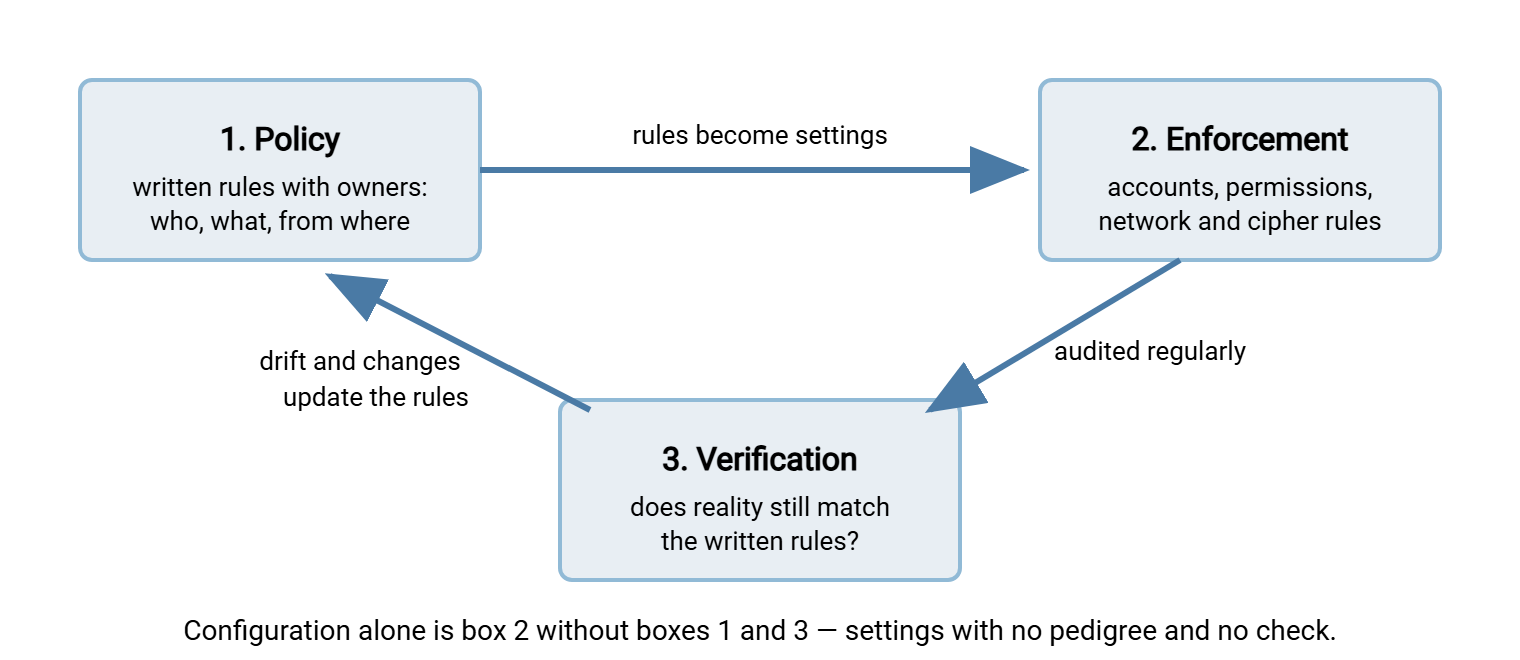
Here is the distinction this whole article turns on. Every server in your estate is configured — it has accounts, permissions, and settings, because it could not run otherwise. Almost no estate is thereby controlled. Configuration is whatever each box currently allows. Control is configuration with a pedigree: derived from a stated policy, consistent across the estate, and checkable against the policy at any time.
The practical test has three parts, and each must pass:
- You can state the rule. "Only the ERP service account may write to the bank's outbound folder, and only from these two addresses." If the rule exists only as the current settings — if the settings are the policy — you have configuration.
- The infrastructure enforces it. The rule holds even when the administrator who wrote it is on leave, even against a colleague in a hurry. Rules enforced by memory and good intentions are wishes.
- You can verify and change it. You can prove the estate matches the rule today. When the rule changes — the contractor leaves, the partner is offboarded — one deliberate action changes reality everywhere. It does not take one action per server that someone must remember.
The test says nothing about products. A single well-run server with documented accounts, scoped permissions, and a quarterly reconciliation passes. Consider five servers, each configured lovingly but differently. There are no written rules and no way to disable a person everywhere at once. Those servers fail — no matter how good each individual configuration is. Control is a property of the estate, not of any box in it.
The loop needs an owner, which the test implies without quite saying. Policy written by nobody in particular is policy nobody updates. Verification on nobody's calendar is verification that stops the first busy quarter. The owner does not have to be senior — they have to be named. Many estates give the loop to the same administrator who runs the transfer servers. They name a manager as the approver for exceptions, and that arrangement works fine. What never works is "the team owns it."
The diagram below shows control as what it really is: a loop, not a setting. Configuration is only the middle box; control is the whole circuit.
The Surfaces Control Must Govern
"Who may move what" unpacks into five specific surfaces. A control layer is complete when every one of them is decided, enforced, and checkable. It is thin exactly where one of them is still folklore.
| Surface | The decision | Enforced by |
|---|---|---|
| Identity | Who may connect at all, proven how — password, key, certificate | Accounts and authentication settings |
| Scope | What each identity can reach, and whether it may read, write, or delete there | Per-account permissions, home folders, virtual paths |
| Origin | From where connections are acceptable — a partner's known addresses, the internal network | IP allow and block rules, firewall policy |
| Method | Which protocols and cipher standards are acceptable; which legacy options are off | Server protocol and encryption settings |
| Change | Who may create a new account or flow, and what approval that takes | Admin rights, a request process, periodic review |
Each surface has a full treatment elsewhere in this library. For identity, authentication methods compared weighs passwords, keys, and certificates honestly. For scope, least privilege in practice turns the principle into folder-level decisions. The change surface — the one that governs the governors — is what a written transfer policy is for.
The fifth surface deserves one more sentence, because it is the one everyone forgets. temp_vendor2 was not an identity failure or a scope failure first. It was a change failure — an account created outside any process, which the other four surfaces then faithfully enforced. Control leaks at the point where new things are born. Accounts are born in a hurry and retire almost never.
One flow, fully decided: a worked miniature
To make the five surfaces concrete, here is a single flow with every decision made. The nightly payments file goes to the bank. Identity: one dedicated service account, svc-bank-out, authenticating with a key, not a password. No human logs in as it. Scope: the account can write to exactly one folder, /outbound/bank/, and can read nothing else on the server. If the account is ever compromised, that sentence is the size of the blast radius. Origin: connections accepted only from the two addresses of the job server that runs the flow. Method: SFTP only; the legacy plain-FTP listener is disabled estate-wide. Change: the flow has a named owner in finance. Altering the account, the folder, or the schedule requires their sign-off, recorded in the change log. Five decisions, one flow, nothing exotic — and now multiply by every flow you run. That multiplication is the layer.
Three Maturity Levels
Level zero: per-box folklore
Each server has whatever accounts and permissions accumulated over its lifetime. Rules exist as memories: "I think that account belongs to the old ERP," "we usually give partners write access to incoming." Offboarding a person means remembering every box they touched. Nobody can say, without a tour of the estate, what a given account can do. This level is not negligence — it is the natural sediment of years of reasonable individual decisions with no loop around them.
You can diagnose level zero with one question. "If this employee left today, what would we disable, and how do we know the list is complete?" If the answer involves the word "probably," the estate is at level zero regardless of how carefully any single server is configured. Probably is not a control; it is a forecast. (What a complete answer looks like is the subject of offboarding that closes the account.)
Level one: assembled control
A written policy exists and names owners. Accounts follow naming standards; each maps to a person or a documented service. Permissions follow a least-privilege pattern. A reconciliation runs on a calendar — scripts or checklists that compare each server's reality against the approved list and flag drift. Joiner and leaver checklists route through the transfer estate. Control at this level is real and auditable. Its cost is that the loop runs on human cadence — drift is caught quarterly, not prevented daily. I have run this loop by hand, and a quarter is exactly long enough to forget why you started it.
Level two: integrated control
Accounts live in one directory rather than on each box, so disabling a person once disables them everywhere. Permissions, origin rules, and cipher policy are set per account or per group in one administrative view. The platform refuses what policy forbids at the moment of connection, so drift within the platform is structurally difficult. External flows concentrate through one controlled entry point. That is the gateway pattern, covered in our gateways and proxies series. So the estate has few doors, each obeying the same rules. Fewer doors also means fewer keys under mats.
Building Control From What You Already Own
As with visibility, the assembled level is a genuine achievement available without a purchase. The recipe:
- Write the policy first. One page: approved methods, who approves accounts, the permission pattern, the offboarding rule. Our guide to approved and forbidden methods shows the shape. Without this page, every later step is folklore with better formatting.
- Inventory every account on every transfer endpoint. Owner, purpose, scope, last login. The unowned and the dormant get thirty days to find a defender, then they are disabled. This single sweep usually retires a double-digit percentage of accounts.
- Use one identity source where the platform allows it. Accounts backed by the operating system or directory mean the leaver process you already have covers transfers too.
- Scope every account to least privilege. Per-partner home folders, write-only drop areas, no shared "everything" account. Most transfer servers support this natively. In Sysax Multi Server, for instance, each account is limited to its designated folder areas. Where a server does not support this natively, home directories plus filesystem permissions get you the same result. The folder-level craft is in least privilege in practice.
- Treat service accounts as their own species. The accounts your scripts and jobs use outlive people and never complain. That makes them the estate's most durable risk; service account hygiene is the maintenance manual.
- Close the loop on a calendar. A recurring reconciliation — quarterly is a sane default — that re-runs the inventory and diffs it against the approved list.
A special word on partners, because external accounts concentrate risk: isolate each partner completely. One account per partner, one home folder per partner, and no path — however convoluted — from one partner's area to another's. Isolation means a leaked credential exposes one relationship instead of your whole exchange estate. It is the control property partners' own auditors most often ask you to demonstrate. If you run many partners, the account-per-partner discipline is what makes offboarding survivable. Our B2B partner exchange series treats that lifecycle as the program it deserves to be.
Kestrel Payroll ran the diff for the first time and found nineteen accounts that appeared on no approved list and that nobody recognized. Following its own written policy, it gave each one thirty days to find a defender. None did, and all nineteen were disabled on the same afternoon. By the next morning exactly one thing had broken: a client's overnight upload. It ran under an account created years earlier for a pilot that had quietly become production. The client was back within the hour on a properly owned account with an expiry date and a folder of its own. The other eighteen were never missed by anyone. The quarterly diff has not turned up more than two accounts since; the first sweep is always the big one.
The reconciliation is the step that turns configuration into control, so here is a copyable version:
QUARTERLY CONTROL RECONCILIATION (per transfer endpoint)

[ ] Export all accounts. Diff against the approved list.
    -> any account not on the list: disable now, investigate after.
[ ] For each account: last login within ninety days?
    -> dormant: disable, note in the log, tell the named owner.
[ ] Spot-check five accounts: do actual permissions match the
    documented scope? Any write access that should be read-only?
[ ] Any shared credentials in use? (one account, several humans)
    -> open a ticket to split; shared identity defeats the audit layer.
[ ] Leavers since last quarter: confirm each is disabled HERE,
    not just in email and payroll.
[ ] Exceptions granted last quarter: still needed? Expire the rest.
[ ] Record completion: date, runner, findings. This record is
    audit evidence — keep it with your transfer logs.
Remember: a control you cannot occasionally verify is a hope. If you adopt nothing else from this article, adopt the diff between "accounts that exist" and "accounts we approved". It is one export and one comparison. It finds a temp_vendor2 every time it runs until the estate is clean.
What Integrated Tooling Adds
The honest vendor disclosure from this series applies here: Sysax sells transfer software. So read this section as the argument a vendor would make. Then test it against the three-part control test above, on our products as on anyone's.
Integrated tooling compresses the loop. Where the assembled build verifies quarterly, a platform enforces at connection time. An account outside the directory cannot log in. A path outside the account's scope cannot be listed. A connection from an unexpected address is refused before authentication is even attempted. As a concrete example of the building blocks, Sysax Multi Server authenticates accounts against Windows or Active Directory as well as its own account store. It supports public-key authentication for SFTP and scopes each account to designated folder areas. It applies per-server IP allow and block rules. Those are the identity, scope, and origin surfaces from the table, administered in one place instead of five config files. Where policy demands validated cryptography, the server can also run in FIPS 140-2 mode. That is the method surface enforced at the cipher level.
Integration also changes the texture of offboarding and audit. When accounts are directory-backed, the departure process your organization already runs — disable in the directory, done — covers transfer access automatically. That closes the leaver gap that assembled builds must chase with checklists (the gap has its own article: why transfer accounts outlive their owners). Enforcement and logging live in the same platform. So "show me everything this account could reach, and everything it actually did" becomes one report instead of a forensic project.
Two honesty notes belong next to that paragraph. First, a transfer platform enforces control within its own boundary. The written policy and the approval process remain human work no software can do. So does the habit of routing flows through the platform rather than around it. Second, no single product covers the change surface. Who may request an account, who approves it, and when it expires is process, and process is yours. Tools make the loop cheap; they do not make it exist. We would sell you the process too; it refuses to be packaged.
How Control Fails
Four failure modes account for most control incidents, and all four are visible in advance if you look:
- Drift. Settings change for good reasons — an urgent fix, a partner's new address — and the policy page is not updated. So the next reconciliation cries wolf. Or, worse, the rules stop describing reality and everyone knows it. Rule: whoever changes enforcement updates policy in the same sitting.
- Exception rot. "Just for this week" write access still in place two years on. Every exception needs an expiry date at birth; the reconciliation sweeps the expired ones.
- Shared accounts. One login used by three humans and a script. The moment anything goes wrong, "who" becomes unanswerable — which quietly destroys the audit layer's evidence too. Split them before the incident, not after.
- The bypass. When the controlled path is slow or unclear, people route around it — a personal cloud account, an unsanctioned server. Every bypass is invisible to both your control and your visibility layer. The defense is partly cultural: an exceptions lane that answers in hours, so asking beats bypassing.
- The unguarded emergency. At two in the morning, mid-incident, someone grants broad access "to get payroll out" — reasonably. The failure is not the grant; it is that nothing schedules its removal. Emergency access needs a standing rule agreed in calm times. The access is logged when used, and reviewed — and normally revoked — on the next working day, no exceptions to the exception.
The Short Version
Control is decided-ness, enforced. Configuration is what your servers happen to allow. Control is configuration derived from written rules, consistent across the estate, and verifiable on demand. It is a loop of policy, enforcement, and reconciliation, not a pile of settings. It governs five surfaces: who connects, what they reach, from where, over which methods, and who may change any of that. You can assemble genuine control from an account inventory, least-privilege scoping, service-account hygiene, and a quarterly diff. Integrated tooling compresses the loop from quarterly to connection-time. It gives the estate one administrative view instead of five. And control leans on its siblings. It needs visibility to be verified. It feeds the audit layer the account-to-human mapping that makes evidence mean anything.
Next in the series: the automation layer — flows that run without hands, under the rules control just established.
Frequently Asked Questions
What is the difference between control and configuration?
Do I need special software to have a control layer?
What should I do with an account nobody recognizes?
Why are shared accounts such a problem for control?
How does the control layer relate to a transfer gateway?
How often should transfer accounts be reviewed?
From the Sysax team: we build secure file transfer software for Windows. Sysax Multi Server is an FTP, FTPS, SFTP, and HTTPS server. Sysax FTP Automation handles scheduled, scripted transfers. Free trials are on the download page.