
The Automation Layer: Flows Without Hands
"Has Dana done the Tuesday files yet?" In many offices there is a person — call her Dana — who starts every workday the same way. She opens the client, connects to the partner server, drags Tuesday's files across, renames two of them, and emails accounting that it's done. Dana is reliable. Dana is also a single point of failure with a two-week vacation coming. The flow she operates exists nowhere except in her hands. When people say a transfer estate "needs automation," Dana's morning is what they mean. Dana is not the problem; the morning is.
The twist that makes this article necessary is that most administrators reading this already automate. You write scripts. You schedule jobs. Should transfers run without hands? For anything routine, yes, and nobody needed an article for that. The interesting question is what turns a pile of automation into an automation layer. Its flows are inventoried and uniform in how they log and retry. They are resilient at three in the morning and still run correctly after their author changes jobs.
This article covers the layer on those terms. It covers what it contains, the difference between having scripts and having managed automation, and three maturity levels. It gives an honest build-it-yourself treatment that respects the scripting skills you have. It also covers what integrated tooling genuinely adds. It is part of our What Makes File Transfer Managed series. It stands on the shoulders of this library's automation pillars — the maturity ladder, watch folders, retry design — linked throughout.
What the Layer Contains
Automation in transfers is four related abilities, and a mature layer has all four:
- Scheduling — flows that run at defined times: the nightly export at half past one, the weekly archive on Sunday. Time-driven automation is the oldest kind and still carries most of the world's routine file movement.
- Event triggers — flows that run when something happens, most commonly a file arriving in a watched folder. Arrival-driven flows react in minutes instead of waiting for the next scheduled slot. The pattern and its pitfalls are covered in our introduction to event-driven transfers and the hot folder pattern.
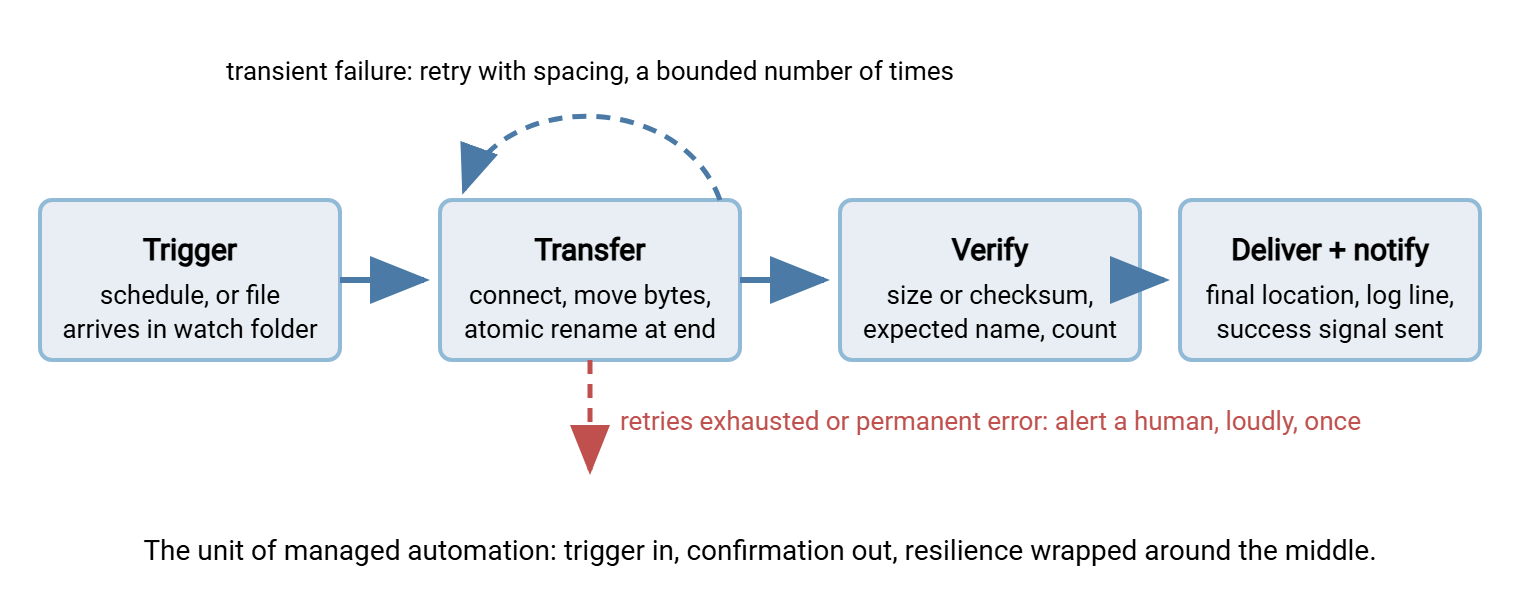
- Resilience — what happens when the attempt fails. It includes retries with sensible spacing and the distinction between "try again" errors and "stop and tell someone" errors. It also includes escalation that wakes a human only when a human is actually needed. This is a design discipline of its own — designing for recovery is the deep treatment.
- Multi-step workflows — because real flows are rarely one hop. Decrypt, validate, rename, deliver, notify: a pipeline of steps where step three failing must not pretend the flow succeeded.
A useful mental picture: a managed flow is not a script that happens to run. It is a unit with a trigger at one end and a confirmation at the other. Resilience wraps around everything between. The diagram below draws that unit.
You Are Already on the Ladder
Automation maturity is a ladder every estate climbs in the same order. It starts with manual operation, then a script, then the script on a schedule. Next come event-driven triggers, then orchestrated multi-step flows. We map those rungs — and how to climb them deliberately instead of accidentally — in automation maturity stages. If you have never scripted a transfer at all, that pillar's walkthrough of a first scripted transfer is the on-ramp.
This article's concern is different. It is the reason automation earns a place among the four MFT capabilities. At every rung of that ladder, your automation can be either a collection of private arrangements or a managed layer. The rung says how sophisticated the triggering is. The management says whether the whole thing is legible, uniform, and survivable. A shop at rung three with a managed layer beats a shop at rung five without one, every time something goes wrong.
There is also a name for the gap between the two: automation debt. These are flows that run but that nobody fully understands. People would fear to touch them and could not confidently rebuild them. Debt accrues silently while everything works. It is invoiced all at once during an incident, a migration, or a departure. Nobody publishes the interest rate. Taking a census of what you actually run is the first honest step toward the managed version of whatever rung you are on. That is the subject of automation inventory and debt.
What Makes Automation "Managed"
Take two estates, both fully scripted, both scheduled, no hands touching routine transfers. In the first, each script is its own small civilization. It has its own logging style, its own retry opinion (usually none), and its own copy of the password. Its author's name in a comment is the only documentation. In the second, the same flows exist, but they answer to shared rules. The difference is five properties — and these five are the whole distinction between having automation and having the automation layer:
- Inventoried. A list of every flow exists: trigger, source, destination, owner, what depends on it. If producing that list would take an afternoon of grepping scheduler entries and reading scripts, the flows own you.
- Uniform in telemetry. Every flow reports start, outcome, files, and errors the same way, into the same place. That is precisely what the visibility layer eats. Silent automation is worse than manual work, because Dana at least noticed her own failures. Two hundred jobs at scale fail quietly unless reporting is uniform by rule.
- Uniform in resilience. Retry behavior, transient-versus-permanent classification, and escalation are policy applied to all flows, not per-author artistic choices. One flow retries forever against a dead partner while another gives up in one attempt. That is not a style difference; it is operational chaos deferred.
- Disciplined about credentials. Flows authenticate with dedicated service accounts under the control layer's rules — not with passwords pasted into script bodies on five machines.
- Survivable. The flow keeps working, and keeps being changeable, after its author leaves. Survivability is documentation plus uniformity: anyone on the team can read any flow because all flows are shaped alike.
Remember: "managed" is a property of the estate, not of any script. One beautiful script proves nothing. Forty flows that all log, retry, and escalate the same way prove the layer exists. Uniformity is the feature. Cleverness is optional.
Three Maturity Levels
Level zero: hands
Routine transfers are performed by people. The costs are familiar — mornings spent dragging files, single points of failure named Dana. But name the subtler one too. Human-operated flows produce no records except what the human remembers. So level zero starves the visibility and audit layers as well. The first script you write pays three layers at once.
Level one: assembled automation
This level brings scripts and a scheduler under shared rules. There is a common wrapper for logging and retries. Credentials are held properly, and an inventory is kept current. Watch-folder flows use debounced, rename-safe patterns that keep them from processing half-written files. This is real managed automation, and plenty of disciplined shops run for years at this level. Its tax is that the rules live in convention: every flow must be written into compliance. The wrapper, the inventory, and the conventions are software and documents you maintain forever. Conventions have no support line; they have you.
Level two: integrated automation
Flows are defined in a tool rather than coded from scratch. Pick a trigger (schedule or folder event), pick source and destination, set retry counts and notification targets, done. Uniformity stops being a convention and becomes the only shape the tool produces. The flows are inventoried by existing — the tool's job list is the inventory. Telemetry lands in one place because there is only one engine writing it.
Building It Yourself, Honestly
The assembled level deserves a real recipe, because scripting skills are genuinely sufficient for it. Four moves take a pile of scripts to a managed layer:
First, write the contract. One page stating what every transfer script must do, then hold every script to it — new ones at review, old ones as you touch them. A workable contract:
THE TRANSFER SCRIPT CONTRACT — every flow, no exceptions

1. IDENTIFY   Logs flow name, start time, and trigger at launch.
2. REPORT     Logs outcome (files, bytes, duration) and exits nonzero
              on ANY failure — partial success is failure.
3. RETRY      Transient errors: retry a bounded number of times with
              spacing. Permanent errors (auth, missing path): fail fast.
4. ESCALATE   On final failure, alert the on-duty channel ONCE, with
              flow name, error text, and where to look next.
5. CREDS      Authenticates as its own service account. No secrets in
              the script body. Ever.
6. SAFE FILES Writes to temp name, renames on completion — consumers
              never see a half-written file.
7. LISTED     Appears in the flow inventory: owner, schedule, purpose.
Second, build one wrapper and make every script use it. Retry loops, log formatting, and alerting are written once and called everywhere. Items two through four of the contract become a library instead of forty copies. Third, keep the scheduler honest: jobs must survive reboots and missed windows, run as the right accounts, and be inventoried themselves. Our scheduled job hygiene checklist is the standard here. Fourth, respect arrival-driven flows' special physics: a watch folder that fires on a file still being written will faithfully automate the delivery of corruption. So debouncing and rename-on-complete are not optional garnish — they are the pattern.
Fifth — and this is the step everyone skips — rehearse the failure path. Automation is judged not by its good nights but by its bad ones. The bad-night behavior is the part you wrote but never watched run. So run it on purpose: block the destination's address for ten minutes. Confirm the retries space out, the give-up happens on schedule, and the alert arrives. Then confirm the classic miss: the flow recovers cleanly when the path returns instead of double-sending everything it queued. A one-hour failure drill per critical flow, once, finds the mistakes that would otherwise introduce themselves during payroll week. I have never run a drill that found nothing, which says more about my scripts than about drills.
Where does this build genuinely win? Custom logic, first of all. Consider a flow that must call your ERP's API mid-pipeline, or transform a file in ways only code can. That is a scripting job at any maturity level. Skills and budget, second. A team fluent in its scripting stack, with more time than money, can reach a high standard for the cost of discipline. The honest ledger of that tradeoff is our build versus buy series. It includes the hours the discipline actually costs per year. It argues the scripts' side properly before pricing it.
What Integrated Tooling Adds
Our standing disclosure: Sysax sells automation software. So test this section's claims against the contract above rather than taking them on faith. They describe what tooling should add, ours included.
The core gain is that the contract becomes the default instead of the discipline. In a dedicated tool such as Sysax FTP Automation, a wizard generates a scheduled task. Connection, schedule, retry and error handling, and an email notification on completion or failure are settings you pick. They are not code you write and maintain. Folder monitoring is built in for arrival-driven flows. Pipeline steps like OpenPGP encryption or decryption sit in the same job definition instead of in glue code. For the flows that still need real scripting, the tool's sysaxftp.exe command-line client scripts transfers from your own batch files. That is a sensible bridge, because no tool absorbs every weird flow. Pretending otherwise is how vendors lose arguments with administrators.
The server side automates too. A transfer server can react the moment a file lands rather than waiting for a client-side poll. Sysax Multi Server supports event triggers of that kind in its Pro and Enterprise editions (worth knowing before you plan around the feature). Server-side triggers pair naturally with client-side schedules. The partner uploads whenever they upload, and processing starts seconds later, no polling loop anywhere.
And the honest boundary, as always in this series: an automation tool manages the flows you define in it. It does not know your flows' business meaning. It will not stop you from automating a bad process very efficiently. It does not by itself give you the estate-wide inventory if half your flows still live elsewhere. The layer is complete when routine transfers — wherever they run — meet the contract. Tooling makes meeting it cheap, not automatic.
Two Traps That Come With Scale
Whichever way you build the layer, two traps arrive with success. They are consequences of automation working, not failing, which is why they surprise people. Success has side effects, and nobody writes a runbook for those.
Double-processing. Retries, reruns, and catch-up after outages all create the same hazard: the same file processed twice — two payment batches, two inventory updates. Managed automation is designed so that running a flow again is safe. It uses unique file naming, processed-file records, and moves-after-success that make a rerun a no-op rather than a duplicate. The discipline has a name, idempotency. Our plain-words treatment in idempotency explained is the companion read before you rerun anything in anger. checkpointing in automation covers the catch-up case specifically.
Invisible coupling. Flow B was scheduled at four because flow A "always finishes by three thirty" — an assumption recorded nowhere. Years later A slows down, and B starts consuming half-written output. Nobody connects the two, because the dependency exists only in a retired administrator's judgment. Managed estates write dependencies down in the flow inventory. Where stakes justify it, they replace schedule guesswork with arrival triggers. B starts when A's output actually lands, not when it usually used to.
Acme found its coupling during the inventory rather than during the incident, which is the cheap way to find one. Writing the flows down exposed why the warehouse export ran at four: the pricing job "always finished by three thirty". One administrator knew that fact. That administrator had retired the previous spring. The pricing job had been slowing by a few minutes a month as the catalog grew. It was by then finishing at three twenty-six. Acme replaced the four o'clock schedule with an arrival trigger on the pricing output. The export has started when the data lands ever since, later on busy days and earlier on quiet ones. The margin had been four minutes, and nobody had known there was a margin.
When Each Approach Wins
The fair summary, in one table — worth copying into any build-versus-buy discussion:
| Situation | Scripts + scheduler + contract | Dedicated automation tool |
|---|---|---|
| A handful of flows, strong scripting skills | Wins — the discipline is affordable at this scale | Optional |
| Many similar flows, retry and alerting must be uniform | Possible, but the wrapper becomes a product you maintain | Wins — uniformity is the tool's native shape |
| Deep custom logic inside the flow | Wins — code is the right tool for code-shaped problems | Use its command-line hooks, or keep that flow scripted |
| Team turnover is real; the author will leave | Survives only if the contract is genuinely enforced | Wins — flows are legible settings, not personal code |
| Most real estates | Both: a tool for the routine majority, contracted scripts for the exceptions | |
The Short Version
Automation is routine flows running without hands — scheduled or arrival-triggered. They retry sensibly, escalate only when a human is genuinely needed, and chain multi-step work without lying about partial failure. What makes it a managed layer rather than a pile of scripts is five properties: inventoried, uniform telemetry, uniform resilience, disciplined credentials, survivable past its authors. You can build that layer from a one-page contract, a shared wrapper, and scheduler hygiene. Tooling makes the contract the default shape of every flow. It earns its keep as flow count and turnover grow. Either way, automation is the layer that feeds the others. It generates the records visibility reads and the audit layer retains. That is exactly where this series goes next. Dana, meanwhile, gets her mornings back.
Frequently Asked Questions
I already script my transfers. Do I have the automation layer?
What is the difference between scheduled and event-driven transfers?
How many times should a failed transfer retry?
Why is a half-written file such a big deal for watch folders?
Should automated flows email me on every success?
Can automation replace the visibility layer?
From the Sysax team: we build secure file transfer software for Windows. Sysax Multi Server is an FTP, FTPS, SFTP, and HTTPS server. Sysax FTP Automation handles scheduled, scripted transfers. Free trials are on the download page.