
The Visibility Layer: Knowing What Moved
"Did the payroll file go to the bank last night?" It is four minutes past nine. The question comes from someone in finance who walked over instead of emailing. It is not really a question about payroll. It is a measurement of your visibility — the first of the four capabilities that make file transfer managed. If the answer comes from one screen in under a minute, you have the layer. Suppose the answer comes from logging into three servers, scrolling a scheduler's history, and calling the one colleague who "usually knows." You are answering from memory and luck, and one day both will be out of the office. (They tend to book the same week.)
Visibility sounds like the easy layer. Every server already writes logs; surely knowing what moved is just a matter of reading them? In practice it is the layer most estates lack, because the information exists in fragments. There is a log per server, a history per scheduler, a mailbox full of unread notifications. No fragment can answer the questions that matter. Hardest of all, no log anywhere records the file that never arrived. Absence is the one event that leaves no fingerprints.
This article treats visibility as one coherent capability. It covers what visibility must answer, why it is genuinely hard, and what it looks like at three levels of maturity. It explains how to build a real version from parts you already own, and what integrated tooling adds beyond that. It is part of our What Makes File Transfer Managed series. It is the capstone to the logging and monitoring pillars this library already teaches. We will link into them throughout.
What Visibility Actually Means
Visibility is central, current knowledge of every transfer in your estate. Unpack the three adjectives and you have the specification. Central: answerable from one place, not reassembled by hand from five. Current: reflecting this morning's reality, not last week's report. Every: covering all sanctioned flows — the moment half your transfers happen outside the view, the view stops settling arguments.
It helps to fence visibility off from its neighbors, because the borders are where people get confused:
- Visibility is not audit. Visibility answers "what is happening?" so you can operate today. Audit answers "what happened?" months later, with records intact enough to convince an outsider. They feed on the same raw material — transfer logs. But audit adds integrity, retention, and evidence discipline, which get their own article in the audit layer.
- Visibility is not server monitoring. Knowing the server's CPU is fine and its disk is half full tells you nothing about whether the invoice feed arrived. Transfer visibility watches the flows, not the box they run on.
- Visibility is not a pile of notifications. Two hundred "job succeeded" emails a day is data, not knowledge. If the answer to "did everything run?" is "probably, nothing shouted," you have alerting fatigue wearing visibility's badge.
One concrete scene shows what the capability is worth. A partner calls, certain they uploaded the claims batch on Tuesday; your processing team is certain nothing came. Without visibility this becomes a week of emails, screenshots, and hardening tempers. With it, one search settles the matter in a minute. The search shows a session from the partner's account at ten past six, one file, name, size, completed. Or it shows no session at all, which is just as useful. Visibility converts arguments about the past into lookups. That conversion, repeated across every dispute, incident, and morning question, is the layer's entire business case. As the definition article in this series argues, visibility is the capability the other three quietly depend on. You cannot enforce policy, trust automation, or assemble evidence over transfers you cannot see. If you have not read managed file transfer in plain words, it sets that frame.
The Questions the Layer Must Answer
A capability is best specified by the questions it must answer quickly. Here is the working set — copy it, because it doubles as an acceptance test for anything you build or buy:
THE VISIBILITY QUESTION LIST (each answerable in under five minutes, from one place)

STATUS     Which transfers ran in the last day, and did each succeed?
FAILURE    What failed, with what error, and has anyone been told?
ABSENCE    Which EXPECTED files have not arrived yet?           <- the hard one
FRESHNESS  When did each recurring feed last deliver, and is that late?
SEARCH     Find every transfer of files matching "PAYROLL_*" this week.
ACTIVITY   Who is connected right now, and what are they moving?
TREND      Is this feed slower or bigger than it usually is?
Two of these deserve a highlight. Absence is the question no log can answer directly. When a partner's export breaks on their side, nothing happens on yours — no session, no error, no line in any file. Absence can only be detected by comparing reality against a list of expectations. That is why an expected-files list is the beating heart of every serious visibility build. Our article on freshness checks and expected files covers the pattern in depth. Failure has its own trap: many transfer failures are silent by default, exiting politely with an error nobody reads. The mechanics are in why jobs fail silently.
Why This Is Harder Than It Sounds
Every ingredient of visibility already exists somewhere in your estate. The difficulty is entirely in the assembly, and it has four standard causes.
Fragmentation. The SFTP server logs to one file, and the old FTP box to another. The scheduler keeps its history in its own database. Each script writes wherever its author felt like on the day. Each fragment is truthful; none is sufficient. The morning question — "did everything run?" — spans all of them, which is why answering it takes forty minutes instead of four. Logs are like witnesses: each one saw part of it.
Format babel. One log says 226 Transfer complete. Another says session closed, 4 files. A third says nothing on success because its author only logged errors. Before you can search across sources you need a common shape — who, what, when, where, outcome. That is a decision, not a download. Our guide to what to log is that decision made carefully.
Rotation and loss. Logs are written for troubleshooting, so they rotate, truncate, and vanish with the disk. A view of "the last day" survives this; the search and trend questions do not. Visibility needs the fragments gathered somewhere durable before they evaporate — the pattern in centralizing transfer logs. A rotated log has no memory and no regrets.
The absence problem, again. Even perfectly centralized logs only describe what happened. The missing-file question requires expectations. Expectations require someone to write down, per flow, what "normal" looks like: name pattern, source, schedule, tolerance. Nobody enjoys this inventory. Every estate that skips it rediscovers why it matters during an incident.
Ownership fog. Even when the data exists, the answer often has no owner. The server team can read the server log. The application team knows what the feed means, and the scheduler belongs to a third group. So the nine o'clock question bounces between three inboxes. Part of building the layer is deciding, in writing, whose screen the answer lives on. A capability nobody owns decays into a folder of stale scripts within a year.
Three Maturity Levels
Level zero: visibility by complaint
Nothing is assembled. Transfers are visible only when a human downstream complains that something they needed is not there. The estate is not unmonitored, exactly — it is monitored by its victims. Level zero is where every estate starts, and it works better than it deserves to. That lasts right up until the complaint arrives from a regulator or a partner instead of a colleague. Those are the two audiences who do not send friendly reminders first.
Level one: assembled from parts
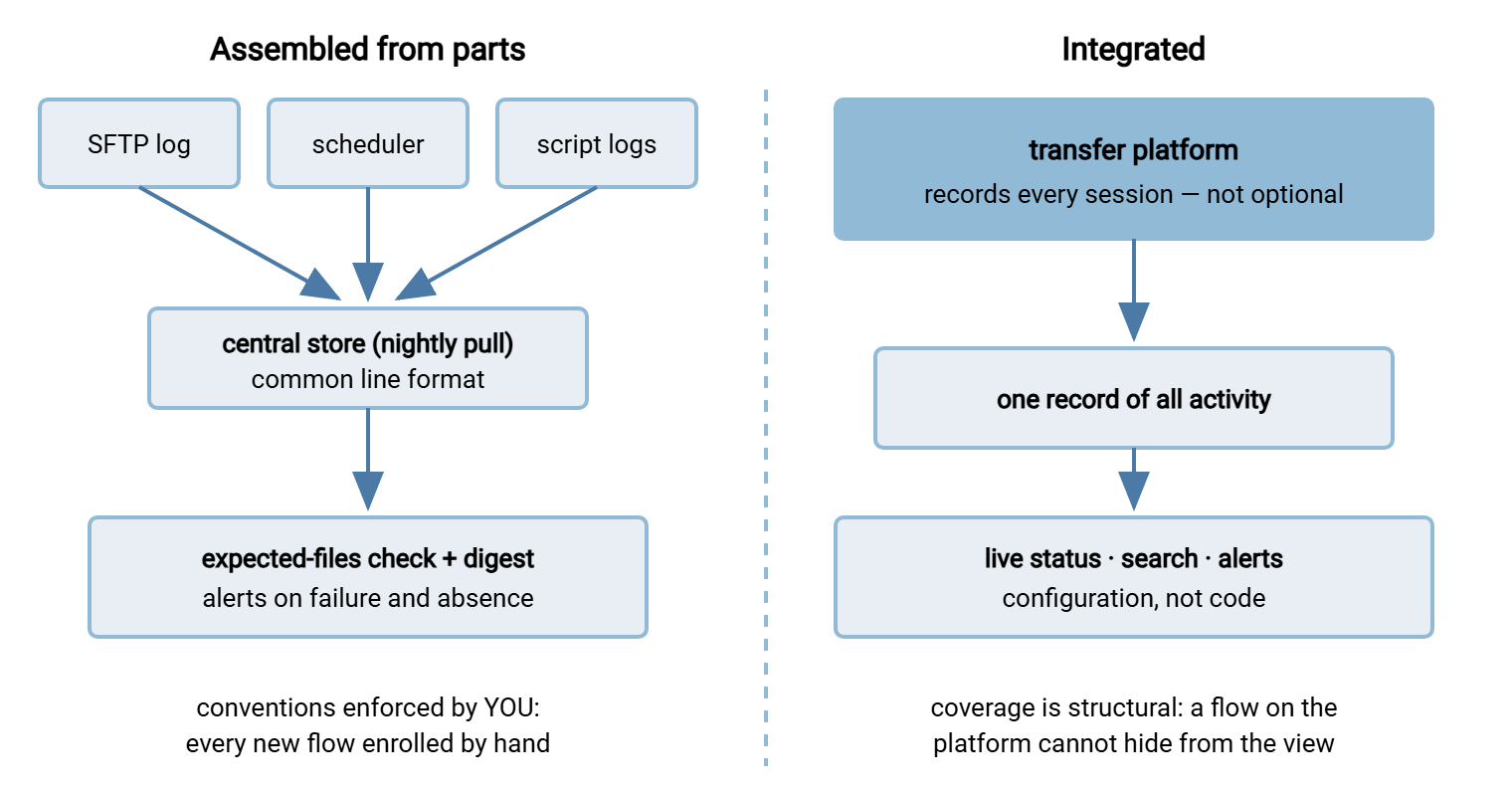
The logs are pulled to one place on a schedule, in a common shape. An expected-files list exists and a periodic check compares it against arrivals. Failures and absences produce an alert; a short morning digest summarizes the night. Search is a text-search away. This level is genuinely respectable — it answers the whole question list. It is held together by convention: every new flow must be enrolled by hand. The checks are themselves scripts someone must keep alive.
Level two: integrated
The transfer platform is the record. Every session is captured because capture is not optional. Status is live rather than batched. Search and dashboards read one store, and alerting on failure or absence is configuration instead of code. The distinctive gain is not prettiness — it is that coverage is structural. A flow cannot exist on the platform without appearing in the view. It is the one place where hiding takes more effort than showing up.
The diagram below contrasts the two working levels — the assembled build with its conventions, and the integrated build with its single record.
Building Visibility From What You Already Own
The assembled level is a real, creditable build, and here is its recipe, as this series promised. Nothing in it requires a purchase — it requires decisions and discipline, neither of which ships in a box, including ours.
- Decide the record shape. Pick the fields every transfer event must produce — timestamp, account, direction, file name, size, source, destination, outcome — and write them down. This one page is the foundation everything else stands on; what to log walks the field list properly.
- Turn on the logs you are not collecting. Most transfer servers log more than anyone reads. A server such as Sysax Multi Server, for instance, can write its activity log to a file or a database — raw material either way. The point at this step is simply that every sanctioned endpoint produces a record somewhere durable.
- Centralize on a schedule. Pull every fragment into one store nightly — even one well-named folder tree on one server. That converts forty minutes of morning archaeology into one search. The tradeoffs of shippers versus pulls are covered in centralizing logs.
- Write the expected-files list. Per recurring flow: name pattern, source, due time, tolerance. Keep it in version control — it is the closest thing your estate has to a map.
- Check and digest. One scheduled job compares arrivals against expectations and failures against silence. Then it sends a short digest: what ran, what failed, what is missing. The craft of status conventions is in job status monitoring basics.
A digest that fits in one glance is the deliverable. Something like:
TRANSFER DIGEST for the night ending 06:00
  RAN:      41 of 43 expected flows
  FAILED:   1  bank-upload      (auth error, retried x3, ALERTED)
  MISSING:  1  partner-invoices (due 02:30, not seen)  <- absence caught
  UNUSUAL:  payroll-out 3x normal size (delivered; flagged for review)
And the honest costs, stated plainly. This build is held up by convention. A new flow that skips enrollment is invisible, and nothing but your code review will catch it. The checks are software you now maintain forever. Search is text search — fine at ten flows, wearying at two hundred. Status is as fresh as the last pull, so "current" means "as of last night" unless you engineer harder. None of these costs is fatal; all of them grow with the estate. That growth curve, priced honestly, is the subject of our build versus buy series.
If the five steps feel like a project, shrink the scope rather than the standard. Run the full recipe for your three most consequential flows first — payroll, the bank, the regulator. Let the long tail join over time. A complete view of the transfers that can hurt you beats a partial view of everything. The small version proves the conventions before you ask forty flows to follow them.
Meridian Parts went looking for a suite after a dispute with a supplier over an invoice batch that both sides swore they had handled correctly. Before the budget meeting, one administrator spent two afternoons on the following work. They pulled the SFTP and scheduler logs into a single folder tree. They wrote a twelve-line expected-files list for the flows that touched money, and scheduled a check that mailed a digest at six. The next dispute, a month later, was settled by one search that showed the supplier's session, one file, completed, at ten past six. The suite request was withdrawn, because what they had needed was visibility. Visibility had turned out to be two afternoons and a list. They enrolled the remaining flows over the following quarter, one at a time, as each earned its place.
Remember: the expected-files list is the highest-value artifact in this entire article. A written list of what should arrive, from where, by when, turns the un-loggable absence problem into a checkable one. That holds even with no other work — no centralizing, no digest. Start there.
What Integrated Tooling Adds
Since our own products live in this market, the disclosure from the start of this series applies here: Sysax sells transfer software. So weigh this section as a vendor's honest best attempt. Hold any tool — ours included — to the question list above. What integration genuinely adds over a good assembled build comes down to four things.
Capture you cannot forget. The platform records every session as a side effect of carrying it. The enrollment gap — the assembled build's chronic disease — disappears for everything that flows through the platform.
Liveness. "Who is connected right now, moving what?" is answerable, because the view and the transfer engine are the same software. Assembled builds see the past; integrated ones also see the present.
Search and reporting as features. One store, indexed, with the reporting layer reading it directly. Where an assembled build greps, an integrated one queries — and feeds proper dashboards. Their design is its own craft covered in transfer dashboards and reporting.
Notification plumbing. Failure and outcome alerts as configuration. On the client side the same pattern applies. A scheduled-transfer tool like Sysax FTP Automation can email success or failure per job out of the box. That is exactly the per-flow signal a digest wants as input. Note the honest scope of both examples: a server's activity log and a client's job notifications are visibility raw material. The one-glance pane across your whole estate is still something you assemble around them, whichever vendor's components you use.
What integration does not add: expectations. No tool knows the partner sends invoices by half past two unless someone writes it down. The expected-files list, the tolerances, the definition of "unusual" — those stay your job at every maturity level, forever. That is the one line item no brochure offers to take off your hands.
The Edges of the View
Two limits apply to every visibility build, assembled or integrated, and pretending otherwise is how the layer gets oversold.
It sees only sanctioned paths. The transfer that went out over a personal cloud account appears on no dashboard. And why shadow sharing happens is rarely malice and usually a path that was easier. Visibility's coverage equals the fraction of real file movement that uses the paths you watch. That makes a clear, humane policy on approved and forbidden methods a visibility control, not just a compliance one. Estates with many forgotten servers have the same problem at estate scale. That cleanup is our sprawl consolidation series.
It fails silently itself. A dead check looks exactly like a quiet, healthy night. Whatever watches your transfers needs something watching it — a heartbeat, a "digest did not arrive" alarm in a calendar, anything. The pattern is monitoring the monitoring, and skipping it is how estates discover their visibility layer died in the spring sometime around autumn. I learned this the slow way: the digest stopped arriving, and for six weeks nobody missed it. That was the whole problem in one sentence.
The Short Version
Visibility is central, current knowledge of every transfer: status, failures, search, and — hardest — the absences. It is difficult because the truth is fragmented across logs that rotate. It is also difficult because missing files leave no trace anywhere except against a written expectation. You can absolutely build the layer from parts you own: a record shape, centralized logs, an expected-files list, one checking job, one digest. Integrated tooling replaces the conventions with structure — capture that cannot be forgotten, a live view, real search. It earns its keep as flow count and consequence grow. Either way, the expectations remain yours to write.
Next in the series is the control layer — from knowing what moved to deciding who may move what. And if this article convinced you to start anywhere, start with the expected-files list and the freshness-check pattern that reads it.
Frequently Asked Questions
What is the difference between visibility and audit in MFT?
How do I detect a file that never arrived?
Isn't emailing a notification from every job enough visibility?
Can I build real transfer visibility without buying anything?
What does an integrated transfer platform add if my scripts already work?
What can't a visibility layer see?
From the Sysax team: we build secure file transfer software for Windows. Sysax Multi Server is an FTP, FTPS, SFTP, and HTTPS server. Sysax FTP Automation handles scheduled, scripted transfers. Free trials are on the download page.