
After the Purchase: Rollout, Baseline, and the Ninety-Day Review
The license key arrives in an email on Thursday afternoon, and with it the pressure that drove the evaluation evaporates. "Shall we just use the trial box for now?" This is the most dangerous week of the whole project. The trial server gets promoted to production for now. The hardening everyone agreed on is deferred until after the first partner is moved. The documentation is postponed until things settle, and things never settle. A year later the server is running, and nobody can say exactly how it is configured. The decision memo's promises have quietly gone unchecked.
The ninety-day rollout is the plan for the period after the signature. This article, the last in our Choosing a File Transfer Server series, walks through it. It covers the deployment baseline and hardening before the first flow rather than after. It covers documenting the configuration while the reasons are still fresh and migrating flows in a deliberate order. It also covers the review meeting that checks whether the decision recorded in the memo is holding up. By the end of it you have a server you can describe, defend, and hand over.
The Ninety Days, Mapped
The disclosure this series makes each time: Sysax sells a file transfer server. So this is the rollout we would want a customer to put our product through, including the review at the end. That review is where a purchase gets judged against what the vendor promised. Nothing below assumes the product was ours. It assumes the product was chosen by the method in the earlier articles and that the memo exists.
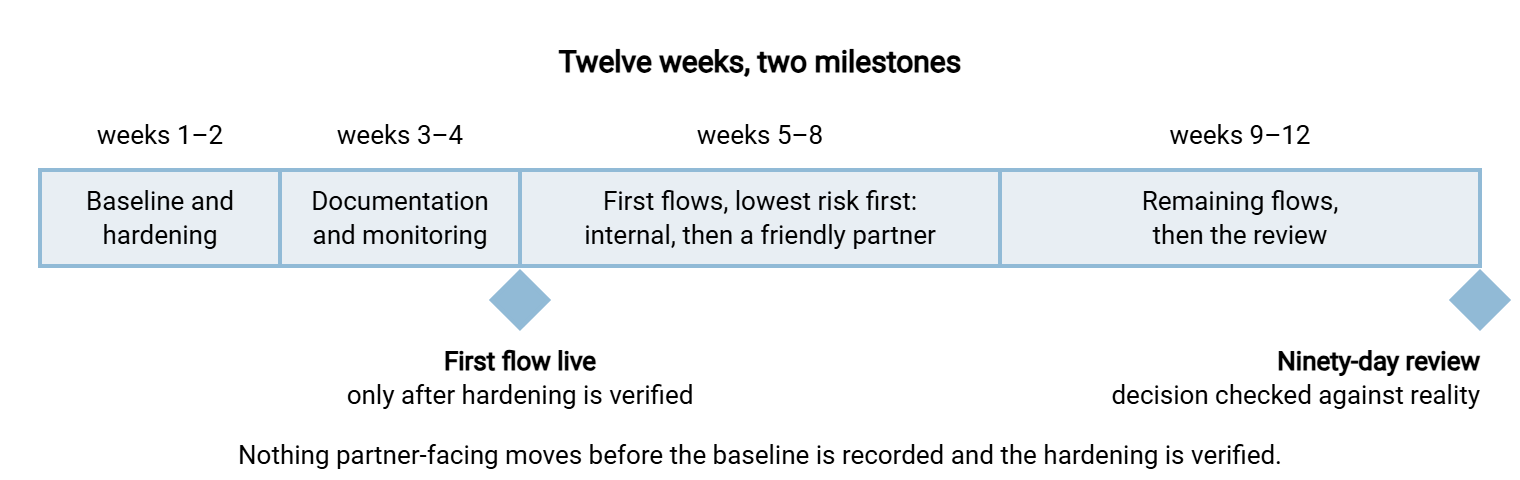
Ninety days is long enough to move real flows and short enough that the people who made the decision are still in the room. The calendar below is a working shape. It allows two weeks for the baseline and hardening, then two for documentation and monitoring. Four weeks cover the first flows. Another four cover the remainder and the review. Teams with a dozen flows compress it; teams with a hundred stretch the flow weeks and keep everything else. The diagram shows the shape and the two points that matter most, the first live flow and the review.
Weeks One and Two: The Deployment Baseline
A deployment baseline is the recorded, known-good state of the production server on the day it goes live. Every setting that matters is written down with the reason it was chosen. The baseline is not the trial server renamed. The trial server has test accounts, relaxed settings from the failure injections, and a history nobody fully remembers. Build production fresh from a clean operating system, using the trial results sheet as the recipe and the vendor documentation as the reference.
The baseline is recorded as a document, not as a backup. A backup restores the state; only the record explains it. Keep it short enough that someone will actually read it:
BASELINE RECORD — production transfer server        Recorded: ______ by ______

HOST         OS build and patch level; VM host; CPU/RAM/disk; snapshot policy
NETWORK      Position (DMZ/internal); addresses; listeners per protocol;
             passive port range and external address; firewall rules by ID
SERVICE      Runs as a service under account ______ (least privilege);
             start type automatic; recovery action on failure
PROTOCOLS    Enabled: ______   Disabled: ______   Reason for each enabled one
CRYPTO       TLS certificate: issuer, expiry, renewal owner;
             SSH host key: fingerprint, distributed to partners on ______;
             cipher/protocol policy in force; validated mode on/off and why
AUTH         Directory binding (OU, service account); key-only accounts;
             lockout thresholds; admin interface reachable from ______ only
STORAGE      Root folder layout; per-partner confinement model; quotas;
             retention rule and purge schedule
LOGGING      What is logged; local destination; central platform;
             retention; who can read it
BACKUP       What is backed up (config + keys + certs); schedule; last
             tested restore date and time taken
LICENSE      Edition; unit and count; maintenance renewal month; vendor
             support contact and contract reference
DEVIATIONS   Every setting that differs from vendor defaults, with reason
Here is what the service, crypto, and logging lines look like for one candidate. This is an example of the specificity the record needs rather than a recommendation. Sysax Multi Server runs as a Windows service. So the service line names the account it runs under and the recovery action. The server logs activity to a file and to a database. So the logging line names both destinations and which one feeds the central platform. The server offers IP allow and block lists. So the auth line records which addresses may reach the administrative interface. The server also has a FIPS 140-2 mode. So the crypto line says whether the control matrix required it to be on. Whatever product you chose, every one of those lines should be answerable from the record without logging in.
Remember: the deviations line is the most valuable one. Defaults are documented by the vendor; only you can document why you changed them, and the next administrator will otherwise change them back.
Hardening From Day One
The single most common rollout mistake is to move the first partner before hardening, on the theory that hardening can be layered on later. It cannot. The problem is not that the settings are hard to apply. Every later change to a live partner-facing server is a change window, a partner notice, and a risk. So the hardening steps get deferred one partner at a time until they are deferred forever. Harden before anything faces a partner. Not after the first one. Not after the friendly one. Before. Our hardening program overview is the full program. The day-one subset is:
- Disable every protocol not on the requirements list. Plain FTP stays off unless a documented exception (that label printer) requires it, confined by address.
- Restrict ciphers and protocol versions to a modern policy. Test it with the partners' actual clients before go-live rather than after their first failed connection.
- Run the service under a least-privilege account that can reach the transfer folders and nothing else on the host.
- Lock down the administrative interface to the addresses and accounts that need it; it should never be reachable from the partner-facing side.
- Enable lockout or throttling with the thresholds the trial verified, and confirm the failures are logged with source addresses.
- Strip identifying banners so the server does not announce its product and version to every scanner that connects.
- Remove every trial-era artifact: test accounts, the relaxed settings used for failure injections, sample folders.
- Turn on the validated cryptographic mode if the control matrix demands it, and record the decision either way.
Then verify, from outside, that the hardening is real. Scan the listeners, attempt the forbidden protocol, try a weak cipher, hit the admin interface from the wrong address. The hardening verification article walks through those checks. Their output is the first entry in the evidence folder that the ninety-day review, and later the auditor, will ask for.
Northgate Retail promoted the trial server to production on a Friday, for now. Fourteen months later a new administrator found the failure-injection test account still enabled, with the password "test" and no folder restriction. There was also a plain-FTP listener that the injection days had left switched on. Nobody had used either, which was the only good news. The auditor wrote both up under a heading nobody enjoyed reading. The hardening that the decision memo had agreed to was done that week, fourteen months late. It took eleven partner notices and two change windows it would not have needed in week one.
Weeks Three and Four: Documentation and Monitoring
Documenting while the reasons are fresh
Two weeks after go-live, the team still remembers why every setting was chosen. Two months after, they remember the settings. Two years after, they remember neither, and the server becomes something nobody dares change. Documentation written in weeks three and four captures the "why" while it exists. The set is small:
- The baseline record above, kept current with every change and its reason.
- Runbooks for the timed tasks from the trial cover onboarding a partner, rotating a key, restricting an address, renewing the certificate, and restoring the configuration. Each is written as the steps the trial admin actually followed, with the time it took. The onboarding runbook is also the start of the account process described in provisioning transfer accounts.
- The decision memo and the vendor answers, filed together. That makes the licensing, support, and exit answers findable by someone who was not in the evaluation.
- The contacts and dates: the vendor's support channel and contract reference, the maintenance renewal month, the certificate expiry, the key-rotation cadence.
- The partner sheet: for each partner, protocol, authentication method, allowed addresses, folder, contact, and the date they were told the new host-key fingerprint.
Monitoring wired in before the first partner
A transfer server that fails silently is worse than one that fails loudly, and silence is the default. The server is perfectly comfortable with it. Before the first partner-facing flow moves, three things must be in place. Logs must flow to the central platform with fields intact. The centralizing logs article covers the mechanics and the what-to-log guide the fields. Alerts must exist for the events that matter: repeated authentication failures, the service stopping, the disk filling, the certificate approaching expiry. They must reach a person, which our guide to alerting that gets read explains is harder than it sounds. And for every scheduled flow there must be a freshness check. That is an alarm that fires when an expected file has not arrived by its deadline. The absence of a file produces no log line to alert on. The freshness checks article shows how to build one.
Weeks Five to Eight: Migrating the First Flows Deliberately
Flows move in order of risk, not convenience, and the first three are chosen to teach you something. First, an internal flow with no partner, an application dropping files for another application, so that the first mistakes are private. Second, the friendly partner from the trial window, who already knows the new fingerprint and has tolerance for a hiccup. Third, a flow with a real deadline but a forgiving downstream, so that the freshness check and the alerting get their first genuine test. Only then the critical flows, one at a time, each with its own rollback.
Each flow follows the same checklist, and the checklist is what makes the twentieth migration as careful as the first:
- Confirm the flow's census row: direction, protocol, schedule, file mix, deadline, downstream consumer, and who to call if it breaks.
- Create the account on the new server from the runbook: key-only where the requirements say so, confined to its folder, restricted by address.
- Tell the other party what will change (address, fingerprint, certificate chain) in writing, with a date, using the partner sheet.
- Run in parallel where the flow allows it. In that case, the old server keeps receiving while the new one receives a copy. Compare the outputs for a full cycle.
- Cut over at the agreed time and watch the first live cycle end to end. Check that the log line, the central platform, and the freshness check all saw it.
- Keep the old path alive but blocked for one cycle, so rollback is a firewall rule rather than a rebuild. Then retire it and record the date.
The cutover strategies covered include parallel run, big bang, and phased by partner. These and the validation and rollback mechanics are covered in depth in our cutover strategies and validation and rollback articles. The article change rollout and rollback covers the same discipline for every change after this one. And writing the partner connection guide gives step three a document the partner can keep. The layer-by-layer mechanics of moving accounts, keys, and folders between products are the subject of our platform migration mechanics series. If the client side of a scheduled flow is being rebuilt at the same time, a scheduling tool can hold the connection profile in one place. An example is Sysax FTP Automation, which holds the host, protocol, key, and mode. With that profile in one place, the cutover is a profile edit rather than a script hunt.
Gotcha: the flow that breaks is rarely the one you were watching. It is the one whose census row said "monthly" and which nobody thought about until month-end. Schedule the review after at least one month-end has passed on the new server.
Weeks Nine to Twelve: The Rest, and the Ninety-Day Review
Finishing the flows
By week nine the checklist is routine and the remaining flows move at a steady pace, with the critical ones given their own change windows. Resist the temptation to let the old server linger "just in case" past the last cutover. A server that is still reachable is a server partners will still use. Our proving it is gone article describes how to show, with logs, that nothing still talks to it before it is powered off.
The review meeting
The ninety-day review is a one-hour meeting with the people who signed the decision memo (the administrator, security, the budget owner). Whoever runs the flows day to day also attends. Its purpose is not to celebrate or to blame. It is to compare the decision with reality while the memo's reasoning is still legible, and to write down what was learned. The agenda:
NINETY-DAY REVIEW — agenda (one hour)

 1. The three measures from memo section 11: each one, met or not,
    with the evidence (log export, timing sheet, incident list).
 2. Flows moved vs planned; flows remaining; anything that went back.
 3. Incidents since go-live: what, how detected, time to fix, root cause.
    Was it detected by monitoring or by a person noticing?
 4. Support: tickets opened, time to first useful answer, compared
    with the vendor's written answer to question S1/S2.
 5. Advisories: any received; time from advisory to patch applied.
 6. Administration time: the timed tasks, actual vs trial timing;
    hours per week spent on the server.
 7. Conditions of purchase (memo section 9): each one, satisfied or not.
 8. What the score got wrong: rows scored 3 or 4 that disappointed,
    rows scored low that turned out not to matter.
 9. The dissent paragraph, reread aloud: was any of it right?
10. Actions with owners and dates; date of the next review (one year).
Items eight and nine are the ones that improve the next evaluation. A row that scored four in the trial and disappoints in production means the verification step was too weak. A dissent that turned out to be right means the tie-breakers or the weights deserve another look. I have sat in a review where the dissent paragraph was right on every point. It was not a comfortable hour, and it was the most useful one of the project. Write the findings into the memo as an addendum, and file the review with it. The pair becomes the starting point when this server is eventually replaced. The pair also becomes the baseline for the ongoing vendor monitoring that continues for the life of the product.
When the Review Says the Decision Was Wrong
Sometimes the honest answer to item one is that the measures were not met, and the reasons are in the product rather than the rollout. This is where the earlier articles pay off, because the memo already contains the response. The conditions of purchase say what the vendor committed to. An unmet condition is a contract conversation, not a shrug. The exit answers say how accounts, keys, and configuration come out. The vendor question set was asked for precisely this day. And the dissent paragraph names the runner-up and the case for it, which is a far better starting point than a fresh shortlist.
Two cautions. First, separate product failure from rollout failure with evidence. A server that fails because hardening was skipped or monitoring was never wired in has not been tested yet. In that case, the fix is the rollout, not the vendor. Second, do not let sunk cost extend a bad decision. The license is spent either way, and the partner coordination of a second migration is cheaper the earlier it happens. A decision reversed at the ninety-day review with a clear memo trail is a process working. The same reversal after three years of quiet workarounds is the failure this whole series exists to prevent.
The Series, Closed
From the requirements worksheet through the criteria, the trial, the vendor questions, the scoring, and now the rollout, the thread has been the same. Write down what you need before you look, verify instead of believing, and keep the reasoning where the next person can find it. The ninety-day review is where that thread is tied off, and where you find out whether it held.
The server is now baselined, hardened, documented, monitored, and carrying real flows, with a review on file that says how well the decision is holding. Nothing on it is "for now". From here the work is operational. There is the update and patch strategy for the years of upgrades ahead. There is the evidence auditors accept when they ask about the flows. And there is the vendor monitoring that keeps the support and advisory promises honest for as long as you own the product.
Frequently Asked Questions
Can we just promote the trial server to production?
What if a partner cannot move during the ninety days?
Who should run the ninety-day review?
Is hardening really necessary before the first internal flow?
What should the three measures in the memo look like?
From the Sysax team: we build secure file transfer software for Windows. Sysax Multi Server is an FTP, FTPS, SFTP, and HTTPS server. Sysax FTP Automation handles scheduled, scripted transfers. Free trials are on the download page.