
Checkpointing in Automated Jobs
Resume, as the earlier articles in this series describe it, is about one file: pick up at the offset where the bytes stopped. But most automated transfers are not one file. They are a run: list a folder, send two hundred files, rename each on arrival, delete the originals, write a report. When a run like that dies at file 171, the protocol's resume can rescue file 171. Nothing in the protocol knows about files 1 to 170. A job that simply starts again will send all of them a second time.
A checkpoint is the job-level answer: a record of progress, written to disk as the run goes. With that record, a restarted run can skip what is done, resume what was in flight, and continue with what is left. This article is about that record. It covers what belongs in it, where to keep it so a crash cannot corrupt it, and how fine-grained it should be. It explains what a restarted job does with it and how mirror jobs get checkpointing almost for free. It also covers when to throw it away and start from scratch on purpose.
It is part of our Resume & Restart series. The logic of when to retry — how long to wait, how many attempts, how to back off — is deliberately left to our retry strategies article. This one is about what the retry finds when it starts.
What a Checkpoint Is, and Is Not
Three ideas sit close together and are easy to confuse. Retry is trying an operation again after it failed. Resume is continuing a single file from its offset instead of from byte zero. A checkpoint is saved state that tells a restarted job where the whole run had got to. Retry is the decision to try again. Resume is the protocol's help with one file. The checkpoint is the memory that makes the retry cheap for everything else.
The analogy is a bookmark. Resume is remembering which line of a page you were reading. The checkpoint is the bookmark itself: it survives you closing the book, dropping it, and coming back tomorrow. Without it, every interruption sends you back to page one.
A checkpoint is not a log. Logs record what happened, in order, for a human to read later. They are too verbose and loosely structured for a program to reconstruct state from. A checkpoint is a small, structured, machine-readable file that answers one question: for each unit of work, is it done? Keep both, separately; our logging patterns article covers the log side.
The Failure Checkpoints Fix
Concrete numbers make the case. A nightly job sends 240 files, 18 GB in total, to a partner's SFTP server, taking about two hours. At file 171 the partner's server reboots for patching, and the job exits with an error.
- Without a checkpoint, the retry lists the folder and starts at file 1. It re-sends 170 files that already arrived — roughly 13 GB and 85 minutes of link time. If the partner's intake rejects duplicates, 170 "file already exists" errors land in the morning report. If the intake silently overwrites, the partner's own processing may run twice.
- With a checkpoint, the retry reads the ledger and sees 170 files marked done. It skips them in under a second, resumes file 171 from its offset, and sends 172 to 240. About 5 GB and 35 minutes. Nobody notices.
The difference compounds. The partial failure in multi-file jobs article explains why a naive rerun is often worse than no rerun. A checkpoint is what turns "rerun" from a risk into the correct response.
What to Persist
The minimum useful checkpoint is a list of file names that finished. The minimum safe checkpoint records a little more, because "finished" must survive awkward questions. Finished which version of the file? The transfer only, or the rename and delete too? How many times did we try? The table lists the fields worth recording.
| Field | Scope | Why it is there |
|---|---|---|
| Run identifier | Run | Ties the checkpoint to one logical run (for a nightly job, a datestamp such as 20250314) so tomorrow's run does not inherit tonight's state by accident. |
| Source snapshot | Run | The list of files the run set out to send, taken once at the start, so files that appear mid-run are handled deliberately rather than surprising a restart. |
| File name and path | File | The key. Use the full relative path; two report.csv files in different folders are different work. |
| Size and modification time | File | Identifies which version was done. If the source's size or time has changed since, "done" no longer applies. |
| Status | File | One of pending, in_progress, done, failed. The restart logic branches on this. |
| Attempts and last error | File | So a file that fails every time is eventually set aside instead of blocking the run forever. |
| Hash of the sent file | File | Optional but valuable: proves what was sent, and lets a resumed file be verified against it. |
| Post-step flags | File | Whether the rename, the source delete, or the notification happened. "Transferred" and "finished" are different states. |
What you do not need to persist is the byte offset of an in-flight file. The partial on the receiving side is the offset; the protocol's resume mechanism reads it. The checkpoint only needs to say in_progress so the restart knows to resume rather than skip.
Where to Keep It
The checkpoint has one job: be readable after a crash. That rules out a few tempting places. Not in the job's memory, obviously. Not in a temporary directory the operating system empties on reboot, because reboots are one of the interruptions you are defending against. Do not assume the remote server holds the checkpoint ("if the file is there, it was sent"). That only works if you are prepared to list and size-check every file on every restart. It is a legitimate strategy for mirrors, covered below, but not a checkpoint. Keep it on local persistent disk, in a directory owned by the job, next to its logs.
The second requirement is that writing the checkpoint cannot itself corrupt it. A process killed halfway through rewriting a file leaves a half-written file. Two patterns avoid this:
- Append-only ledger. One line per completed unit, appended to the end of a file. A single small append either lands in full or not at all, which is exactly the property you want. To find out what is done, read the whole file. This is the simplest safe design and the one in the example below.
- Write-then-rename. The state might be a structured document that must be rewritten (a JSON file with every file's status, say). In that case, write the new version to
state.json.tmpand rename it overstate.json. The rename is atomic on every mainstream filesystem, so a reader sees either the old version or the new one, never a mixture. This is the same trick as the atomic rename pattern for delivered files.
A third option, popular because it is nearly impossible to get wrong, is a marker file per unit. After invoice-0171.pdf is sent and verified, create an empty invoice-0171.pdf.done in a state directory. The filesystem is the ledger, existence is the status, and there is nothing to parse. It scales fine to thousands of files and badly to millions; beyond that, an embedded single-file database provides the same guarantees for you.
Remember: write the checkpoint after the unit is verified, never before. A checkpoint that says "done" for a file that was still in flight when the job died is worse than no checkpoint. That is because the restart will skip a file that never arrived.
The State Machine
Every file in the run moves through a small set of states. The value of a checkpoint is that a restarted job can read each file's state and know exactly what to do. The diagram shows the states and the transitions between them, including the two that only happen on a restart.
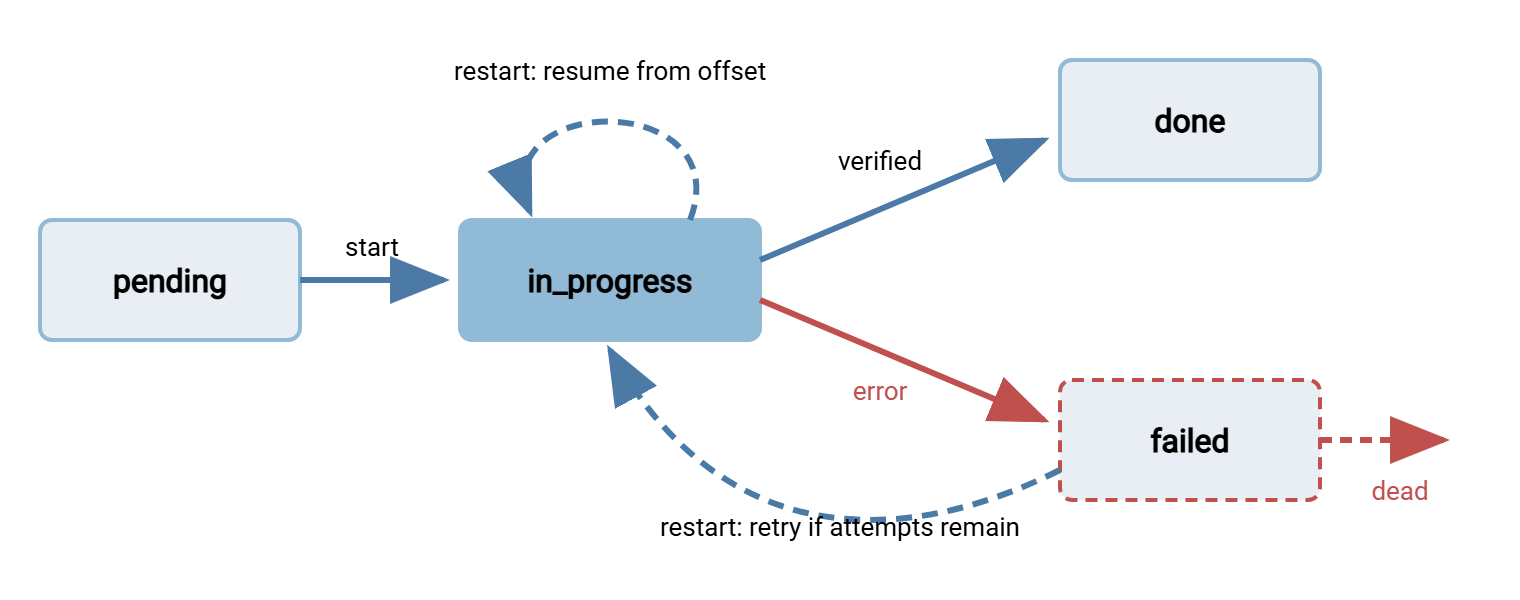
The two dashed transitions are what a checkpoint buys you. A file found in_progress at restart is resumed from its partial, using whatever mechanism the protocol provides. A file found failed is retried if its attempt count is below the limit. Otherwise, it is set aside as dead so one bad file cannot hold the run hostage. The article on poison files and dead letters covers what to do with it afterwards.
Per-File or Per-Batch?
Checkpoints have a granularity, and the right one depends on what you would hate to repeat. A per-batch checkpoint says only "run 20250314 completed". It is trivial to implement and is enough when a batch is small and fast. If the whole thing takes four minutes, restarting it costs four minutes and no design effort. A per-file checkpoint says which files completed. It is the right choice whenever the batch is long, the files are many, or re-sending a file has consequences at the far end. A per-file with resume checkpoint adds the in_progress state so the one file in flight is continued rather than restarted. That matters when individual files are large.
The rule of thumb: checkpoint at the granularity of the most expensive unit you are not willing to repeat. A thousand small files sent in a minute: per-batch. 240 files totaling 18 GB: per-file. Six files of 20 GB each: per-file with resume. Going finer than you need costs complexity and adds failure modes of its own.
Restart Semantics: What the Rerun Actually Does
Here is the whole restart algorithm, in the order the job should perform it:
- Take the lock. If the previous run is somehow still alive, do not start a second one on top of it. Two jobs writing one checkpoint is a corruption machine. See locking and overlap prevention.
- Load the checkpoint for this run identifier. If none exists, this is a fresh run: snapshot the source listing and mark everything
pending. - Reconcile with the source. Files in the snapshot whose size or modification time changed go back to
pendingand their partials are discarded. Files that vanished are marked skipped. Files that are new since the snapshot are, by policy, either added aspendingor left for the next run. Either is fine as long as it is deliberate. - Skip every
donefile. Optionally, confirm the remote copy still exists with the recorded size; this catches the case where the far end lost data between runs. - Resume every
in_progressfile, then verify it before marking it done. A resumed file gets the extra checks described in verifying a resumed transfer. - Retry every
failedfile with attempts remaining; set the rest aside as dead and report them. - Process every
pendingfile normally, writing the checkpoint after each verified success. - Run post-steps that are still outstanding, and checkpoint those too.
In a shell script, the simplest honest version of this looks like the following. It uses an append-only ledger, a lock, lftp's resume-capable put -c, and a temp name with a rename so the partner never sees a partial.
#!/bin/bash
set -u
RUN=$(date +%Y%m%d)                              # run identifier: one ledger per night
LEDGER=/var/lib/xfer/nightly-$RUN.ledger         # one line per finished file
touch "$LEDGER"
exec 9>/var/lock/nightly.lock
flock -n 9 || { echo "another run is active"; exit 0; }

for f in /data/outgoing/*.tar.gz; do
    name=$(basename "$f")
    grep -qxF "$name" "$LEDGER" && continue      # checkpoint says done: skip

    lftp -u batch,"$BATCH_PW" sftp://sftp.example.com -e "
        put -c \"$f\" -o incoming/$name.part;
        mv incoming/$name.part incoming/$name;
        bye" || { echo "$name" >> "$LEDGER.failed"; continue; }

    echo "$name" >> "$LEDGER"                    # checkpoint written last, after success
done
Line by line: the run identifier is today's date, so each night gets its own ledger and yesterday's state cannot leak in. flock -n takes the lock or exits immediately. grep -qxF looks for the file name as an exact whole line in the ledger. Its flags mean -x whole line, -F literal string, -q quiet. It skips the file if found. put -c resumes onto the temp name if a partial exists; mv renames it into place only once the upload completed. A failure goes to a separate failed list. Only after all of that does the file's name go into the ledger.
Notice what this script gets right and what it leaves out. If it is killed between the mv and the echo, the rerun finds no ledger entry and no .part file. It then uploads the whole file again. That is wasted work but a correct result: the operation is idempotent, meaning doing it twice leaves the same outcome as doing it once. Checking whether incoming/$name already exists with the right size before uploading is the next refinement. What the script leaves out is verification: it trusts lftp's exit code. The production version compares sizes, or hashes where the server allows it, before writing the ledger line. Safe reprocessing patterns goes further down this road.
Resuming a Mirror or Sync Job
Mirror jobs are the happy case, because the destination is the checkpoint. A mirror compares the source tree with the destination tree and transfers whatever differs. So rerunning an interrupted mirror naturally does only the remaining work. You still have to make the in-flight file resumable and keep the partial from masquerading as a finished file:
# rsync: rerun after an interruption does only the missing work
rsync -av --partial-dir=.rsync-partial --timeout=60 /data/outgoing/ batch@backup.example.com:/mirror/outgoing/

# lftp: -c continues an interrupted mirror, resuming partial files
lftp -u batch,"$BATCH_PW" sftp://sftp.example.com -e "mirror -R -c /data/outgoing incoming; bye"
Two cautions. First, a mirror's quick comparison is usually size plus modification time. A partial that happens to carry the source's modification time will look complete. rsync's --partial-dir sidesteps this by keeping partials out of the tree. And lftp resumes by size, so a smaller file is treated as partial. Second, a mirror with a delete option acts on the rerun exactly as it would on a first run. So an interrupted run that was halfway through a rename can produce surprising deletes. A dry run before the real rerun shows what it is about to do.
Resume the Run, or Start From Scratch?
Sometimes the right move is to delete the checkpoint and let the job start fresh. That is a decision, not a failure, and it should have written rules. Discard the checkpoint when:
- The source set was regenerated. Tonight's export replaced last night's files under the same names. Nothing in the old ledger applies. Using the run identifier in the ledger name makes this automatic.
- The checkpoint is older than one cycle. A ledger from three nights ago describes a run nobody cares about any more.
- The far end lost data. After a restore at the partner, "done" in your ledger no longer means "present over there". Delete the ledger and let the reconcile step rebuild the truth.
- The job's logic changed. A new naming rule, a new destination folder, or a new post-step means old "done" entries may describe a different job.
- The partner asks for a full resend. Their request overrides your state.
Everything else — a crash, a reboot, a network drop, a killed process — is a resume-the-run case. The surviving reboots and misfires article covers how to make sure the rerun is actually triggered after the interruption. This article assumed it was.
Making the Post-Steps Safe
The transfer is rarely the whole job. After the file lands there is usually a rename, a source delete, an archive copy, a notification, or a downstream trigger. Each is a unit of work that can be interrupted, and each one that is not idempotent needs its own checkpoint flag. The safe order is: transfer, verify, checkpoint the transfer, run the post-step, checkpoint the post-step. A source deleted before its transfer was verified cannot be resent. A notification sent twice because the checkpoint was written first is an incident report. Our multi-step workflow article treats the sequencing in depth.
The same discipline applies whether the job is a script or a scheduled task in a dedicated tool. Sysax FTP Automation, for instance, runs scheduled and scripted transfers with retry and error-handling settings and pre- and post-processing steps. Whatever tool drives the run, the questions in this article still need an answer that survives a crash. What was done, what was in flight, what has been post-processed? The answer is a checkpoint you designed on purpose.
The Version to Keep in Your Head
A checkpoint is job-level memory: a small structured record, written to persistent local disk after each verified unit of work. It lets a restarted run skip what is done, resume what was in flight, and retry or set aside what failed. Write it append-only or write-then-rename so a crash cannot corrupt it, and always after verification. Choose per-file granularity whenever a rerun would be expensive or visible to the far end, and add the in-progress state when individual files are large. Mirrors get most of this free from the destination itself, as long as partials are kept out of the tree. And throw the checkpoint away, deliberately, when the source set or the job changed under it.
From here, verifying a resumed transfer is the step between "resumed" and "done" in the state machine above. The article on a resume strategy for your flows decides which flows need all of this and which can simply restart. For the reasons the interruptions happen in the first place, start with why transfers get interrupted.
Frequently Asked Questions
What is the difference between a checkpoint and a resume?
Where should the checkpoint file live?
Do I need to store the byte offset of the file that was in flight?
My job sends a thousand small files in a minute. Is checkpointing worth it?
When should I delete the checkpoint and start over?
From the Sysax team: we build secure file transfer software for Windows. Sysax Multi Server is an FTP, FTPS, SFTP, and HTTPS server. Sysax FTP Automation handles scheduled, scripted transfers. Free trials are on the download page.