
A Resume Strategy for Your Flows
The earlier articles in this series explain what resume is, how each protocol does it, and which settings switch it off. They also explain how to checkpoint a whole run and how to verify the result. What they do not do is tell you which of your transfers should use any of it. That is a decision. It is a different decision for a 40 GB nightly archive over a VPN than for three hundred small invoices sent hourly to a partner. Turning resume on everywhere is as much a mistake as leaving it off everywhere.
This article is the decision procedure. It takes the handful of facts that actually determine the answer. These are file size, link quality, protocol, source stability, file count, and what the destination does with partials. It turns them into one of three strategies per flow: restart, resume, or resume with checkpointing. It then gives the settings checklist that makes the chosen strategy real on both ends. It provides a drill for killing a transfer on purpose to prove it works. It also gives a short record to write down so the decision survives you.
It closes our Resume & Restart series. If you arrived here first, the opening article on why transfers get interrupted is the foundation. The terms it defines — offset, partial, checkpoint, idempotent — are used without ceremony below.
Decide Per Flow, Not Per Tool
A flow is one named, recurring movement of files: this source, this destination, this protocol, this schedule, this owner. "Branch offices to headquarters, nightly backup archive, SFTP, 01:00" is a flow. "SFTP" is not. Resume strategy attaches to the flow, because two flows on the same server with the same tool can need opposite answers. If you do not yet have a list of your flows, the documenting transfer flows series shows how to build one. This article assumes you can name the flow you are deciding about.
The default posture, before any analysis, is restart. It is what every tool does out of the box. It has no failure modes of its own, and it is only wrong when it is expensive. Resume and checkpointing are things a flow has to earn by being costly to repeat. Each flow gets exactly one of three strategies:
- Restart. Resume is off or irrelevant. On failure, the retry sends the file again from byte zero. Simple, and correct for more flows than you might think.
- Resume. On failure, the retry continues each interrupted file from its offset, then verifies it. Used when individual files are expensive to repeat.
- Resume with checkpoint. Resume for the file in flight, plus a job-level record so the retry skips files already delivered. Used when the run as a whole is expensive to repeat.
The Inputs That Decide
Six facts about a flow determine the strategy. Gather them before deciding; most take a minute each.
File size
Size sets the cost of a restart. A useful way to think about it is transfer time on the flow's actual link, because that is what an interruption wastes. On a 20 megabit-per-second link, a 10 MB file takes four seconds. A 1 GB file takes about seven minutes, and a 40 GB file takes about four and a half hours. Restarting the first costs nothing worth engineering around. Restarting the last costs the batch window. These are rough thresholds that work for most environments. Below about 10 MB, restart. From there to a few hundred megabytes, resume if the link is poor. Above that, resume always.
Link quality
Link quality sets the probability of needing to restart at all. A transfer that runs inside one data center almost never gets interrupted. The same transfer across a consumer broadband line with a VPN that rekeys every hour gets interrupted routinely. The question to ask is "how often does this path drop, in practice?" — your logs know, and so does the timeouts and keepalives series. A flaky link lowers the size threshold at which resume becomes worth it; a clean one raises it.
Protocol and direction
Protocol sets what is possible. FTP, FTPS, SFTP, and rsync can resume in both directions. HTTP can resume downloads and, without help from the application, cannot resume uploads. scp cannot resume at all. Direction matters within that. For a push, the partial lives on the far server and your client must be able to ask its size. For a pull, the partial is local and the check is trivial. How resume works per protocol has the details, and push versus pull covers the direction question more broadly.
Source stability
Source stability sets whether resume is safe. A file that is written once and never changes — a finished archive, an installer, a completed export with a unique name — is a safe resume target. A file regenerated under the same name every run, or a log that is still being appended to, is not: resuming it joins two versions together. If the source is not stable, either make it stable (a datestamp in the name; see naming convention design) or choose restart.
File count
File count sets whether checkpointing is needed. One file per run: resume is enough. Dozens or hundreds of files is what checkpointing is for. That is especially true when re-sending a delivered file causes trouble at the far end — duplicate rejections, double processing.
What the destination does with partials
Finally, the destination sets how careful you must be with the partial itself. If anything at the far end consumes files from the landing folder automatically, a kept partial is a hazard. In that case, resume must be combined with temporary names and an atomic rename so the consumer never sees an incomplete file. The partial-file safety checklist is the companion to this one.
The Decision, as a Flowchart
The diagram walks the inputs in the order that resolves fastest. Most flows are decided by the first two questions.
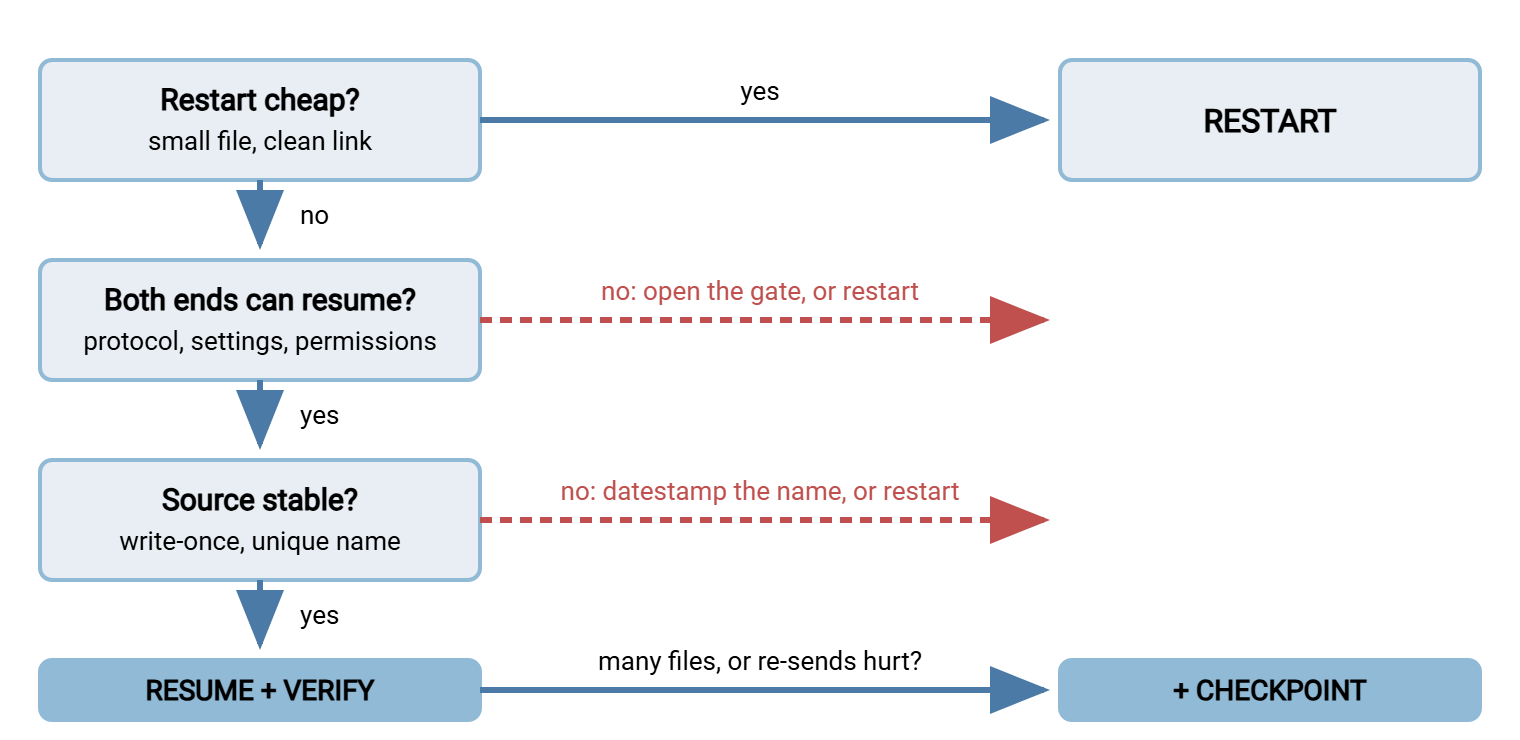
Four Flows, Four Decisions
Worked examples make the procedure concrete. Each is a flow you will recognize.
| Flow | Inputs | Strategy | How |
|---|---|---|---|
| Branch nightly backup archive to headquarters | One 40 GB file; VPN that rekeys; SFTP or rsync; write-once with datestamped name; backup tool publishes a hash | Resume | rsync --partial-dir or sftp reput inside a retry loop; verify the published hash; rename into place |
| Hourly invoices to a partner | 300 files of 50 KB; clean link; SFTP; partner rejects duplicates | Restart with checkpoint | Per-file ledger so the retry skips delivered invoices; no per-file resume, each file restarts |
| Installer distribution to field devices | One 3 GB file; cellular links; HTTPS pull; write-once; published checksum | Resume | curl -C - on the device with the stored ETag; verify the checksum before installing |
| Daily export regenerated under one name | One 800 MB file; clean link; FTPS; source rewritten each morning | Restart, until renamed | Resume is unsafe on a same-name source; add a datestamp to the name, then move to resume |
Notice the second row. A flow of small files needs no per-file resume at all — a 50 KB restart costs nothing. But it badly needs a checkpoint, because the cost of a naive rerun is 300 duplicate rejections at the partner. Resume and checkpointing are separate decisions, and this flow takes one without the other.
The third row is resume in its most valuable form. It is a pull over a link you do not control, by a device nobody is watching, of a file that never changes once published. The device stores the ETag from its first attempt and sends it with If-Range on every resume. So a republished installer is fetched fresh rather than stitched onto an old partial. The published checksum is checked before anything is installed. The fourth row is the honest answer for a flow that cannot yet resume safely. The export is rewritten under the same name every morning, so a partial from yesterday is never a prefix of today's file. "Restart" is the correct strategy today. The note beside it says what would change the answer — a datestamp in the name. So the next person knows the improvement was considered rather than missed.
The Settings Checklist for Both Ends
A strategy of "resume" is a promise that has to be kept by settings on the client, on the server, and in the job around them. This is the checklist; every item is explained in resume support compared.
On the client or job side:
- Transfer type is binary, explicitly, not "auto".
- The action when the destination file exists is resume (or resume-if-smaller), not overwrite and not ask.
- Any "delete incomplete files" option is off for this flow.
- Temporary names are used, and the tool resumes onto its own temporary name and renames on completion. For rsync,
--partial-dir. - A timeout is set so a dead connection is detected in seconds, not hours (
--timeoutin rsync,net:timeoutin lftp,--speed-timewith--speed-limitin curl). - A retry with backoff wraps the transfer, with a maximum attempt count; see retry strategies.
- Keepalives are enabled so long transfers survive idle timers.
- Before each resume the job measures the partial and applies the stale-partial rules from verifying a resumed transfer.
- After each resume the job runs the flow's chosen verification rung before renaming into place.
- For multi-file runs, a checkpoint ledger is written after each verified file.
On the server side:
- FTP:
FEATadvertisesREST STREAMandSIZE. The flow's account has append or overwrite permission in its upload folder. The folder allows listing so the client can learn the partial's size. - SFTP: the account can open existing files for writing; the storage behind the server is a real filesystem or has been tested with an offset write.
- HTTP: static files served with
Accept-Ranges: bytes, and any proxy or cache in front confirmed to passRangethrough. - Idle and session timeouts are long enough for the flow's largest file, or keepalives are honored.
- Stale partials are cleaned up on a schedule so they never accumulate or get mistaken for deliveries; the quotas and cleanup series covers the job.
- Activity logging is on, so a disputed resume can be reconstructed from the command sequence.
On a Windows server running Sysax Multi Server, the server-side items map to its per-account permissions and activity logging. That covers the FTP, FTPS, SFTP, and HTTPS services it provides. On the client side, a scheduled job in Sysax FTP Automation carries the flow's retry and error-handling configuration. So the retry policy lives with the job rather than in a script someone has to find. Whatever the tools, the checklist is the same, and the drill below is how you find out whether it was actually applied.
Remember: "resume" is a strategy only when every item on both lists is true for that flow. One unchecked item — an "auto" transfer type, a missing append permission, a partial-deleting cleanup job — silently turns the flow into "restart" without telling anyone.
Kill It on Purpose: The Resume Drill
The only way to know a flow's resume works is to interrupt it and watch. Do it on purpose, on a schedule, with a test file in the flow's real path, rather than discovering the answer during an outage. The drill uses three interruptions because they fail in different ways.
# Prepare a test file the flow will pick up (random bytes, hash recorded)
dd if=/dev/urandom of=/data/outgoing/drill-test.bin bs=1M count=500
sha256sum /data/outgoing/drill-test.bin | tee /var/lib/xfer/drill-test.sha256

# Interruption 1: kill the client process mid-transfer
timeout -s KILL 30 /opt/xfer/nightly-send.sh        # exit code 137 = killed
# then trigger the job's normal retry and watch its log for REST/350, a 206, or "put -c"

# Interruption 2: cut the network for two minutes during the transfer
# (block the flow's port outbound with your firewall tool, wait 120 seconds, unblock)
# the transfer should fail within the configured timeout, then retry and resume

# Interruption 3: restart the far-end service during a maintenance window
# the retry should wait through its backoff, reconnect, and resume

# After each interruption: the received file must match the recorded hash, and for
# a multi-file run the ledger must show earlier files skipped, not re-sent
sha256sum /srv/incoming/drill-test.bin
Each interruption tests something different. Killing the process tests the retry trigger and the client's handling of its own partial. Does the next run find the partial, measure it, and resume onto it? Cutting the network tests the timeout. A job with no timeout can sit on a dead connection until an idle timer somewhere else fires, which may be hours. No resume can start until that timer fires. Restarting the far-end service tests the backoff and reconnect path, and also whether the server kept the partial through its restart. In every case there are exactly two acceptable outcomes. In one, the file arrives and matches the hash with a log showing a resume. In the other, the file arrives and matches with a log showing a deliberate restart from scratch because a stale-partial rule fired. A file that arrives and does not match the hash is a failed drill, and the flow is not resumable until you know why.
Run the drill when a flow is first set up and whenever a client, server, or path component changes. Run it on a calendar afterwards — a couple of times a year for important flows is plenty. The testing and staging series covers how to do this kind of exercise without disturbing production. And job status monitoring is where the drill's "did the retry fire?" question gets answered automatically.
Document What You Chose
A resume strategy that lives in one person's head is a resume strategy that ends when they change jobs. Every flow record should carry a short resume section. This is the template we use, filled in for the branch backup example:
Flow:            branch-to-hq-nightly-backup
Strategy:        RESUME (single file per run; no checkpoint needed)
Why:             40 GB over VPN that rekeys hourly; restart would miss the 06:00 cutoff
Client settings: rsync -a --partial-dir=.rsync-partial --timeout=60, retry x5 with backoff
Server settings: SFTP account "branch17", write to existing files allowed in /incoming
Source rule:     archive is write-once, name carries YYYYMMDD; never resume a same-name file
Stale partial:   discard if older than the source, larger than the source, or older than 1 day
Verification:    size + sha256 against hash published by the backup tool
Partial cleanup: nightly job removes .rsync-partial entries older than 2 days
Last drill:      recorded as YYYYMMDD in the flow log; all three interruptions passed
Owner:           infrastructure team, on-call rotation
Ten lines, and the next person can tell in a minute what the flow expects to happen on failure, why, and when it was last proven. The documenting transfer flows series shows where this section fits in a fuller flow record. The postmortem guide shows what the record is for when something does go wrong. The first question after an overnight failure is "what was this flow supposed to do?", and the answer should be written down.
The Version to Keep in Your Head
Resume strategy is decided per flow, from six inputs: file size, link quality, protocol and direction, source stability, file count, and what the destination does with partials. Small files on clean links restart. Large or slow-link files with stable sources resume, then verify. Runs of many files, or files whose re-delivery hurts, add a checkpoint whether or not they resume. Unstable sources get a datestamp in the name before they get resume. The strategy is only real once the client and server checklists are both true. It is only proven once you have killed the flow on purpose three ways and checked the hash. It is only durable once it is written in the flow record with the drill date next to it.
That completes the series. If you want to go back to the mechanics, how resume works per protocol is the reference. For the job-level side, see checkpointing in automated jobs. For the flows where file size itself is the problem, the large-file strategies series picks up where this one leaves off.
Frequently Asked Questions
Should I just enable resume on every flow to be safe?
What file size makes resume worth it?
Can a flow need checkpointing without needing resume?
How do I safely test resume on a production flow?
What should the flow documentation say about resume?
From the Sysax team: we build secure file transfer software for Windows. Sysax Multi Server is an FTP, FTPS, SFTP, and HTTPS server. Sysax FTP Automation handles scheduled, scripted transfers. Free trials are on the download page.