
Managed File Transfer in Plain Words
"Do you use managed file transfer?" The question sits on page four of a customer's security questionnaire, between encryption at rest and background checks. It comes with a yes/no box. You run two SFTP servers, a scheduler, and a folder of scripts that mostly behave. Is that a yes? Ask three people what managed file transfer — MFT — means and you will get a protocol name, a product pitch, and a shrug. The term is in the questionnaire, the brochure, and the job posting, and almost nobody defines it. The definitions that do exist tend to be lists of whatever the definer happens to sell. For an administrator with a box to tick, that is worse than useless.
This article is the plain-words version. MFT is not a protocol — SFTP is not more "managed" than FTP by nature. It is not encryption. It is not any single product. Strip the acronym away and MFT is four capabilities wearing a trench coat. They are visibility, control, automation, and audit. They apply to the file transfers your organization already does. Each of those capabilities is real, useful, and — this matters — achievable more than one way, including by assembling things you may already own. (The coat is where the marketing lives.)
By the end you will be able to say what "managed" actually adds above the protocols. You will know where the idea came from and what MFT is not. You will know how to test in five minutes whether your own transfers are managed today. That also answers the questionnaire honestly in whichever direction the evidence points. This is the opening article of our What Makes File Transfer Managed series. The four articles that follow take the coat off one capability at a time.
The Word "Managed" Does All the Work
Start with what file transfer is without the adjective. A transfer moves bytes from one machine to another: a client connects, authenticates, sends or fetches a file, disconnects. The protocols that do this — FTP, FTPS, SFTP, HTTPS — are solved problems. Any of them, correctly configured, will move your file reliably and (for the encrypted ones) privately. The bytes have never been the hard part.
Now notice what none of them do. No protocol tells you, the next morning, which of last night's forty expected files actually arrived. No protocol stops a departing contractor's account from quietly living on for two years. No protocol retries a failed transfer at three in the morning, or emails anyone about it. And no protocol can give an auditor this proof, months later: a specific payroll file went to its intended place, and nowhere else. I have watched all four of those sentences come true on well-run estates, and not one of them announced itself.
Those are not byte-moving problems. They are management problems — problems of knowing, deciding, delegating, and proving. So here is the honest definition:
Definition: file transfer is managed when someone can do all of the following. They can see every transfer, control who may move what, run the routine flows without human hands, and prove all of it later. MFT is not a thing you install so much as a state you can demonstrate. The four capabilities are the test, and tooling is just one way to pass it.
That phrasing is deliberate. The industry usually uses "MFT" to mean a category of software suites, and the suites are real. But the capabilities came first. Organizations passed the test with logs, scripts, and discipline long before anyone sold a suite. Keep the capabilities and the products separate in your head and the whole topic becomes simple.
The four capabilities are also more independent than the bundled suites suggest. You can have superb automation with no audit trail worth the name; plenty of estates do. You can have meticulous audit records over flows that a human still runs by hand every morning. That independence is good news. It means you can adopt the layers one at a time, in the order your actual problems dictate. This series returns to that theme often.
Protocols Move Bytes. Management Answers Questions.
The cleanest way to see the boundary between a protocol and the management layer is to sort by the question being asked. Protocol questions sound like: which port? Which encryption? Active or passive? Key or password on the wire? Management questions sound entirely different:
| The question you must answer | The capability that answers it |
|---|---|
| "Did the invoice feed arrive last night? Where is it now?" | Visibility — central, current knowledge of every transfer |
| "Who is allowed to send files to the bank, and who decided that?" | Control — policy applied to accounts, folders, and flows |
| "What happens at three in the morning when the partner's server is down?" | Automation — flows that run, retry, and escalate without hands |
| "Prove this file reached the regulator before the deadline — from months ago." | Audit — evidence-grade records that survive and convince |
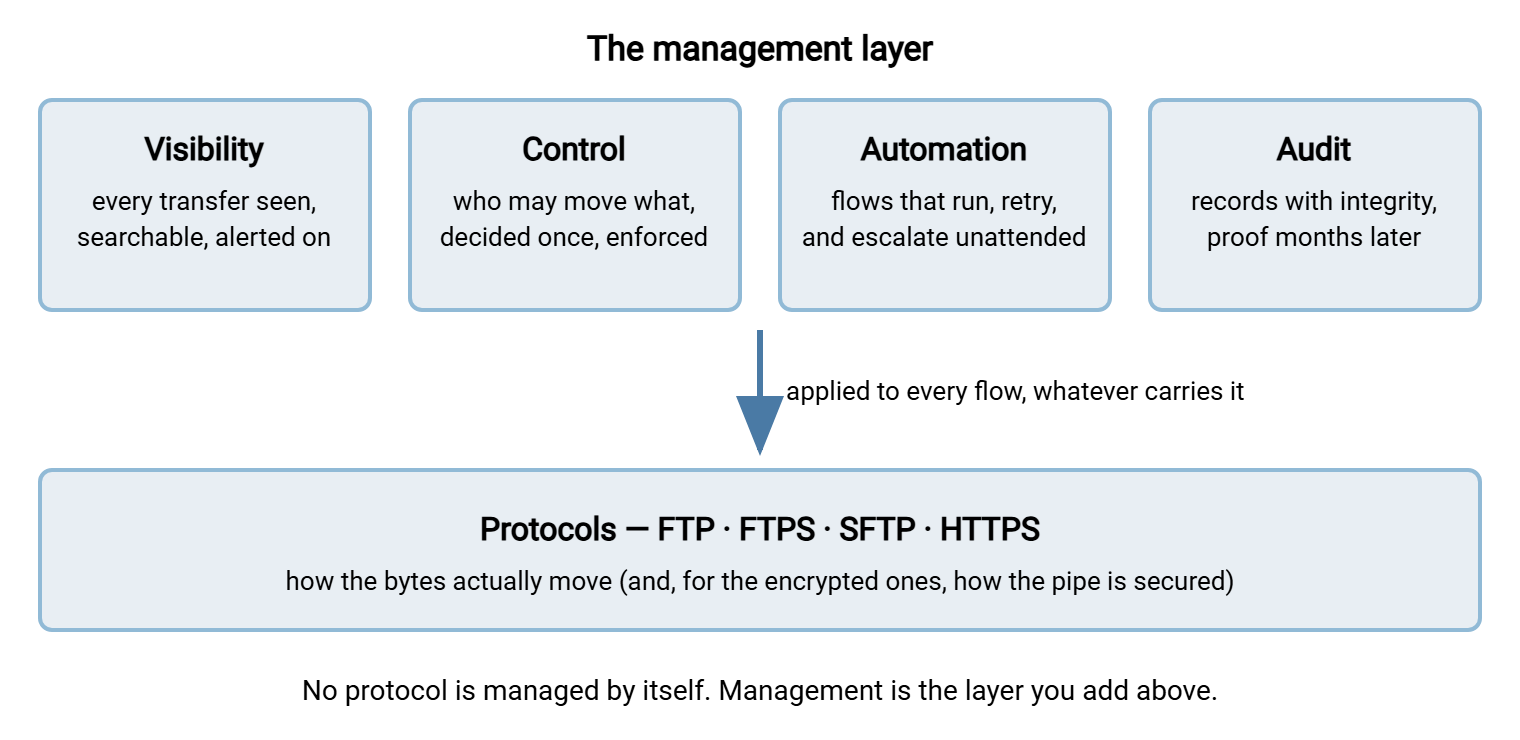
Every protocol is equally silent on all four rows. This is why "we use SFTP, so we're covered" is a category error. SFTP secures the pipe. It says nothing about what flows through it, who arranged that, or whether anyone can prove it afterward. The protocol choice matters — our SFTP versus FTPS comparison covers it properly. But it is a different decision, made on a different floor of the building.
The diagram below is the picture this whole series hangs on. It shows the four capabilities as a layer sitting above the protocols, applied to every flow no matter which protocol carries it.
Where the Idea Came From
The category has a history, and knowing it explains both the substance and the hype. It starts with a plain FTP server in the corner of a machine room, decades ago. The server moved files and kept a modest log, and that was the whole story. When a partner needed a nightly feed, an administrator wrote a script. When the script failed, someone noticed eventually — usually because a person downstream complained about a missing report. The complaint was the monitoring system, and its coverage was excellent.
Then three pressures arrived, roughly together. First, volume: one partner became forty, one script became two hundred, and the pile stopped fitting in one person's head. Second, consequence: the files themselves became payroll runs, medical claims, card settlements — files whose failure or leakage costs real money and real trust. Third, regulation: auditors started asking pointed questions about data in motion, and "the script has always worked" stopped being an acceptable answer. Our article on what auditors actually ask about transfers lists those questions verbatim; they are the birth certificate of this category.
Software vendors responded the way vendors do: they bundled the answers. Take a protocol server and add central logging. Add a scheduler with retries. Add user administration and canned reports. Sell the bundle to the people getting the audit questions. The industry needed a name for the bundle, and "managed file transfer" stuck. Three letters is the industry's preferred unit of reassurance.
Here is the part a vendor rarely tells you: no standards body defines MFT. There is no committee, no specification, no compliance seal. It is a marketing-born label around a genuinely useful core. That means any vendor can print the acronym on anything. The only defense you have is to evaluate the four capabilities directly. That is exactly how this series will treat them. It is also how you should treat the vendor writing this sentence.
The label's elasticity cuts both ways, though. Because nobody owns the definition, the term also cannot be gatekept. A team that assembled the four capabilities from open tools and careful habits is entitled to say their transfers are managed. No vendor gets to disagree. When a compliance questionnaire asks "do you use managed file transfer?", the honest answer describes your capabilities, not your purchase orders.
The Four Capabilities, One at a Time
Each capability gets a full article of its own in this series. Here is the honest one-paragraph version of each, so you can see the whole shape before descending into the parts.
Visibility: knowing what moved
Visibility is the ability to answer "what happened?" from one place, quickly: what transferred, what failed, what never showed up at all. It is built from transfer logs, job status, and alerting. Its hardest trick is noticing the file that didn't arrive, which no error message will ever announce. The visibility article covers what it takes to build this from logs you already have, and what integrated tooling genuinely adds.
Control: policy over every flow
Control is the ability to decide who may move what — and have the infrastructure enforce the decision. It does not trust memory and good intentions. It shows up as central authentication, per-account permissions, and standards that new flows cannot quietly ignore. Control is also the difference between "each server is configured somehow" and "policy exists, and the configuration follows it." The control article unpacks that difference.
Automation: flows without hands
Automation is routine transfers running on schedule or on file arrival, with retries, error handling, and notifications. There is no human in the loop, and no heroics when the human is on vacation. Every scripting admin already owns a version of this capability; the managed claim is about uniformity and survivability, not magic. The automation article maps where scripts genuinely win and where they quietly cost you.
Audit: proving it later
Audit is the capability that answers questions months after the transfer: who moved what, when, where, with records intact enough to convince a skeptical outsider. It needs complete logging, tamper resistance, retention, and reports. It is the layer most estates discover they lack at the worst possible moment. The moment tends to arrive by email, with a reference number. The audit article covers evidence-grade record keeping from the ground up.
What MFT Is Not
Half of understanding a fuzzy term is fencing off what it does not mean. Each of these confusions is common enough to deserve its own sentence of correction:
- Not a protocol. There is no MFT port and no MFT handshake. MFT deployments speak SFTP, FTPS, HTTPS, and friends — the same protocols everyone else uses. "We switched to SFTP" is a transport upgrade, not a management layer.
- Not encryption. Encryption in transit is table stakes for any serious transfer, managed or not. A fully encrypted estate can still be blind, uncontrolled, manual, and unable to prove anything.
- Not a specific product. The capabilities are the point. A shop with disciplined logs, central authentication, solid scheduled jobs, and retained evidence has managed file transfer, whatever the tools are called. A shop with an expensive suite configured badly does not.
- Not compliance in a box. Regulations ask for outcomes — protected data, provable delivery, accountable access. MFT capabilities make those outcomes much easier to demonstrate, but no purchase makes you compliant by itself.
- Not only for large enterprises. The capabilities scale down. A two-admin shop can have excellent visibility and audit with modest effort. And, just as honestly, some small estates don't need much of either. The closing article in this series is an assessment that genuinely allows "no" as an answer.
- Not storage. MFT is about files in motion and the records of that motion. Where files live long-term is a separate discipline with its own retention rules.
- Not new. The capabilities are decades old; mainframe shops ran visible, controlled, automated, evidenced batch transfers before the acronym existed. The label is younger than the practice, which is one more reason to trust the practice over the label.
Bought, Built, or Both
Because MFT is a set of capabilities rather than a product, there are three honest ways to get it. Most real estates end up with a mix.
Assembled from parts. Centralize the logs your servers already write. Keep an inventory of flows. Schedule jobs with your platform's scheduler, wrap them in disciplined retry and alerting, and archive the evidence. This is real MFT, built from skills you have. Its costs are ongoing discipline and the fact that every new flow must be manually enrolled in your conventions. Nothing enforces them but you. I ran an estate this way for years, and the conventions held for exactly as long as I kept checking them.
Integrated tooling. Dedicated transfer software bakes the conventions in. The server records every session because recording is not optional. The scheduler and the transfer engine share one view. Reports come from one database instead of a folder of grepped logs. You trade money and some flexibility for enforcement and one throat to choke.
A disclosure before we go further: Sysax sells software in this category, so we are not neutral. Read this whole series as education first, and hold our own products to the standards these articles describe. Concretely, Sysax Multi Server is a Windows transfer server (FTP, FTPS, SFTP, HTTPS) with per-account authentication and activity logging to file or database. That is strong raw material for the control and visibility layers. Sysax FTP Automation is a scheduling and scripting client with folder monitoring, retries, and email notifications — a building block for the automation layer. Neither is a complete four-layer suite by itself, and we will say so again in the layer articles. Dashboards and audit reports are things you assemble around components like these, whoever makes them.
Which mix is right for you is an economics question as much as a technical one — flow count, failure cost, and the hours you actually have. Our build versus buy series works that decision properly, with the scripts' side argued as honestly as the tools'.
Northgate Retail bought a full four-layer suite after a questionnaire asked the question at the top of this article. The team ticked the box with relief. A year later the annual review found that the team used the scheduler and the log viewer every day. They used the policy engine for one partner, and the workflow designer, reporting module, and approval chains not at all. In all, they used roughly a fifth of what they had licensed. Nobody had done anything wrong; the checkbox had asked whether they owned the acronym, not which capabilities they lacked. They kept the suite, because the fifth they used was worth having. They wrote the other four-fifths down as the cost of answering a question before defining it. The five-minute test below is the definition they wished they had run first.
A Five-Minute Test You Can Run Today
Definitions are cheap; here is the operational test. Answer these five questions about your own estate, honestly, with a stopwatch running. Copy the list somewhere you will see it again:
THE MANAGED-TRANSFER TEST (five minutes, no preparation allowed)

1. VISIBILITY   Did every expected transfer complete in the last day?
                Pass: answered from ONE place, under five minutes.

2. CONTROL      Pick a coworker. What exactly can their account move, and
                who approved it? Pass: an authoritative answer exists in
                writing, not in someone's memory.

3. AUTOMATION   Your most important flow fails tonight at 3 a.m.
                What happens before a human wakes up?
                Pass: retry and alerting you can describe precisely.

4. AUDIT        Prove one specific file from ninety days ago reached its
                destination. Pass: evidence produced within one hour,
                from records nobody could have quietly edited.

5. COVERAGE     Are there transfers happening OUTSIDE the paths above?
                Pass: you can name the sanctioned methods and honestly
                believe there are no others in daily use.
Remember: if you pass all five, you have managed file transfer in every sense that matters. That holds regardless of whether any product with "MFT" on the label is installed. If you fail some, you now know exactly which capability articles in this series to read first. The acronym is not the achievement; the answers are.
Question five deserves a special word, because it is the one people fail while passing the others. Management only covers what flows through the managed paths. If half your file movement happens over ad-hoc shares and personal cloud accounts, your four layers are managing a minority of reality. That is a policy problem before it is a tooling problem. Our guide to approved and forbidden transfer methods is the companion read. The article on discovering shadow sharing without a witch hunt shows how to find the other half without making enemies of it.
The Version to Tell a Colleague
If someone asks you in the hallway what MFT actually is, here is the one-minute answer. File transfer protocols move bytes, and that problem is solved. Managed file transfer is everything those protocols don't do. It means seeing every transfer in one place and controlling who may move what. It means running routine flows without hands and keeping proof that stands up later. Those four capabilities can be bought as a suite or assembled from logs, schedulers, and discipline. What matters is passing the test, not owning the acronym. And because no standards body defines the term, judge every claim — every vendor's, including ours — against the capabilities themselves. Then tick the box, in whichever direction the evidence points.
From here, read the layers in whatever order your pain dictates. Start with visibility if you cannot say what moved last night. Or jump ahead to the maturity map in automation maturity stages to place your estate on the ladder before you read on.
Frequently Asked Questions
Is MFT software a replacement for an SFTP server?
Is MFT a protocol like SFTP or FTPS?
We use SFTP everywhere. Doesn't that mean our transfers are managed?
Do I have to buy an MFT product to have managed file transfer?
What is the difference between MFT and just automating my transfers?
Is MFT overkill for a small company?
Who defines what counts as MFT?
From the Sysax team: we build secure file transfer software for Windows. Sysax Multi Server is an FTP, FTPS, SFTP, and HTTPS server. Sysax FTP Automation handles scheduled, scripted transfers. Free trials are on the download page.