
What Actually Moves in a Transfer Platform Swap
"Just move everything over." That is the whole ticket; it arrives with a deadline and no attachments. I have been the somebody it was assigned to, and "everything" is where the trouble hides. A transfer server is not a folder you copy. It is a stack of layers: an address, an identity partners have pinned, accounts with secrets, and permission rules. It also has a folder tree still receiving files, jobs that fire on arrival, and a history an auditor expects to keep reading. Each layer moves by a different mechanism. A few do not move at all.
A platform swap is the replacement of one transfer server product with another while the partners and their flows carry on. This article is the map. It walks every layer, old to new, and sorts each into three bins. One holds what copies cleanly. Another holds what must be translated because the two platforms mean different things by the same words. The third holds what never follows you and must be rebuilt. It opens our Platform Migration Mechanics series. The five after it take each bin apart, down to the commands.
A migration has two halves, and this series is one of them. The coordination half belongs to our Workload Migration series. It covers inventory, cutover strategy, partner notice, validation and rollback governance. See the migration inventory, cutover strategies, partner coordination, and validation and rollback. This series is the mechanics: moving a server's contents and identity from one platform to another. Where coordination comes up, I link to it rather than teach it twice.
A Transfer Server Is Ten Layers
Name the layers before you sort them. Every transfer server, whatever it runs on, is built from the same ten. Each is a separate task with its own way of going wrong.
- Endpoint: the name partners type (
transfer.example.com) and the address it resolves to. It also includes the ports listening there: 22 for SFTP, 21 and a passive range for FTP and explicit FTPS. There is 990 for implicit FTPS and 443 for an HTTPS portal. - Identity: the proof that the server is who it claims. It includes the SSH host key whose fingerprint SFTP clients remember. It also includes the TLS certificate that FTPS and HTTPS clients check against a chain of trust.
- Accounts: usernames, each one's authentication method and enabled state, and the settings hung on it: contact details, limits, allowed protocols.
- Secrets: the passwords behind password accounts (stored as one-way hashes, never as the password itself) and the public keys behind key-based accounts.
- Permissions: each account's home directory, what it may do in each folder, and the walls that keep one partner from seeing another.
- Folders and contents: the directory tree and every file in it, including the live inboxes partners are writing to while you plan.
- Live sessions and in-flight files: the connections open and the uploads half-finished at the instant of the switch.
- Conventions and behavior: the unwritten protocol partners rely on: upload-then-rename, marker files that signal completeness, the format of a directory listing, the timezone of a timestamp.
- Jobs, hooks, and settings: scripts that fire on upload, scheduled tasks on the box, and the server's own configuration: passive port range, limits, banners, IP allow and block lists.
- History: the activity logs and transfer records: who connected, what moved, when, from where.
The diagram lays the ten layers side by side. A solid arrow means a clean copy, and a dashed arrow means a translation. A red broken arrow means a layer that must be rebuilt.
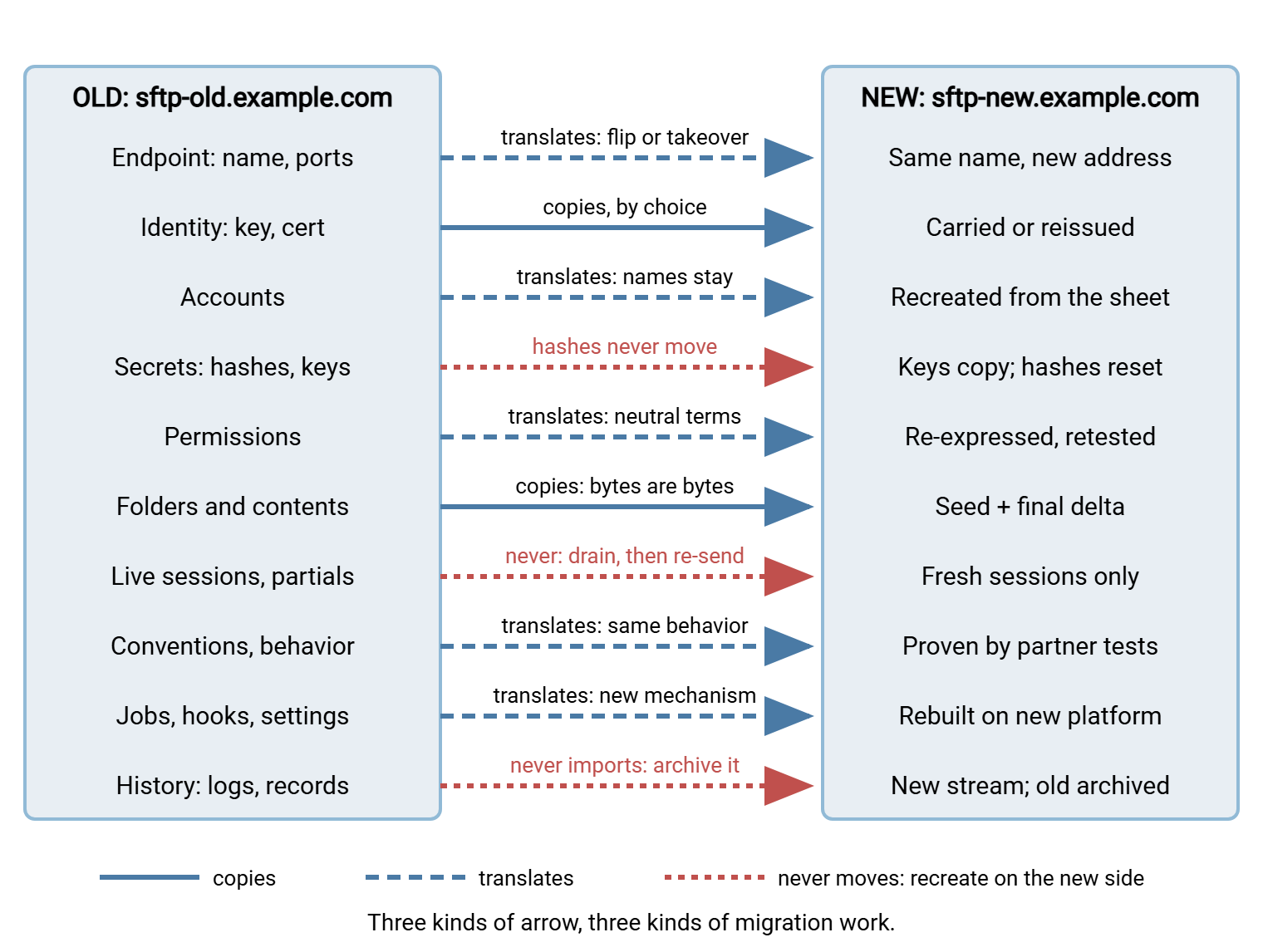
The Layer Map
The table is the whole series on one page; every row points at the article that does the work.
| Layer | Bin | Mechanism | Where it is covered |
|---|---|---|---|
| Endpoint | Translates | Name follows you; address changes by alias flip or IP takeover; ports and passive range re-opened on the new host | Cutover runbook |
| Identity | Copies, by choice | Host key carried (partners see nothing) or reissued (new fingerprint announced); certificate and private key carried or renewed, chain re-verified | Keys and certificates |
| Accounts | Translates | Usernames kept letter for letter; auth method, limits, and contact data re-entered from a worksheet | Accounts and permissions |
| Secrets | Public keys copy; password hashes never move | Authorized keys carried as public data; passwords reset, delivered out of band, or moved to directory authentication | Accounts and permissions |
| Permissions | Translates | Effective rights written in neutral terms, re-expressed in the new model; isolation tested per account | Accounts and permissions |
| Folders and contents | Copies | Tree recreated exactly; contents seeded early, topped up by deltas; live inboxes get a final delta under a write freeze | Folders and in-flight files |
| Conventions and behavior | Translates | Temp-name renames, marker files, listing formats, and timestamps verified identical on the new platform | Folders and in-flight files |
| Jobs, hooks, settings | Translates | Event scripts and scheduled tasks rebuilt; passive range, limits, banners, and IP lists re-entered as settings | Migrating the automation |
| Live sessions, in-flight files | Never moves | Drained before the switch; half-uploaded files left for the partner to re-send | Folders and in-flight files |
| History | Never imports | Old logs archived and indexed beside the new stream; new server logs from its first minute | Post-migration |
Bin One: What Copies Cleanly
The first bin holds everything that is just data: bytes that mean the same thing on any platform. Copying them is a transport problem, not a translation problem, and transport is the easy kind.
File contents are the biggest item and the simplest. A partner's manifest is the same bytes wherever it sits. The work is volume and timing, not meaning: a seed copy days ahead, repeated deltas, and a final delta during the cutover freeze. That is the pattern in seed-and-delta cutover. Preserve file timestamps while you copy. Some partner scripts fetch "files newer than my last run". A copy stamped with tonight's date makes them re-fetch the whole archive.
Northgate Retail learned that one the expensive way. Their seed copy reset every modification time to the moment of copying. Nobody noticed, because every file was there. On the first morning after cutover a partner's script asked for everything newer than its last run. It was handed fourteen months of acknowledgments, which it processed with great diligence. The partner's finance team spent the afternoon un-processing them. The fix was one flag on the copy command. The apology took longer.
Public keys copy because they are public by design. A partner's authorized key is one line of text that identifies their private key without revealing it. It works on any SSH server that supports the key type. The only care is mapping each key to its account.
The TLS certificate and its private key copy as a bundle, and the SSH host key copies too, if you decide to carry it. That "if" is the largest decision in the identity layer. Carry the old key and every partner sees the same fingerprint; nobody gets a warning. Issue a new one and every partner must update what they have pinned. Both are legitimate; migrating keys and certificates weighs them. A private key copies cleanly in the byte sense and demands care in the handling sense. (It is the one file here you must not email to yourself.)
The folder tree's names and IP allow lists are data as well. The DNS name is the most portable thing you own. Partners connect to transfer.example.com, and where it points is yours to change. Resist the urge to tidy the tree in transit. A migration and a reorganisation are two projects; per-partner folder structures is the second.
A useful test: if the item is something you gave the platform — a file, a key, a name, an address list — it copies. If it is something the platform made for itself — a hash, a session, a log entry — it does not. Almost every layer sorts itself with that one question.
Bin Two: What Translates
The second bin holds the layers where both platforms have a concept with the same name and a different meaning. Both have "accounts", but one stores a dozen per-account fields in a database and the other six in a text file. Both have a folder rule called "write", but one means create-and-overwrite and the other create-only. Nothing here copies byte for byte, because the bytes would be read by different rules on arrival.
Translation is always the same three steps. Doing them explicitly separates a migration that holds up from one that produces mysterious permission errors for a month.
- Read the old platform's configuration and write down what it actually does, in platform-free language. Not "bayside has the Standard Partner profile" but "the account bayside logs in with a password. It lands in a home folder containing
inboxandoutbox. It can list, upload, rename, and delete ininbox. It can list and download inoutbox. It cannot see anything above its home." - Find the new platform's mechanism for each sentence. Some map to one setting, some to three, and some have no equivalent. Those with no equivalent go on a list to solve or negotiate with the partner.
- Test the result from the outside, as the partner, comparing behavior rather than configuration screens.
Five layers live here. Accounts keep their usernames letter for letter identical while their settings are re-entered. A swap is also your best chance to leave the dead ones behind. The article on finding stale and orphaned accounts tells you which they are. Permissions need re-expression for home directories, per-folder rights, and isolation. The article on permission models explained shows how far apart two vocabularies can be. Settings: passive port range, connection limits, banner text, allow lists. Jobs and hooks are the scripts that run when a file lands. They nearly always need rewriting because they call the old platform's event mechanism. And conventions, the behavior partners observe without anyone having documented it.
Conventions deserve a particular warning because they appear in no export. If partners upload as report.csv.tmp and rename to report.csv, the new platform must permit the rename and must not hide or reject the temporary name. If a downstream job waits for report.done, zero-byte marker uploads must succeed. If a partner's script parses FTP directory listings, the listing must come back in the same style. The practices are in temp names and atomic renames and marker and control files. Carrying them through a swap is the job of migrating folders and in-flight files.
Bin Three: What Never Moves
The third bin catches people. Each item looks as if it should move, and every platform's documentation is quiet about why it cannot.
Password hashes
A transfer server does not store passwords. It stores a hash, the output of a one-way function that turns the password into a fixed-length scramble. A random salt is usually mixed in so two users with the same password produce different scrambles. At login the server hashes what was typed the same way and compares. The design goal is that nobody, including the administrator, can turn the stored value back into the password.
That goal is exactly why hashes do not migrate. To verify a password, the new platform would have to run the same function with the same salt handling and the same storage encoding as the old one. Platforms choose those independently and offer no way to import someone else's. Even where two products share an algorithm, the surrounding format differs and the import path does not exist. You cannot move a secret you do not know, and by design you do not know it.
Three strategies exist, and every migration picks one per account population. A coordinated reset, where each partner sets a new password on the new platform. Temporary passwords delivered out of band, through a channel the partner already trusts, with a forced change at first login. Or directory-integrated authentication, where the server stops holding secrets and asks a directory to verify each login. The third is the structural escape: the directory owns the secret. So the next migration is a matter of pointing a new server at it. A Windows target such as Sysax Multi Server can authenticate against Windows and Active Directory for exactly this reason. The same design exists on other platforms. The article on migrating accounts and permissions compares the tradeoffs.
Live sessions and in-flight files
A session is a conversation between one client and one server process. It cannot be handed to a different process on a different machine. What matters is what the session was doing. A file half-uploaded at the switch exists on the old server as a partial, often under a temporary name. On the new one it does not exist at all. The only correct handling is to drain. Stop accepting new writes and wait for active transfers to finish. Let anything genuinely interrupted be re-sent by the partner's own retry logic. Partials copied across as if complete are the most common way a migration corrupts data without anyone noticing.
History
Logs describe what one server did. Importing them into another server's log store would make the new platform claim events it never saw. Most platforms cannot ingest foreign records anyway. History does not migrate; it is archived, copied intact, hashed, and indexed so that "who downloaded the March manifest?" can still be answered. The new platform logs from its first minute, ideally into the same central collector the old one fed. A server that logs to both a file and a database, as Sysax Multi Server does, gives you two independent streams from cutover night. The unbroken audit trail is built in post-migration cleanup and hardening.
A Worked Example: One Partner Through Ten Layers
Abstractions settle when you run one real partner through them. Bayside uploads nightly manifests by SFTP with a password, downloads acknowledgments each morning, and runs a job that pins the server's fingerprint. Their move sheet:
Partner: Bayside            Flow: FLOW-041 manifests (inbound), acks (outbound)

Endpoint      transfer.example.com stays; A record flips to 203.0.113.20
              port 22 open on new host firewall; Bayside connects by name
Identity      host key CARRIED (Bayside job runs strict checking)
              fingerprint on new must equal SHA256:9pQ...kM (recorded from old)
Account       username "bayside" (exact case); SFTP only; contact ops@bayside
Secret        hash cannot move -> temporary password via existing secure
              channel Mar 10; forced change on first login
Permissions   home = /partners/bayside; sees "/" with inbox/ and outbox/
              inbox: list, upload, rename, delete   outbox: list, download
              isolation test: cannot reach /partners/harlow
Folders       inbox live (writes nightly ~02:10); seed Mar 8, deltas daily,
              final delta under freeze on cutover night
Conventions   uploads as .tmp then renames -> rename permission REQUIRED
              expects ack_YYYYMMDD.txt in outbox; timestamps in UTC
Jobs/hooks    on-upload script "notify_erp" -> rebuilt on new event mechanism
Sessions      Bayside job retries every 15 min -> drain, no action
History       old logs archived; Bayside rows searchable in archive index
Ten lines, ten mechanisms, and three of them (the secret, the sessions, and the history) are not copies at all. Multiply by your partner count and that is the migration. The inventory register is where those rows live until decommission.
The sheet generalizes into four columns: the layer, the old platform's behavior as observed, the new platform's mechanism, and who verified it and when. Fill "old" from evidence (exports, log extracts, a test login as the partner). The documented setup and the running setup parted company long ago. Never fill "verified by" before the test has run. A sheet of confident blanks is worse than no sheet, because someone will believe it.
The Order the Layers Move In
The layers move in the order their lead times demand. Endpoint preparation starts first. The DNS record's time-to-live must be shortened days before anyone flips it. Partners who connect by IP need weeks of notice. The identity decision, carry or reissue, comes next. A reissued fingerprint has to reach every partner through a trusted channel before cutover night, not on it. Accounts, secrets, and permissions are built in the weeks before and tested as each partner. Folders are seeded early and topped up with deltas while partners verify conventions with real uploads. Jobs and settings are rebuilt and dry-run. Cutover night executes the freeze, final delta, address switch, service start, and smoke tests, rollback switch ready. Cleanup and decommission proof close the job. The old server stays frozen but alive until the evidence says it may stop.
Remember: the same ten layers exist whatever you are migrating from or to. That could be a homegrown SSH server, a commercial Windows product, or a managed service. Nothing here depends on the direction of the move. A trial installation of the target, stood up early, is where "verified by" gets filled. Treat it as a rehearsal stage, not a demo. The article on building a staging environment shows how.
Wrapping Up: Three Bins, Ten Layers, One Sheet
A transfer platform swap is ten separate moves wearing one project name. Data you gave the platform copies: files, public keys, certificates, names. Concepts the two platforms name alike and mean differently translate, through a neutral description and an outside-in test. Password hashes, live sessions, and history never move. They are reset, drained, and archived. Any plan that assumes otherwise finds out on cutover night. That is what "everything" meant in the ticket. It was never going to fit in one sentence.
The next articles do the work bin by bin. The article on migrating accounts, permissions, and home directories takes on the secret problem and the permission translation. The article on migrating SSH keys and TLS certificates settles the host-key fork. And the cutover night runbook puts all ten layers on a clock. For the coordination half, start with cutover strategies.
Frequently Asked Questions
Can I just copy the old server's configuration files to the new one?
Why can't password hashes be migrated if I can see them in the old database?
Do partners have to change anything on their side?
Should the old server's logs be imported into the new platform?
Which layer usually causes the most trouble after cutover?
From the Sysax team: we build secure file transfer software for Windows. Sysax Multi Server is an FTP, FTPS, SFTP, and HTTPS server. Sysax FTP Automation handles scheduled, scripted transfers. Free trials are on the download page.