
Comparing Protocols Fairly in Your Own Environment
"SFTP is slow." "FTPS is fast but awkward." "HTTPS is for browsers, not for bulk." I have heard all three said in one meeting, by three people, none of whom had measured any of them on the same hardware. The reputations are old, earned under conditions that no longer apply, and repeated most confidently by whoever has measured least. The honest answer to "which protocol is fastest?" is that it depends on your files and your links. The useful answer is that you can find out in an evening.
This article is the method for that evening. It lays out the parity rules that make a comparison fair and explains where each protocol spends its time. It tells the truth about encryption overhead. It walks through a worked comparison on one server whose winner changes three times as the file mix changes. It is part of our Benchmarking Transfer Performance series. It assumes the discipline from designing a transfer benchmark: a written question, frozen test data, five runs per cell, median and spread.
What the protocols are likely to show before you run anything is covered in our protocol performance comparison. That article covers the structural reasons behind the reputations. This article is about measuring it yourself, without measuring your configuration instead.
Why the Reputations Mislead
Each reputation has a true origin. SFTP earned "slow" when early clients sent one request at a time and waited for each reply. SSH implementations also used small internal windows that throttled a single connection on long links. FTPS earned "fast" because it inherited plain FTP's data channel, which is nothing but a raw stream of bytes with no framing at all. HTTPS earned "not for bulk" when web servers were tuned for pages and uploads were bolted on.
None of that describes a modern client talking to a modern server. Today's SFTP clients pipeline (they keep many requests in flight without waiting). The SSH window problem is solved in current implementations. FTPS still has the raw data channel. But it also opens a fresh connection and a fresh TLS handshake for every file. That cost was invisible when files were big and is dominant when they are small. HTTPS moves a file as a single request and response on a connection that stays open. That turns out to be the cheapest per-file pattern of the three. The reputations are not wrong about history. They are wrong about your server, and the only cure is to measure your server.
The Parity Rules
A protocol comparison is fair when the only thing that differs between cells is the protocol. That sounds obvious and is violated constantly, usually by accident. One client compresses by default. One landing folder is scanned by antivirus. One test used the files that were still in cache. The result is a comparison of configurations with a protocol label on it. Print the checklist below and tick it before the first run.
PARITY CHECKLIST — tick every line before the first run
[ ] Same server host, same disk, same network card for every protocol
[ ] Same client machine and same network path for every protocol
[ ] Same frozen file set (checksums recorded) and same direction
[ ] Same concurrency for every protocol: 1 connection, then 4
[ ] Compression OFF in every client (or ON everywhere, as its own cell)
[ ] Comparable cipher strength on all three; write down which
[ ] Session reuse / keep-alive: each tool's default, recorded in the log
[ ] Antivirus scanning of the landing folder: identical for all
[ ] Cache state: fresh random files before every run
[ ] Stopwatch: wall clock around the whole batch, from the shell
[ ] Five runs per cell; report median and spread
[ ] RTT measured and recorded before every WAN run
The first line is the one most often impossible, and it matters most. Comparing SFTP on one machine with FTPS on another compares the machines (disks, network cards, patch levels) with the protocols as a footnote. A server that speaks all three protocols from one installation solves this outright. Sysax Multi Server serves SFTP, FTPS, and HTTPS from a single Windows host. So every cell hits the same disk through the same network card. Its activity log timestamps every session and transfer for all three in one format. That is a server-side clock regardless of protocol.
Two lines deserve a comment. Compression must be off everywhere for the base comparison. Some SSH clients turn it on quietly and do not mention it. On compressible data a compressed SFTP run will beat an uncompressed FTPS run for reasons that have nothing to do with the protocol. Test compression later as its own knob. Cipher strength should be comparable, not identical (the protocols negotiate from different lists). But you should know what was negotiated and write it down. Most clients print it with a verbose flag.
Remember: if two cells differ in anything other than the protocol, the result has a protocol label but measures something else. Tick the checklist, then run. Untick nothing afterward.
Where Each Protocol Spends Its Time
A transfer has phases, and the protocols differ mostly in how many round trips each phase costs. A round trip is one message to the far end and its reply. On a LAN it takes a fraction of a millisecond. Across a WAN it takes tens of milliseconds. Every phase that waits for a reply pays one.
- Connect and handshake. All three open a TCP connection and negotiate encryption: an SSH key exchange for SFTP, a TLS handshake for FTPS and HTTPS. A few round trips, paid once per session, or, for FTPS, once per session and again for each data connection.
- Authentication. A password or key exchange. One to a few round trips, once per session.
- Per-file setup. SFTP sends an open request and reads the reply. It then often sends a request to set attributes and a close, each with a reply. That is three or four round trips per file unless the client pipelines them. FTPS asks for a passive port and opens a new TCP connection to it. It performs a TLS handshake on that connection (shorter when the server supports session resumption). It sends the transfer command, waits for the "ready" reply, and transfers. It closes the data connection and reads the completion reply. That is five or six round trips per file. HTTPS sends one request and reads one response on a connection that stays open. That is about one round trip per file when keep-alive works. When it does not, a full new connection and handshake are added.
- Data phase. The bytes. Here the protocols are close to equal: all three encrypt with comparable ciphers. All three ride a TCP connection whose behavior on a long link is governed by the same window arithmetic. Our article on the bandwidth-delay product explains that arithmetic.
- Per-file teardown. Close and confirmation, folded into the counts above.
Five or six round trips is a great deal of conversation for a hundred kilobytes. The diagram below draws the consequence. For a 10 megabyte file on a LAN, the fixed per-file cost is a sliver next to the data phase. For a 100 kilobyte file it is most of the time. For the same small file across a WAN, every one of those round trips costs 40 milliseconds. The fixed cost swallows everything.
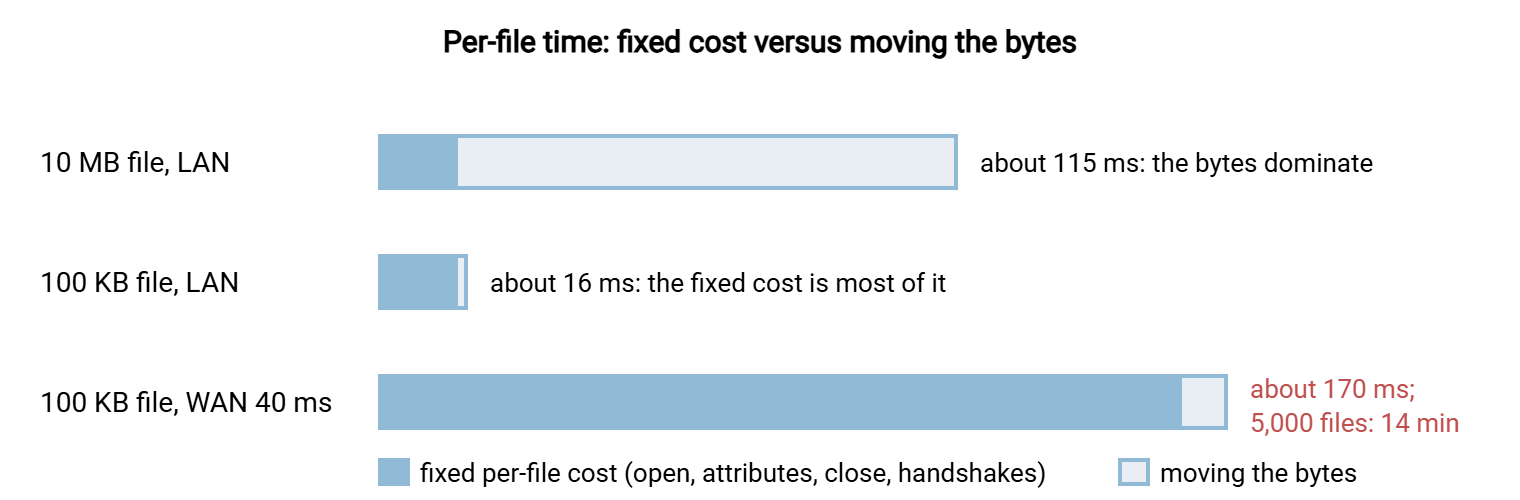
This is why the file mix decides the winner. With large files, the protocols spend almost all their time in the data phase, where they are nearly equal. With small files, they spend almost all their time in per-file setup, where they differ by a factor of several. With small files on a WAN, the difference is multiplied by the round-trip time. The same three protocols are ranked three different ways, with nothing changed but the files. That is what the worked comparison below shows in numbers. It is also what protocol overhead and small files helps you spot in a job that is already slow.
Encryption Overhead, Told Straight
All three protocols encrypt everything, so encryption cannot explain a difference between them. It can only explain a difference between any of them and plain FTP. Its cost is real and usually small. Modern processors include hardware instructions for the common block ciphers. A single core encrypts at many hundreds of megabytes per second, several times what a gigabit link can carry. On such hardware, an encrypted transfer on a full gigabit link shows a few percent of one core busy and a rate within a few percent of plain text.
The cost becomes visible in four situations. An old or very small processor without cipher acceleration can fall below the link speed. A ten-gigabit link can outrun a single core, so a single connection tops out and only parallel connections use the link. A server encrypting for dozens of simultaneous clients spends real CPU in aggregate, even if each client's share is small. And a cipher the hardware does not accelerate can cost several times more than one it does. The unaccelerated cipher might be one chosen by a strict policy on one end, say. The test for all four is the same: watch CPU during the run. A core pinned at full use during a transfer says the cipher matters; an idle CPU says look elsewhere.
What you must not do is weaken the cipher policy to win a benchmark. The differences between the ciphers a sensible policy already allows are honestly small on modern hardware. A policy that permits weak ciphers to gain a few percent has traded a security property for a rounding error. Our guide to cipher policy basics describes what a sensible policy looks like. Benchmark within it.
The Worked Comparison
One server, three protocols, one client, frozen random test sets, compression off everywhere, one connection unless stated. The LAN is gigabit; the WAN is a 100 megabit link with a measured round-trip time of 40 milliseconds. Every figure is the median of five runs. Spreads were within about five percent on the LAN and ten percent on the WAN. So differences smaller than that are ties.
| File set and link | SFTP | FTPS | HTTPS | Reading |
|---|---|---|---|---|
| Mix A: 1 × 2 GB, LAN | 21 s | 19 s | 20 s | All near the wire; effectively a tie |
| Mix B: 200 × 10 MB, LAN | 25 s | 26 s | 23 s | Per-file cost visible but small; a tie |
| Mix C: 5,000 × 100 KB, LAN, 1 connection | 80 s | 200 s | 40 s | HTTPS ahead; FTPS pays a connection and handshake per file |
| Mix C, LAN, 4 connections | 24 s | 55 s | 13 s | Parallelism cuts all three by three to four times; order unchanged |
| Mix A: 1 × 2 GB, WAN | about 3 min | about 3 min | about 3 min | The link is full; nothing to choose |
| Mix C: 5,000 × 100 KB, WAN, 1 connection | about 14 min | about 21 min | about 8 min | Round trips × 40 ms; the link is mostly idle |
Read the table by rows, not columns, and the story writes itself. For one big file, the protocols tie on the LAN because all three fill the network. They tie on the WAN because all three fill the link. Two gigabytes at 11 megabytes per second is about three minutes no matter who carries it. For the medium batch, the per-file cost shows as a few seconds and stays inside the spread. For five thousand small files, the per-file cost is the whole result. FTPS spends about 40 milliseconds per file setting up and tearing down a data connection with its own TLS handshake. SFTP spends about 15 milliseconds in request round trips and server-side work. HTTPS spends about 8 milliseconds on a connection it never closes. Across the WAN those become 250, 170, and 90 milliseconds per file. The same 500 megabytes takes anywhere from eight to twenty-one minutes.
Two more lessons hide in the small-file rows. Four parallel connections cut every protocol's time by three to four times without changing the order. That is the general shape of parallelism. It hides per-file waiting until the disk or the CPU saturates, as our article on parallel streams explains. And the WAN small-file row is the one that would change most from a client with better pipelining or a server with TLS session resumption. Implementation matters as much as protocol at this end of the table. Whether SFTP's own tuning could close its gap is in our guide to SFTP performance.
Kestrel Payroll ran the table backwards. They picked FTPS for a new client feed because a one-file LAN test had shown it "eight percent faster" than SFTP. The eight percent was inside the spread, but it went into the decision anyway. The feed itself was eleven thousand small payslip files a night across a WAN. It ran twenty minutes longer over FTPS than the old SFTP feed it replaced. The client noticed before Kestrel did. The rerun with the real mix took one evening and reversed the choice.
Rule of thumb: for large files, expect a tie and pick the protocol on security, firewall, and partner grounds. For many small files, expect HTTPS with keep-alive to lead, SFTP to follow, and FTPS to trail. For those files, expect parallel connections to matter more than the choice between them.
Reading the Results Without Fooling Yourself
The worked table is one server on one night. Yours will differ in the numbers and probably agree in the shape. The reading rules make your numbers safe to act on.
- Ties are results. A difference smaller than the spread is not a difference, however much it looks like one in a bar chart. "Tie on large files" is the single most useful thing a protocol benchmark can tell a team. It moves the decision onto grounds that matter more. These are which protocol partners can use, which one the firewall team can live with, and which one is simplest to secure.
- The file mix is the variable, not the protocol. If your real job is a nightly batch of large exports, the small-file rows are irrelevant to you, and the reverse. Benchmark the mix you have. See the earlier article on the many-small-files problem for why the two cases barely share a bottleneck.
- Implementation is half the story. A pipelining SFTP client and a non-pipelining one can differ more on small files than SFTP and HTTPS do. A web server that closes the connection after every request loses HTTPS its advantage instantly. Check that habit before assuming. Our guide to large files over HTTP covers it alongside resumable uploads. When you compare protocols, you compare the clients and servers you actually have.
- Parallelism is a knob, not a protocol feature. Test each protocol at one connection and at four; report both. A protocol that wins only at four connections has won a tuning contest. The tuning may or may not survive contact with the disk on the production server.
- A LAN winner is not a WAN winner. The rows that matter for a partner feed are the WAN rows. If you could not run them, say so, and do not extrapolate. If a WAN row surprises you, latency versus bandwidth diagnosis says which to blame.
Finally, remember what the comparison cannot tell you. It cannot tell you how the protocols rank on firewall friendliness or how partners' tools cope with them. Nor can it rank them on certificate versus key management or audit requirements. Those usually outweigh a few seconds either way. Our partner protocol decision guide weighs them. The benchmark's job is narrower: to stop a reputation from making the decision for you.
Adding Plain FTP as a Control
On an isolated lab LAN, never on a production path and never with real data, an extra column for plain FTP is a useful control. It shares FTPS's connection pattern without the encryption. So the gap between the FTP and FTPS columns is the true cost of TLS on your hardware, per file and per byte. On modern hardware the large-file gap will be a few percent, and the small-file gap will be mostly the handshake per data connection. Seeing those numbers once cures most people of blaming encryption for anything else, and the cure is permanent.
Treat the control as a lab instrument only. Plain FTP moves credentials and data in clear text. The cases where it remains acceptable are narrow and specific. Our article on when plain FTP is acceptable lists them. And "it benchmarked faster" is not among them.
The Winner Is a Row, Not a Column
A fair protocol comparison needs one server that speaks all three, one client, and frozen random files. It needs compression off, comparable ciphers, and five runs per cell. It also needs a checklist ticked before the first run. Run it and the reputations dissolve. Large files tie. Medium batches tie. Small files separate the protocols by their per-file round trips. A WAN multiplies that separation by its latency. The protocol that wins is the one whose per-file pattern suits your files and your link. For a great many real jobs the honest verdict is a tie that hands the decision to security and partner considerations. That is a disappointing thing to bring back to the meeting with the three confident people, and the right one.
From here, the tuning knobs worth benchmarking applies the same one-change-at-a-time discipline to parallelism, buffers, compression, and ciphers within whichever protocol you chose. The article on measuring what users feel explains why a protocol that wins the table can still lose the help desk. If you skipped the foundations, why most transfer benchmarks lie is the catalog of everything the parity checklist protects you from.
Frequently Asked Questions
Is SFTP really slower than FTPS?
Why does HTTPS win on small files?
How much does encryption really cost?
Can I compare protocols on two different servers?
Should I pick the protocol that benchmarks fastest?
From the Sysax team: we build secure file transfer software for Windows. Sysax Multi Server is an FTP, FTPS, SFTP, and HTTPS server. Sysax FTP Automation handles scheduled, scripted transfers. Free trials are on the download page.