
When Customers Must Send You Files
"Did you get the photos?" "Which photos?" "I sent them Tuesday. From my phone." Somewhere in that call is a warranty claim, a case worker with a queue, and a file that is currently in one of three places. It is in a personal inbox, a sharing link that expired yesterday, or the customer's camera roll, where it began. Somewhere else in your organization a loan application is waiting on pay stubs and a support case is waiting on a log bundle, for the same reason. The customer was willing. The path you offered them was confusing, broke on their phone, or rejected the file without saying why. So they gave up, or they emailed it to whichever employee they happened to know. Now the file is late, unlogged, and sitting somewhere your security policy has never heard of.
This is customer-facing file exchange: the class of file transfer where the other party is an outsider. That means a customer, a client, or an applicant, rather than an employee or a technical partner. It is the hardest audience in file transfer, and I say that as someone who has spent years arguing with partner firewalls. This article states the problem honestly before any design work begins. It covers who these senders really are, the scenarios they show up in, and the two very different sets of requirements. Those are the customer's and the auditor's, and any solution must satisfy them at the same time. It is the opening article of our customer-facing file exchange series. Everything the later articles build rests on the problem as stated here.
Why Customers Are the Hardest Audience
Most file transfer advice quietly assumes things about the people involved. It assumes they can be trained, or at least given a wiki page. It assumes their machines are managed — company laptops with known software and an IT department behind them. It assumes they have some obligation to follow your procedures, because you employ them or because a contract says so. Customers break every one of those assumptions:
- Customers cannot be trained. You will never run an onboarding session for them, and they will not read documentation. Whatever they need to know must be carried by the upload experience itself, in the moment, or it will not be known at all.
- Their devices are unmanaged. You do not know their operating system, their browser, their screen size, or what security software sits between them and you. A large share of them will arrive on a phone. Any design that requires installing software has failed before it starts.
- Their patience is not yours to assume. An employee will retry a flaky transfer because it is their job. A customer will try once, maybe twice. Then they will either abandon the task or route around you through whatever channel is easiest — usually email. Every ounce of friction converts directly into support tickets, delays, and workarounds.
- They send you their mistakes. Wrong file, wrong format, a photo of a screen instead of the document, a file named
scan(1) - Copy FINAL.pdf. None of this is malice; it is what unsupervised humans do. Your intake must absorb it gracefully.
Customers sit at the far end of the map of everyone you exchange files with. Insiders — your own staff sharing files with each other and with known outside recipients — are a different problem with different answers. Our person-to-person sharing series covers them. Insiders can be given accounts, defaults, and a gentle push toward the approved tool. Trading partners — the payroll bureau, the logistics firm, the bank — are different again. They are technical counterparties who connect repeatedly. So you can hand them standards, protocols, and credential procedures, as our B2B partner exchange series describes. The rule of thumb: partners get standards; customers get simplicity. A partner can be asked to configure a transfer client against your specification. A customer gets a web page that works the first time, or nothing.
The Scenario Catalog
"Customers send us files" hides several distinct scenarios, and they push the design in different directions. Before building anything, identify which of these you actually have. Most organizations have more than one, and have budgeted for one.
Documents feeding a process
Mortgage and loan applications, tenant screening, tax preparation, legal matters, employee onboarding for your clients' new hires. The files are small — scanned PDFs and photos of documents — but they are dense with personal data: identity documents, financial statements, medical records. The sender is usually a one-time or occasional sender under deadline stress. The receiving side is a case worker who needs the file attached to the right case, not sitting in a general pile. Sensitivity is the defining constraint here; our guide to recognizing personal data is required background for anyone running this scenario.
Claims and evidence
Insurance claims, warranty claims, damage reports, disputes. Photos and videos, taken minutes ago on a phone, sent by someone who may be having one of the worse days of their year. The volume per event is a handful of files, but they are large — modern phone video easily reaches hundreds of megabytes. The emotional context means friction is unusually costly. A claimant defeated by your upload page does not try again cheerfully.
Recurring data files
A payroll bureau's clients sending timesheet files every period. A print shop's customers sending artwork. A lab receiving sample data. These senders repeat, which changes everything: they can hold an account, they learn the path once, and their files often feed automation. That means file naming, format, and arrival timing start to matter the way they do in any scheduled flow. This scenario sits closest to partner exchange, and some of these customers eventually graduate into partners with proper standards. The graduation ceremony is a support ticket asking whether you offer SFTP.
Support and diagnostics
Log bundles, configuration exports, crash dumps, database backups sent to your support desk. Files can be large and are often compressed archives — which matters later, when scanning meets an archive it cannot see inside. The sender is mid-frustration about something else entirely; the upload is a chore standing between them and their real problem. Support-driven intake also produces the widest variety of file types and the strangest filenames you will ever see. I once received a crash dump named untitled, which I cannot criticize; my own scratch folder is called stuff.
Large media and deliverables
Video production, photography, architecture, engineering: customers delivering multi-gigabyte source material. Size dominates the design — browser uploads have practical limits, connections drop mid-transfer, and a failed upload at ninety percent is a customer relations incident. The mechanics of moving big files over the web are covered in large files over HTTP. What makes the ninety-percent failure survivable is covered in resumability for large files.
Each scenario also has a receiving side with its own shape. Documents feed a named case and a case worker; claims feed an adjuster's queue. Recurring data feeds automation that expects the file at a certain time in a certain format. Support files feed an engineer mid-ticket. When you gather requirements, walk the file all the way to the person or process that consumes it. The intake design has to deliver the file there, not merely onto your server. A pile of correctly received files that someone must manually sort into cases is only half a solution, and the sorting backlog becomes its own incident. Piles do not sort themselves; they only grow.
Remember: identify your scenarios before designing anything. A claims intake and a recurring data feed both look like "customers uploading files." But one needs a frictionless anonymous-ish path for distressed one-time senders. The other needs accounts, naming rules, and automation hooks. A single design serving both badly is the most common failure in this space.
Both Sides of the Counter
Every customer exchange design gets judged twice: once by the customer standing at the counter, and once by the auditor examining the back office. Their requirement lists are real, legitimate, and pull in opposite directions. The diagram below shows both lists meeting at the exchange point you are about to design.
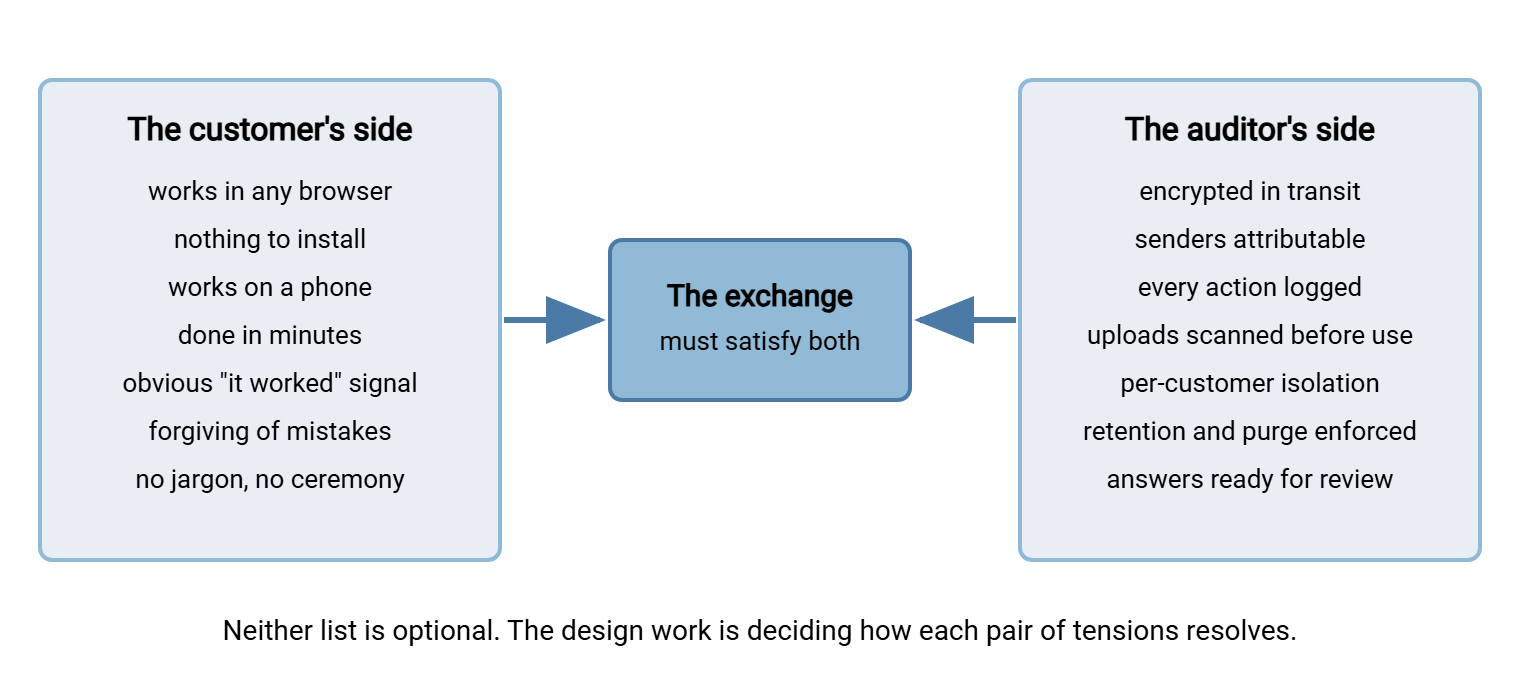
Be honest about the tension instead of pretending it away. Almost every customer-side simplification weakens a control, and almost every control adds friction. No account means weaker attribution. Accepting every file type means more work for scanning and validation. Generous size limits mean more storage and longer scans. Friendly error messages must not leak security detail. The design work in the rest of this series is not about winning this argument for either side. It is about resolving each tension deliberately, in writing, so that the friction you keep is friction you chose. When a security requirement survives, it should be invisible to the customer where possible (encryption in transit costs the customer nothing). It should be softened where it cannot be invisible (an account, but one your staff creates for them with a painless first login).
A worked example makes the method concrete. Take the attribution tension: the auditor wants every upload tied to a known sender; the customer wants to send a file without inventing yet another password. The lazy resolutions are the two extremes. One extreme is to force full account registration on a one-time claimant (and watch abandonment climb). The other is to accept anonymous uploads into the case system (and fail the next review). The designed resolution sits between: the case worker creates the access and sends the customer a ready-to-use path tied to their case. So attribution comes from your records rather than from the customer's effort. The customer typed nothing but the file itself; the auditor still gets "upload received on this case's access, at this time, from this address." Every tension on the diagram has a designed middle like this, and finding it is precisely the work. The extremes find themselves.
What Happens If You Do Not Design It
Customer exchange is unusual among transfer problems in that refusing to solve it does not preserve the status quo. It creates a worse system on its own. The files must flow for business to happen, so if you provide no path, your staff and your customers will improvise one:
- Email attachments, the universal default: size-capped, unencrypted in many hops, scattered across mailboxes, and invisible to any audit. The full indictment is in why email is bad at file transfer. The customer-facing version is worse, because the receiving mailbox is whichever employee the customer happened to know.
- Consumer sharing links from whatever service the customer already uses, which moves your regulated intake onto infrastructure you do not control and never sees your scanner or your logs.
- Physical media in the post — it still happens, especially for large files, with all the custody problems our USB and shared-folder alternatives series exists to solve.
- The heroic employee who stands up an unofficial intake — a personal cloud folder, a forgotten FTP account — because the official answer was "we can't do that." Now you have shadow infrastructure with customer data on it.
Each improvised path is unscanned, unlogged, and unbounded. The question is never "should customers be able to send us files?" — they already do. The question is whether the path they use is one you designed. Finding the paths already in use, without turning it into a hunt for culprits, is its own discipline. The article discovering shadow sharing without a witch hunt covers it. Most of what that discovery finds will have customer data on it.
Gathering Requirements From Both Sides
The practical starting point is a short, two-sided requirements pass. Interview the people who face customers — the support desk, the case workers, the account managers. Interview the people who face auditors — security, compliance, whoever answers the questionnaires. The worksheet below is copyable; fill it in per scenario from the catalog above, not once for the whole company.
CUSTOMER EXCHANGE REQUIREMENTS WORKSHEET  (one per scenario)

Scenario: ______________________  Owner: ______________________

THE CUSTOMER'S SIDE  (ask the support desk and case workers)
- Who sends? one-time / occasional / recurring
- On what device? assume phone unless proven otherwise
- How many files per event? ____  Typical size? ____  Largest? ____
- What formats do they REALLY send (not what we wish)?
- What deadline or stress are they under?
- What happens today when the upload fails? (be honest)
- What do they need to see to trust it worked?

THE AUDITOR'S SIDE  (ask security and compliance)
- Does this content include personal data? what kinds?
- Must the sender be identified? how strongly?
- Required: encryption in transit? scanning before use?
- Who may see the files internally? isolation between customers?
- How long are files kept? who enforces deletion?
- What evidence must exist per upload? (who, what, when, outcome)
- Which regulation or contract drives the above?

THE VOLUME QUESTION  (ask both)
- Events per day/week: ____  Growth expected: ____
- At what volume does manual handling break?
Two honesty rules make the worksheet worth the paper. First, record what customers actually send, not what the process documentation claims they send — the support desk knows the truth. Second, make the auditor's side name its driver. "Encryption because the client contract requires it" is a requirement; "encryption because it seems right" is a preference you can weigh. Vague requirements on either side produce designs that satisfy neither. "It seems right" is a feeling, and reviews do not audit feelings.
Northgate Retail learned the first honesty rule before launch rather than after. The warranty-claims process document said customers sent "a completed claim form and a copy of the receipt." So the first draft of the portal accepted PDFs only. The support desk, handed the worksheet to check, pointed out that nearly every claim arrived as three phone photos and a screenshot of an order confirmation. They also pointed out that the "form" was usually the customer's own description typed into the email body. The PDF-only filter came out a week before go-live and a photo-first upload page went in. Launch day was quiet, which for an intake portal is the highest available praise.
The Dimensions That Drive the Design
Once the worksheet is filled in, four dimensions do most of the deciding — and each points at a later article in this series:
| Dimension | What it decides | Where it is designed |
|---|---|---|
| Sender repetition (one-time vs recurring) | Accounts vs per-request access; how much learning you may expect | Upload portal design and account lifecycle |
| File size and count | Upload mechanics, limits, resumability, storage plan | Portal design; web upload mechanics in how web upload works |
| Sensitivity of content | Authentication strength, isolation, retention, incident exposure | Governance |
| Volume of events | How much intake handling must be automated vs manual | Intake validation and safety |
Volume deserves a special warning because it moves. A pilot with five uploads a week survives any amount of manual fussing: someone eyeballs each file, renames it, moves it to the case folder. At fifty a day, that person is a bottleneck; at five hundred, the pile is a backlog with personal data aging inside it. Design for the volume you expect in a few years, not the volume of the pilot. Pilots are small on purpose. Production is large by accident.
What a Designed Solution Looks Like
The rest of this series builds the solution piece by piece, but the shape is worth previewing so the problem statement has a destination. A designed customer exchange has four layers:
- A front door built for strangers: a web page over HTTPS, reachable from any browser including a phone's, with nothing to install and no jargon. This is well-trodden ground technically — a server product such as Sysax Multi Server provides HTTPS web-based transfers out of the box. Customers upload and download from a browser against accounts you control, with per-account folders keeping each customer's files isolated from every other's. The product runs on your own Windows server, so customer files land on infrastructure you control rather than a third party's.
- An intake pipeline that trusts nothing: every upload is validated, scanned, quarantined when suspect, and normalized before any internal system touches it. That is the subject of validating and sanitizing customer uploads, building on why transfer flows need scanning. Automation carries the load here. A folder-monitoring tool like Sysax FTP Automation can watch the upload area, move arrivals into processing on a schedule, and notify the owning team. That means nobody has to poll a folder to learn a customer delivered.
- Lifecycle and support that scale: accounts created, supported, and retired without drowning the help desk — articles three and five of this series.
- Governance that was designed in: retention, personal-data care, and audit answers decided up front, not reverse-engineered during a review — article six.
The Problem, Stated Plainly
Customers must send you files, and they will do it on unmanaged devices, without training, with limited patience, and with occasional mistakes. Those are facts to design for, not failures to complain about. Meanwhile your auditor's list — encryption, attribution, logging, scanning, isolation, retention — is equally non-negotiable, because the files customers send are among the most sensitive you hold. The design work is resolving those two lists against each other, scenario by scenario, on purpose. Start with the worksheet, know your scenarios, and then move to the first concrete design decision: the portal itself. That is covered in designing customer upload portals, and the safety net behind it in intake validation and safety. The aim is that the next call opens with "got them, thanks" instead of "which photos?"
Frequently Asked Questions
How is customer file exchange different from sharing files with partners?
Can we just let customers email their files to us?
Do customers need accounts to send us files?
Why treat customer uploads as dangerous? Our customers aren't attackers.
What is the single most common mistake in customer exchange design?
From the Sysax team: we build secure file transfer software for Windows. Sysax Multi Server is an FTP, FTPS, SFTP, and HTTPS server. Sysax FTP Automation handles scheduled, scripted transfers. Free trials are on the download page.