
A Short History of FTP, Told Without Dates
"Why does it open a second connection?" The question came from a new administrator at Meridian Parts. They were staring at a packet capture of a partner transfer. The transfer had logged in cleanly and then sat there. It is the right question. And "because FTP is weird" is the wrong answer. Every strange thing FTP does was a sensible decision on the network it was built for. That includes the two connections, the password you can read in the capture, and the server that dials back into your network. Every patch since is the story of that network changing underneath it.
This article tells the story without a single date. A date turns history into trivia. What helps at work is the sequence: what came first, what each addition fixed, and what it could not. By the end you will be able to look at any FTP quirk and name the decision behind it. You will also know why SFTP is not a chapter of this story, whatever its name suggests. This article is part of our Why FTP Won't Die series. For the compact version, see the history of FTP in the protocol series. This piece asks what each decision still costs you.
The Network FTP Was Built For
Picture a network of a few dozen institutions: universities, research labs, a handful of contractors. Every host had a globally reachable address. Nobody had a reason to want otherwise. No firewalls, no home routers, no address translation. The threat model, where anyone had one, was "someone might make a mistake," not "someone is attacking us."
What those machines did have was disagreement. Different word sizes, different character sets, different opinions about where a line of text ends. Getting a file from one to another so that it arrived meaningful was a real engineering problem. Translating between unlike computers is what FTP was designed to do. Security was not on the list. Not from carelessness: the network was a community. Accounts existed to track who used the machine time, not to keep anyone out.
One fact surprises people: FTP is older than the transport it now runs on. It began on the research network's original host-to-host protocol. It was carried across when the network adopted the TCP/IP suite still in use today. The standards document that defines FTP as we know it was written at that transition. It remains the reference. Its stated goals are, roughly: share files, hide the differences between file systems, move data reliably. Sharing is first. Protection is not on the page.
Decision One: Two Connections, and the Server Calls You Back
The first great decision was to split a session into two conversations. The control connection is the long-lived one, where commands and replies travel. Log in, change directory, "send me this file." The data connection is a separate, short-lived connection. It opens for each transfer or directory listing and closes afterward. FTP's control and data channels covers the mechanics. The question here is why anyone would design it that way.
The reasons were good ones. Keeping commands off the data path meant the control connection stayed responsive while a large file streamed. So you could send an abort and expect an answer. It also allowed an elegant trick: one client could arrange a transfer directly between two servers. The bytes never passed through the client at all.
The second half of the decision is the half that hurts. In the original design the server opens the data connection back to the client. On that network the choice was symmetrical: every host could accept an inbound connection. So it did not matter who dialed whom. Nobody imagined that most clients would one day sit behind a device whose entire purpose is to refuse unsolicited inbound connections. That design is now called active mode. Its collision with the modern network is the subject of active vs passive FTP explained. (The firewall is doing its job. So is the server. They disagree about which decade it is.)
Decision Two: Text You Can Read, Including the Password
The second decision was to make the protocol readable by a person. Commands are short English words: USER, PASS, RETR, STOR. Replies begin with a three-digit code. Its first digit tells a program whether things went well. The reply's text tells a human what happened. You can drive a session by hand. A program can parse the same conversation without ambiguity. FTP is still one of the easiest protocols to debug for this reason. FTP commands and reply codes shows how.
The consequence is just as direct: the password is one more line of that readable conversation. On a community network, nobody was listening. Sending PASS and the secret in the clear was not a flaw anyone would have raised. On a network where anyone on the path can capture packets, it is the single most-cited reason to retire the protocol.
The same era gave us the two transfer types, ASCII and binary. Machines disagreed about how text should be encoded. So FTP offered to translate text files on the way through. Machines mostly agree now, and the feature survives mainly as a trap. Move a program or an archive in ASCII mode and it arrives quietly corrupted. The ASCII/binary trap is a fossil of a genuine problem. Fossils, it turns out, can still bite.
The Age of the Public Archive
Before the web, FTP was how software and documents reached people. You logged in as anonymous and typed your email address as a courtesy password (nobody checked). Then you browsed a directory tree. Archive sites collected free software. Mirror sites copied them around the world. This is when FTP became universal: every operating system shipped a client. Without one you could not fetch anything. The history and risk of anonymous FTP tells that part.
Then the web arrived. Browsers spoke FTP addresses for a long while. Gradually the web took over public distribution; a link on a page beats a directory listing. Much later the major browsers removed FTP support altogether. FTP did not die. It retreated from the public front door to the back office: partner exchanges, scheduled jobs, devices that upload their output somewhere. Why FTP persists picks up there.
The Firewall Arrives, and Passive Mode Becomes the Default
The network grew, went commercial, and turned hostile. Two inventions rewrote the rules. Firewalls began refusing unsolicited inbound connections as a matter of policy. NAT, network address translation, lets a whole office share one public address. It made clients unreachable from outside even in principle. The address a client announced for its callback was often a private one. That address meant nothing on the internet. Active mode's callback stopped working for most clients on most networks. It has been generating tickets ever since. See why file transfer fights firewalls for the mechanics.
The rescue was already in the standard. In passive mode, the client opens both connections and the server only listens. Passive mode had been there from early on, originally so a client could arrange those server-to-server transfers. It was a little-used option. Once firewalls were everywhere, a short guidance document urged clients to use it by default. Within a generation of software, "passive" went from obscure to assumed. The port-range headaches it brought are the subject of configuring passive port ranges.
The diagram below contrasts the two worlds. On the left is the network FTP was designed for, where the server's callback is welcome. On the right is today's network, where a firewall refuses the callback. The client opens both connections instead.
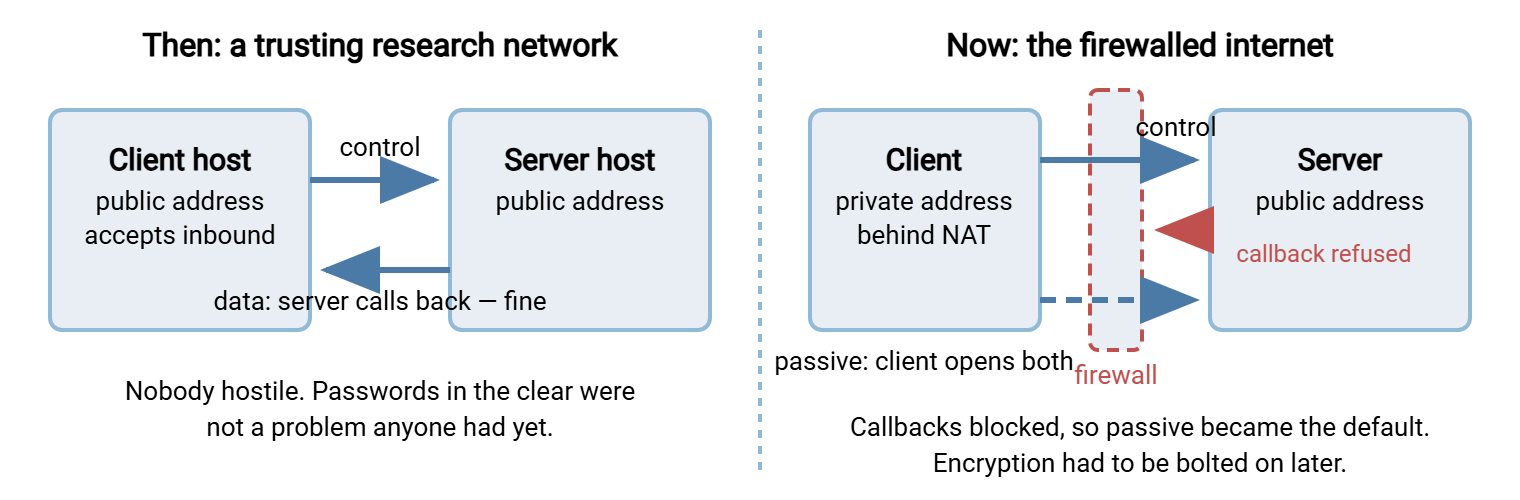
Passive mode did not remove the two-connection design. It reversed the direction of the second connection. Port ranges, firewall rules, and announced public addresses are the same fossil from a different angle.
The Extension Era: Patching a Living Protocol
Once the protocol was in universal use, changing it wholesale was impossible. So it grew by extension. Each extension patched one symptom of the original design:
- Feature negotiation. Extensions arrived piecemeal. So clients needed a way to ask a server which ones it supported. The
FEATcommand answers with a list. Reading that list shows which era a server stopped in, a trick shown below. - Extended addressing. The original
PORTandPASVcommands assumed the original address size. When a longer address format (IPv6) arrived, new commands were needed:EPRTandEPSV. These are explained in the four data-connection commands. - Internationalization. The original assumed file names were plain ASCII. An extension allowed names in a universal encoding. So a file named in any language could travel without mangling.
- Machine-readable listings. A directory listing was originally whatever text the server's operating system printed for humans. So scripts had to parse a dozen variants. A later extension defined a strict format. It also added commands to fetch a file's size and modification time. And it added a way to resume an interrupted transfer from a byte offset.
The catch is that extensions are optional. Many servers, and most embedded devices, never implemented them. So every serious client still carries parsers for the old listings. It falls back when the modern commands are refused. Extensions improved FTP's manners. They could not touch its two structural facts: passwords in the clear, and two connections.
Wrapping It in TLS: FTPS
The cleartext problem was eventually attacked head-on, in two stages. First came a general, mechanism-neutral security framework for FTP. It provided a command to negotiate a security mechanism. Other commands set how strongly the data connection should be protected. Then TLS became the mechanism that mattered. This encryption layer grew up under the web and was originally called SSL. FTP over TLS became FTPS.
Two flavors exist. The order they appeared in explains the confusion. Implicit FTPS came first, as an unofficial stopgap. It uses a separate, dedicated port. TLS starts the instant the connection opens. Explicit FTPS was standardized afterward. Connect to the ordinary FTP port, then ask for TLS with an AUTH command. Implicit survives because it shipped early and devices have long memories. See explicit vs implicit FTPS and how TLS wraps FTP.
FTPS fixed the cleartext problem. It could not fix the two-connection problem, and it made one part worse. Some firewalls read FTP conversations to open data ports on the fly. They cannot read an encrypted control connection. This makes FTPS the most firewall-hostile member of the family. FTPS, firewalls, and NAT explains why. A patch on a patch still has the original shape.
Remember: every extension and wrapper added to FTP fixed a symptom. None changed the two decisions at its core. The second connection still needs firewalls to accommodate it. The design never assumed anyone was listening. When FTP frustrates you, you are almost always meeting one of those two.
A Different Lineage Entirely: SSH and SFTP
While FTP was being patched, different people were solving a different problem. Remote login tools of the day sent passwords in the clear, exactly as FTP did. After a password-sniffing attack on a university network, a researcher there wrote a replacement: SSH, the secure shell. One encrypted connection. The server proves its identity with a key. The user proves theirs with a password or a key of their own. Its copy companion, SCP, was modeled closely on the old remote-copy tool. Like that tool, it can copy files but cannot list a directory or resume a transfer (how SCP works).
SCP's limits led the SSH designers to build something richer: a subsystem. This is a service running inside an SSH connection. It offers the operations of a remote file system: open, read, write, rename, list, get attributes. Because the job resembled FTP's, they called it SFTP. It shares no code, no commands, and no connection model with FTP. Its packets are binary, not readable text. It uses one connection, not two. Its specification was never completed as a formal standard. Implementations converged on an early draft and have interoperated on it ever since. (A draft everyone implements is a standard with a modest title.)
The name has caused a generation of confusion. SFTP is not FTPS and this series' own FTP family tree exist to clear it up. For the history, the point is simple: SFTP is not FTP's descendant. It is SSH's. It inherited SSH's single connection, SSH's keys, and SSH's assumption that the network is hostile. Everything FTP never had, because FTP was born before anyone needed it.
Alongside, Not After: The Web, Object Storage, and APIs
The other lineages grew up beside FTP rather than out of it. HTTP was born for hypertext, with a verb for fetching a page. Uploading came later, through forms and a verb for storing a resource. See how web upload works for the details. TLS made it HTTPS. An extension called WebDAV taught HTTP to behave like a remote file system. Business exchanges built AS2 on HTTP. This added signatures, encryption, and signed receipts (AS2 explained).
Then came a different idea about storage: not a file system of directories but a flat space of objects. These objects were addressed by name and reached through an HTTP-based API. A URL could carry its own permission. So a file could be handed to a partner without a login at all. See object storage in file flows for more. The smallest cousin, TFTP, went the other way: a tiny protocol over UDP with no login at all. It was built to bootstrap devices with nothing else installed (how TFTP works).
None of these "replaced" FTP in any clean sense. Each was built on a different assumption about identity and trust. Each found the niche its assumption suited. FTP kept the places where a trusting network's assumptions still roughly hold, or where nobody has paid to change them. Modern servers reflect the coexistence. Sysax Multi Server, for instance, speaks FTP alongside FTPS, SFTP, and HTTPS on one Windows server. So a legacy device and a partner on keys can share a machine while the older protocol is wound down.
Reading a Server's History in One Command
You can watch the whole story replay by asking a server which features it supports. Connect with any client that lets you send a raw command. The built-in Windows console client accepts quote. Send FEAT:
C:\> ftp ftp.example.com
Connected to ftp.example.com.
220 Welcome
User (ftp.example.com:(none)): alex
331 Password required
Password:
230 Login successful
ftp> quote FEAT
211-Features:
 UTF8              <- internationalization extension
 MLST type*;size*;modify*;   <- machine-readable listings
 MLSD
 SIZE              <- metadata commands from the extension era
 MDTM
 REST STREAM       <- resume from a byte offset
 EPSV              <- extended addressing
 EPRT
 AUTH TLS          <- the security framework, with TLS as the mechanism
 PBSZ
 PROT
211 End
ftp> quit
Every line after the first is an era. A server that answers with only SIZE and MDTM stopped before the addressing and TLS work. A server that refuses FEAT altogether is speaking the original protocol. That is exactly what a great many embedded devices will tell you. See legacy devices that only speak FTP for more about living with them. Note that the built-in console client speaks only active mode. It cannot use the TLS the server just advertised. See an honest look at the built-in FTP clients for those limits.
Which brings us back to the capture at Meridian Parts. The partner's server refused FEAT outright: original protocol, nothing newer. The new administrator was using the built-in console client, active mode only. The partner's firewall was refusing the callback, as firewalls do. The login succeeded because the control connection was fine. The listing hung because the second connection never arrived. A client that could go passive fixed it in a minute. The afternoon had gone to not knowing which era the server lived in.
The Decisions and Their Consequences at a Glance
| Original decision | Why it made sense then | What it costs now | The patch |
|---|---|---|---|
| Server opens the data connection back to the client | Every host was reachable; direction did not matter | Fails through firewalls and NAT | Passive mode by default; port ranges; firewall helpers |
| Readable text, including the password | Easy to drive by hand; nobody was listening | Credentials captured by anyone on the path | FTPS, which then breaks the firewall helpers |
| ASCII and binary transfer types | Machines disagreed about text encoding | Corrupted binaries when the type is wrong | Clients default to binary |
| Listings in whatever format the OS printed | Listings were for people, not scripts | Fragile parsing in every automation tool | Machine-readable listing extension, often unimplemented |
| Anonymous login as the public front door | No web; archives had to be reachable by anyone | Open drops abused; scanners flag it instantly | The web took public distribution; anonymous access disabled |
Why the Sequence Matters to You
Knowing the sequence changes how you handle the protocol. When a transfer hangs after a successful login, you recognize the callback. You reach for passive mode before the server logs. When an auditor asks why port 21 is open, you can explain what the protocol assumes about the network. You can also explain why that assumption stopped holding. It is a far better conversation than "it's legacy." And when someone asks why an old protocol is still running at all, you have an honest answer. It was built for a world that no longer exists. It was patched with real ingenuity every time that world changed. The patches kept it useful long past their retirement age. It has outlasted more than one announced replacement, mostly by declining to notice.
That is the theme of the rest of the series. Why FTP persists takes the economics seriously. The article on what its persistence costs measures the other side of the ledger. And the FTP family tree draws the lineages as one picture you can hand to a colleague.
Frequently Asked Questions
Is FTP really older than the web?
Why does FTP use two connections when every other protocol uses one?
Was passive mode invented because of firewalls?
Is SFTP a newer version of FTP?
Why did FTP send passwords in plain text?
From the Sysax team: we build secure file transfer software for Windows. Sysax Multi Server is an FTP, FTPS, SFTP, and HTTPS server. Sysax FTP Automation handles scheduled, scripted transfers. Free trials are on the download page.