
The FTP Family Tree: FTP, FTPS, SFTP, and What Came After
A partner's connection sheet arrives and says "SFTP, port 21, passive mode." Every word on it is confident, and the combination is impossible. Somebody on their side has blended three protocols into one. Now you have to work out what they actually run before anyone can connect. I get one of these a few times a year, and I have sent at least one myself. It happens constantly, and not because people are careless. The names really are misleading. "Secure FTP" is used for at least three different things. One of them is not FTP at all.
This article draws the whole family tree so the names stop being a puzzle. It has three roots, not one trunk: an FTP lineage, an SSH lineage, and a web lineage. There is also a cousin that shares only the initials. For each member you will see what it inherited, what it rejected, what it fixed, and where it is used today. The mechanics of each protocol live in their own series. This piece is the map. It is part of our Why FTP Won't Die series. It builds on the short history of FTP, which told the same story as a sequence.
Three Roots, Not One Trunk
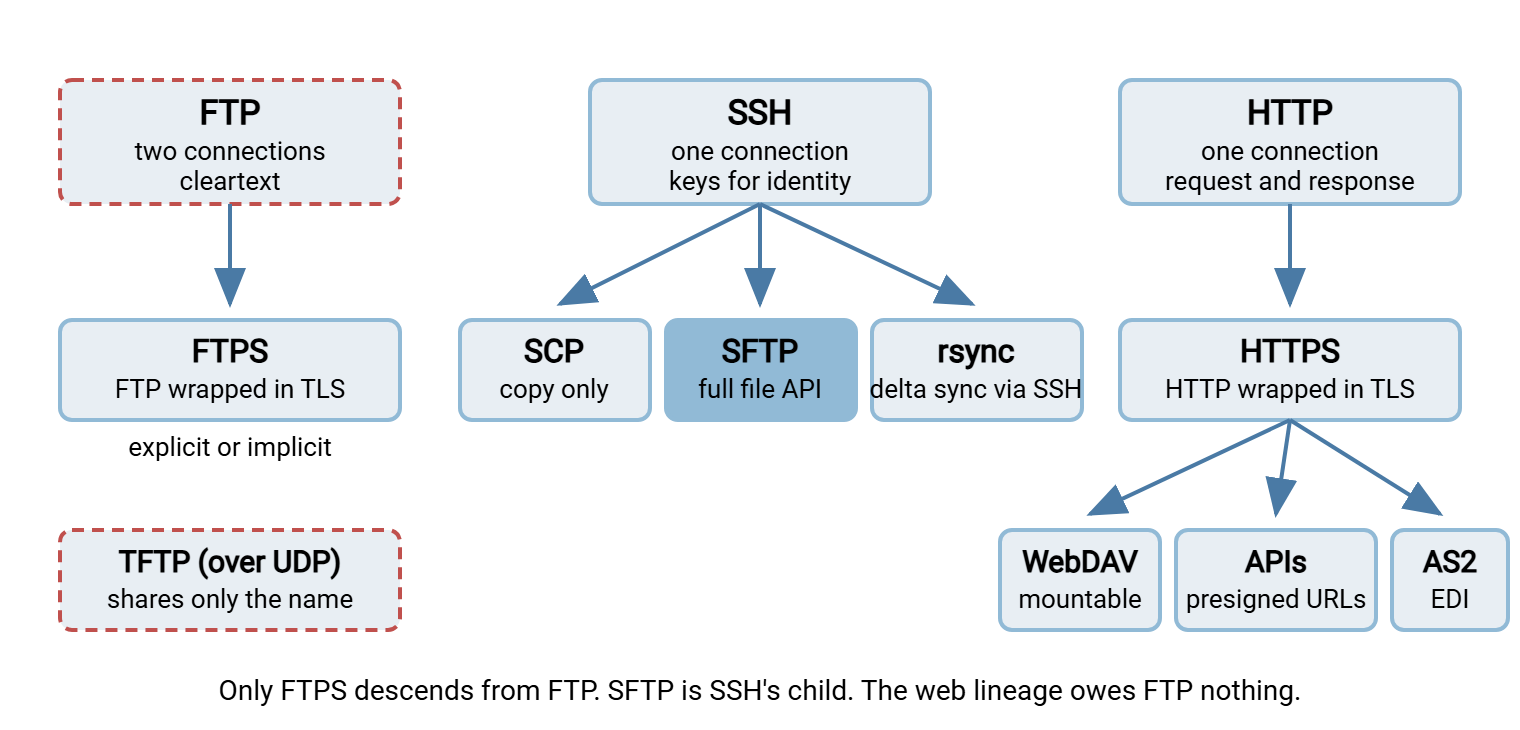
The single most useful fact in this article is that there is no single line of descent. Only one protocol, FTPS, is actually a child of FTP. SFTP is a child of SSH, the secure shell, and shares nothing with FTP but a job description. HTTPS-based transfer, WebDAV, presigned URLs, object storage APIs, and AS2 all descend from HTTP, the web's protocol. They owe FTP nothing. TFTP is related to FTP the way a namesake is related to a relative: not at all.
Administrators who assume SFTP is "FTP version two" make wrong predictions about it. They open the wrong port, expect a passive mode, and look for a certificate. They wonder why the firewall does not need a helper. Know the root and you can predict the behavior before opening a manual. The diagram below shows the three roots and their descendants. Plain FTP and TFTP are drawn with a dashed outline because neither encrypts anything.
The FTP Lineage: FTP and Its One Child
Plain FTP is the root. Its control connection runs on port 21 and carries readable commands. It uses a separate data connection for every transfer or listing. There is no encryption of anything. Its structure is covered in FTP's control and data channels. The second connection raises the active-versus-passive question, covered in active vs passive FTP explained.
FTPS is FTP wearing a coat. The protocol underneath is unchanged (same commands, same reply codes, same two connections). TLS wraps around the control connection and, when configured properly, the data connection too. It comes in two flavors. With explicit FTPS, the client connects to the ordinary port. It then asks for encryption with an AUTH TLS command. With implicit FTPS, it uses a separate dedicated port on which TLS begins immediately. The differences are settled in explicit vs implicit FTPS. The wrapping itself is covered in how TLS wraps FTP.
What FTPS inherited: everything, including the two-connection design and therefore the passive port ranges and firewall trouble. What it rejected: nothing. What it fixed: cleartext, and only cleartext. It also imported the web's identity model. So the server proves who it is with a certificate, and clients may optionally present certificates of their own. That makes FTPS the natural choice for an organization with FTP infrastructure, certificates, and partners with FTP clients already in place. It is a frustrating choice for anyone fighting a firewall that cannot see inside the encrypted control connection. The coat, it turns out, is the part the firewall wanted to read.
The SSH Lineage: SCP, SFTP, and rsync
SSH was built to replace cleartext remote login, not file transfer. It provides one encrypted connection, normally on port 22, over which many services can run. The server proves its identity with a host key. The user proves theirs with a password or, better, a key pair. Every member of this branch inherits that model wholesale. That is why none of them has a passive mode, a certificate, or a second connection.
SCP was the first file tool on SSH, modeled closely on an older cleartext remote-copy command. It copies files and does nothing else (no directory listing, no resume, no rename). Many SSH toolkits now quietly perform SCP copies through the SFTP machinery underneath. How SCP works covers it. SCP vs SFTP vs rsync compares the branch's three tools.
SFTP is the branch's main line: a subsystem, a service running inside the SSH connection. It offers the operations of a remote file system: open, read, write, list, rename, delete, get attributes. Its packets are binary, not readable text. It uses exactly one connection. It is named SFTP because the job resembles FTP's. It does not share any code, command, or ancestry with FTP. SFTP is not FTPS settles that permanently. The article on how SFTP works explains the mechanics. What it inherited: SSH's single connection, keys, and host-key trust model. What it rejected: all of FTP. What it fixed: cleartext, the second connection, and password-only identity, all at once. That is why it became the default answer for partner exchange.
rsync is not a transfer protocol in the same sense. It is a synchronization tool with its own algorithm for sending only the differences between two copies of a file. It usually rides over SSH for transport and identity. That places it on this branch in practice. Our delta-transfer series starts with how the rsync algorithm works.
The Web Lineage: HTTPS and Everything Built on It
HTTP was designed for fetching pages. Its transfer model is request and response over one connection. A client asks for a resource or sends one, the server answers, done. HTTPS is HTTP wrapped in TLS. The server is identified by a certificate. The client is identified by whatever the application chooses: a password, a session, a token, occasionally a certificate. The universal client is the browser, which is the web lineage's greatest advantage. Nobody has to install anything to upload a file through a form. How web upload works explains the mechanics.
Three descendants matter for file movement. WebDAV extends HTTP with the verbs a file system needs (create folder, list, lock, set properties). So a remote location can be mounted like a drive. The article on how WebDAV works covers it. The article on where WebDAV survives is honest about its niche. APIs and presigned URLs take the opposite approach. Instead of a file system, they use a flat space of named objects reached by HTTP calls. Links carry their own time-limited permission, so a file can be handed over without an account at all. See presigned URLs and object storage in file flows. AS2 uses HTTP as a carrier for business documents. It adds digital signatures, encryption of the payload, and signed receipts that prove delivery. That is why the EDI world standardized on it. AS2 explained is the starting point.
What the web lineage inherited from FTP: nothing. What it rejected: the long-lived session and, mostly, the idea of a directory tree. What it fixed: firewalls (one port, outbound, universally allowed). It also fixed the client problem (a browser is always there). And it fixed identity (tokens and short-lived links instead of standing passwords). Where it struggles is exactly where FTP's model shines: large batches of files moved by a scheduled job. That is why the two lineages coexist rather than one replacing the other.
The Cousin: TFTP
TFTP, the trivial file transfer protocol, is on the tree only to be placed correctly. It runs over UDP rather than TCP, on port 69. It has no login of any kind and can only read or write a file by name. It exists to bootstrap devices that have nothing else installed yet (switches fetching firmware, machines booting from the network). It must never leave the management network. It shares three letters with FTP and not one line of design. How TFTP works and TFTP security and containment cover the cousin properly.
Remember: the "S" tells you nothing by itself. In FTPS it means TLS wrapped around FTP. In SFTP it means SSH, a different protocol entirely. In HTTPS it means TLS around the web. Ask which root a protocol grew from. Its ports, firewall behavior, and identity model follow automatically.
The Name Confusions, Settled
The names overlap. So the same phrase on a connection sheet can mean different things depending on who wrote it. The common ones, decoded:
- "Secure FTP." Ambiguous. Usually SFTP, sometimes FTPS, occasionally plain FTP that somebody assumes is fine. Always ask.
- "FTP over SSL," "FTP-SSL," "FTP/S," "FTP with TLS." All FTPS. Then ask: explicit or implicit, and which port.
- "FTPES." Explicit FTPS specifically. Some clients use this label for the explicit flavor and reserve "FTPS" for implicit.
- "SSH FTP," "FTP over SSH." Usually SFTP. Rarely it means literally tunneling plain FTP through an SSH port forward. That is an awkward arrangement that breaks on the data connection. If a partner really means that, suggest SFTP instead.
- "SFTP, port 21." A contradiction. Port 21 is FTP's; SFTP lives on SSH's port. One of the two words is wrong, and the port number is usually the reliable one.
- "Simple File Transfer Protocol." An obscure, unrelated protocol from long ago once used the same initials as SFTP. If you meet it in old documentation, it is a historical footnote, not a live option.
- "FTP with PGP." Plain FTP carrying files that were encrypted before sending. The files are protected; the login is not. Our at-rest series explains the distinction in at-rest vs in-transit encryption.
- "Web upload," "HTTPS drop," "portal." The web lineage: a browser form or an API, with whatever identity the application uses.
Acme learned the value of that list the slow way. A new supplier's sheet read "secure FTP, port 22, passive mode, see attached certificate." The administrator, reasonably, built an FTPS account and opened a passive range. Three days and two firewall tickets later, nothing had connected. The first useful clue came from the supplier's own test. Their client asked them to accept a host-key fingerprint, which meant SSH, which meant SFTP. The passive range and the certificate had been copied from the previous partner's sheet. The connection took eleven minutes once both sides knew which root they were standing on.
Telling the Roots Apart From the Evidence
When the paperwork is unclear, the traffic is not. Three clues identify the root within seconds. Each is something you can see in a client log, a firewall log, or a packet capture without special tooling:
- The port. Port 21 (or a dedicated implicit port such as 990) means the FTP lineage. Port 22 means SSH, and therefore SCP, SFTP, or rsync. Port 443 means the web lineage.
- The second connection. If a transfer opens a fresh connection to a high port after the login, you are looking at FTP or FTPS. SSH and web transfers never do this.
- The identity prompt. A client that asks you to accept a host-key fingerprint is speaking SSH. A client that warns about an untrusted certificate is speaking TLS: FTPS or HTTPS. A client that asks for nothing at all before sending a password is speaking plain FTP.
A firewall log makes the first two clues especially clear. One long connection on port 22 is SFTP. FTP or FTPS in passive mode starts with a connection on port 21. A burst of short connections to ports in the tens of thousands follows. That pattern is also why the FTP lineage generates the tickets that the costs of FTP's persistence counts. It is also why why file transfer fights firewalls spends most of its length on one branch of the tree.
The Family at a Glance
| Protocol | Lineage | Transport | Security model | What it fixed | Typical use today |
|---|---|---|---|---|---|
| FTP | Root | TCP 21 plus a data connection per transfer | None; password in the clear | Moving files between unlike machines | Devices, contained internal flows |
| FTPS | FTP | TCP 21 (explicit) or a dedicated port (implicit), plus data connections | TLS; server certificate, optional client certificate | Cleartext | Partners with FTP tooling and certificates |
| SCP | SSH | TCP 22, one connection | SSH host key; password or key | Cleartext remote copy | Quick admin copies |
| SFTP | SSH | TCP 22, one connection | SSH host key; password or key | Cleartext, second connection, password-only identity | Partner exchange, server-to-server jobs |
| rsync over SSH | SSH (transport) | TCP 22, one connection | SSH host key; password or key | Resending unchanged data | Mirroring, bulk sync |
| HTTPS upload/download | HTTP | TCP 443, one connection per request | TLS certificate; app-defined login or token | Client installation, firewalls | Portals, person-to-person sharing |
| WebDAV | HTTP | TCP 443 (or 80) | As HTTPS | Web without folders or locks | Mounted remote folders, niche |
| APIs and presigned URLs | HTTP | TCP 443 | TLS; tokens, signed time-limited links | Standing accounts for one-off handoffs | Application integration, object storage |
| AS2 | HTTP | TCP 443 (or 80) | Signed and encrypted payload; signed receipts | Proof of delivery between businesses | EDI and retail supply chains |
| TFTP | Cousin | UDP 69 | None; no login at all | Booting with nothing installed | Device boot and firmware, management network only |
Decoding a Partner's Connection Sheet
The practical payoff of the tree is a short confirmation you can send before the first connection attempt. No need to wait until after the third failed one. The message below forces every ambiguous name into a specific answer. Copy it, fill in what you already know, and ask the partner to correct the rest. If you onboard partners often, fold it into the partner intake form. That way it is asked every time:
CONNECTION DETAILS TO CONFIRM

Protocol (pick exactly one):
  [ ] SFTP (over SSH)          [ ] FTPS explicit (AUTH TLS on the FTP port)
  [ ] FTPS implicit (own port) [ ] HTTPS upload / API
  [ ] plain FTP (no encryption - please say why)
Host name ..................: ftp-partner.example.com
Port .......................: ____
Authentication (pick one) ..: [ ] password  [ ] SSH key  [ ] client certificate  [ ] token
Server identity to verify ..: SSH host key fingerprint / certificate issuer: ____
If FTPS: passive port range on your side ......: ____ - ____
If FTPS: is the data connection encrypted (PROT P)? ____
Our source IP addresses to allowlist .........: 203.0.113.10, 203.0.113.11
Directories: upload to ...: /inbound/    download from ...: /outbound/
File naming or marker convention .............: ____
Contact for connection issues ................: ____
Two lines catch most problems. "Server identity to verify" tells you which root you are on. A host-key fingerprint means SSH; a certificate means TLS. The server identity also gives you something to check before trusting the connection. The article on host keys and known hosts explains this for the SSH side. "Passive port range" is only meaningful for the FTP lineage. If a partner supplies one for "SFTP," you have just learned they mean FTPS, or that they have a very old sheet. SFTP vs FTPS is the article to hand a partner who asks which one to offer.
Where the Industry Converged
Given three roots, you might expect three surviving standards. In practice the tree has two thick branches and several thin ones. For machine-to-machine exchange between organizations (partner feeds, scheduled jobs, batch files), the industry converged on SFTP. It offers one port, keys, no cleartext, and a client on every platform. For anything involving a person or an application, it converged on the web lineage: portals, APIs, and short-lived links. FTPS survives where FTP infrastructure and certificate habits are entrenched and the firewall path is under control. This is particularly true in industries that standardized on it early. AS2 holds the EDI world because signed receipts are a legal requirement there, not a nicety. WebDAV persists in specific products. And plain FTP has retreated to the devices and contained internal flows described in why FTP persists.
For a server administrator, "which protocol?" is rarely a single answer. A partner-facing server today typically has to speak the SSH branch and at least one member of the FTP branch. It often needs a web front door as well. Partners arrive from all three lineages, and none of them checks with you first. That is the practical reason multi-protocol servers exist. Sysax Multi Server, for example, answers FTP, FTPS, SFTP, and HTTPS on one Windows machine. The same accounts, IP allow and block lists, and activity logging work across all four. So the family tree above can be hosted under one roof while the cleartext root is wound down. That can happen at whatever pace the devices and partners allow.
The Version to Keep on a Sticky Note
FTPS is FTP plus TLS: same two connections, same firewall trouble, certificates for identity. SFTP is SSH's file service: one connection, keys for identity, nothing in common with FTP but the letters. HTTPS, WebDAV, APIs, presigned URLs, and AS2 are the web's family and owe FTP nothing. TFTP is a namesake. When a name is ambiguous, ask for the port and the server identity: a host-key fingerprint or a certificate. The root reveals itself. It would have saved Acme three days. From here, the future of file movement looks at where the branches are heading. The article on living with FTP responsibly deals with the root that is still running in your wiring closet.
Frequently Asked Questions
What is the difference between FTP and SFTP?
Is SFTP just FTP with encryption added?
A partner wrote "SFTP on port 21" - what do they mean?
Which should I offer new partners, SFTP or FTPS?
Is TFTP a lightweight version of FTP?
Where do HTTPS uploads and APIs fit - are they replacing SFTP?
From the Sysax team: we build secure file transfer software for Windows. Sysax Multi Server is an FTP, FTPS, SFTP, and HTTPS server. Sysax FTP Automation handles scheduled, scripted transfers. Free trials are on the download page.