
Living With FTP Responsibly While It Lasts
"Next quarter," the partner said, for the third quarter running. You have done the census. Some of the FTP in your estate has an ending event you can see. That might be a device refresh, a contract renewal, or a rewrite already on the calendar. Some of it has no ending event you can see. The scanners on the third floor will speak FTP until they are replaced. The controller on the factory floor will speak FTP until the line is rebuilt. The partner will move to SFTP next quarter, in the sense that next quarter is always coming. Retirement is the right long-term answer, and it is not available this month. This article is about what a responsible administrator does in the meantime.
The answer is containment: a small set of measures that turn an FTP listener from an open door into a narrow, watched corridor. They do this without touching the devices or partners that cannot change. Each measure is covered in depth elsewhere in this library. This article assembles them into a posture, in order of payoff. It includes a checklist you can run against any FTP server in an afternoon. It also includes a migration plan skeleton to keep on the shelf for the day the ending event arrives. It is part of our Why FTP Won't Die series. The article on why FTP persists explains how the flows got here. The article on what its persistence costs tells you which ones deserve a project instead.
The Stance in Three Words: Contained, Documented, Scheduled
Responsible FTP is not a matter of good intentions. It is a matter of three verifiable properties. A flow is contained when it meets these conditions. It reaches one internal server, from known source addresses. Its account can do nothing but its one job. Every session is logged. The flow is documented when a written record says what it is and why it still uses FTP. The record also says who owns it and what would end it. The transfer inventory is the natural home for that record. The flow is scheduled when the ending event has a date or a trigger, and a plan exists for the day it fires. A flow with all three is a managed exception. A flow missing any of them is just legacy.
Notice what is not on the list: any expectation that the device or the partner will change. Containment is done entirely on your side, because your side is the only side you control.
Containment One: Plain FTP Never Faces the Internet
The single highest-payoff rule is also the simplest to state: no plain FTP listener is reachable from the internet. Not for devices, which are inside your network anyway. Not for partners, either. Every partner who can reach the internet can reach an SFTP or FTPS listener on the same server. The rare partner who genuinely cannot is an exception with an end date. That is not a reason to expose port 21 to every scanner on earth. When plain FTP is acceptable draws the line carefully. For internet-facing traffic the answer is never.
Implement it at two places. At the edge firewall, block inbound port 21 and the implicit FTPS port unless a specific, documented rule allows a specific partner address. On the server, bind the FTP listener to the internal interface only. That way, even a firewall mistake cannot expose it. Then add the rule people forget: block outbound port 21 from the general network except from named hosts. It does nothing for security directly. But it makes every forgotten script that still pushes files to an outside FTP server announce itself in the firewall log. That log is the cheapest discovery tool you own. Inbound vs outbound flows explains the direction-by-direction thinking.
Meridian Parts added the outbound block as an afterthought, on a Friday. By Wednesday the firewall log showed a workstation in accounts payable connecting to an outside FTP server every night at half past eleven. It was a scheduled task pushing a remittance report to a supplier who had gone out of business two years earlier. The server on the other end still accepted the login. Nobody at Meridian knew the task existed. The census had missed it for a quarter. The firewall found it in five days.
Containment Two: Segmentation
Devices that speak only FTP tend to be the least patched, least monitored equipment on the network. That makes them attractive stepping stones. Segmentation puts them where a compromise goes nowhere. The pattern is a dedicated network segment (a VLAN or equivalent) for FTP-only devices. Firewall rules let each device reach exactly one destination: the transfer server, on port 21 and its passive port range. They allow nothing else. Not the file server. Not the directory. Not each other. The transfer server then moves the files onward over whatever protocol the rest of the estate uses. So plain FTP exists only inside that one corridor.
The diagram below shows the shape. FTP-only devices on their own segment reach one internal listener. The same server offers partners only encrypted protocols across the edge firewall. That firewall blocks plain FTP inbound. Every session flows to a log collector.
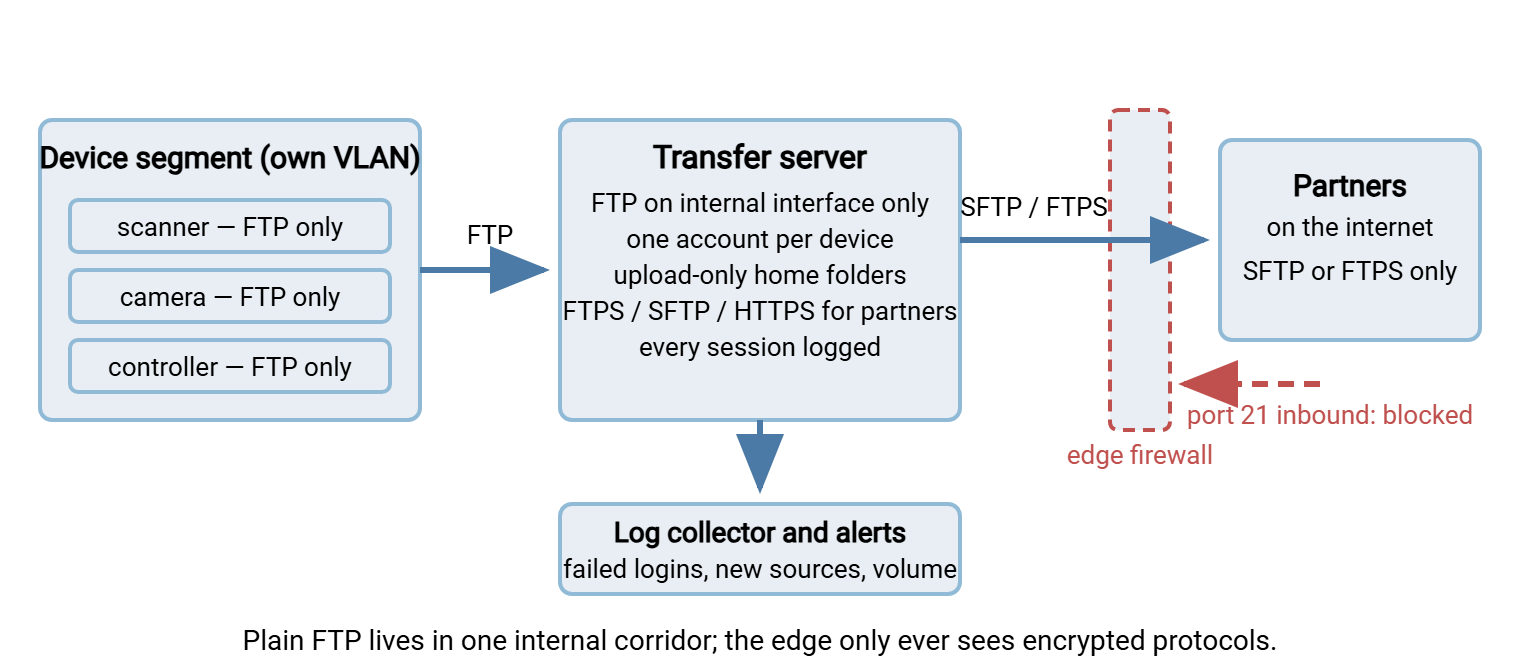
Segmentation is also what makes the rest of containment cheap. Once a device can only reach one server, a stolen device password can only do what that device could do. Segmenting transfer paths describes the general method. The article on small-organization DMZ alternatives shows how to get most of the benefit without a full DMZ.
Containment Three: Credential Hygiene
Because plain FTP sends every password in the clear, the only question is what a captured password is worth. Credential hygiene makes the answer "one folder on one server," and it has four rules:
- One account per device, per job, per partner. Never a shared "scanners" account. A unique account tells the log who connected. It lets you disable one flow without touching the others. It also limits a captured password to one flow's folder. Service account hygiene gives the discipline.
- Never directory credentials over plain FTP. Directory authentication is valuable for SFTP and FTPS and dangerous for FTP. A captured FTP login is then a captured domain login. Give plain-FTP accounts local credentials that exist nowhere else. A server such as Sysax Multi Server supports per-account authentication including Windows and directory accounts alongside local ones. So you can use the directory for the encrypted protocols while keeping every plain-FTP account local and unique.
- Jail each account to its folder, and make the folder one-way. A scanner needs to upload; it does not need to list, download, or delete. An upload-only home folder means a compromised device cannot read what other devices sent. Account and jail hardening covers the mechanics, and least privilege in practice the principle.
- Store the password properly on the client side. Where a device holds it, that is unavoidable. Where a script holds it, keep it out of the script body. Or at least restrict the file so only the job's account can read it. The article on job credentials storage has the options. Rotate it whenever a change does not need a site visit, and record the last rotation date in the census.
Containment Four: Disable Anonymous Access and Strip the Defaults
Every FTP server ships with settings that made sense on the trusting network it was designed for. Turn them off. Anonymous login comes first. No device or partner needs it. An anonymous upload folder is the classic abuse target (locking down guest access, upload-drop abuse). Check for it explicitly rather than assuming. The article on finding anonymous access shows how. It takes a minute per server. (I have found it enabled on a server whose owner was certain it was off. Certainty is not a test login.)
Then the rest of the defaults. Replace the welcome banner that names the software and its version with something blank. The article on banner and information leakage recommends this. Set a tight passive port range and open only that range on the internal firewall (configuring passive port ranges). Set short idle timeouts so abandoned sessions do not linger. Disable any command the devices do not use (most FTP-only devices need STOR and little else). Refuse directory listings outside the account's home. None of this hurts a device that only uploads. All of it narrows what an attacker can do with a captured password.
Remember: containment is done on your side only. The devices and partners do not change. The protocol does not change. And yet a captured password goes from "domain access" to "one upload folder on one internal server, with an alert." That is the difference between an exception you can defend and one you cannot.
Containment Five: Monitoring and Brute-Force Defense
A contained flow is predictable, and predictability makes monitoring cheap. A scanner connects from one address, on business days, and uploads a few dozen files. Anything else is a signal. Log every session (successful and failed logins, source address, account, files transferred, bytes). Send the logs somewhere the FTP server itself cannot alter. Follow what to log and centralizing logs. Then write a handful of alerts, each of which corresponds to a containment rule being broken:
- A login for a device account from any address other than the device's.
- A burst of failed logins on any account, the signature of a credential attack, described in monitoring authentication attacks.
- A new account appearing on the server that is not in the census.
- A device account connecting outside its normal hours, or transferring far more or far fewer files than usual.
- Any successful connection to the plain-FTP listener from outside the device segment.
Pair the alerts with two active defenses. Per-account IP allowlisting means the scanner's account only works from the scanner's address. This turns the first alert into a hard block. See IP allowlisting and geo-restriction. Add lockout after repeated failures. Design it so an attacker cannot use it to lock out the legitimate device. Follow lockout and throttling design. Both are ordinary settings. Sysax Multi Server, for example, provides IP allow and block lists and activity logging to both file and database. It also lets you disable weak ciphers and old TLS versions on the encrypted listeners. So the server that keeps plain FTP in its corridor also keeps the partner-facing protocols current.
Finally, read the log. Once a month, list every account that connected over plain FTP and compare it with the census. Accounts that never connect can be disabled. The article on finding stale and orphaned accounts has the queries. Accounts that connect from new places need a conversation. This review is the one containment step that costs recurring time: about an hour a month for a typical estate. It is also the one that catches the flow nobody told you about. Alerts from transfer logs automates what can be automated.
The Containment Checklist
Run this against each FTP server. Every line is a yes-or-no question with a verifiable answer. A "no" is a task. A server with no remaining "no" lines is contained:
FTP CONTAINMENT CHECKLIST            server: ftpsrv01      reviewed: ________

EXPOSURE
[ ] Plain FTP listener bound to the internal interface only
[ ] Edge firewall blocks inbound port 21 and the implicit FTPS port
[ ] Outbound port 21 from the general network blocked except named hosts
[ ] Partners reach this server only over FTPS, SFTP, or HTTPS

SEGMENTATION
[ ] FTP-only devices sit on their own segment
[ ] Each device may reach only this server, on port 21 and the passive range
[ ] Passive range is small, documented, and matched by the firewall rule

CREDENTIALS
[ ] One local account per device, job, or partner - no sharing
[ ] No directory (domain) accounts permitted over plain FTP
[ ] Each account jailed to its own folder; upload-only or download-only
[ ] Passwords stored outside scripts, or in files only the job can read
[ ] Last rotation date recorded per account

DEFAULTS
[ ] Anonymous login disabled and verified by a test login
[ ] Banner reveals no software name or version
[ ] Idle timeout set; unused commands disabled
[ ] No directory listing outside the account's home

MONITORING
[ ] All sessions logged with source, account, files, bytes, and result
[ ] Logs shipped to a collector the server cannot modify
[ ] Alerts: wrong source address, failed-login burst, new account,
    off-hours or volume anomaly, plain FTP from outside the device segment
[ ] Per-account IP allowlist and lockout enabled
[ ] Monthly review of connecting accounts against the census - owner: ______

DOCUMENTATION
[ ] Every account appears in the census with reason, owner, and ending event
[ ] Migration plan on file for every flow (see below)
The Migration Plan on the Shelf
Containment buys time; it does not buy permanence. Keep a migration plan ready for every contained flow. Ending events arrive on their own schedule and rarely with notice. A device fails and its replacement is ordered in a hurry. A partner's new system goes live and their contact asks, that week, what you need. An auditor sets a deadline. On that day you want to execute a plan, not write one. The FTP retirement plan describes the full program. The skeleton below is the per-flow page that program is made of. Keep it beside the census entry it belongs to:
MIGRATION PLAN - flow ftp-014 (scanner, 3rd floor -> ftpsrv01)

TARGET PROTOCOL ....: SFTP (device successor supports it; confirmed on spec sheet)
ENDING EVENT .......: device refresh, budgeted; trigger = purchase order raised
OWNER ..............: facilities (M. Okafor); technical: transfer team

PREREQUISITES
  [ ] Successor device model confirmed to support SFTP with key or password
  [ ] SFTP account created on ftpsrv01, jailed to the same folder
  [ ] Host key fingerprint recorded for entry into the device
  [ ] Downstream job that picks up scans confirmed protocol-independent

RUNBOOK
  1. Configure the new device for SFTP against ftpsrv01; test one scan
  2. Verify the file lands in the same folder, same naming, same permissions
  3. Run both devices for one week; compare daily counts
  4. Disable the old device's FTP account (do not delete for thirty days)
  5. Update census: flow now SFTP; remove from plain-FTP review list

ROLLBACK ...........: re-enable the FTP account; the old device remains
                      on the segment until step 4 is thirty days old
PROOF OF COMPLETION : no plain-FTP login for this account in ninety days
                      of logs; account deleted; census updated
For script-driven flows the runbook is shorter. The job can often be re-pointed rather than rewritten. Take a batch file that calls the console ftp client. It can be switched to a command-line client that speaks FTPS and SFTP with the same job structure. (Sysax FTP Automation includes sysaxftp.exe, built to stand in for the console client in exactly that situation.) After that, the change is a host key, a credential, and a test run. For partner flows the prerequisites are mostly a communication plan. The article on partner communications supplies it. The mechanics per flow type are in migrating from FTP to SFTP or FTPS. Every plan should end with evidence that the old path is really gone. That closing step is in proving FTP is gone.
Review the shelf twice a year. Plans rot: device models change, contacts leave, the downstream job gets rewritten. A ten-minute check per plan keeps them executable. The review is the moment to ask whether any ending event has quietly arrived (a device already replaced, a partner already capable). The partner from the opening paragraph did eventually move. Nobody noticed for two months, because nobody asked.
When Containment Is Not Enough
Containment is the right posture for a flow whose cost is low and whose ending event is visible. It is the wrong posture when any of the following is true. In those cases, a retirement project should start now:
- The flow carries personal, payment, or health data, or anything an auditor has already flagged.
- Directory credentials are used over plain FTP and cannot be changed to local ones, because the client insists on them.
- An internet-facing plain-FTP listener exists and no exception rule can close it. The partner truly cannot move, and you cannot route their traffic another way.
- A credential incident has already involved an FTP account.
- The number of contained flows is growing rather than shrinking, which means the no-new-FTP rule is not being enforced.
In those cases the honest reading of the cost worksheet is that containment costs more than migration would. The article on why retire FTP opens the program. Our war stories series is a useful companion. Several of its incidents, the leaked credential among them, began with a flow everyone assumed was contained and nobody had checked.
The Working Administrator's Stance
The stance this series arrives at is neither "FTP is fine" nor "FTP must go today." It is that every remaining FTP flow should be contained, documented, and scheduled. The flow should be reachable only from where it should be, by an account that can do only what it should. Alerts should fire when either changes. The flow should be recorded with its reason and owner. It should be paired with a plan that can be executed the week its ending event arrives. An administrator who can show that for every flow has nothing to apologize for to an auditor, a manager, or a successor. The protocol will outlast most of us. The exceptions do not have to.
If you started at the beginning of the series, the arc is complete. The article on the history explains the design. The family tree explains the alternatives. The article on the future explains which decisions will still be right when the last scanner is replaced. Containment is what you do in between.
Frequently Asked Questions
Is it acceptable to keep plain FTP running at all?
Which containment step should I do first?
Can I keep using domain accounts for our FTP users?
How do I know whether a contained flow is still in use?
What should be in the migration plan for a flow I cannot move yet?
From the Sysax team: we build secure file transfer software for Windows. Sysax Multi Server is an FTP, FTPS, SFTP, and HTTPS server. Sysax FTP Automation handles scheduled, scripted transfers. Free trials are on the download page.